
Аюулгүй байдлын чухал мэдээлэл
Please read all safety and operating instructions carefully before using this VCR. Retain this manual for future reference.
- Эрчим хүчний эх үүсвэр: Connect the VCR only to the power supply indicated on the label.
- Агааржуулалт: Тохиромжтой агааржуулалтыг хангах. Агааржуулалтын нүхийг хааж болохгүй.
- Ус ба чийг: Do not expose the VCR to rain or moisture. Do not place objects filled with liquids on the VCR.
- Цэвэрлэгээ: Unplug the VCR from the wall outlet before cleaning. Use a dry cloth.
- Үйлчилгээ: Энэ бүтээгдэхүүнд өөрөө үйлчлэх гэж бүү оролдоорой. Бүх засвар үйлчилгээг мэргэшсэн үйлчилгээний ажилтнуудад хандаарай.
Бүтээгдэхүүн дууссанview
The Sharp VC-A422 is a 4-head VCR designed for reliable playback and recording of VHS tapes. It features a user-friendly interface for easy operation.
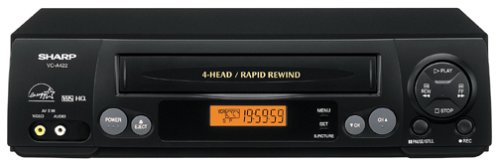
Зураг: Урд view of the Sharp VC-A422 4-Head VCR, showing the tape slot, display, and control buttons.
Тохиргоо
1. Савлах ба байрлуулах
- Carefully remove the VCR from its packaging.
- Place the VCR on a stable, level surface. Ensure there is adequate space around the unit for ventilation.
- Avoid placing the VCR near heat sources, direct sunlight, or areas with high humidity.
2. Телевизтэй холбогдох
To connect your VCR to a television, you will typically use RCA audio/video cables (red, white, yellow) or a coaxial cable.
- RCA Connection (Recommended for best quality):
- Connect the yellow video output jack on the VCR to the yellow video input jack on your TV.
- Connect the white audio output jack on the VCR to the white audio input jack on your TV.
- Connect the red audio output jack on the VCR to the red audio input jack on your TV.
- Select the corresponding AV input on your television (e.g., Video 1, AV1, Input 1).
- Коаксиаль холболт:
- Connect a coaxial cable from the "RF Out" or "Antenna Out" jack on the VCR to the "Antenna In" or "RF In" jack on your TV.
- Connect your antenna or cable TV signal to the "RF In" or "Antenna In" jack on the VCR.
- Tune your television to channel 3 or 4 (depending on the VCR's output setting) to receive the VCR signal.
3. Эрчим хүчний холболт
- Plug the VCR's power cord into a standard electrical outlet.
- The VCR should enter standby mode, indicated by a clock display or power light.
Ашиглалтын заавар
1. Үндсэн тоглуулах
- Ensure the VCR is powered on and your TV is set to the correct input.
- Insert a VHS tape into the tape slot. The VCR will automatically load the tape.
- дээр дарна уу ТОГЛОХ button on the VCR or remote control.
- Дахин тоглуулахыг зогсоохын тулд ЗОГС товч.
- Тоглуулахыг түр зогсоохын тулд товчийг дарна уу ЗУРАГСАХ товч. Үргэлжлүүлэхийн тулд дахин дарна уу.
- To fast forward or rewind, press the FF (Fast Forward) or REW (Rewind) button. Press ТОГЛОХ хэвийн тоглуулахыг үргэлжлүүлэх.
- Соронзон хальсыг гаргахын тулд товчийг дарна уу ГАРАХ товч.
2. Бичлэг хийх програмууд
The Sharp VC-A422 allows for recording television programs. Ensure a blank or recordable VHS tape is inserted and its safety tab is intact.
- Tune the VCR to the desired channel using the VCR's tuner.
- дээр дарна уу БИЧЛЭГ button. The VCR will begin recording.
- Бичлэгийг зогсоохын тулд дарна уу ЗОГС товч.
- For timed recordings, refer to the VCR's on-screen programming guide (if available) or consult the full manual for detailed timer recording instructions.
Засвар үйлчилгээ
Proper maintenance ensures the longevity and optimal performance of your VCR.
- Гадна цэвэрлэгээ: Wipe the exterior of the VCR with a soft, dry cloth. Do not use liquid cleaners or abrasive materials.
- Толгой цэвэрлэх: If picture quality degrades (e.g., snowy picture, lines), the video heads may be dirty. Use a dry-type VCR head cleaning cassette sparingly. Excessive use can wear down the heads.
- Соронзон хальсны арчилгаа: Store VHS tapes in their cases, away from dust, direct sunlight, and strong magnetic fields. Avoid exposing tapes to extreme temperatures.
- Агааржуулалт: Keep the VCR's ventilation slots clear of obstructions to prevent overheating.
Алдааг олж засварлах
If you encounter issues with your Sharp VC-A422 VCR, refer to the following common problems and solutions:
| Асуудал | Боломжит шалтгаан | Шийдэл |
|---|---|---|
| Хүч чадалгүй | Цахилгааны утас салгагдсан; цахилгааны залгуур идэвхгүй байна. | Цахилгааны утас холболтыг шалгана уу. Гаралтыг өөр төхөөрөмжөөр шалгана уу. |
| Зураг, дуу байхгүй | Incorrect TV input selected; A/V cables loose or incorrectly connected. | Select correct TV input (e.g., AV1, Video 1). Ensure A/V cables are securely connected to matching color ports. |
| Snowy or distorted picture | Dirty video heads; poor tape quality; incorrect channel for coaxial connection. | Use a VCR head cleaning cassette. Try a different tape. If using coaxial, ensure TV is on channel 3 or 4. |
| Tape will not eject | Power failure; mechanical issue. | Ensure VCR is powered on. If problem persists, seek professional service. |
| Бичлэг хийх боломжгүй | Tape's safety tab removed; VCR not tuned to a channel. | Check if the safety tab on the VHS tape is intact (cover the notch with tape if removed). Ensure VCR tuner is set to the desired channel. |
Үзүүлэлтүүд
- Брэнд: Хурц
- Загвар: VC-A422
- Толгойнууд: 4-Head (Video)
- Барааны жин: 6 фунт
- Багцын хэмжээ: 15.55 x 11.02 x 5.24 инч
- ASIN: B00005LABU
- Эхний боломжтой огноо: 4 оны есдүгээр сарын 1999
Тэмдэглэл: Техникийн үзүүлэлтүүдийг мэдэгдэлгүйгээр өөрчлөх боломжтой.
Баталгаат хугацааны мэдээлэл
This Sharp product is covered by a limited warranty. For specific details regarding warranty coverage, duration, and terms, please refer to the warranty card included with your purchase or visit the official Sharp webсайт. Баталгаат нэхэмжлэл гаргахын тулд худалдан авалтаа нотлох баримтаа хадгалаарай.
Хэрэглэгчийн дэмжлэг
For further assistance, technical support, or service inquiries, please contact Sharp customer support. You can find contact information on the official Sharp webсайт эсвэл таны бүтээгдэхүүнд өгөгдсөн баримт бичигт.
Visit the official Sharp store for more information: Sharp албан ёсны дэлгүүр
Хууль эрх зүйн татгалзал
ХЭРЭГЛЭГЧИЙН СЭРЭМЖЛҮҮЛЭГ: Энэхүү телевизийн хүлээн авагч нь зөвхөн аналог нэвтрүүлгийн тохируулагчтай бөгөөд АНУ дижитал нэвтрүүлэгт шилжсэнтэй холбогдуулан 2009 оны 2-р сарын 17-ны дараа антеннтай агаарын нэвтрүүлгийг хүлээн авахын тулд хөрвүүлэгч хайрцаг шаардлагатай болно. Зөвхөн аналог телевизорууд нь кабелийн болон хиймэл дагуулын телевизийн үйлчилгээ, тоглоомын консол, VCR, DVD тоглуулагч болон үүнтэй төстэй бүтээгдэхүүнүүдтэй өмнөх шигээ ажиллах ёстой. Дэлгэрэнгүй мэдээлэл авахыг хүсвэл Холбооны Харилцаа Холбооны Комиссын 1-888-225-5322 (TTY: 1-888-835-5322) дугаарт залгаарай эсвэл комиссын дижитал телевизийн оффис дээр зочилно уу. Web сайт дээр: www.dtv.gov.