
1. Танилцуулга
This manual provides instructions for the setup, operation, and maintenance of your Bose MediaMate Computer Speakers. These speakers are designed to enhance the audio experience for your computer, whether for music, movies, or gaming. The compact design and upward-angled sound projection optimize audio delivery for desktop use, occupying minimal desk space.
2. Аюулгүй байдлын мэдээлэл
Please read and follow all safety instructions before using this product to prevent electric shock, fire, or injury. Keep this manual for future reference.
- Чанга яригчийг ус, чийгэнд бүү тавь.
- Чанга яригчийг радиатор, халаалтын төхөөрөмж, зуух болон бусад төхөөрөмжийн ойролцоо (үүнд ... орно) байрлуулж болохгүй. ampөргөгч) дулаан үүсгэдэг.
- Зөвхөн үйлдвэрлэгчээс заасан хавсралт/дагалдах хэрэгслийг ашиглана уу.
- Аянга шуурганы үед эсвэл удаан хугацаагаар ашиглаагүй үед энэ төхөөрөмжийг цахилгааны залгуураас салга.
- Бүх үйлчилгээг мэргэшсэн үйлчилгээний ажилтнуудад шилжүүлээрэй. Төхөөрөмж нь цахилгаан тэжээлийн утас, залгуур гэмтсэн, шингэн асгарсан, эд зүйл унасан, бороо, чийгэнд өртсөн, хэвийн ажиллахгүй байгаа тохиолдолд засвар үйлчилгээ хийх шаардлагатай. , эсвэл хасагдсан.
3. Багцын агуулга
Таны багцад бүх зүйл байгаа эсэхийг шалгана уу:
- Bose MediaMate Computer Speakers (2 units)
- Эрчим хүчний адаптер
- Audio Cable (3.5mm stereo jack)
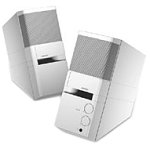
Image: The Bose MediaMate Computer Speakers in Gray. The image shows two compact speakers, one with visible volume and mix controls, and a headphone jack.
4. Тохиргоо
Follow these steps to set up your Bose MediaMate Computer Speakers:
- Байршил: Place the speakers on a flat, stable surface on either side of your computer monitor. Ensure they are angled slightly upward towards your listening position for optimal sound.
- Аудио кабелийг холбох: Connect the 3.5mm audio cable from the back of the primary speaker (the one with controls) to the audio output jack on your computer.
- Эрчим хүчийг холбох: Plug the power adapter into the power input on the primary speaker, then plug the adapter into a wall outlet.
- Асаах: Turn on the speakers using the volume knob. The power indicator light should illuminate.
5. Ашиглалтын заавар
Once set up, operating your MediaMate speakers is straightforward:
- Дууны хяналт: Use the large knob labeled "VOLUME" on the front of the primary speaker to adjust the overall sound level.
- Холимог хяналт: The "MIX" knob allows you to blend audio from two different sources if you have a second device connected to the auxiliary input.
- Чихэвчний Жак: For private listening, plug your headphones into the headphone jack located on the front of the primary speaker. This will mute the speakers.
- Хос оролт: The speakers feature dual inputs, allowing you to connect and mix two audio sources simultaneously. For example, you can connect your computer and a portable music player.
6. Засвар үйлчилгээ
To ensure the longevity and optimal performance of your speakers:
- Цэвэрлэгээ: Use a soft, dry cloth to clean the exterior surfaces of the speakers. Do not use liquid cleaners or aerosols.
- Тоос: Regularly dust the speaker grilles to prevent accumulation that could affect sound quality.
- Хадгалах: Хэрэв чанга яригчийг удаан хугацаагаар хадгалах бол тэдгээрийг цахилгаанаас нь салгаад сэрүүн, хуурай газар хадгална уу.
7. Алдаа засах
If you encounter issues with your Bose MediaMate speakers, refer to the following common problems and solutions:
| Асуудал | Боломжит шалтгаан | Шийдэл |
|---|---|---|
| Дуу алга |
|
|
| Гажуудсан дуу чимээ |
|
|
| Зөвхөн нэг чанга яригч ажиллаж байна |
|
|
8. Техникийн үзүүлэлтүүд
- Брэнд: Bose
- Загвар: MediaMate
- Холболт: 3.5mm Audio Input, AC Power
- Аудио гаралт: Стерео
- Чанга яригчийн төрөл: Мультимедиа
- Материал: Металл
- Чанга яригчийн хэмжээ: 6 Centimeters (Audio Driver)
- Барааны жин: 3 фунт
- Өнгө: Саарал
9. Баталгаат хугацаа ба дэмжлэг
Bose MediaMate Computer Speakers come with a limited warranty. For specific warranty details and duration, please refer to the warranty card included with your product or visit the official Bose webсайт.
For technical support, product registration, or service inquiries, please contact Bose customer service:
- Утас: 800-444-2673
- Webсайт: www.bose.com
Please have your product model number (MediaMate) and purchase date available when contacting support.