
Танилцуулга
This manual provides detailed instructions for the proper use and maintenance of your Casio WV-59E-1AVEF digital watch. This timepiece features radio-controlled timekeeping, ensuring accurate time display by receiving time calibration signals. Please read this manual thoroughly to ensure optimal performance and longevity of your watch.
Key features include display illumination, world time function, 5-bar water resistance, and an automatic calendar.
Бүтээгдэхүүн дууссанview
The Casio WV-59E-1AVEF is a robust digital watch designed for daily wear. It features a square case, digital display, and a comfortable resin strap. The watch is equipped with multiple buttons for navigating its various functions.
Зураг 1: Урд view of the Casio WV-59E-1AVEF digital watch, displaying the time, date, and various mode indicators.
Хяналт ба дэлгэц
- Дэлгэц: Shows time, date, and function indicators.
- Товчлуур: Typically located on the sides of the watch for mode selection, adjustment, and illumination.

Зураг 2: Хажуу тал view of the Casio WV-59E-1AVEF watch, highlighting the control buttons on the left and right sides of the case.

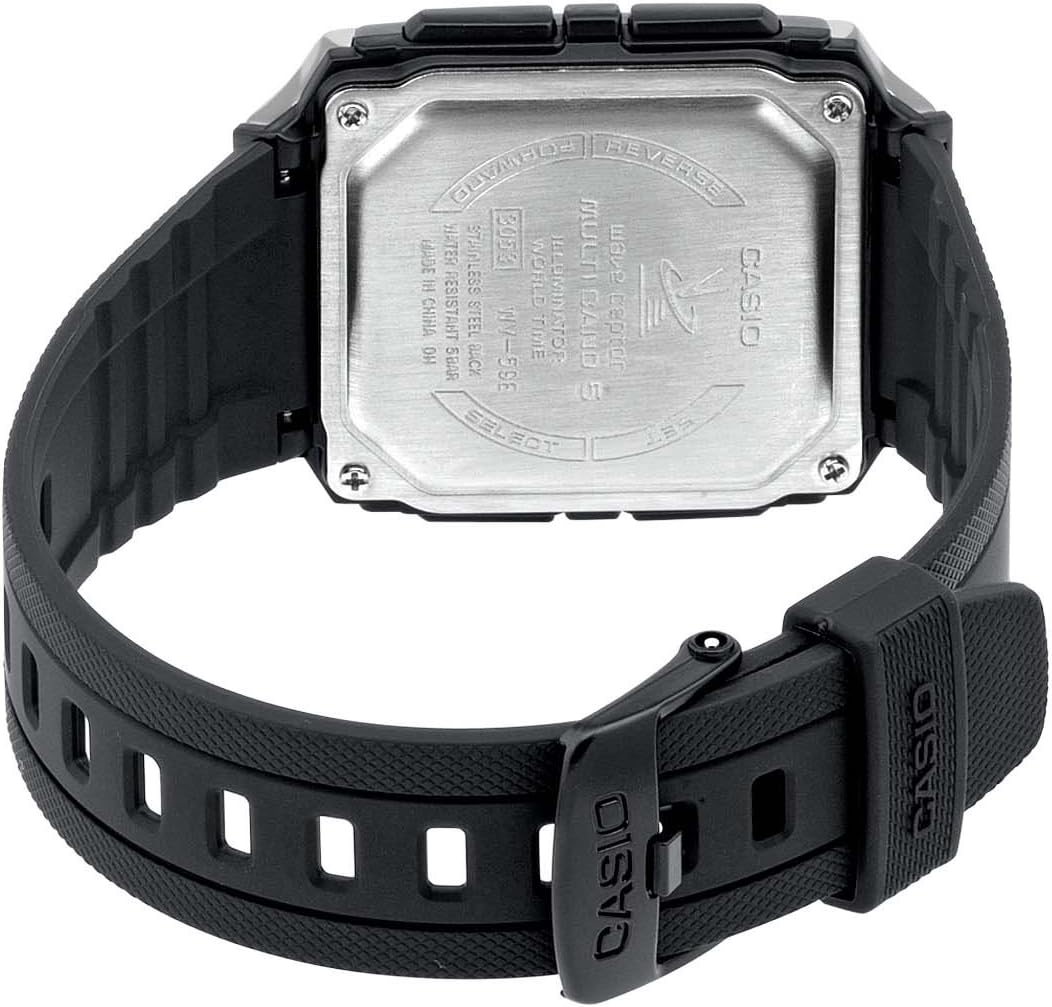
Зураг 3: Арын view of the Casio WV-59E-1AVEF watch, showing the stainless steel case back with model number WV-59E, water resistance rating, and 'Wave Ceptor' branding.
Тохиргоо
Initial Time Setting and Time Zone
Upon first use or after a battery change, you may need to set your home city (time zone) manually. This is crucial for the watch to receive the correct time calibration signal.
- Цаг хэмжилтийн горимд, товчийг дараад барина уу ТОХИРУУЛАХ button (usually top-left) until the city code starts to flash.
- -г ашиглана уу Урагшаа болон УРВАХ buttons (usually on the right side) to select your desired home city code. Refer to the world time map for city codes corresponding to your region.
- дээр дарна уу MODE button (usually bottom-left) to cycle through other settings like DST (Daylight Saving Time) and 12/24-hour format. Adjust these as needed using the Урагшаа болон УРВАХ товчлуурууд.
- дээр дарна уу ТОХИРУУЛАХ Тохиргооны дэлгэцээс гарахын тулд товчийг дахин дарна уу.
Radio Signal Reception (Wave Ceptor)
Your watch automatically receives time calibration signals to maintain accurate time. Automatic reception typically occurs in the early hours of the morning. For best reception, place the watch near a window overnight.
To manually initiate signal reception:
- Цаг хэмжилтийн горимд, товчийг дараад барина уу ХҮЛЭЭН АВАХ button (refer to watch diagram for exact button, often bottom-right) for about two seconds.
- The watch will display "RCV" or "GET" to indicate it is attempting to receive the signal.
- Keep the watch stationary and away from sources of interference (e.g., computers, televisions) during reception.
- Successful reception will be indicated by "OK" or "RCVD". If reception fails, "ERR" or "FAIL" will be displayed.

Зураг 4: The 'Wave Ceptor' logo, indicating the watch's radio-controlled timekeeping capability.
Үйлдлийн горимууд
дээр дарна уу MODE button (usually bottom-left) to cycle through the different modes:
- Цагийн горим: Одоогийн цаг, огноог харуулна.
- Дэлхийн цагийн горим: Чамд зөвшөөрнө view the current time in various cities around the world.
- Секундомер горим: Хэмжилтийн хугацаа өнгөрсөн.
- Сэрүүлгийн горим: Өдөр тутмын сэрүүлгийг тохируулах.
Дэлхийн цагийн горим
In World Time Mode, use the Урагшаа болон УРВАХ buttons to scroll through different city codes and view their current times.
Секундомер горим
- Enter Stopwatch Mode.
- дээр дарна уу START/STOP button (often top-right) to start and stop the stopwatch.
- дээр дарна уу RESET button (often bottom-right) to reset the stopwatch to zero.
Сэрүүлгийн горим
- Enter Alarm Mode.
- -г ашиглана уу Урагшаа болон УРВАХ buttons to select an alarm number (if multiple are available).
- -г удаан дар ТОХИРУУЛАХ сэрүүлгийн цаг анивчиж эхлэх хүртэл товчийг дарна уу.
- -г ашиглана уу Урагшаа болон УРВАХ buttons to set the alarm hour and minute.
- дээр дарна уу ТОХИРУУЛАХ товчлуурыг дарж дохиоллын тохиргоог хадгална.
- дээр дарна уу ON/OFF button (often top-right) to toggle the alarm on or off.
Гэрэлтүүлэг
дээр дарна уу ГЭРЭЛ button (usually top-right or a dedicated button) to illuminate the display for easy viewгэрэл багатай нөхцөлд.
Засвар үйлчилгээ
Зай солих
The watch is powered by a Lithium metal battery. When the display becomes dim or functions become unreliable, it is time to replace the battery. It is recommended to have battery replacement performed by a qualified watch technician to ensure proper sealing and water resistance.
Water Resistance (50 Meters / 5 Bar)
Your watch is water resistant to 50 meters (5 bar). This means it is suitable for everyday use and can withstand splashes, rain, showering, and shallow swimming. It is үгүй suitable for diving, snorkeling, or high-impact water sports. Do not operate buttons while the watch is wet or submerged.
Цэвэрлэгээ
Wipe the watch case and strap with a soft, dry cloth. For resin straps, you can use a mild soap solution and rinse thoroughly, then dry completely. Avoid using harsh chemicals or abrasive cleaners.
Алдааг олж засварлах
- Time is incorrect or not synchronizing:
- Ensure your home city code is set correctly for your time zone.
- Place the watch near a window overnight for automatic reception.
- Manually initiate signal reception (refer to "Radio Signal Reception" section).
- Check for strong interference sources nearby (e.g., electronic devices).
- Батерей бага байж магадгүй бөгөөд солих шаардлагатай.
- Дэлгэц бүдэг эсвэл хоосон байна:
- Батерей дуусч магадгүй. Зайг солих.
- Ensure the watch is not in a power-saving mode (if applicable to your model).
- Товчнууд хариу өгөхгүй байна:
- Цаг түгжигдсэн горимд ороогүй байгаа эсэхийг шалгаарай (хэрэв байгаа бол).
- If the watch is wet, dry it thoroughly before operating buttons.
- A low battery can affect button responsiveness.
Үзүүлэлтүүд

Зураг 5: Diagram illustrating the dimensions of the Casio WV-59E-1AVEF watch face, with measurements in millimeters and inches for reference.
| Брэнд | Casio |
| Загварын нэр | WV-59E |
| Загварын дугаар | WV-59E-1AVEF |
| Зүйлийн хэлбэр | Дөрвөлжин |
| Дэлгэцийн төрөл | Дижитал |
| Кейсийн материалын төрөл | Акрил |
| Цонхны материалын төрөл | Акрил |
| Хамтлаг материалын төрөл | Давирхай |
| Хамтлаг өнгө | Хар |
| Өнгө залгах | Хар |
| Тэврэлтийн төрөл | Тэврэлт |
| Кейсийн диаметр | 39 миллиметр |
| Кейсийн зузаан | 12.5 миллиметр |
| Хамтлагийн өргөн | 18 миллиметр |
| Зүйлийн жин | 40 грамм |
| Хөдөлгөөний төрөл | Кварц |
| Усны эсэргүүцлийн гүн | 50 Meters (5 Bar) |
| Эрчим хүчний эх үүсвэр | Батерейгаар ажилладаг (1 литийн металл батерей багтсан) |
| Онцлог шинж чанарууд | Radio-controlled time, Stopwatch, Alarm, Illumination, World Time, Automatic Calendar |
| Оруулсан бүрэлдэхүүн хэсгүүд | Resin strap |
| Олон улсын нийтлэлийн код | 04971850882220 |
Баталгаат болон дэмжлэг
For warranty information and customer support, please refer to the warranty card included with your product or visit the official Casio webсайт. Худалдан авалтын баримтаа худалдан авалтын баталгаа болгон хадгалаарай.
For service or repairs, contact an authorized Casio service center.