
1. Танилцуулга
This manual provides essential information for the installation, operation, and maintenance of your Legrand Bticino LT Terraneo Sprint 2-Wire Black/White Video Intercom, Model 344342. This video intercom system is designed for reliable communication and access control, offering a clear black and white video display and a handset for audio communication. Please read this manual thoroughly before installation and use to ensure proper function and safety.
2. Аюулгүй байдлын мэдээлэл
- Суурилуулалт, засвар үйлчилгээ хийхээсээ өмнө үргэлж цахилгааныг салга.
- Суурилуулалтыг орон нутгийн цахилгааны дүрмийн дагуу мэргэшсэн ажилтан гүйцэтгэнэ.
- Төхөөрөмжийг чийг, бороо, хэт өндөр температурт бүү гарга.
- Төхөөрөмжийг дулааны эх үүсвэрийн ойролцоо эсвэл нарны шууд тусгалд байрлуулахаас зайлсхий.
- Use only original accessories and spare parts provided or approved by Legrand.
- Do not attempt to open or repair the unit yourself. Refer all servicing to qualified service personnel.
3. Багцын агуулга
Бүх зүйл багцад байгаа эсэхийг шалгана уу:
- Legrand Bticino LT Terraneo Sprint Indoor Video Intercom Unit (Model 344342)
- Ороомогтой утастай гар утас
- Mounting bracket/plate
- Холбох эрэг ба хананы залгуур
- Хэрэглэгчийн гарын авлага (энэ баримт бичиг)
- Connection terminals (if not pre-installed)
4. Бүтээгдэхүүн дууссанview
The Legrand Bticino LT Terraneo Sprint video intercom features a compact design with essential controls for convenient use. The unit includes a black and white display for clear visitor identification and a traditional handset for private conversations.
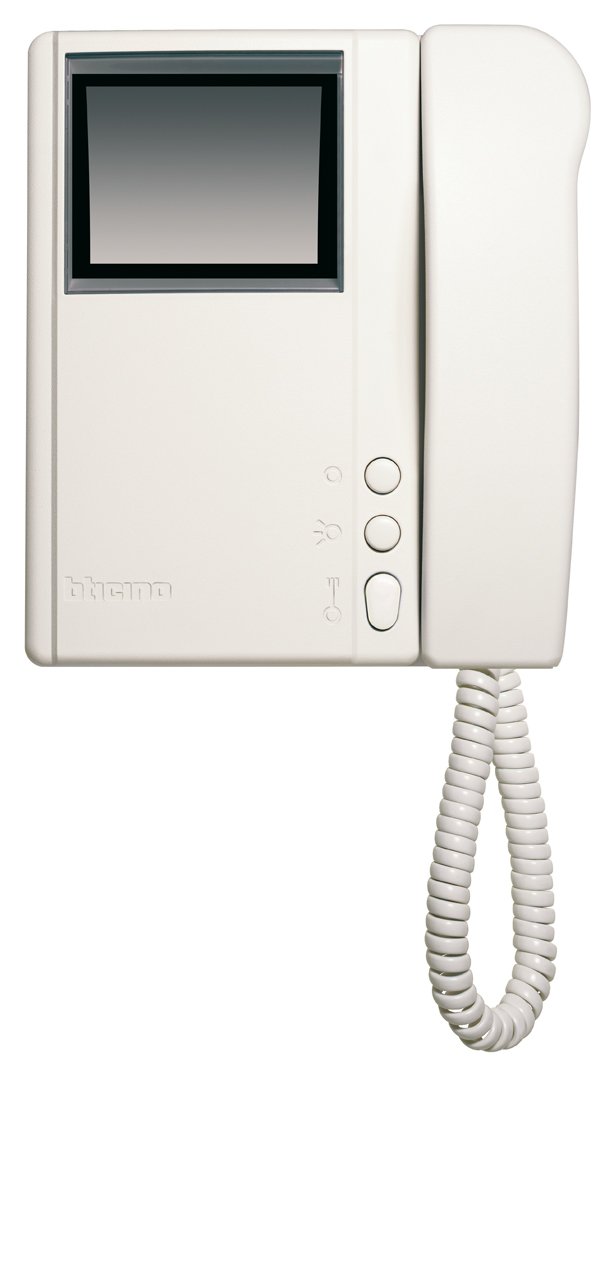
Зураг 4.1: Урд view of the Legrand Bticino LT Terraneo Sprint Video Intercom Unit.
4.1. Үндсэн бүрэлдэхүүн хэсгүүд
- Видео дэлгэц: Black and white screen for viewзочдыг хүлээн авах.
- Гар утас: For audio communication with the outdoor unit.
- Хаалга гаргах товчлуур: Activates the electric lock to open the door.
- Answer/Call Button: Initiates or ends a call.
- Хяналтын товчлуур: Activates the camera on the outdoor unit to view the entrance.
- Дууны хяналт: Adjusts the ringtone and communication volume.
4.2. Product Details and 360-Degree View
Observe the detailed features and a complete 360-degree view of the video intercom unit to familiarize yourself with its design and connections.
Видео 4.1: Дэлгэрэнгүйview of the Legrand Bticino LT Terraneo Sprint Video Intercom. This video demonstrates the product's features and components.
Видео 4.2: 360 градус view of the Legrand Bticino LT Terraneo Sprint Video Intercom. This video provides a comprehensive visual inspection of the unit from all angles.
5. Тохиргоо ба суурилуулалт
The Legrand Bticino LT Terraneo Sprint video intercom operates on a 2-wire system, simplifying installation. Ensure power is disconnected before beginning.
5.1. Mounting the Indoor Unit
- Choose a suitable location indoors, away from direct sunlight, heat sources, and moisture. The ideal height is typically 150-160 cm from the floor.
- Secure the mounting bracket to the wall using the provided screws and wall plugs. Ensure it is level.
- Connect the 2-wire bus cable and any other necessary connections (e.g., floor call, auxiliary services) to the terminals on the back of the indoor unit. Refer to the wiring diagram specific to your system.
- Carefully attach the indoor unit to the mounting bracket, ensuring it clicks securely into place.
- Connect the coiled cord from the handset to the designated port on the main unit.
5.2. Анхны эрчим хүч
Once all connections are made and the unit is securely mounted, restore power to the system. The unit should power on, and the display may show a startup sequence. If the system does not power on, check all connections and the power supply.
6. Ашиглалтын заавар
6.1. Дуудлагад хариулах
When a visitor presses the call button on the outdoor unit, the indoor unit will ring, and the video display will activate, showing the visitor. To answer the call, lift the handset or press the 'Answer' button (if available).
6.2. Хаалга онгойлгох
During a call or while monitoring, press the 'Door Release' button to activate the electric lock and allow the visitor entry.
6.3. Орох хэсгийг хянах
руу view the entrance area without an incoming call, press the 'Monitor' button. The video display will activate, showing the view from the outdoor unit's camera. The monitoring duration may be limited.
6.4. Дууны хэмжээг тохируулах
Use the volume control knob or buttons on the unit to adjust the ringtone volume and the audio level during a conversation.
7. Засвар үйлчилгээ
7.1. Цэвэрлэгээ
To clean the unit, gently wipe the surfaces with a soft, dry cloth. For stubborn marks, a slightly damp cloth with mild soap can be used, followed by a dry cloth. Do not use abrasive cleaners, solvents, or chemical sprays, as these can damage the unit's finish and electronic components.
7.2. Тогтмол шалгалт
Periodically check the coiled cord of the handset for any signs of wear or damage. Ensure all buttons respond correctly. If any issues arise, refer to the troubleshooting section or contact technical support.
8. Алдаа засах
If you encounter problems with your video intercom, consult the following table before contacting technical support.
| Асуудал | Боломжит шалтгаан | Шийдэл |
|---|---|---|
| No power to the indoor unit. | Power supply disconnected or faulty. | Check the main power supply and all connections. Ensure the circuit breaker is on. |
| Дэлгэц дээр видео байхгүй байна. | Outdoor unit camera issue or wiring problem. | Check the wiring between the indoor and outdoor units. Ensure the outdoor unit camera is clean and unobstructed. |
| No audio during conversation. | Handset not properly connected or volume too low. | Ensure the handset cord is securely plugged in. Adjust the volume control. |
| Хаалганы түгжээ ажиллахгүй байна. | Wiring to electric lock faulty or lock mechanism issue. | Verify the wiring to the electric lock. Check the lock mechanism for any obstructions or damage. |
9. Техникийн үзүүлэлтүүд
| Онцлог | Дэлгэрэнгүй |
|---|---|
| Брэнд | Легранд |
| Загварын дугаар | 344342 |
| Бүтээгдэхүүний төрөл | 2-Wire Black/White Video Intercom |
| Хэмжээ (сав баглаа боодол) | 8 x 8 x 8 см |
| Зүйлийн жин | 4.54 гр |
| Батерейнууд багтсан | Үгүй |
| Батерей шаардлагатай | Үгүй |
| ASIN | B001ZWERK6 |
| Эхний боломжтой огноо | 24 2013 оны XNUMX-р сар |
10. Баталгаат хугацаа ба дэмжлэг
Баталгаат хугацааны талаарх мэдээллийг авахыг хүсвэл бүтээгдэхүүнтэй хамт ирсэн баталгаат картыг үзнэ үү эсвэл албан ёсны Legrand дэлгүүрт зочилно уу. website. For technical support, service, or to purchase spare parts, please contact your local Legrand distributor or authorized service center. Keep your purchase receipt as proof of purchase for warranty claims.