1. Танилцуулга
This manual provides instructions for the SanDisk MobileMate MS+ USB 2.0 Mobile Card Reader/Writer, model SDDR-107-A10M. This device facilitates the transfer of files between various memory cards and your computer. It supports Memory Stick, Memory Stick Duo, Memory Stick PRO, and Memory Stick PRO Duo formats, offering a Hi-Speed USB 2.0 interface for efficient data transfer.
2. Багцын агуулга
Таны багцад бүх зүйл байгаа эсэхийг шалгана уу:
- SanDisk MobileMate MS+ USB 2.0 Mobile Card Reader/Writer (SDDR-107-A10M)
- 3-inch type Installation CD
- USB өргөтгөл кабель
- Clear protective caps (2)

Figure 2.1: SanDisk MobileMate MS+ Card Reader, USB extension cable, and protective caps.
3. Тохиргоо
3.1 Системийн шаардлага
Таны компьютер дараах хамгийн бага шаардлагыг хангаж байгаа эсэхийг шалгаарай:
- PC: Windows 98SE/ME/2000/XP, supported memory cards, USB 2.0 port (for Hi-Speed transfer), CD-ROM drive.
- Macintosh: Mac OS 9.2.x+, OS X v10.1.2+, supported memory cards, USB 2.0 port (for Hi-Speed transfer), CD-ROM drive.
3.2 Драйвер суурилуулах
- Insert the provided 3-inch Installation CD into your computer's CD-ROM drive.
- Follow the on-screen instructions to install any necessary drivers or the TransferMate application.
- If prompted, restart your computer after installation.
3.3 Connecting the Card Reader
- Компьютер дээрээ байгаа USB портыг олоорой.
- Plug the SanDisk MobileMate MS+ directly into the USB port. If the port is difficult to access or crowded, use the provided USB extension cable.
- Your computer should detect the device automatically.
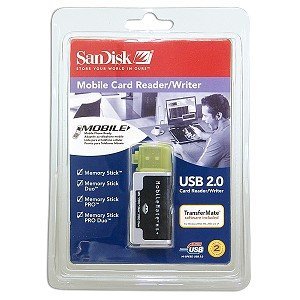
Figure 3.1: SanDisk MobileMate MS+ Card Reader with protective cap.
4. Ашиглалтын заавар
4.1 Санах ойн карт оруулах
- Identify the correct slot on the MobileMate MS+ for your memory card type (Memory Stick, Memory Stick Duo, Memory Stick PRO, or Memory Stick PRO Duo).
- Gently insert the memory card into the appropriate slot until it is fully seated. Do not force the card.
4.2 Нэвтрэх Files
- Once the card reader is connected and a memory card is inserted, your computer should recognize it as a removable drive.
- Open "My Computer" (Windows) or "Finder" (Mac) and locate the new removable drive.
- Double-click the drive icon to view the contents of the memory card.
4.3 Шилжүүлэх Files
- Using Drag-and-Drop: -г сонгоно уу files or folders you wish to transfer from the memory card and drag them to a desired location on your computer's hard drive. Conversely, drag files from your computer to the memory card drive to transfer them to the card.
- Using TransferMate Application: If installed, launch the TransferMate application for additional features such as easy transfer, printing, emailing, and displaying images. Refer to the TransferMate application's help documentation for detailed instructions.
4.4 Төхөөрөмжийг аюулгүйгээр салгах
Before disconnecting the MobileMate MS+ from your computer, always safely eject the device to prevent data corruption:
- Windows: Click the "Safely Remove Hardware" icon in the system tray, then select the MobileMate MS+ device. Wait for the "Safe to Remove Hardware" message.
- Macintosh: Drag the removable drive icon to the Trash or right-click (Control-click) the drive icon and select "Eject."
Once safely ejected, you can physically disconnect the card reader from the USB port.
5. Засвар үйлчилгээ
- Цэвэрлэгээ: Use a soft, dry, lint-free cloth to clean the exterior of the card reader. Do not use liquid cleaners or solvents.
- Хадгалах: When not in use, store the MobileMate MS+ with its protective caps in a clean, dry environment away from extreme temperatures and direct sunlight.
- Харьцуулах: Төхөөрөмжийг унагах эсвэл хүчтэй цохилтод оруулахаас зайлсхий.
6. Алдаа засах
| Асуудал | Боломжит шалтгаан | Шийдэл |
|---|---|---|
| Төхөөрөмжийг компьютер танихгүй байна. |
|
|
| Өгөгдөл дамжуулах хурд удаан. |
|
|
| Cannot read or write to memory card. |
|
|
7. Техникийн үзүүлэлтүүд
| Загварын дугаар | SDDR-107-A10M |
| Бүтээгдэхүүний хэмжээс | 6.1 x 4.8 x 1.2 инч (ойролцоогоор) |
| Зүйлийн жин | 2.89 унц (ойролцоогоор) |
| Холболтын технологи | USB төрөл А |
| Интерфэйс | Hi-Speed USB 2.0 (compatible with USB 1.1) |
| Дэмжигдсэн Медиа Төрлүүд | Memory Stick, Memory Stick Duo, Memory Stick PRO Duo, Memory Stick Pro |
| Өнгө | Хар |
| Зохицуулалтын зөвшөөрөл | FCC, CE, C-Tick |
8. Баталгаат хугацаа ба дэмжлэг
For information regarding product warranty, technical support, or service, please refer to the documentation included with your purchase or visit the official SanDisk webсайт. Хэрэглэгчийн дэмжлэгийн холбоо барих мэдээллийг ихэвчлэн үйлдвэрлэгчийн вэбсайтаас олж болно. webсайт.
Үйлдвэрлэгч: SanDisk