
Танилцуулга
Худалдан авалт хийсэнд баярлалааasing the Snakebyte Wireless Bluetooth Premium PS3 Controller. This manual provides detailed instructions for setting up, operating, maintaining, and troubleshooting your new controller. Please read this manual thoroughly before use to ensure optimal performance and longevity of your device.
Багцын агуулга
Бүх зүйл багцад байгаа эсэхийг шалгана уу:
- Snakebyte Wireless Bluetooth Premium PS3 Controller
- USB Charging Cable (approximately 3 meters)
- Хэрэглэх заавар (энэ баримт бичиг)

Image: The Snakebyte Wireless Bluetooth Premium PS3 Controller shown in its retail blister packaging, indicating the product and included cable.
Тохиргоо
1. Хянагчийг цэнэглэж байна
Before initial use, fully charge the controller. Connect the supplied USB charging cable to the controller's charging port and the other end to a USB port on your PlayStation 3 console or a compatible USB power adapter. The indicator lights on the controller will show charging status and turn off or change color when fully charged.
2. PlayStation 3 руу холбогдох
To connect the controller wirelessly to your PlayStation 3 console:
- PlayStation 3 консолоо асаалттай байгаа эсэхийг шалгаарай.
- Connect the controller to the PS3 console using the supplied USB charging cable. This will register the controller with the console.
- дээр дарна уу PS товч (located in the center of the controller) once. The controller will power on and attempt to establish a connection.
- Once the controller is registered and connected, the indicator lights will illuminate, typically assigning a player number.
- You can now disconnect the USB cable for wireless gameplay. If the connection is lost, reconnect the USB cable and press the PS button again.

Зураг: Урд view of the Snakebyte Wireless Bluetooth Premium PS3 Controller, showing the button layout including the central PS button.
Ашиглалтын заавар
Хянагчийн зохион байгуулалт ба функцууд
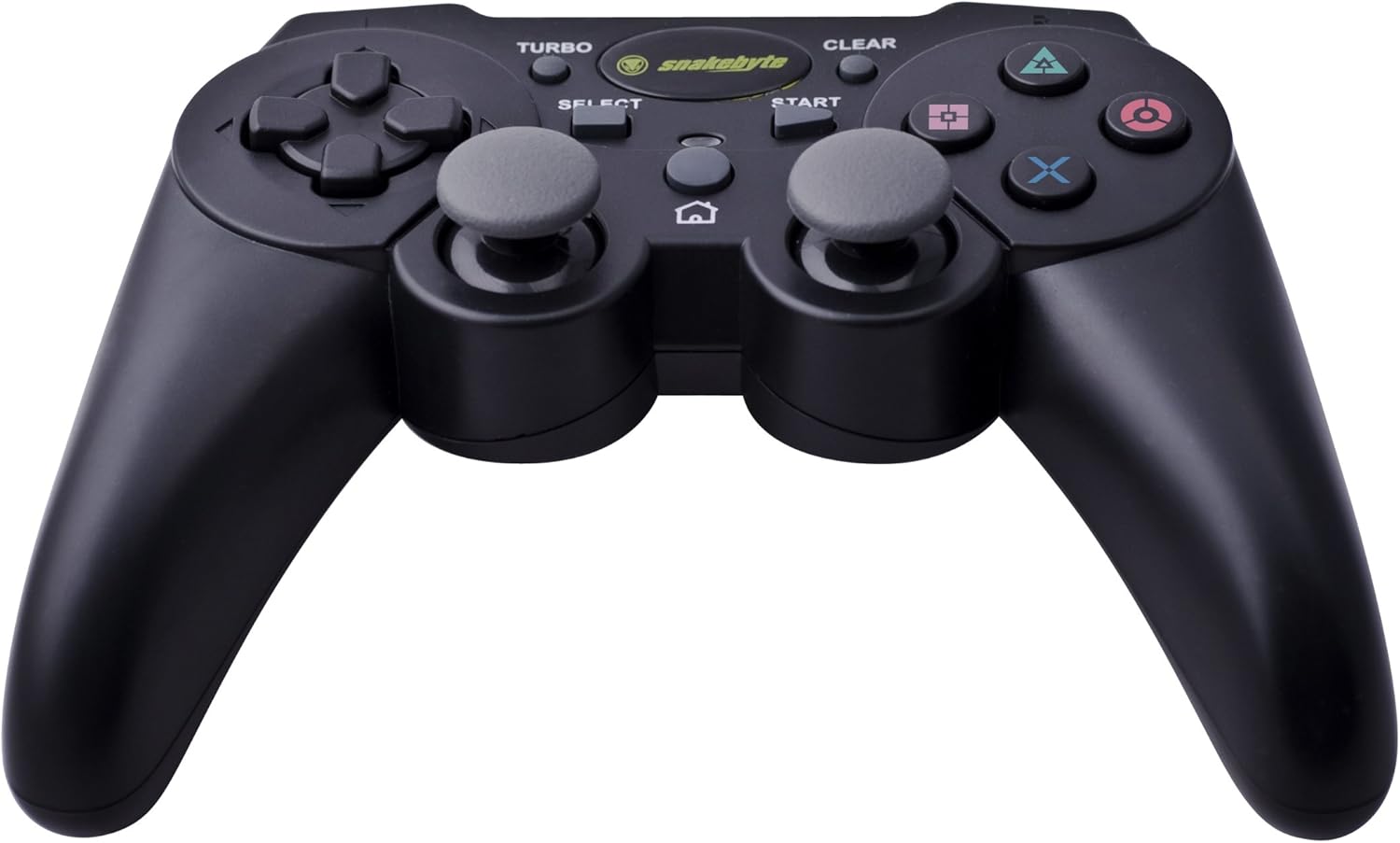
Image: The Snakebyte Wireless Bluetooth Premium PS3 Controller, highlighting the dual analog sticks and various buttons.
- Чиглэлийн дэвсгэр (D-Pad): For precise directional input in games.
- Зүүн аналог зөөгч: Хөдөлгөөний анхдагч хяналт.
- Баруун аналог зөөгч: Камерын удирдлага эсвэл хоёрдогч хөдөлгөөн.
- Үйлдлийн товчлуурууд (Гурвалжин, Тойрог, Загалмай, Дөрвөлжин): Тоглоомтой холбоотой үйлдлүүд.
- L1/R1 товчлуурууд: Тоглоомын доторх янз бүрийн функцэд зориулсан мөрний товчлуурууд.
- L2/R2 өдөөгч: Analog triggers for pressure-sensitive input, often used for acceleration/braking or aiming/firing.
- START товч: Pauses games or opens menus.
- СОНГОХ товчлуур: Opens in-game maps, inventories, or other menus.
- PS товч: Powers on the controller, accesses the PS3 XMB (Cross Media Bar) menu, or turns off the controller/console.
- TURBO товч: Activates the turbo function for other buttons.
- Цэвэрлэх товчлуур: Deactivates the turbo function.
Турбо функц
The controller features a TURBO function, allowing a selected button to register multiple presses rapidly with a single hold. This can be useful for certain game mechanics.
- To activate TURBO: Press and hold the TURBO товчлуур, then press the desired action button (e.g., Cross, Square, Circle, Triangle, L1, R1, L2, R2). Release both buttons. The selected button will now have the TURBO function enabled.
- To deactivate TURBO for a specific button: Press and hold the CLEAR товчлуур, then press the button for which TURBO is currently active. Release both buttons.
- To deactivate all TURBO functions: Press the CLEAR товчлуур once without holding it down.
Motion Sensing and Vibration Feedback
This controller supports motion sensing capabilities, allowing for intuitive control in compatible games. It also provides vibration feedback to enhance immersion during gameplay, reacting to in-game events such as impacts or explosions.
Асаах, унтраах
- Асаахын тулд: товчийг дарна уу PS товч.
- To power off: The controller will automatically enter sleep mode after a period of inactivity to conserve battery. Alternatively, you can hold the PS товч for several seconds to bring up the PS3 menu, where you can choose to turn off the controller.
Засвар үйлчилгээ
- Цэвэрлэгээ: Хянагчийг цэвэрлэхийн тулд зөөлөн, хуурай даавуу ашиглаарай. Зүлгүүрийн цэвэрлэгч эсвэл уусгагч хэрэглэж болохгүй.
- Хадгалах: Удирдагчийг нарны шууд тусгал, хэт температураас хол, сэрүүн, хуурай газар хадгална.
- Батерейны арчилгаа: Батерейны ашиглалтын хугацааг уртасгахын тулд удирдлагыг байнга бүрэн цэнэггүй болгохоос зайлсхий. Байнга ашиглаагүй байсан ч тогтмол цэнэглээрэй.
- Гэмтлээс зайлсхийх: Do not drop the controller or expose it to excessive force or moisture.
Алдааг олж засварлах
| Асуудал | Боломжит шийдэл |
|---|---|
| Хянагч утасгүй холболтгүй байна. |
|
| Товчлуур эсвэл аналог саваа хариу өгөхгүй байна. |
|
| Хянагч цэнэглэгдэхгүй байна. |
|
Хянагчийг дахин тохируулж байна
If the controller behaves erratically or becomes unresponsive, you can perform a reset. Locate the small reset button on the back of the controller (often in a small hole). Use a thin, pointed object (like a straightened paperclip) to press and hold the reset button for a few seconds. This will restart the controller's internal electronics.
Үзүүлэлтүүд
- Брэнд: Snakebyte
- Загварын дугаар: SB904714
- Тохиромжтой платформ: Sony PlayStation 3
- Холболт: Утасгүй (Bluetooth)
- Товчлуурын тоо: 16
- Хэмжээ (L x W x H): Ойролцоогоор 23.01 x 16.31 x 8.51 см (9.06 x 6.42 x 3.35 инч)
- Жин: Ойролцоогоор 419.99 гр (0.93 фунт)
- Өнгө: Хар
Баталгаат болон дэмжлэг
For warranty information and technical support, please refer to the documentation provided with your purchase or contact your retailer. You may also visit the official Snakebyte webнэмэлт тусламж, бүтээгдэхүүний талаарх мэдээллийг авах боломжтой.