
Танилцуулга
The Nokia Bluetooth Stereo Headset BH-905 is designed to provide a superior audio experience with active noise cancellation and wide compatibility. This manual provides instructions for setting up, operating, and maintaining your headset to ensure optimal performance.
The headset features 10 microphones: 8 dedicated to capturing ambient noise for cancellation and 2 for capturing speech in noisy environments. It offers versatile connectivity, supporting both wireless Bluetooth and wired connections with various devices.
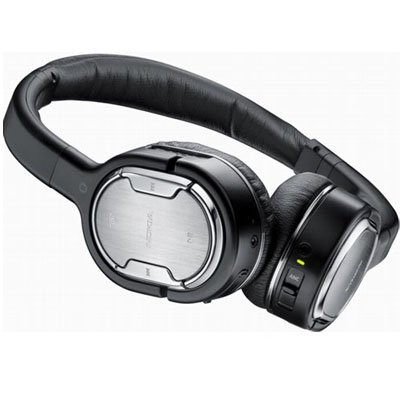
Image: The Nokia Bluetooth Stereo Headset BH-905, showcasinгоёмсог загвартай бөгөөд чихний дээгүүрээ наалддаг аягатай.
Гол онцлогууд
- Идэвхтэй дуу чимээг арилгах (ANC): Significantly reduces ambient noise for an immersive listening experience.
- 10 Microphones: Utilizes 8 microphones for noise capture and 2 for clear speech transmission in loud surroundings.
- Өргөн нийцтэй байдал: Connects wirelessly via Bluetooth or wired to a variety of mobile phones, music players, and other audio devices.
- Хялбар удирдлага: Intuitive controls allow for easy switching between music and calls without needing to look at the device.
Тохиргоо
Bluetooth хослуулах
- Ensure your headset is charged and powered off.
- Мобайл төхөөрөмж дээрээ Bluetooth-г идэвхжүүлнэ үү.
- Press and hold the power button on the headset until the indicator light flashes blue rapidly, indicating pairing mode.
- On your device, search for Bluetooth devices and select "Nokia BH-905" from the list.
- If prompted, enter the passcode (usually "0000").
- Once paired, the indicator light will turn solid blue or flash slowly.
Утастай холболт
For devices without Bluetooth or when battery is low, use the provided audio cables. The headset includes plugs for standard audio jacks and airplane adapters for versatile use.
- Connect one end of the audio cable to the headset's audio input port.
- Connect the other end to your audio source (e.g., mobile phone, MP3 player, airplane entertainment system).
Ашиглалтын заавар
Асаах/унтраах
- To power on, press and hold the power button until the indicator light illuminates.
- Унтраахын тулд заагч гэрэл унтрах хүртэл асаах товчийг дараад барина уу.
Идэвхтэй дуу чимээг цуцлах (ANC)
The BH-905 features advanced Active Noise Cancellation technology. With 8 dedicated microphones, it captures ambient low-frequency noise and generates an inverse sound wave, effectively canceling out unwanted sounds. This allows for a clearer audio experience, especially in noisy environments like airplanes or busy streets.
- To activate ANC, locate the ANC switch on the headset and slide it to the 'On' position. A green indicator light will confirm activation.
- To deactivate ANC, slide the switch to the 'Off' position.
Дуудлага удирдах
The headset is equipped with 2 microphones specifically designed for speech. These microphones not only capture your voice clearly but also work to cancel out ambient noise, ensuring that the person you are speaking with hears you, not your surroundings.
- Дуудлагад хариулах / дуусгах: Use the dedicated call button on the headset.
- Switching between Music and Calls: The headset allows for seamless transitions between listening to music and taking calls. When a call comes in, your music will pause, and you can answer the call directly from the headset.
Хөгжим тоглуулах
Control your music directly from the headset using the intuitive buttons. The design supports "blind usage," meaning you can operate the controls by feel without needing to look at them.
- Тоглуулах/түр зогсоох: Use the play/pause button.
- Дууг алгасах: Use the forward/backward track buttons.
- Дууны хяналт: Тусгай дууны товчлууруудыг ашиглан дууны түвшинг тохируулна уу.
Video: An official Nokia video demonstrating the features and technology behind the BH-905 headset, including its active noise cancellation and multi-microphone system for clear audio and calls.
Засвар үйлчилгээ
- Чихэвчийг зөөлөн, хуурай даавуугаар тогтмол цэвэрлээрэй.
- Avoid exposing the headset to extreme temperatures, moisture, or direct sunlight.
- Store the headset in its protective case when not in use to prevent damage.
- Чихэвчийг задлах эсвэл өөрчлөх гэж бүү оролдоорой, учир нь энэ нь баталгааг хүчингүй болгоно.
Алдааг олж засварлах
- Эрчим хүчгүй: Чихэвч бүрэн цэнэглэгдсэн эсэхийг шалгаарай.
- Хослох боломжгүй: Make sure the headset is in pairing mode and within range of your device. Try restarting both devices.
- Дуу байхгүй/Дууны чанар муу: Check volume levels on both the headset and your connected device. For wired connections, ensure cables are securely plugged in. For Bluetooth, ensure a stable connection.
- ANC үр дүнтэй ажиллахгүй байна: ANC унтраалга 'Асаалттай' байрлалд байгаа эсэхийг шалгаарай.
- Callers Cannot Hear Me Clearly: Ensure the headset's microphones are not obstructed.
If issues persist, refer to the Nokia support webсайт эсвэл нэмэлт тусламж авахын тулд харилцагчийн үйлчилгээтэй холбогдоно уу.
Үзүүлэлтүүд
| Онцлог | Тодорхойлолт |
|---|---|
| Брэнд | Nokia |
| Загварын дугаар | 02716J5 |
| Form Factor | Over-ear (two_ear) |
| Дуу чимээний хяналт | Идэвхтэй дуу чимээг арилгах |
| Холболтын технологи | Bluetooth, утастай |
| Утасгүй холбооны технологи | Bluetooth |
| Нэмэлт онцлогууд | Microphone; Stereo |
| Хяналтын төрөл | Хэвлэл мэдээллийн хяналт |
| Зүйлийн жин | 0.32 фунт |
| UPC | 758478021477 |
| GTIN | 758478021477 |
Баталгаат болон дэмжлэг
The Nokia Bluetooth Stereo Headset BH-905 comes with a 12 сарын баталгаат хугацаа худалдан авсан өдрөөс. Энэхүү баталгаа нь ердийн ашиглалтын үеийн үйлдвэрлэлийн согогийг хамарна. Баталгаат заргад зориулж худалдан авалтаа нотлох баримтаа үлдээнэ үү.
For technical support, warranty service, or additional information, please visit the official Nokia support website or contact your local Nokia customer service center.