
1. Танилцуулга
The BUFFALO Giga Switching Hub LSW3-GT-24NSR is a 24-port Gigabit Ethernet switch designed for high-speed network environments. It is ideal for small to medium-sized offices and workplaces requiring robust and reliable network connectivity. This device supports full Gigabit speeds across all ports, ensuring efficient data transfer.
Key features include a fanless design for silent operation and enhanced reliability, as well as a loop detection function to prevent network disruptions caused by accidental network loops.
2. Аюулгүй байдлын мэдээлэл
Осол гэмтэл, гэмтлээс урьдчилан сэргийлэхийн тулд төхөөрөмжийг ашиглахаасаа өмнө дараах аюулгүй байдлын арга хэмжээг уншиж, ойлгоорой.
- Эрчим хүчний хангамж: Зөвхөн дагалдаж ирсэн цахилгаан адаптерийг ашиглаарай. Цахилгааны залгуур нь заасан хүчдэлтэй тохирч байгаа эсэхийг шалгаарайtage шаардлага.
- Агааржуулалт: Агааржуулалтын нүхийг хааж болохгүй. Хэт халалтаас урьдчилан сэргийлэхийн тулд төхөөрөмжийн эргэн тойронд хангалттай агаарын урсгалыг хангана.
- Байгаль орчин: Avoid exposing the device to water, high humidity, extreme temperatures, or direct sunlight.
- Харьцуулах: Do not drop or subject the device to strong impacts. Do not attempt to open or repair the device yourself. Refer all servicing to qualified personnel.
- Кабель: Ensure all network cables are properly connected and secured.
3. Багцын агуулга
Бүх зүйл багцад байгаа эсэхийг шалгана уу:
- BUFFALO Giga Switching Hub LSW3-GT-24NSR Unit
- Цахилгаан кабель
- Rack Mount Brackets (if included with your model)
- Резинэн хөл (ширээний тавцан дээр байрлуулах зориулалттай)
4. Тохиргоо
4.1 Физик суурилуулалт
The LSW3-GT-24NSR can be installed on a desktop or mounted in a 19-inch equipment rack.
Ширээний байршил:
- Attach the included rubber feet to the bottom of the unit to prevent slipping and provide stability.
- Place the unit on a flat, stable surface with adequate ventilation.
Rack суурилуулах:
- Attach the rack mount brackets to the sides of the unit using the provided screws.
- Secure the unit into a standard 19-inch equipment rack using appropriate rack screws (not included).
4.2 Сүлжээний кабель холбох
Connect your network devices (computers, servers, other switches) to any of the 24 RJ-45 ports on the front panel using standard Ethernet cables (Category 5e or higher recommended for Gigabit speeds).

Зураг 1: Урд самбар дээшview with 24 Ethernet Ports and Status LEDs.
4.3 Цахилгааныг холбох
- Connect the power cable to the AC IN port on the rear of the device.
- Цахилгааны кабелийн нөгөө үзүүрийг тохирох цахилгаан залгуурт холбоно уу.
- The device will power on automatically. The POWER LED on the front panel should illuminate.

Зураг 2: Арын самбар дээшview with AC IN Power Port.
5. Ашиглалтын заавар
5.1 LED үзүүлэлтүүд
The front panel features several LED indicators to monitor the status of the switch and its ports.
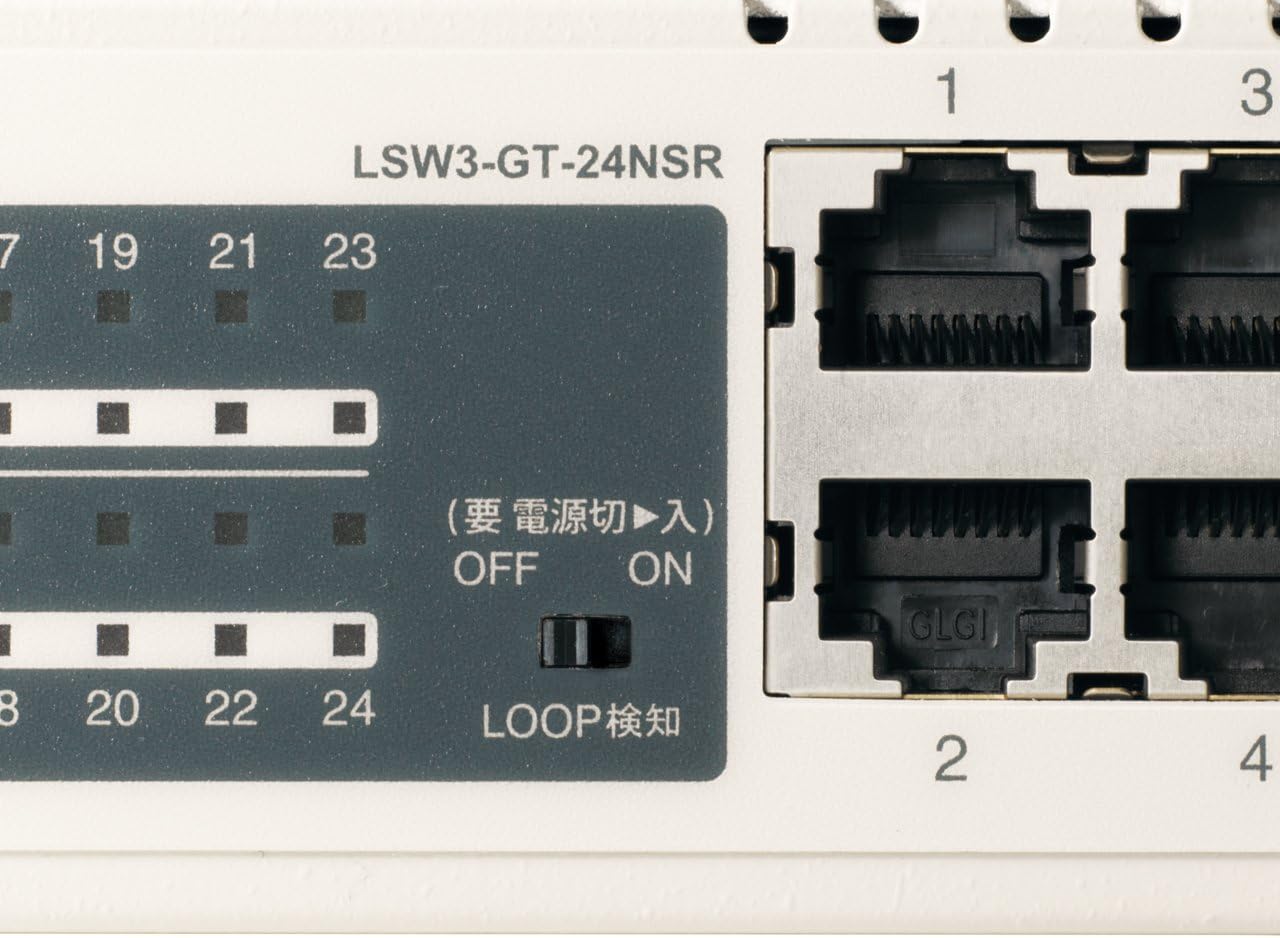
Зураг 3: Нарийвчилсан view of LED Indicators and Loop Detection Switch.
| LED нэр | Статус | Тодорхойлолт |
|---|---|---|
| ХҮЧ | On | Төхөөрөмж асаалттай байна. |
| LINK / ACT (порт бүрт) | On | A network device is connected and a link is established. |
| Анивчих | Портоор дамжуулан өгөгдөл дамжуулагдаж эсвэл хүлээн авагдаж байна. | |
| 1000/100/10М (порт бүрт) | Ногоон | Port is operating at 1000 Mbps (Gigabit Ethernet). |
| Улбар шар | Port is operating at 100 Mbps (Fast Ethernet). | |
| Унтраах | Port is operating at 10 Mbps (Ethernet). | |
| LOOP DETECT | On | A network loop has been detected. |
5.2 Гогцоо илрүүлэх функц
The LSW3-GT-24NSR features a hardware switch for enabling or disabling the loop detection function. This function helps prevent network instability caused by accidental network loops.
Figure 4: Loop Detection Switch (ON/OFF).
- АСААЛТ: Loop detection is active. If a loop is detected, the corresponding port will be automatically shut down to prevent network broadcast storms, and the LOOP DETECT LED will illuminate.
- Унтрааж байна: Loop detection is disabled.
It is recommended to keep the loop detection function ON for network stability.
6. Засвар үйлчилгээ
6.1 Төхөөрөмжийг цэвэрлэх
To maintain optimal performance, periodically clean the exterior of the switch.
- Цэвэрлэхийн өмнө цахилгааны кабелийг салга.
- Зөөлөн, хуурай даавуугаар гадаргууг арчина.
- Do not use liquid cleaners, aerosols, or solvents, as these may damage the casing эсвэл дотоод бүрэлдэхүүн хэсгүүд.
6.2 Байгаль орчны асуудал
Ensure the device is operated within its specified environmental conditions:
- Температур: 0°C - 40°C (32°F - 104°F)
- Чийгшил: 10% - 85% (конденсацгүй)
7. Алдаа засах
If you encounter issues with your BUFFALO Giga Switching Hub, refer to the following common problems and solutions.
7.1 Эрчим хүчгүй
- Шинж тэмдэг: POWER LED унтарсан байна.
- Шийдэл: Цахилгааны кабель төхөөрөмж болон цахилгааны залгуурт найдвартай холбогдсон эсэхийг шалгана уу. Цахилгааны залгуур ажиллаж байгаа эсэхийг шалгана уу.
7.2 No Link or Slow Speed on a Port
- Шинж тэмдэг: The LINK/ACT LED for a connected port is off, or the 1000/100/10M LED indicates a lower speed than expected (e.g., 100M instead of 1000M).
- Шийдэл:
- Ethernet кабель хоёр төгсгөлд найдвартай холбогдсон эсэхийг шалгана уу.
- Try a different Ethernet cable. Ensure it is a Category 5e or higher cable for Gigabit speeds.
- Төхөөрөмжийг унтраалга дээрх өөр порт руу холбоно уу.
- Check the network adapter settings on the connected device (computer, server) to ensure it is configured for auto-negotiation or the correct speed.
7.3 Network Instability / LOOP DETECT LED is On
- Шинж тэмдэг: The LOOP DETECT LED is illuminated, and network performance is degraded or unstable.
- Шийдэл:
- A network loop has been detected. This typically occurs when two ports on the same switch (or different switches) are connected to each other, creating an infinite data path.
- Carefully inspect your network cabling to identify and remove any redundant connections that form a loop.
- If the loop detection switch is ON, the affected port will be automatically shut down. Once the loop is resolved, the port should resume normal operation.
8. Техникийн үзүүлэлтүүд
| Онцлог | Тодорхойлолт |
|---|---|
| Брэнд | BUFFALO |
| Загварын дугаар | LSW3-GT-24NSR |
| Портын тоо | 24 х 10/100/1000BASE-T RJ-45 порт |
| Шилжүүлэгч хүчин чадал | 48 Gbps (Non-blocking) |
| Дамжуулах хувь | 35.7 Mpps |
| MAC хаягийн хүснэгтийн хэмжээ | 8K оролт |
| Jumbo Frame Support | 9КБ хүртэл |
| Онцлогууд | Auto-MDI/MDIX, Auto-Negotiation, Loop Detection Function, Fanless Design |
| Эрчим хүчний хангамж | Дотоод AC тэжээлийн хангамж |
| Хэмжээ (W x D x H) | (Specific dimensions not provided in source, typical for 1U rackmount) |
| Жин | (Specific weight not provided in source) |
| Ашиглалтын температур | 0 хэмээс 40 хэм хүртэл |
| Ашиглалтын чийгшил | 10% - 85% (конденсацгүй) |
9. Баталгаат хугацаа ба дэмжлэг
This BUFFALO product is covered by a manufacturer's warranty. Please refer to the warranty card included with your product or visit the official BUFFALO webнарийвчилсан баталгаат нөхцөлийг сайтаас авна уу.
For technical support, product registration, or further assistance, please visit the official BUFFALO support webсайт эсвэл харилцагчийн үйлчилгээний хэлтэстэй холбогдоно уу. Холбоо барих мэдээллийг ихэвчлэн үйлдвэрлэгчээс олж болно webсайт эсвэл бүтээгдэхүүний савлагаанд .