
1. Танилцуулга
This manual provides instructions for the installation, operation, and maintenance of your Orbit 27954 Pocket Star 4-Station Plus Indoor Sprinkler Controller. This controller is designed to manage residential 24-volt sprinkler systems, offering dual programming capabilities and a rain delay feature.
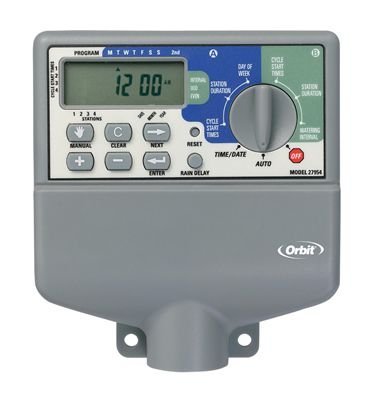
Image 1.1: The Orbit 27954 Pocket Star 4-Station Plus Indoor Sprinkler Controller. This image displays the front panel of the controller, featuring its digital display and control buttons.
2. Аюулгүй байдлын мэдээлэл
Please read all instructions carefully before installation and operation. Failure to follow these instructions may result in property damage or personal injury.
- This controller is designed for indoor use only. Do not install outdoors or in areas exposed to water.
- Ямар нэгэн утас залгах, засвар үйлчилгээ хийхээс өмнө цахилгаан тэжээлийг салгасан эсэхийг шалгаарай.
- All electrical wiring should comply with local codes and regulations. If you are unsure, consult a qualified electrician.
- Төхөөрөмжийг өөрөө засах гэж бүү оролдоорой. Бүх үйлчилгээг мэргэшсэн боловсон хүчинд шилжүүлээрэй.
3. Тохиргоо
3.1 Савлах
Carefully remove the controller from its packaging. Verify that all components are present. Retain packaging for future use or disposal.
3.2 Хянагчийг суурилуулах
- Choose a suitable indoor location near a standard 120V AC outlet and away from direct sunlight or extreme temperatures.
- Use the provided mounting template (if applicable) or mark the desired screw locations on the wall.
- Install mounting screws into the wall, leaving the screw heads slightly extended.
- Hang the controller onto the screws using the keyhole slots on the back of the unit.
- Secure the controller by tightening the screws.
3.3 Утас
Чухал: Утас тавихаасаа өмнө цахилгааныг салга.
- Эрчим хүчний холболт: Plug the controller's power cord into a standard 120V AC outlet.
- Valve Wiring: Connect one wire from each sprinkler valve to a numbered terminal (1, 2, 3, 4) on the controller. Connect the common wire from all valves to the terminal labeled 'C' (Common).
- Sensor Wiring (Optional): If using a rain sensor, connect its wires to the designated sensor terminals. Refer to your sensor's manual for specific wiring instructions.
3.4 Анхдагч асаалт
Once all wiring is complete and secure, connect the power cord to the electrical outlet. The controller display should illuminate, indicating it is powered on.
4. Ашиглалтын заавар
4.1 Дэлгэц болон товчлууруудыг ойлгох нь
The controller features a digital display and several buttons for navigation and programming. Familiarize yourself with the 'Program', 'Set', 'Arrow' (up/down), and 'Rain Delay' buttons.
4.2 Одоогийн цаг болон огноог тохируулах
- Press the 'Set' button repeatedly until 'Set Time' appears on the display.
- Use the 'Arrow' buttons to adjust the hour, then press 'Set' to move to minutes.
- Минут, өглөө/үдээс хойш, жил, сар, өдрийг давтана уу.
4.3 Programming Watering Schedules
The controller supports dual programs (A and B) for flexible scheduling.
- Хөтөлбөрийг сонгох: Press the 'Program' button to select Program A or B.
- Эхлэх цагийг тохируулах: Press 'Set' until 'Start Time' appears. Use 'Arrow' buttons to set the desired start time for the first cycle. The controller supports multiple start times per program.
- Ажиллах хугацааг тохируулах: Press 'Set' until 'Run Time' appears. Use 'Arrow' buttons to set the duration (in minutes) for each station (1-4).
- Услах өдрүүдийг тохируулах: Press 'Set' until 'Watering Days' appears. Use 'Arrow' buttons to select specific days of the week, odd/even days, or interval watering.
4.4 Гар ажиллагаа
To manually water a station or all stations:
- Press the 'Manual' button (if available, or follow specific manual run instructions in the display menu).
- Select the desired station or 'All Stations'.
- Set the run time using the 'Arrow' buttons.
- The selected station(s) will begin watering immediately.
4.5 Борооны саатлын функц
The rain delay feature allows you to pause watering for a set period without losing your programmed schedule.
- Press the 'Rain Delay' button.
- Use the 'Arrow' buttons to select the delay duration (e.g., 24, 48, or 72 hours).
- The controller will pause watering for the selected period and resume the schedule automatically afterward.
5. Засвар үйлчилгээ
5.1 Цэвэрлэгээ
Wipe the controller's exterior with a soft, damp даавуу. Зүлгүүрийн цэвэрлэгч эсвэл уусгагч хэрэглэж болохгүй, учир нь эдгээр нь дэлгэц эсвэл дэлгэцийг гэмтээж болзошгүй.asing.
5.2 Seasonal Considerations
As an indoor controller, the unit is not directly exposed to outdoor elements. However, ensure the indoor environment remains within recommended operating temperatures to prolong its lifespan.
6. Алдаа засах
| Асуудал | Боломжит шалтгаан | Шийдэл |
|---|---|---|
| Хянагчийн дэлгэц хоосон байна. | Хүч чадалгүй. | Check power outlet, ensure power cord is securely plugged in. Verify circuit breaker. |
| Sprinklers do not turn on. | Incorrect programming, wiring issue, or rain sensor activated. | Verify watering schedule. Check valve wiring connections. Ensure rain sensor is not active or bypassed. |
| Only some sprinklers turn on. | Faulty valve, wiring issue to specific station. | Check wiring for the non-working station. Test the valve manually. |
| Watering occurs at incorrect times. | Incorrect time/date setting or program schedule. | Verify current time and date. Review and adjust program start times and watering days. |
7. Техникийн үзүүлэлтүүд
- Загвар: Orbit 27954 Pocket Star 4-Station Plus Indoor Controller
- Брэнд: Орбит
- Хэсгийн дугаар: 27954
- Станцуудын тоо: 4
- Ботьtage: 24 вольт (AC)
- Хүний интерфэйсийн оролт: Товчлуур
- Шаардлагатай батерей: Үгүй
- Суурилуулалт: Дотор
- Онцлогууд: Dual program, Rain delay
- Багцын хэмжээ: 21.84 x 13.46 x 6.6 см
- Жин: 226.8 гр
8. Баталгаат хугацаа ба дэмжлэг
Баталгаат хугацаа эсвэл техникийн дэмжлэг авахыг хүсвэл албан ёсны Orbit-ээс лавлана уу webсайт эсвэл харилцагчийн үйлчилгээний хэлтэстэй холбогдоно уу. Худалдан авалтын баримтаа худалдан авалтын баталгаа болгон хадгалаарай.