
Танилцуулга
Thank you for choosing the Casio G-Shock GW-M5600A-7ER. This watch combines robust G-Shock durability with advanced radio-controlled timekeeping and solar power technology. This manual provides essential information for proper setup, operation, and maintenance of your watch. Please read it carefully to ensure optimal performance and longevity.
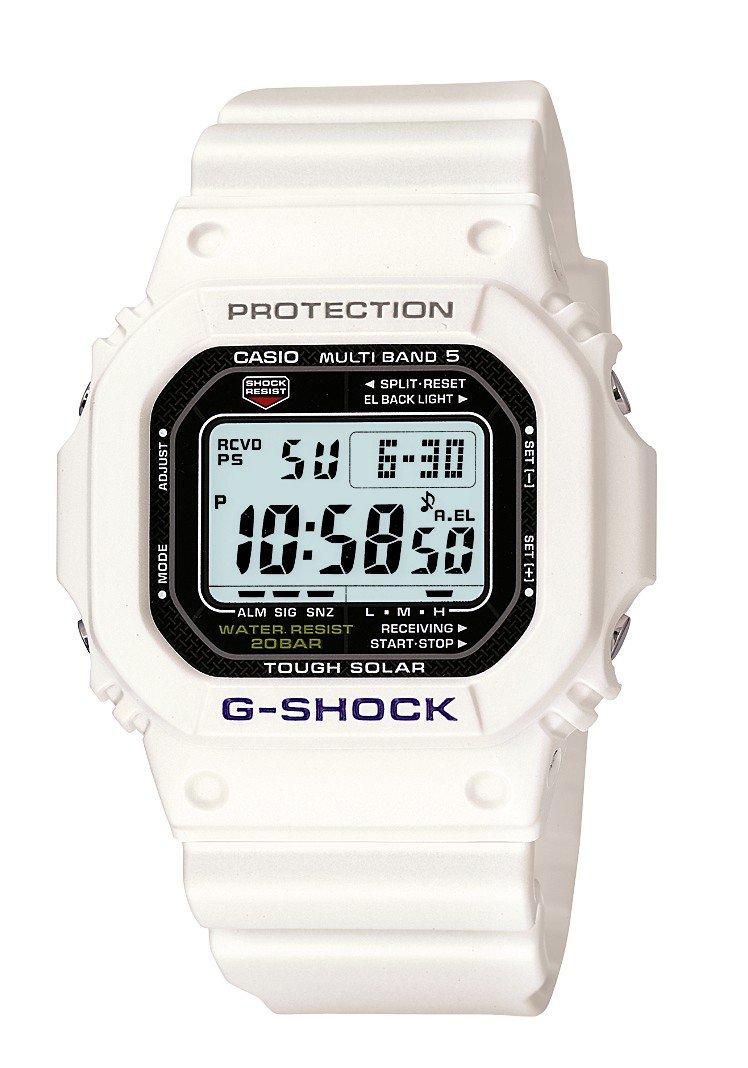
Зураг: Урд view of the Casio G-Shock GW-M5600A-7ER watch, showcasing its digital display and resin strap.
Гол онцлогууд
- Радио удирдлагатай цаг хэмжилт: Automatically receives time calibration signals for accurate timekeeping.
- Нарны эрчим хүчээр ажилладаг: Equipped with a solar panel that converts light into electrical power, eliminating the need for battery replacement.
- 200 метрийн усны эсэргүүцэл: Suitable for swimming, snorkeling, and diving (excluding saturation diving).
- Цочролын эсэргүүцэл: Designed to withstand impacts and vibrations.
- Дижитал дэлгэц: Clear and easy-to-read digital time and function display.
- Секундомерын функц: Measures elapsed time, split time, and 1st-2nd place times.
- Сэрүүлгийн функц: Multiple daily alarms and an hourly цагийн дохио.
- Дэлхийн цаг: Дэлхийн томоохон хотууд болон тодорхой бүс нутгуудын одоогийн цагийг харуулна.
- Эрдэс шил: Protective, scratch-resistant hard mineral lens.
- Удаан эдэлгээтэй давирхайн хийц: High-performance and durable resin case and strap.
Тохиргоо
1. Анхны цэнэглэлт
Your watch is powered by a solar cell. Before initial use, expose the watch face to bright light for several hours to ensure it is sufficiently charged. The watch may arrive with a low charge, indicated by a flashing 'CHG' or 'LOW' indicator on the display. Avoid prolonged storage in dark places.
2. Setting Your Home City
The Home City setting is crucial for correct time calibration and World Time functionality. Refer to the detailed instructions in the full manual for specific button operations to set your Home City. This setting determines which time calibration signal the watch attempts to receive.
3. Time Calibration Signal Reception
The watch automatically attempts to receive a time calibration signal up to six times a day (or five times a day for the Chinese calibration signal). For optimal reception, place the watch near a window at night, away from metal objects and electronic devices. Manual reception can also be initiated:
- In Timekeeping Mode, hold down the 'A' button (top left) for several seconds until the current time calibration status appears.
- Press the 'D' button (bottom right) to initiate manual reception.
- The watch will display 'RCVD' upon successful reception.
Ашиглалтын заавар
Горимын навигаци
Press the 'C' button (bottom left) to cycle through the different modes:
- Цагийн горим: Одоогийн цаг, огноог харуулна.
- Дэлхийн цагийн горим: Displays current time in various time zones.
- Сэрүүлгийн горим: Өдөр тутмын сэрүүлгийг тохируулж, идэвхжүүл.
- Секундомер горим: Өнгөрсөн хугацааг хэмжинэ.
- Countdown timer горим: Set a countdown from a specified time.
Секундомер ашиглах
- Navigate to Stopwatch Mode using the 'C' button.
- Press the 'D' button (bottom right) to start/stop the stopwatch.
- Press the 'B' button (top right) to record split times or reset the stopwatch when stopped.
Сэрүүлэг тохируулах
- Navigate to Alarm Mode using the 'C' button.
- Hold down the 'A' button (top left) until the alarm time starts flashing.
- Use the 'B' and 'D' buttons to adjust the hour and minute settings.
- Press 'A' to confirm and exit the setting screen.
- Press 'D' to toggle the alarm ON/OFF.
Гэрэлтүүлэг
Press the 'B' button (top right) to illuminate the display for easy viewing in low light conditions. The duration of illumination can be adjusted in the watch settings.
Засвар үйлчилгээ
Цагийг цэнэглэж байна
To maintain optimal performance, ensure your watch is regularly exposed to light. The power indicator on the display shows the current charge level. If the charge level is low, expose the watch to direct sunlight or strong artificial light. Avoid covering the watch face when charging.
Цэвэрлэгээ
Цагийг зөөлөн, хуурай даавуугаар арчиж, шороо болон чийгийг арилгана. Зөрүүд бохирдлыг арилгахын тулд зөөлөн даавуу ашиглаарай.ampУс болон зөөлөн саармаг угаалгын нунтагаар арчиж хатаана. Шингэрүүлэгч эсвэл бензин зэрэг ууршимтгай бодис хэрэглэхээс зайлсхий, учир нь тэдгээр нь давирхайн бүрэлдэхүүн хэсгүүдийг гэмтээж болзошгүй.
Усны эсэргүүцэлтэй холбоотой урьдчилан сэргийлэх арга хэмжээ
While your watch is water-resistant to 200 meters, it is important to observe the following:
- Цаг нойтон эсвэл живсэн үед товчлууруудыг бүү ажиллуул.
- Avoid exposing the watch to hot water or steam (e.g., in showers, saunas) as this can compromise seals.
- After exposure to saltwater, rinse the watch thoroughly with fresh water and wipe dry.
Алдааг олж засварлах
Time Not Syncing
- Check Home City Setting: Ensure your Home City is correctly set to a region that receives time calibration signals.
- Reception Environment: Move the watch to a location with better signal reception, ideally near a window, away from electronic interference.
- Гараар хүлээн авах: Attempt a manual time calibration signal reception (refer to Setup section).
- Цэнэглэх түвшин: Ensure the watch has sufficient charge. Low power can affect signal reception.
Дэлгэц хоосон эсвэл бүдэг байна
- Цэнэглэх түвшин: The watch may be in power-saving mode or have a very low charge. Expose it to bright light for an extended period.
- Эрчим хүч хэмнэх: The watch enters power-saving mode when left in the dark for a certain period. Press any button or expose it to light to reactivate the display.
Товчнууд хариу өгөхгүй байна
- Дахин тохируулах In rare cases, a full reset might be necessary. Consult the full Casio manual for your specific module number (usually found on the watch's case back) for detailed reset procedures.
- Ус: Ensure the watch is completely dry if it has been exposed to water.
Үзүүлэлтүүд
| Загварын дугаар | GW-M5600A-7ER |
| Үйлдвэрлэгч | G-SHOCK |
| Дэлгэцийн төрөл | Дижитал |
| Хөдөлгөөн | Кварц |
| Эрчим хүчний эх үүсвэр | Нарны эрчим хүчээр ажилладаг |
| Усны эсэргүүцлийн гүн | 200 метр |
| Кейсийн материалын төрөл | Давирхай |
| Хамтлаг материалын төрөл | Давирхай |
| Цонхны материалын төрөл | Ашигт малтмал |
| Кейсийн диаметр | 49 мм |
| Кейсийн зузаан | 17 мм |
| Хамтлагийн өргөн | 25 мм |
| Тэврэлтийн төрөл | Танг тэврэлт |
| Зүйлийн хэлбэр | Дөрвөлжин |
| Хамтлаг өнгө | Цагаан |
| Өнгө залгах | Саарал |
Баталгаат болон дэмжлэг
Your Casio G-Shock GW-M5600A-7ER watch comes with a Үйлдвэрлэгчийн 2 жилийн баталгаат хугацаа. Энэхүү баталгаа нь ердийн ашиглалтын үед хийгдсэн материал, хийцийн согогийг хамарна. Баталгаат заргад зориулж худалдан авалтаа нотлох баримтаа үлдээнэ үү.
For detailed warranty terms, service, or technical support, please refer to the official Casio website or contact your local authorized Casio service center. Contact information can typically be found in the full product manual or on the manufacturer's webсайт.