
1. Оршил ба түүнээс дээшview
The SparkFun Pro Mini ATmega328-3.3V/8MHz is a compact microcontroller development board designed for projects where space is a premium. It is compatible with Arduino boards and the Arduino IDE, offering a powerful ATmega328 microcontroller in a small form factor. This board operates at 3.3V and 8MHz, making it suitable for low-power applications and direct interfacing with 3.3V peripherals without additional level shifting.
This manual provides essential information for setting up, operating, and maintaining your SparkFun Pro Mini.

Зураг 1: Дээд тал view of the SparkFun Pro Mini ATmega328-3.3V/8MHz Development Board.
2. Үндсэн шинж чанарууд
- Микроконтроллер: ATmega328 running at 8MHz with an external resonator (0.5% tolerance).
- Үйл ажиллагааны ботьtage: 3.3 В.
- Эрчим хүчний оролт: RAW pin supports 3.4V to 12V DC input; VCC pin requires regulated 3.3V.
- Зохицуулагч: On-board 3.3V regulator with a maximum 150mA output, over-current protected.
- Холболт: Designed for direct connection to an FTDI Basic Breakout board (sold separately) for programming.
- Аналог зүү: 8 analog input pins (A0-A7), with A4, A5, A6, A7 located off-edge.
- Дижитал зүү: Standard GPIO pins, including PWM capabilities.
- Үзүүлэлтүүд: On-board Power and Status LEDs.
- Хэмжээ: Approximately 0.7 x 1.3 inches (18 x 33mm).
- I2C: Footprints for optional I2C pull-up resistors.

Figure 2: The SparkFun Pro Mini shown with a ruler, illustrating its compact dimensions.
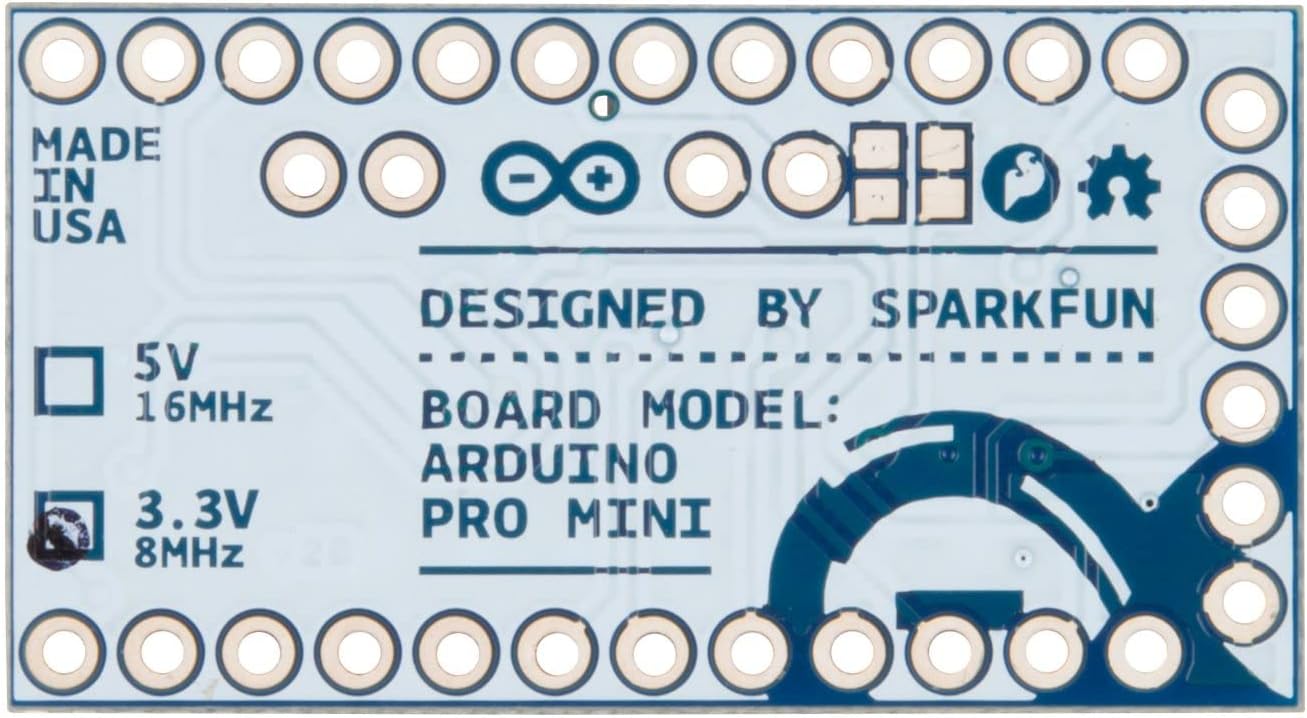
Figure 3: The underside of the Pro Mini, indicating its 3.3V and 8MHz operating characteristics.
3. Тохиргоо ба холболтууд
3.1 Пиноут дээшview
The Pro Mini features various pins for power, communication, and general-purpose input/output (GPIO). Understanding the pinout is crucial for proper integration into your projects.

Зураг 4: Дээд тал view of the Pro Mini, highlighting the various pin labels for identification.

Figure 5: Comprehensive pinout diagram detailing the functions of each pin on the SparkFun Pro Mini.
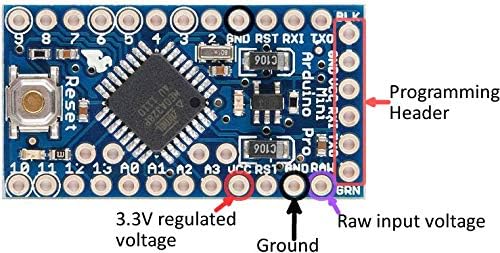
Зураг 6: Ойрын зураг view of the Pro Mini, labeling the programming header, 3.3V regulated voltage, ground, and raw input voltage зүү.
3.2 Самбарыг ажиллуулах
The Pro Mini can be powered in two primary ways:
- RAW Pin: Connect an unregulated DC voltage source between 3.4V and 12V to the RAW pin. The on-board regulator will convert this to 3.3V for the microcontroller.
- VCC Pin: If you have a pre-regulated 3.3V power supply, connect it directly to the VCC pin. Do not apply more than 3.3V to this pin.
Ensure that the power source is correctly connected to avoid damage to the board. The board includes over-current protection for the regulator.
3.3 Самбарыг програмчлах
The SparkFun Pro Mini does not have an on-board USB connector. To program the board, an external FTDI Basic Breakout board (or a compatible USB-to-serial converter) is required.
- Connect the FTDI Basic Breakout board to the programming header pins on the Pro Mini. Ensure the pins (GND, VCC, RXI, TXO, RST, BLK) align correctly.
- Connect the FTDI Basic Breakout board to your computer via a USB cable.
- Arduino IDE-г нээнэ үү.
- Select "Arduino Pro or Pro Mini" from the "Tools > Board" menu.
- Select "ATmega328 (3.3V, 8 MHz)" as the processor.
- Choose the correct COM port for your FTDI device under "Tools > Port".
- You can now upload your sketches to the Pro Mini.

Figure 7: The SparkFun Pro Mini connected to an FTDI Basic Breakout board for programming via USB.
4. Үйл ажиллагаа
4.1 Basic Sketch Upload
After successfully connecting and configuring the board in the Arduino IDE, you can upload any compatible Arduino sketch. A common first step is to upload the "Blink" example sketch to verify basic functionality.
4.2 Захын төхөөрөмжүүдийг холбох
The 3.3V operating voltage of this Pro Mini makes it ideal for direct interfacing with many modern sensors and modules that also operate at 3.3V. When connecting peripherals, always ensure voltage compatibility. If a peripheral requires 5V, a logic level shifter will be necessary to prevent damage to the Pro Mini.
- Дижитал I/O: Use digital pins for on/off control, reading switches, or controlling LEDs.
- Аналог оролт: Pins A0-A7 can read analog sensor values.
- Цуврал харилцаа холбоо: Use RXI/TXO pins for serial communication with other devices.
- I2C харилцаа холбоо: The board supports I2C communication, with optional pull-up resistor footprints available.

Figure 8: The Pro Mini integrated into a breadboard circuit with other electronic components, demonstrating typical usage.
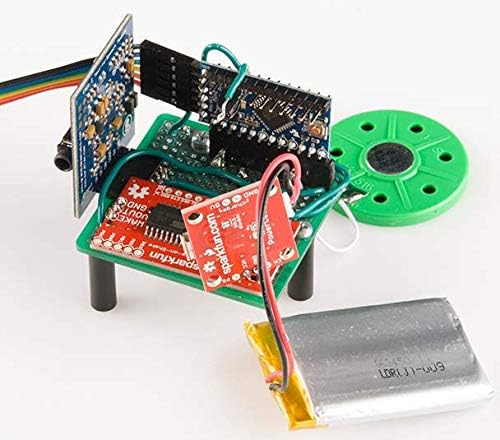
Figure 9: A compact project example utilizing the SparkFun Pro Mini, powered by a small battery.
5. Засвар үйлчилгээ
The SparkFun Pro Mini is a robust development board, but proper care ensures its longevity and reliable operation.
- Харьцуулах: Always handle the board by its edges to avoid touching components, especially the microcontroller, which can be sensitive to static electricity.
- Хадгалах: Store the board in an anti-static bag when not in use, away from dust and moisture.
- Цэвэрлэгээ: If necessary, gently clean the board with isopropyl alcohol and a soft brush. Ensure the board is completely dry before applying power.
- Эрчим хүчний хангамж: Always verify your power supply voltage and polarity before connecting to the board. Incorrect voltage or reverse polarity can cause permanent damage.
6. Алдаа засах
- Board Not Recognized by IDE:
- Ensure your FTDI Basic Breakout board drivers are correctly installed on your computer.
- Verify that the FTDI board is properly connected to the Pro Mini's programming header.
- Check that the correct COM port is selected in the Arduino IDE.
- Confirm that "Arduino Pro or Pro Mini" is selected as the board and "ATmega328 (3.3V, 8 MHz)" as the processor.
- Ноорог байршуулах амжилтгүй:
- Check all connections between the FTDI board and Pro Mini.
- Ensure the power supply to the Pro Mini is stable and within the specified range (3.3V to VCC or 3.4-12V to RAW).
- Sometimes, pressing the reset button on the Pro Mini just before or during the upload process can help.
- Цахилгаангүй/LED унтраалттай:
- Verify your power source is active and providing the correct voltage.
- Check the polarity of your power connections.
- If using the RAW pin, ensure the voltage is between 3.4V and 12V. If using VCC, ensure it is a regulated 3.3V.
- Гэнэтийн зан байдал:
- Double-check your wiring for shorts or incorrect connections.
- Ensure all connected peripherals are compatible with 3.3V logic levels. Use level shifters if necessary for 5V components.
- Review логик алдааны код.
7. Техникийн үзүүлэлтүүд
| Онцлог | Тодорхойлолт |
|---|---|
| Микроконтроллер | ATmega328 |
| Үйл ажиллагааны ботьtage | 3.3 В |
| Оролтын хэмжээtage (RAW) | 3.4V - 12V DC |
| Цагийн хурд | 8 МГц |
| Флэш санах ой | 32 КБ (ATmega328) |
| SRAM | 2 КБ (ATmega328) |
| EEPROM | 1 КБ (ATmega328) |
| Дижитал оролт гаралтын зүү | 14 (6 with PWM support) |
| Аналог оролтын зүү | 8 (A0-A7) |
| Max Current per I/O Pin | 40 мА |
| Хэмжээ | 0.7 x 1.3 инч (18 x 33 мм) |
| Жин | 0.32 унц |
| Холболтын технологи | I2C, Serial (UART) |
8. Баталгаат хугацаа ба дэмжлэг
For technical support, warranty information, or further assistance with your SparkFun Pro Mini ATmega328-3.3V/8MHz Development Board, please refer to the official SparkFun Electronics webсайт эсвэл тэдний хэрэглэгчийн дэмжлэгтэй шууд холбогдоно уу.