
1. Танилцуулга
The D-Link GO-SW-5G is a 5-Port Unmanaged Gigabit Desktop Switch designed for home and small office environments. This device provides a simple and cost-effective solution to expand your network connectivity, offering high-speed Gigabit Ethernet ports for reliable data transfer. It incorporates D-Link's Green Technology for energy efficiency, reduced heat generation, and extended product lifespan.
This switch is a plug-and-play device, requiring no complex configuration or software installation, making it easy to integrate into an existing network.
2. Багцын агуулга
Доор жагсаасан бүх зүйл таны багцад байгаа эсэхийг шалгана уу.
- D-Link GO-SW-5G 5-Port Gigabit Desktop Switch
- Эрчим хүчний адаптер
- Шуурхай суулгах гарын авлага
Хэрэв ямар нэгэн зүйл дутуу эсвэл гэмтсэн бол жижиглэн худалдаалагчтайгаа холбогдож тусламж авна уу.
3. Тохируулах заавар
The D-Link GO-SW-5G switch is designed for easy plug-and-play installation. Follow these steps to set up your device:
3.1. Цахилгаан хувиргагчийг холбоно уу
- Locate the power input port on the side of the D-Link GO-SW-5G switch.
- Connect the provided power adapter to this port.
- Цахилгаан адаптерийн нөгөө үзүүрийг ердийн цахилгаан залгуурт холбоно уу.
- The power LED on the front of the switch will illuminate, indicating that the device is receiving power.

Зураг 1: Хажуу тал view of the D-Link GO-SW-5G switch with the power input port.
3.2. Өөрийн сүлжээнд холбогдоно уу
- Using a standard Ethernet cable (RJ45), connect one end to an available LAN port on your router (not your modem).
- Connect the other end of this Ethernet cable to any of the five available ports on the back of the D-Link GO-SW-5G switch.
- The corresponding LED on the front of the switch will light up, indicating an active connection.
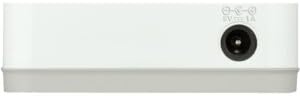
Зураг 2: Арын view of the D-Link GO-SW-5G switch with five Ethernet ports.
3.3. Connect Network Devices
- Connect your network devices (e.g., computers, gaming consoles, network printers, smart TVs) to the remaining available Ethernet ports on the D-Link GO-SW-5G switch using Ethernet cables.
- Each connected device will have its corresponding LED on the front of the switch illuminate, confirming a successful connection.

Зураг 3: Урд view of the D-Link GO-SW-5G switch showing active port LEDs.
4. Ашиглалтын заавар
The D-Link GO-SW-5G is an unmanaged switch, meaning it operates automatically without requiring user configuration. Once connected as described in the Setup section, it will begin forwarding network traffic between connected devices.
- Автомат хэлэлцээр: The switch automatically detects the network speed (10/100/1000 Mbps) and duplex mode (half/full) of connected devices and adjusts accordingly.
- Автомат MDI/MDIX: All ports support automatic MDI/MDIX crossover, eliminating the need for crossover cables when connecting to other switches or hubs.
- LED үзүүлэлтүүд: Each port has an LED indicator on the front panel. A lit LED indicates an active link, and blinking indicates network activity.
5. Засвар үйлчилгээ
To ensure optimal performance and longevity of your D-Link GO-SW-5G switch, consider the following maintenance guidelines:
- Байршил: Шилжүүлэгчийг нарны шууд тусгал, дулааны эх үүсвэр, хэт их чийгээс хол, сэрүүн, хуурай газар байрлуул. Төхөөрөмжийн эргэн тойронд хангалттай агааржуулалтыг хангах.
- Цэвэрлэгээ: Use a soft, dry cloth to clean the exterior of the switch. Avoid using liquid or aerosol cleaners, as they may damage the device.
- Кабелийн менежмент: Ethernet кабелиудыг орооцолдох, санамсаргүй байдлаар салгахаас сэргийлж цэгцтэй байлга.
- Эрчим хүчний мөчлөг: If you experience network issues, a simple power cycle (unplugging the power adapter for 10 seconds and then plugging it back in) can often resolve minor problems.
6. Алдаа засах
If you encounter issues with your D-Link GO-SW-5G switch, refer to the following common troubleshooting steps:
- Цахилгаан LED байхгүй:
- Цахилгаан адаптер нь унтраалга болон ажиллаж байгаа цахилгаан залгуурт найдвартай холбогдсон эсэхийг шалгаарай.
- Өөр төхөөрөмжийг залгах замаар цахилгааны залгуур ажиллаж байгаа эсэхийг шалгана уу.
- No Link/Activity LED for a Connected Device:
- Ethernet кабель нь шилжүүлэгчийн порт болон сүлжээний төхөөрөмж хоёуланд нь найдвартай залгагдсан эсэхийг шалгана уу.
- Кабель гэмтлийг арилгахын тулд өөр Ethernet кабель ашиглаж үзээрэй.
- Холбогдсон төхөөрөмж асаалттай, сүлжээний адаптер зөв ажиллаж байгаа эсэхийг шалгаарай.
- Төхөөрөмжийг шилжүүлэгчийн өөр порт руу холбож үзнэ үү.
- Сүлжээний хурд удаан:
- Verify that all connected devices and cables support Gigabit Ethernet (1000 Mbps) for optimal performance. The switch will operate at the lowest common speed.
- Ensure your router and internet service provider (ISP) plan support the desired speeds.
- Perform a power cycle on the switch and your router.
- Завсарлагатай холболт:
- Сул кабелийн холболт байгаа эсэхийг шалгана уу.
- Ensure the switch is not overheating; provide adequate ventilation.
- Test with different Ethernet cables.
7. Техникийн үзүүлэлтүүд
| Брэнд | D-Link |
| Загварын дугаар | GO-SW-5G/B |
| Портын тоо | 5 |
| Шилжүүлэгчийн төрөл | Удирдлагагүй |
| Өгөгдөл дамжуулах хурд | 1 Gigabits Per Second (10/100/1000 Mbps) |
| Интерфэйс | RJ45 |
| Өнгө | Цагаан |
| Зүйлийн жин | 0.22 фунт |
| Ботьtage | 100-240 вольт |
| Тохиромжтой төхөөрөмжүүд | PC, Mac, and other Ethernet-enabled devices |
| Солих даавуу | 10 Gbps |
| UPC | 790069365669 |
8. Баталгаат хугацаа ба дэмжлэг
Хязгаарлагдмал баталгаа: The D-Link GO-SW-5G switch comes with a 3-year limited warranty. For detailed terms and conditions, please refer to the warranty information included in your package or visit the official D-Link webсайт.
Техникийн дэмжлэг: For technical assistance, product registration, or to download the latest firmware and documentation, please visit the D-Link дэмжлэг Webсайт эсвэл D-Link хэрэглэгчийн үйлчилгээтэй холбогдоно уу.