
Аюулгүй байдлын чухал мэдээлэл
Read all instructions carefully before installation and operation. Failure to follow these instructions may result in electric shock, fire, or serious injury. This device is intended for indoor use only.
- АНХААРУУЛГА: Risk of electric shock. Disconnect power at the circuit breaker or fuse box before installing or servicing.
- Суурилуулалтыг мэргэшсэн цахилгаанчин эсвэл сургагдсан ажилтан гүйцэтгэх ёстой.
- Бүх утас холболтууд найдвартай, орон нутгийн цахилгааны кодуудтай нийцэж байгаа эсэхийг шалгаарай.
- Таймерын цахилгааны хамгийн дээд үзүүлэлтээс хэтрүүлж болохгүй.
- Keep children away from the timer and wiring during installation and operation.
Бүтээгдэхүүн дууссанview
The Intermatic 610224 is a digital 7-day programmable timer designed to automate the ON/OFF switching of electrical loads such as lights, fans, and other appliances. It features a clear digital display and intuitive controls for setting daily or weekly schedules. This timer operates at 120V AC and can handle loads up to 15 Ampэрес.
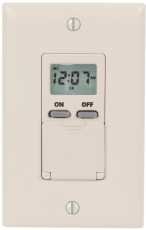
Зураг: Урд view of the Intermatic 610224 Digital 7-Day Timer. The image displays the timer's ivory-colored faceplate with a digital screen at the top and several control buttons below it. The buttons are arranged for setting time, programming, and manual override functions.
Суурилуулалт
Follow these steps to properly install your Intermatic 610224 Digital 7-Day Timer.
- Цахилгааныг унтраах: Таны сольж буй унтраалга руу залгах хүчийг хянадаг таслуур эсвэл гал хамгаалагчийг олоорой. Цахилгааныг бүрэн унтраа. Боть ашиглан тэжээл унтарсан эсэхийг шалгана ууtage шалгагч.
- Одоо байгаа шилжүүлэгчийг устгах: Carefully remove the wall plate and unscrew the existing switch from the wall box. Disconnect the wires from the old switch, noting which wire is connected to which terminal (Line, Load, Neutral, Ground).
- Утасны холболтууд: The Intermatic 610224 timer requires Line (hot), Load, Neutral, and Ground connections. Connect the wires from the wall box to the corresponding terminals on the timer:
- -г холбоно уу Шугам (Халуун) wire (usually black) from the power source to the terminal marked 'LINE'.
- -г холбоно уу Ачаалал wire (usually black, going to the fixture) to the terminal marked 'LOAD'.
- -г холбоно уу Төвийг сахисан wire (usually white) to the terminal marked 'NEUTRAL'.
- -г холбоно уу Газар wire (usually bare copper or green) to the terminal marked 'GROUND'.
Note: A wiring diagram is typically included with the product packaging. Ensure all connections are tight and secure.
- Суурилуулалт: Gently push the wired timer into the wall box. Secure it with the provided screws. Attach the new wall plate.
- Эрчим хүчийг сэргээх: Turn the power back on at the circuit breaker or fuse box. The timer display should illuminate.
Ашиглалтын заавар
This section details how to set the current time and program ON/OFF events for your timer.
Одоогийн цаг, өдрийг тохируулах
- Press the 'CLOCK' button. The time display will flash.
- Use the 'HOUR' and 'MIN' buttons to adjust the current hour and minute.
- Press the 'DAY' button to select the current day of the week.
- Press 'CLOCK' again to save the settings and exit.
ON/OFF үйл явдлуудыг програмчлах
The timer allows for multiple ON/OFF programs per day. Refer to your specific model's manual for the exact number of programs (typically up to 14 ON and 14 OFF events).
- Press the 'PROG' button. The display will show '1 ON' and the time will flash.
- Use the 'HOUR' and 'MIN' buttons to set the desired ON time for program 1.
- Press the 'DAY' button repeatedly to select the day(s) of the week for this program (e.g., Mon-Sun, Mon-Fri, Sat-Sun, individual days).
- Press 'PROG' again. The display will show '1 OFF' and the time will flash.
- Use the 'HOUR' and 'MIN' buttons to set the desired OFF time for program 1.
- Press the 'DAY' button to select the day(s) for this OFF program, matching the ON program.
- Repeat steps 1-6 for additional ON/OFF programs (e.g., '2 ON', '2 OFF', etc.).
- After setting all desired programs, press the 'CLOCK' button to exit programming mode.
Гараар хүчингүй болгох
To temporarily override the current program without deleting it:
- Press the 'MANUAL' button. This will cycle the output between ON, OFF, and AUTO modes.
- In 'AUTO' mode, the timer follows the programmed schedule.
- In 'ON' or 'OFF' mode, the timer will remain in that state until the next programmed event or until 'MANUAL' is pressed again to return to 'AUTO'.
Зуны цагийн тохируулга
Some models may have an automatic Daylight Saving Time adjustment feature. If not, manually adjust the time by one hour forward or backward as required using the 'HOUR' button in clock setting mode.
Засвар үйлчилгээ
The Intermatic 610224 Digital 7-Day Timer requires minimal maintenance.
- Цэвэрлэгээ: To clean the timer, wipe the surface with a soft, damp даавуу. Зүлгүүрийн цэвэрлэгч эсвэл уусгагч хэрэглэж болохгүй, учир нь тэдгээр нь өнгөлгөө эсвэл дотор эд ангиудыг гэмтээж болзошгүй.
- Зайны нөөц: This timer typically includes an internal battery backup to retain programmed settings during power outages. The battery is usually non-replaceable by the user and designed to last the life of the product. If the display is blank or programs are lost after a power outage, the battery may be depleted, indicating the unit may need replacement.
Алдааг олж засварлах
If you encounter issues with your timer, refer to the following common problems and solutions.
| Асуудал | Боломжит шалтгаан | Шийдэл |
|---|---|---|
| Таймерын дэлгэц хоосон байна. | Таймерт цахилгаан байхгүй. | Check circuit breaker or fuse. Ensure wiring connections are secure. |
| Цаг хэмжигч програмчлагдсан цагт асаахгүй/унтраахгүй. | Incorrect programming; Timer is in Manual ON/OFF mode. | Review programming steps. Ensure timer is in 'AUTO' mode (press 'MANUAL' button until 'AUTO' is displayed). |
| Цахилгаан унтраалттай болсны дараа цаг буруу байнаtage. | Internal battery backup depleted. | Reset the current time and day. If this occurs frequently, the timer may need replacement. |
| Load (light/appliance) does not turn on. | Load is faulty; Wiring issue; Timer is OFF. | Test the load directly. Check wiring connections. Ensure timer is programmed to ON or manually set to ON. |
Үзүүлэлтүүд
- Загвар: 610224
- Ботьtage: 120V AC, 60Гц
- Одоогийн үнэлгээ: 15A Resistive, 10A Tungsten, 1/2 HP
- Program Cycles: 7 хоног
- Хөтөлбөрүүд: Up to 28 ON/OFF events (14 ON, 14 OFF)
- Ашиглалтын температур: 0°C - 50°C (32°F - 122°F)
- Хаалт: Ivory, Wall Mount
Баталгаат болон дэмжлэг
Intermatic products are manufactured to high-quality standards and are backed by a manufacturer's warranty. For specific warranty details, please refer to the warranty card included with your product or visit the official Intermatic webсайт.
For technical support, troubleshooting assistance, or to inquire about replacement parts, please contact Intermatic customer service. Contact information can typically be found on the product packaging or the manufacturer's webсайт.