
1. Тохиргоо
1.1 Савлах, агуулах
Сав баглаа боодолоос ТВ болон бүх дагалдах хэрэгслийг болгоомжтой авч хая. Бүх бүрэлдэхүүн хэсгүүд байгаа эсэхийг шалгаарай:
- Sharp LC-40LE653U 40-Inch Smart LED TV
- Алсын удирдлага
- 2 АА батерей
1.2 Тавиур суурилуулах
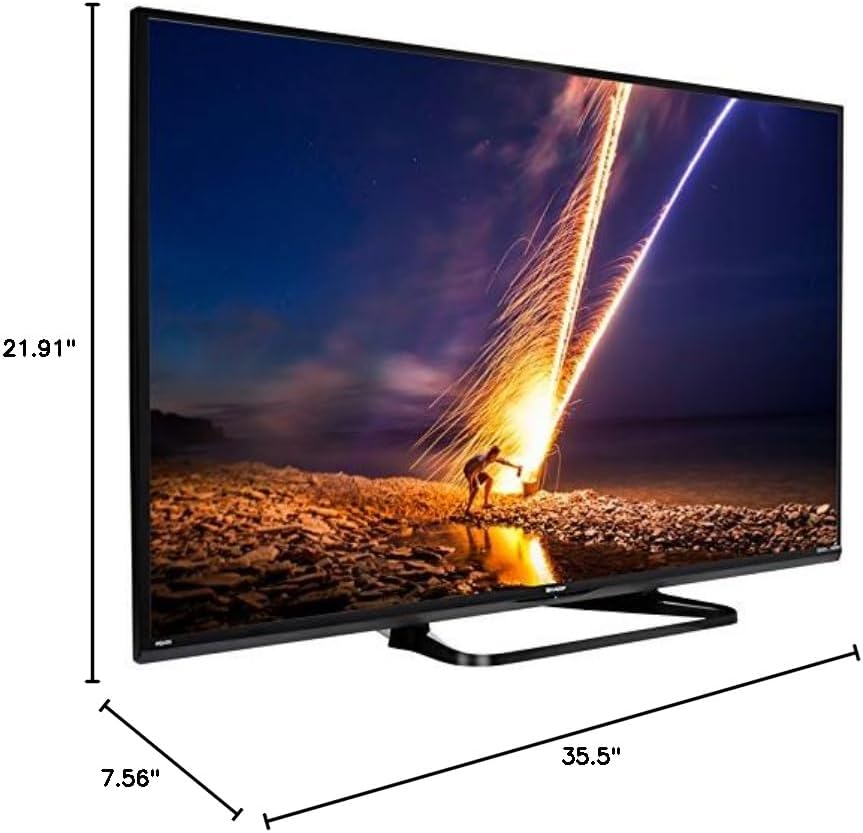
If placing the TV on a table, attach the included stand. Refer to the diagram below for proper assembly. Ensure all screws are securely fastened.
1.3 Гадаад төхөөрөмжүүдийг холбох
Connect your external devices such as cable boxes, Blu-ray players, or gaming consoles to the TV's input ports. The TV features multiple connectivity options.


Боломжтой портууд нь:
- HDMI: 2 ports for high-definition audio and video. One HDMI port supports MHL (Mobile High-Definition Link).
- USB: 1 port for media playback or connecting a USB device.
- Ethernet: Утастай сүлжээний холболтод зориулагдсан.
- Component/Video: For older video devices.
- DTV/TV (Antenna): Антен эсвэл кабелийн телевизийн тэжээлийг холбоход зориулагдсан.
- Аудио гаралт: Optical for digital audio, and RCA for analog audio.
1.4 Эрчим хүчний холболт
After connecting all necessary devices, plug the TV's power cord into a wall outlet.
1.5 Анхны тохиргоо
Upon first power-on, the TV will guide you through an initial setup process. This includes language selection, time zone, and network configuration. For Wi-Fi setup, select your network and enter the password.
2. Ашиглалтын заавар
2.1 Алсын удирдлагын функцууд
The remote control allows you to access all TV functions. Insert the two AA batteries into the remote control, ensuring correct polarity.

- Эрчим хүч (улаан товчлуур): ТВ-г асаах эсвэл унтраана.
- Оруулах: Оролтын эх үүсвэрийг сонгоно (HDMI, ТВ, USB гэх мэт).
- VOL +/-: Дууны түвшнийг тохируулна.
- CH +/-: Телевизийн сувгийг өөрчилдөг.
- Навигацийн товчлуурууд (Дээш/Доош/Зүүн/Баруун/Оруулна уу): Цэс рүү шилжих, сонголтуудыг сонгоход ашигладаг.
- УХААЛАГ: Accesses the Smart Central Apps menu.
- Цэс: Opens the main TV menu for settings adjustments.
- NETFLIX: Netflix програмын шууд нэвтрэх товчлуур.
2.2 Smart TV Features (Smart Central Apps)
The Sharp LC-40LE653U features Smart Central Apps, providing access to various online services and a web browser. Ensure your TV is connected to the internet via Wi-Fi or Ethernet.

- Аппликешнүүдэд хандах: Press the 'SMART' button on your remote to open the Smart Central Apps menu.
- Дэмждэг үйлчилгээ: Includes Hulu Plus, Netflix, Pandora, Vudu, and YouTube.
- Web Хөтөч: Баригдсаныг ашиглана уу web browser for general internet browsing. Navigation is done via the remote control.
2.3 Wallpaper Mode
When the TV is turned off, Wallpaper Mode can display virtually any image. To use this feature, connect a USB drive containing your desired images to the TV's USB port. Navigate to the Wallpaper Mode settings in the TV menu to select and configure your images.
3. Засвар үйлчилгээ
3.1 ТВ цэвэрлэх
Дэлгэцийг цэвэрлэхийн тулд зөөлөн, хуурай, хөвөнгүй даавуугаар зөөлөн арчина. Зөрүүд тэмдгийн хувьд бага зэрэг dampen the cloth with water or a specialized screen cleaner. Avoid using harsh chemicals, abrasive cleaners, or direct spraying of liquids onto the screen or cabinet.
Clean the TV cabinet with a soft, dry cloth. Ensure the TV is unplugged before cleaning.
3.2 Програм хангамжийн шинэчлэлтүүд
Periodically check for software updates through the TV's settings menu to ensure optimal performance and access to the latest features. Updates can be performed via the internet connection.
4. Алдаа засах
If you encounter issues with your Sharp LC-40LE653U TV, refer to the following common solutions:
- Эрчим хүчгүй: Ensure the power cord is securely plugged into both the TV and a working wall outlet. Check if the power indicator light on the TV is on.
- Зураг/дуу чимээ байхгүй: Verify the correct input source is selected using the 'Input' button on the remote. Check all cable connections (HDMI, component, etc.) are secure.
- Зургийн чанар муу: Зурагтын цэснээс зургийн тохиргоог (гэрэлтэлт, контраст, хурц тод байдал) тохируулна уу. Оролтын эх үүсвэр нь өндөр чанартай дохио өгч байгаа эсэхийг шалгаарай.
- Интернет холболт байхгүй: Check your Wi-Fi router or Ethernet cable connection. Re-enter your Wi-Fi password in the TV's network settings. Restarting your router may resolve connectivity issues.
- Алсын удирдлага ажиллахгүй байна: Алсын удирдлага дахь батерейг солино уу. Алсын удирдлага болон ТВ-ийн IR мэдрэгчийн хооронд ямар ч саад бэрхшээл байхгүй эсэхийг шалгаарай.
For more detailed troubleshooting steps, consult the full online manual or contact customer support.
5. Техникийн үзүүлэлтүүд
Key technical specifications for the Sharp LC-40LE653U 40-Inch Smart LED TV:
| Онцлог | Тодорхойлолт |
|---|---|
| Загварын дугаар | LC-40LE653U |
| Дэлгэцийн хэмжээ | 39.5 инч (40 инчийн ангилал) |
| Дэлгэцийн технологи | LCD |
| Шийдвэр | 1080p (Бүтэн HD) |
| Сэргээх хурд | 60 Гц |
| Харьцаа | 16:9 |
| Холболтын технологи | Wi-Fi |
| Тоног төхөөрөмжийн интерфейс | Ethernet, HDMI, USB |
| Total Number of HDMI Ports | 2 (one with MHL support) |
| Нийт USB портууд | 1 |
| Аудио оролт | HDMI, Optical, USB |
| Чанга яригчийн хамгийн их гаралтын чадал | 20 ватт |
| Бүтээгдэхүүний хэмжээ (D x W x H) | 7.56" x 35.5" x 21.91" |
| Зүйлийн жин | 16.3 фунт |
| Суурилуулах төрөл | Ширээний бэхэлгээ |
| Дэмжигдсэн интернет үйлчилгээ | Hulu Plus, Netflix, Pandora, Vudu, YouTube |
| Эрчим хүчний Оддын гэрчилгээтэй | Тиймээ |
6. Баталгаат хугацаа ба дэмжлэг
6.1 Бүтээгдэхүүний баталгаа
This Sharp LC-40LE653U TV comes with a 1 жилийн хязгаарлагдмал баталгаат хугацааБаталгаат хугацааны нэхэмжлэл гаргахын тулд худалдан авалтын баримтаа хадгална уу. Баталгаа нь хэвийн ашиглалтын нөхцөлд гарсан үйлдвэрлэлийн согогийг хамарна.
6.2 Хэрэглэгчийн дэмжлэг
For technical assistance, troubleshooting beyond this manual, or warranty service, please contact Sharp customer support. Refer to the official Sharp webсайт эсвэл таны бүтээгдэхүүний бүртгэлийн картаас хамгийн сүүлийн үеийн холбоо барих мэдээллийг авна уу.