
Танилцуулга
Худалдан авалт хийсэнд баярлалааasing the STOGA Ubox STV040 Dual Lens Car DVR Camera. This manual provides detailed instructions for the proper installation, operation, and maintenance of your device. Please read this manual thoroughly before using the product to ensure optimal performance and safety.
Багцын агуулга
Нээхдээ савлагааны агуулгыг шалгана уу. Хэрэв ямар нэгэн зүйл алга болсон эсвэл гэмтсэн бол худалдагчтайгаа холбогдоно уу.
- 1 x STOGA Ubox STV040 Car DVR Camera
- 1 х машины цэнэглэгч
- 1 x Car Mount
- 1 x External GPS Module
- 1 х хэрэглэгчийн гарын авлага
Бүтээгдэхүүн дууссанview
Familiarize yourself with the components and features of your STOGA Ubox STV040 Car DVR Camera.

Зураг 1: Урд view of the DVR camera with the display screen active.

Зураг 2: Урд view detailing the dual wide-angle lenses and surrounding controls.
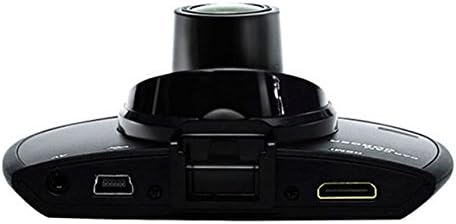
Зураг 3: Топ view illustrating the connectivity ports (HDMI, USB, AV).
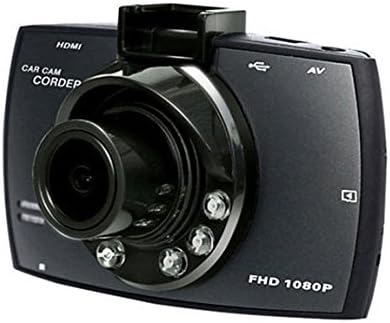
Зураг 4: Angled perspective of the DVR camera, showing its compact design.
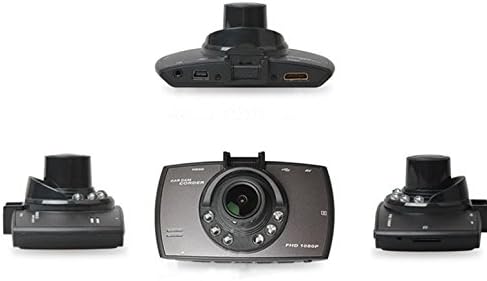
Зураг 5: Цогц view of the DVR camera from various angles.
Тохиргоо
1. Installing the Micro SD Card
Insert a Micro SD card (Class 6 or higher, 4GB-32GB) into the designated slot on the DVR camera. Ensure the card is inserted correctly until it clicks into place. The device supports continuous loop recording and emergency event recording.
2. Камер суурилуулах
- Attach the car mount to the windshield in a position that does not obstruct your view.
- Securely attach the DVR camera to the car mount.
- Adjust the camera angle to ensure both lenses capture the desired view (front and interior/side). The dual lenses are 180-degree rotatable.
3. Эрчим хүчний холболт
Connect the car charger to the DVR camera's power input and plug the other end into your vehicle's 12V power outlet (cigarette lighter socket). The camera will typically power on automatically when the vehicle starts and power off when the vehicle is turned off.
4. GPS Module Connection (Optional)
Connect the external GPS module to the designated GPS port on the DVR camera. This enables GPS logging, recording location data along with video footage.
Ашиглалтын заавар
Асаах/унтраах
- Автомат: The camera powers on and starts recording automatically when the car engine starts. It powers off automatically when the engine is turned off.
- Гарын авлага: Press and hold the power button to manually turn the device on or off.
Бичлэгийн горимууд
- Давталтын бичлэг: The camera continuously records video in segments. When the memory card is full, it automatically overwrites the oldest unlocked footage.
- Яаралтай тусламжийн бичлэг (G-Sensor): The built-in G-Sensor detects sudden impacts or collisions. In such an event, the current video segment is automatically locked and protected from being overwritten.
Цэсийн навигаци
Use the control buttons located on the device to navigate through the menu options on the 2.0" TFT LCD screen. Adjust settings such as video resolution, date/time stamp, language (English, Chinese, Japanese, Russian), and G-Sensor sensitivity.
Тоглуулах
- Stop recording if currently active.
- Enter playback mode via the menu.
- Хүссэн видеогоо сонгоно уу file for playback on the device screen.
- Alternatively, remove the Micro SD card and insert it into a computer to view files.
Нууц үгийн хамгаалалт
The device supports password protection to prevent unauthorized access to recordings. Refer to the on-screen menu for setting up and managing this feature.
Засвар үйлчилгээ
- Цэвэрлэгээ: Use a soft, dry cloth to clean the camera lenses and screen. Avoid abrasive cleaners or solvents.
- Микро SD карт: Format the Micro SD card regularly (e.g., once a month) to ensure optimal performance and prevent data corruption. Back up important files форматлахын өмнө.
- Температур: Төхөөрөмжийг хэт өндөр температур, нарны шууд тусгал, өндөр чийгшилд удаан хугацаагаар байлгахаас зайлсхий.
- Програм хангамжийн шинэчлэлтүүд: Үйлдвэрлэгчийг шалгана уу webГүйцэтгэлийг сайжруулах, функц нэмэхийн тулд боломжтой програм хангамжийн шинэчлэлтүүдийг үе үе сайтаас авна уу.
Алдааг олж засварлах
| Асуудал | Боломжит шалтгаан / шийдэл |
|---|---|
| Камер асахгүй байна. |
|
| Бичлэг гэнэт зогссон. |
|
| Видео чанар муу. |
|
| GPS ажиллахгүй байна. |
|
| Батерей нь цэнэг барихгүй. |
|
Үзүүлэлтүүд
| Онцлог | Дэлгэрэнгүй |
|---|---|
| Загварын дугаар | Ubox STV040 |
| Дэлгэц | 2.0" TFT LCD (960 x 240 pixels) |
| Линз | Dual 140-degree A+ wide-angle, 180-degree rotatable |
| Мэдрэгч | CMOS |
| Видеоны нягтрал | 1280 x 480 @ 30 fps, 640 x 480 @ 30 fps |
| Видео формат | AVI |
| Зургийн формат | M-JPG |
| Шөнийн хараа | Хэт улаан туяаны шөнийн харааны функц |
| Хадгалах | Micro TF (SD HC) card, 4GB-32GB, Class 6 and above |
| GPS | Supports external GPS module |
| G-мэдрэгч | Integrated, supports emergency event recording lock |
| Микрофон/чанга яригч | Нэгдсэн |
| Гаралт | CVBS (Video Output) |
| Батерей | 3.7V 700mA Lithium-Polymer battery |
| Үйлдлийн системийн нийцтэй байдал | Windows 2000/XP/Vista/Windows 7 |
| Дэмжигдсэн хэлүүд | English, Chinese, Japanese, Russian |
Баталгаат болон дэмжлэг
For warranty information and technical support, please refer to the documentation provided with your purchase or contact your retailer. Keep your purchase receipt as proof of purchase for warranty claims.
For further assistance, you may also visit the official STOGA website (if available) or contact their customer service department.