
Supersonic IQ3710DJBT
Supersonic IQ Sound IQ-3710DJBT Portable DJ Speaker User Manual
Загвар: IQ-3710DJBT
Аюулгүй байдлын чухал заавар
Please read all instructions carefully before operating this device. Keep this manual for future reference.
- Энэ төхөөрөмжийг бороо, чийгэнд бүү тавь.
- Агааржуулалтын нүхийг хааж болохгүй.
- Радиатор, халаалтын төхөөрөмж, зуух болон бусад төхөөрөмж (үүнд ampөргөгч) дулаан үүсгэдэг.
- Цахилгааны утсыг алхах, хавчихаас хамгаалаарай, ялангуяа залгуур, тохь тухтай сав, төхөөрөмжөөс гарах цэгээс хамгаалаарай.
- Зөвхөн үйлдвэрлэгчээс заасан хавсралт/дагалдах хэрэгслийг ашиглана уу.
- Аянга шуургатай үед эсвэл удаан хугацаагаар ашиглаагүй үед энэ төхөөрөмжийг цахилгааны залгуураас салга.
- Бүх засвар үйлчилгээг мэргэшсэн үйлчилгээний ажилтнуудад хандаарай. Төхөөрөмж ямар нэгэн байдлаар гэмтсэн тохиолдолд засвар үйлчилгээ хийх шаардлагатай.
Бүтээгдэхүүн дууссанview
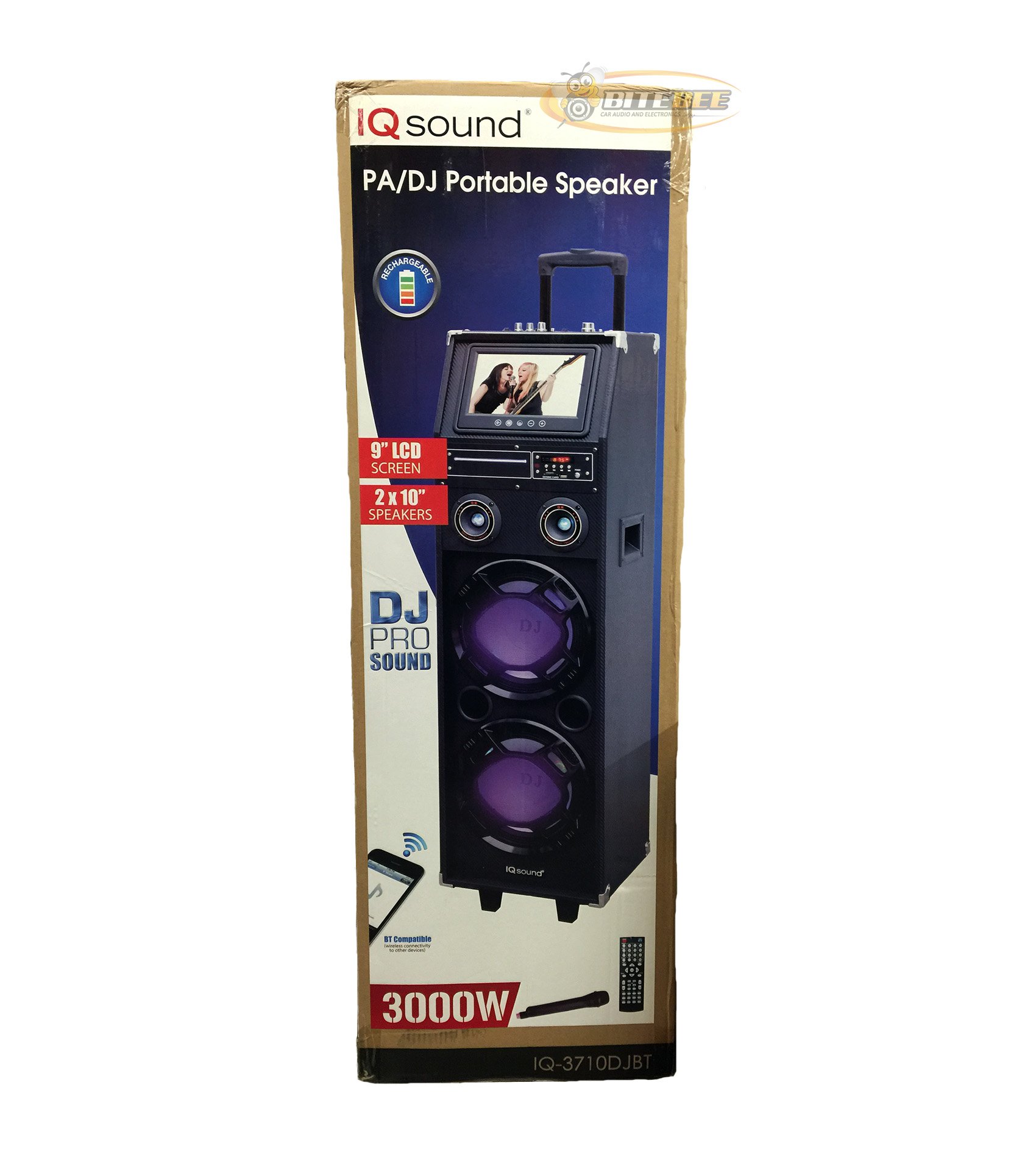
Зураг: Урд view of the Supersonic IQ Sound IQ-3710DJBT Portable DJ Speaker, showcasing its dual speakers, 9-inch LCD screen, and control panel.
Онцлогууд
- Dual 10-inch Full Range Speakers
- Built-in Bluetooth for wireless audio streaming
- FM Radio tuner
- 5-Band Equalizer for audio customization
- 9-inch LCD Display for video and menu navigation
- Зөөврийн зориулалттай цэнэглэдэг батерей
- Integrated LED Lights for visual effects
- Multimedia Compatible (supports various video and music formats)
- USB Input for external audio devices
- SD Card Slot for media playback
- 1 Гитарын оролт
- 1 Microphone Jack (includes 1 microphone)
- Алсын удирдлага багтсан
- Built-in Handle and Wheels for easy transport
Багцын агуулга
- IQ-3710DJBT Portable DJ Speaker
- Эрчим хүчний адаптер
- Микрофон
- Алсын удирдлага
- Хэрэглэгчийн гарын авлага (энэ баримт бичиг)
Controls and Connections (General)
The main control panel is located on the top or rear of the speaker, featuring buttons for power, mode selection, playback controls (play/pause, skip), volume adjustment, EQ settings, and light controls. Input ports for USB, SD card, microphone, and guitar are also present. The 9-inch LCD display provides visual feedback for media playback, FM radio tuning, and menu navigation.
Тохиргоо
1. Батерейг цэнэглэж байна
- Connect the included power adapter to the speaker's DC input port.
- Plug the power adapter into a standard wall outlet (AC 100-240V, 50/60Hz).
- The charging indicator light (if present) will illuminate. Allow approximately 6-8 hours for a full charge before first use.
- Чанга яригчийг цэнэглэж байх үед ашиглаж болно.
2. Анхдагч асаалттай
- Ensure the speaker is fully charged or connected to a power source.
- Locate the Power button (usually on the control panel) and press it to turn on the speaker.
- The LCD display will illuminate, and the speaker will enter the default mode.
3. Захын төхөөрөмжүүдийг холбох
Микрофон: Insert the included microphone's cable into the Microphone Jack.
Гитар: Insert your guitar's cable into the Guitar Input.
Ашиглалтын заавар
Горим сонгох
дээр дарна уу MODE button on the control panel or remote control to switch between available modes: Bluetooth, FM Radio, USB, SD, and AUX (if applicable). The current mode will be displayed on the LCD screen.
Bluetooth ажиллагаа
- Turn on the speaker and switch to Bluetooth горим using the MODE button. The LCD will display "Bluetooth" or a similar indicator.
- Bluetooth-ийг идэвхжүүлсэн төхөөрөмж дээрээ (жишээ нь, ухаалаг утас, таблет) Bluetooth-г идэвхжүүлж, боломжтой төхөөрөмжүүдийг хайж олоорой.
- СонгохIQ-3710DJBT" төхөөрөмжүүдийн жагсаалтаас.
- Once paired, the speaker will emit a confirmation sound, and you can now play audio wirelessly from your device.
- Use your device or the speaker's controls for playback (play/pause, skip tracks, volume).
FM радиогийн үйл ажиллагаа
- руу шилжих FM радио горим using the MODE button.
- дээр дарна уу ТОГЛОХ/ЗОГСООХ button (or a dedicated scan button) to automatically scan and save available FM stations.
- -г ашиглана уу ӨМНӨ/ДАРААХ Хадгалсан станцуудаар шилжих товчлуурууд.
- Adjust the volume using the main volume knob or remote control.
USB/SD карт тоглуулах
- USB флаш дискийг дотор нь оруулна уу USB порт эсвэл SD карт руу SD картны үүр.
- The speaker should automatically switch to USB or SD mode and begin playing media. If not, press the MODE зөв оролтыг сонгохын тулд товчлуурыг дарна уу.
- Use the playback controls (play/pause, previous/next) on the speaker or remote to manage your media.
- The 9-inch LCD display will show file information and video playback (if applicable).
Эквалайзер (EQ) тохируулга
The 5-band EQ allows you to fine-tune the audio output. Locate the EQ controls on the speaker's panel. Adjust the sliders or knobs for different frequency bands (e.g., bass, mid-range, treble) to achieve your desired sound profile.
Microphone and Guitar Use
Once connected, adjust the individual volume controls for the microphone and guitar (if available) on the speaker's control panel. The main volume knob controls the overall output.
LED гэрлийн хяналт
дээр дарна уу ГЭРЭЛ button (or similar) on the control panel or remote to cycle through different light modes or to turn the lights on/off.
LCD дэлгэц
The 9-inch LCD display shows current mode, track information, FM frequency, and can play video files from USB or SD card. Navigate menus using the dedicated navigation buttons or remote control.
Засвар үйлчилгээ
- Цэвэрлэгээ: Use a soft, dry cloth to clean the exterior of the speaker. Do not use abrasive cleaners or solvents. For the LCD screen, use a screen-specific cleaning solution and a microfiber cloth.
- Батерейны арчилгаа: To prolong battery life, fully charge the speaker before first use and recharge it regularly, even if not in frequent use. Avoid completely draining the battery. Store in a cool, dry place.
- Хадгалах: Чанга яригчийг удаан хугацаагаар ашиглахгүй бол сэрүүн, хуурай орчинд, нарны шууд тусгал болон хэт өндөр температураас хол хадгална уу.
- Тээвэрлэлт: Utilize the built-in handle and wheels for easy and safe transport of the speaker.
Алдааг олж засварлах
| Асуудал | Боломжит шалтгаан | Шийдэл |
|---|---|---|
| Чанга яригч асахгүй байна. | Battery is drained or power adapter is not connected. | Connect the power adapter and charge the speaker. Ensure the power outlet is functional. |
| Дууны гаралт байхгүй. | Volume is too low, incorrect mode selected, or device not properly connected. | Increase volume. Verify correct mode (Bluetooth, USB, FM). Reconnect Bluetooth device or reinsert USB/SD card. Check microphone/guitar connections. |
| Bluetooth хослол амжилтгүй боллоо. | Speaker not in Bluetooth mode, device too far, or interference. | Ensure speaker is in Bluetooth mode. Move device closer to speaker. Turn off and on Bluetooth on your device. Try pairing again. |
| FM радио хүлээн авах чадвар муу байна. | Сул дохио эсвэл хөндлөнгийн оролцоо. | Relocate the speaker to an area with better reception. Perform an auto-scan again. |
| USB/SD media not playing. | Дэмжигдээгүй file format, corrupted media, or improper insertion. | Ensure media is inserted correctly. Check file formats (refer to specifications for supported types). Try a different USB drive or SD card. |
Үзүүлэлтүүд
- Загвар: IQ-3710DJBT
- Брэнд: Дуунаас хурдан
- Чанга яригчийн төрөл: Зөөврийн DJ чанга яригч
- Илтгэгчид: 2 x 10-inch Full Range
- Дэлгэц: 9 инчийн LCD
- Холболт: Bluetooth, USB
- Оролтууд: USB, SD Card, Microphone (1), Guitar (1)
- Радио: FM тааруулагч
- Тэгшитгэл: 5 хамтлагтай тэнцэх чадвар
- Эрчим хүчний эх үүсвэр: Built-in Rechargeable Battery, AC Power Adapter
- Хэмжээ (L x W x H): 15 x 14 x 45 инч (ойролцоогоор)
- Жин: 54 фунт (ойролцоогоор)
- Дагалдах хэрэгсэлд багтсан: Microphone, Remote Control, Power Adapter
Баталгаат болон дэмжлэг
This product comes with a standard manufacturer's warranty. For specific warranty terms and conditions, please refer to the warranty card included in your package or visit the official Supersonic webсайт.
For technical support, service inquiries, or to purchase replacement parts, please contact Supersonic customer service. Contact information can typically be found on the product packaging or the official brand webсайт.
Онлайн дэмжлэг: www.supersonicinc.com (This is a placeholder link, please verify the actual support URL.)
Ask a question about this manual
Ask about setup, troubleshooting, compatibility, parts, safety, or missing instructions. Manuals+ will review the question and use this page’s manual context to help answer it.