
1. Танилцуулга
This manual provides comprehensive instructions for the setup, operation, and maintenance of the EDUP EP-3701 USB WiFi Disk. The EP-3701 is a portable wireless storage device designed to expand storage and facilitate data sharing for iOS and Android smartphones and tablets without the need for cables or a computer.
Төхөөрөмжийн зөв ажиллагааг хангах, эвдрэлээс урьдчилан сэргийлэхийн тулд ашиглахаасаа өмнө энэхүү гарын авлагыг сайтар уншина уу.
2. Бүтээгдэхүүн дууссанview
The EDUP EP-3701 acts as a bridge between your USB storage devices (like USB flash drives or external hard drives) and your mobile devices via a Wi-Fi connection. It creates its own Wi-Fi hotspot, allowing multiple devices to connect and access stored fileнэгэн зэрэг.
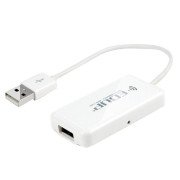
Зураг 2.1: Урд view of the EDUP EP-3701 USB WiFi Disk, showing the USB host port and the integrated USB cable.
3. Үндсэн шинж чанарууд
- Wireless Data Access: Хандалт files on connected USB storage devices wirelessly from smartphones, tablets, and computers.
- Олон хэрэглэгчийн дэмжлэг: Allows multiple users to connect and stream/access data simultaneously.
- Зөөврийн дизайн: Compact and lightweight, ideal for travel and on-the-go use.
- Эрчим хүчний эх үүсвэр: Powered via USB, can be connected to a USB wall adapter, power bank, or computer USB port.
- Програмын хяналт: Dedicated mobile application for easy file management and device configuration.
4. Багцын агуулга
Бүх зүйл багцад байгаа эсэхийг шалгана уу:
- EDUP EP-3701 USB WiFi Disk
- Хурдан эхлүүлэх гарын авлага (энэ гарын авлага)
5. Тохиргоо
5.1. Төхөөрөмжийг асааж байна
- Connect the integrated USB cable of the EP-3701 to a USB power source (e.g., a 5V/1A USB wall adapter, a power bank, or a computer's USB port).
- The power indicator light on the device will illuminate, indicating it is powered on.
5.2. Connecting USB Storage
- Insert your USB flash drive or external hard drive into the USB host port on the EP-3701.
- Ensure the USB storage device is properly seated.
5.3. Connecting Mobile Device
- Ухаалаг утас эсвэл таблет дээрээ Wi-Fi тохиргоо руу очно уу.
- Locate and connect to the Wi-Fi network named "EDUP_XXXXXX" (XXXXXX will be the last six digits of the device's MAC address).
- The default password is "12345678". It is recommended to change this password after initial setup.
- Download and install the "WiFi Disk" application from your device's app store (App Store for iOS, Google Play Store for Android).
- Open the "WiFi Disk" app. The app will automatically detect and connect to the EP-3701.
6. Ашиглалтын заавар
6.1. File Менежмент
- Үзэх Files: Within the "WiFi Disk" app, navigate through the folders and files on the connected USB storage.
- Байршуулах Files: Дамжуулах files from your mobile device to the USB storage connected to the EP-3701.
- Татаж авах Files: Дамжуулах files from the USB storage to your mobile device.
- Медиа дамжуулалт: Видео, хөгжим тоглуулах болон view photos directly from the USB storage without downloading.
6.2. Сүлжээний тохиргоо
The "WiFi Disk" app allows you to configure network settings:
- Change Wi-Fi Name (SSID): Modify the name of the EP-3701's Wi-Fi network.
- Wi-Fi нууц үг солих: Update the password for the Wi-Fi network.
- Internet Passthrough (Bridge Mode): Connect the EP-3701 to an existing Wi-Fi network to provide internet access to connected devices while still allowing access to the USB storage.
7. Засвар үйлчилгээ
- Цэвэрлэгээ: Төхөөрөмжийн гадна талыг цэвэрлэхийн тулд зөөлөн, хуурай даавуугаар цэвэрлээрэй. Шингэн цэвэрлэгч, аэрозоль хэрэглэж болохгүй.
- Хадгалах: Төхөөрөмжийг нарны шууд тусгал, хэт температураас хол, сэрүүн, хуурай газар хадгална.
- Програм хангамжийн шинэчлэлтүүд: Periodically check the "WiFi Disk" app or the EDUP official webоновчтой гүйцэтгэл, аюулгүй байдлыг хангахын тулд програм хангамжийн шинэчлэлт хийх сайт.
- Аюулгүй зайлуулах: Always ensure data transfer is complete before disconnecting the USB storage device or powering off the EP-3701.
8. Алдаа засах
8.1. Төхөөрөмж асахгүй байна
- Ensure the USB cable is securely connected to a working USB power source.
- Өөр USB порт эсвэл тэжээлийн адаптер ашиглаж үзнэ үү.
8.2. Cannot Connect to Wi-Fi Network
- Verify you are selecting the correct "EDUP_XXXXXX" network.
- Double-check the Wi-Fi password (default is "12345678").
- Restart the EP-3701 device and your mobile device.
8.3. USB Storage Not Detected
- Ensure the USB storage device is properly inserted into the EP-3701's USB host port.
- Check if the USB storage device is formatted in a supported file system (FAT32, NTFS, exFAT).
- Some high-power consumption external hard drives may require an external power source.
- Try a different USB storage device to rule out a faulty drive.
8.4. App Not Functioning Correctly
- Ensure your mobile device is connected to the EP-3701's Wi-Fi network.
- Close and reopen the "WiFi Disk" app.
- Reinstall the "WiFi Disk" app.
- Төхөөрөмжийнхөө апп дэлгүүрээс програмын шинэчлэлт байгаа эсэхийг шалгаарай.
9. Техникийн үзүүлэлтүүд
| Онцлог | Тодорхойлолт |
|---|---|
| Загвар | EP-3701 |
| Интерфэйс | USB 2.0 (Host), USB 2.0 (Power Input) |
| Утасгүй стандарт | IEEE 802.11b/g/n |
| Давтамжийн зурвас | 2.4 GHz |
| Аюулгүй байдал | WPA / WPA2, WPA-PSK / WPA2-PSK |
| Дэмжигдсэн File Системүүд | FAT32, NTFS, exFAT |
| Эрчим хүчний оролт | DC 5V/1A (via USB) |
| Хэмжээ | (Approximate, based on typical USB dongle size) 60mm x 25mm x 10mm |
| Ашиглалтын температур | 0°C - 40°C (32°F - 104°F) |
10. Баталгаат хугацаа ба дэмжлэг
EDUP products typically come with a limited warranty. Please refer to the warranty card included with your purchase or visit the official EDUP webТанай бүс нутагт хамаарах баталгаат нөхцлийн дэлгэрэнгүй мэдээллийг сайтаас авна уу.
For technical support, product inquiries, or warranty claims, please contact EDUP customer service through their official webсайт эсвэл таны бүтээгдэхүүний савлагаанд заасан холбоо барих мэдээлэл.
Webсайт: www.szedup.com