
1. Танилцуулга
Худалдан авалт хийсэнд баярлалааasing the ipega PG-9057 Wireless Game Controller. This manual provides detailed instructions for setting up, operating, and maintaining your device. Please read this manual carefully before use to ensure optimal performance and longevity of your controller.
2. Бүтээгдэхүүний онцлог
- Утасгүй холболт: Enjoy gaming freedom with wireless connection technology.
- Олон платформын нийцтэй байдал: Supports Android devices (smartphones, tablets, TV boxes) and Windows PCs.
- High Durability Buttons: Equipped with high-quality, durable buttons for extended gaming sessions.
- Нарийвчлалын удирдлага: Features a D-pad with pressure sensitivity and a 360-degree joystick with no dead zone for accurate input.
- Эргономик дизайн: Designed for comfortable grip and prolonged use.
- Нэгдсэн утас эзэмшигч: Conveniently mount your smartphone for mobile gaming.
3. Багцын агуулга
Хайрцагнаас задлахдаа багцын агуулгыг шалгана уу:
- ipega PG-9057 утасгүй тоглоомын хянагч
- USB цэнэглэгч кабель
- User Manual (Japanese version included)
4. Тохиргоо
4.1. Хянагчийг цэнэглэж байна
Before first use, fully charge the controller using the provided USB cable. Connect the small end of the USB cable to the controller's charging port and the other end to a USB power source (e.g., PC, USB wall adapter).
4.2. Device Compatibility Overview
The ipega PG-9057 controller supports various devices and connection methods as shown below:

This image displays the ipega PG-9057 Wireless Game Controller, highlighting its compatibility with various devices including smartphones, tablets, personal computers, and VR headsets.
4.3. Connection Methods and System Environment
The controller offers multiple connection options depending on your device and operating system. Refer to the table below for detailed compatibility.

This table outlines the system requirements and connection methods for the ipega PG-9057 controller, detailing compatibility with Android smartphones, tablets, and TV boxes via Bluetooth 4.0 or USB, and PCs via USB.
4.3.1. Bluetooth Connection (Android Devices)
- Хянагч цэнэглэгдсэн эсэхийг шалгаарай.
- -г удаан дар ГЭР товчлуур болон A button simultaneously until the indicator light flashes rapidly. This puts the controller into pairing mode.
- Андройд төхөөрөмж дээрээ Bluetooth тохиргоо руу очоод Bluetooth-г асаана уу.
- хайх available devices and select "ipega PG-9057" (or similar name) from the list.
- Хослуулсны дараа хянагч дээрх заагч гэрэл тогтворжих болно.
4.3.2. USB Wired Connection (Windows PC / Android Devices)
- Connect the controller to your Windows PC or Android device using the USB cable.
- The device should automatically recognize the controller. No special drivers are usually required for basic functionality.
5. Ашиглалтын заавар
5.1. Үндсэн удирдлага
The ipega PG-9057 features standard gamepad controls for intuitive gaming.

Нарийвчилсан view of the ipega PG-9057 controller's D-pad, joystick, and A/B/X/Y buttons, illustrating their high sensitivity and precise input capabilities.
- D-Pad: For directional input, offering pressure sensitivity.
- Зүүн/Баруун Joysticks: 360-degree movement with no dead zone for precise control.
- A/B/X/Y товчлуурууд: Standard action buttons with zero delay response.
- L1/R1, L2/R2 Triggers: Тоглоомын янз бүрийн үйлдлийн мөрний товчлуурууд болон гохууд.
- СОНГОХ/ЭХЛҮҮЛЭХ Товчнууд: For in-game menu navigation and actions.
- HOME товчлуур: To power on/off the controller or return to the main menu.
5.2. Using with a Smartphone
The controller includes an integrated holder for smartphones, allowing for a portable gaming experience.
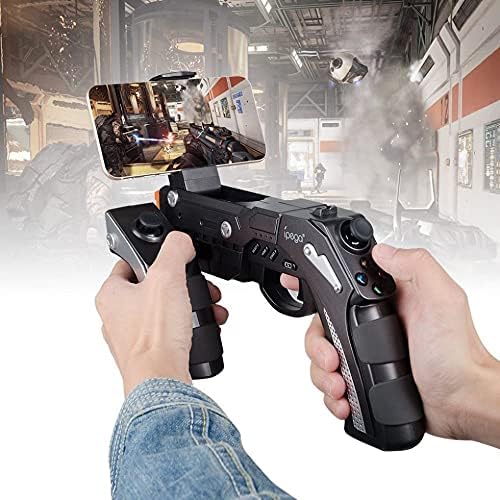
A user is shown holding the ipega PG-9057 Wireless Game Controller with a smartphone securely attached, actively engaged in mobile gaming.
- Extend the phone holder located on the top of the controller.
- Carefully place your smartphone into the holder, ensuring it is securely gripped.
- Connect the controller to your smartphone via Bluetooth as described in Section 4.3.1.
- Launch your desired game and configure controller settings if necessary.
6. Засвар үйлчилгээ
To ensure the longevity and optimal performance of your ipega PG-9057 controller, follow these maintenance guidelines:
- Цэвэрлэгээ: Хяналтын гадаргууг зөөлөн, хуурай даавуугаар арчина. Хүчтэй химийн бодис эсвэл зүлгүүрийн цэвэрлэгч хэрэглэж болохгүй.
- Хадгалах: Удирдагчийг нарны шууд тусгал, хэт температураас хол, сэрүүн, хуурай газар хадгална.
- Дусалаас зайлсхийх: Дотоод эд ангиудыг гэмтээж болзошгүй тул хянагчийг уналт болон цохилтоос хамгаална уу.
- Цэнэглэж байна: Do not overcharge the battery. Disconnect the charging cable once the controller is fully charged.

The ipega PG-9057 Wireless Game Controller is shown, emphasizing its construction from high-quality, durable ABS material.
7. Алдаа засах
If you encounter issues with your controller, please refer to the following common solutions:
- Хянагч холбогдоогүй байна:
- Хянагч бүрэн цэнэглэгдсэн эсэхийг шалгаарай.
- Verify that Bluetooth is enabled on your device and the controller is in pairing mode.
- Хянагч болон төхөөрөмжөө хоёуланг нь дахин эхлүүлээд үзээрэй.
- If using USB, ensure the cable is securely connected and try a different USB port.
- Товчлуур эсвэл joystick хариу өгөхгүй байна:
- Хянагч таны төхөөрөмжид зөв холбогдсон эсэхийг шалгана уу.
- Restart the controller and reconnect.
- Ensure the game you are playing supports external controllers.
- Хоцрогдол эсвэл оролтын саатал:
- Ensure there are no obstructions or excessive distance between the controller and your device.
- Бусад утасгүй төхөөрөмжүүдийн хөндлөнгийн оролцоог багасгах.
- For critical gaming, consider using a wired USB connection if supported by your device.
8. Техникийн үзүүлэлтүүд
| Тодорхойлолт | Үнэ цэнэ |
|---|---|
| Брэнд | ипэга |
| Загвар | PG-9057 |
| Тохиромжтой төхөөрөмжүүд | Android, Windows |
| Хянагчийн төрөл | Тоглоомын дэвсгэр |
| Холболтын технологи | Утасгүй |
| Онцлогууд | Утасгүй |
| Тохиромжтой зүйлс | Android, Windows |
| Холболтын арга | Утасгүй |
| Онцлог шинж чанарууд | Утасгүй |
| Техник хангамжийн платформ | Дээд талын хайрцаг |
| Эрчим хүчний эх үүсвэр | Батерейгаар ажилладаг |
| Багцын зүйлсийн тоо | 1 |
| UPC | 602747571722 |
| ASIN | B018TSBFE4 |
| GTIN | 602747571722 |
9. Баталгаат хугацаа ба дэмжлэг
For warranty information and customer support, please refer to the documentation provided with your purchase or visit the official ipega webсайт. Аливаа баталгаат нэхэмжлэлийн хувьд худалдан авалтаа нотлох баримтаа хадгалаарай.