
1. Танилцуулга
This manual provides comprehensive instructions for the WINGONEER CP2104 USB 2.0 to TTL UART 6-Pin Serial Converter Module. This module facilitates communication between a computer's USB port and TTL-level serial devices, making it suitable for various electronic projects, STC microcontroller programming, and updating firmware on devices such as DVD players, hard drives, routers, and GPS units. Please read this manual thoroughly before use to ensure proper operation and safety.
2. Бүтээгдэхүүн дууссанview
The WINGONEON CP2104 module is a compact and reliable USB to TTL serial converter. It features the stable and trusted CP2104 chipset, offering full-speed USB 2.0 compatibility at 12Mbps. The module provides a standard USB Type-A connector and a 6-pin header for TTL connections, including DTR, 3.3V, 5V, TXD, RXD, and GND. It is designed for broad compatibility with various operating systems.

Figure 2.1: WINGONEER CP2104 USB to TTL UART 6-Pin Serial Converter Module.
3. Онцлогууд
- Designed for USB to TTL electronic projects, STC downloads, and device updates (DVD, hard disk, router, GPS).
- Integrated USB to RS232 transfer circuit with stable and reliable CP2104 chipset.
- Supports Windows 98SE, 2000, XP, Vista, Windows 7, Windows 10, Mac OS 9, Mac OS X, and Linux 2.40.
- USB 2.0 compatible with 12Mbps full-speed operation.
- Standard USB Type-A connector.
- 6-pin male TTL header with DTR, 3.3V, 5V, TXD, RXD, GND connections.
- Supports event transmission pause and line suspend.
- USB suspend states supported via suspend pins.
- Ашиглалтын температурын хүрээ: -40 ° C-аас + 85 ° C хүртэл.
4. Техникийн үзүүлэлтүүд
| Онцлог | Тодорхойлолт |
|---|---|
| Загварын дугаар | CP2104 |
| Брэнд | WINGONEER |
| USB стандарт | USB 2.0 Full-Speed (12Mbps) |
| Гаралтын зүү | DTR, 3.3V, 5V, TXD, RXD, GND |
| Оролтын хэмжээtage | 5 Volts (DC) via USB |
| Тохиромжтой төхөөрөмжүүд | Desktop Computers, Laptops, Other Electronic Devices |
| Үйлдлийн системийн дэмжлэг | Windows 98SE/2000/XP/Vista/7/10, Mac OS 9/X, Linux 2.40+ |
| Ашиглалтын температур | -40 хэмээс +85 хэм хүртэл |
| Өнгө | Цэнхэр |
5. Тохиргоо
5.1. Багцын агуулга
- 1x WINGONEER CP2104 6-PIN Module
- Jumper wires (typically included, as seen in product images)
5.2. Драйвер суулгах
Before connecting the module, it is recommended to install the necessary drivers for the CP2104 chipset. While some operating systems, like Windows 10 and Linux, may recognize the device automatically, manual driver installation is often required for full functionality and stability.
- Драйверуудыг татаж авах: Visit the official Silicon Labs website (manufacturer of the CP2104 chip) and download the latest VCP (Virtual COM Port) drivers for your specific operating system (Windows, Mac, Linux).
- Драйверуудыг суулгах: Follow the instructions provided with the downloaded driver package. For Windows, this typically involves running an executable installer. For Linux, consult the Silicon Labs documentation for installation procedures.
- Суулгацыг баталгаажуулах: After installation, connect the CP2104 module to a USB port on your computer.
- Windows: Open Device Manager (search for "Device Manager" in the Start menu). Look under "Ports (COM & LPT)" for an entry like "Silicon Labs CP210x USB to UART Bridge (COMx)". Note the assigned COM port number.
- Линукс: Терминал нээгээд бичнэ үү
ls /dev/ttyUSB*. You should see an entry like/dev/ttyUSB0. - MacOS: Check System Information > USB or use terminal commands like
ls /dev/cu.SLAB_USBtoUART.
5.3. Pinout болон холболтууд
The module features a 6-pin header for connecting to your target device. Understanding each pin's function is crucial for correct operation.
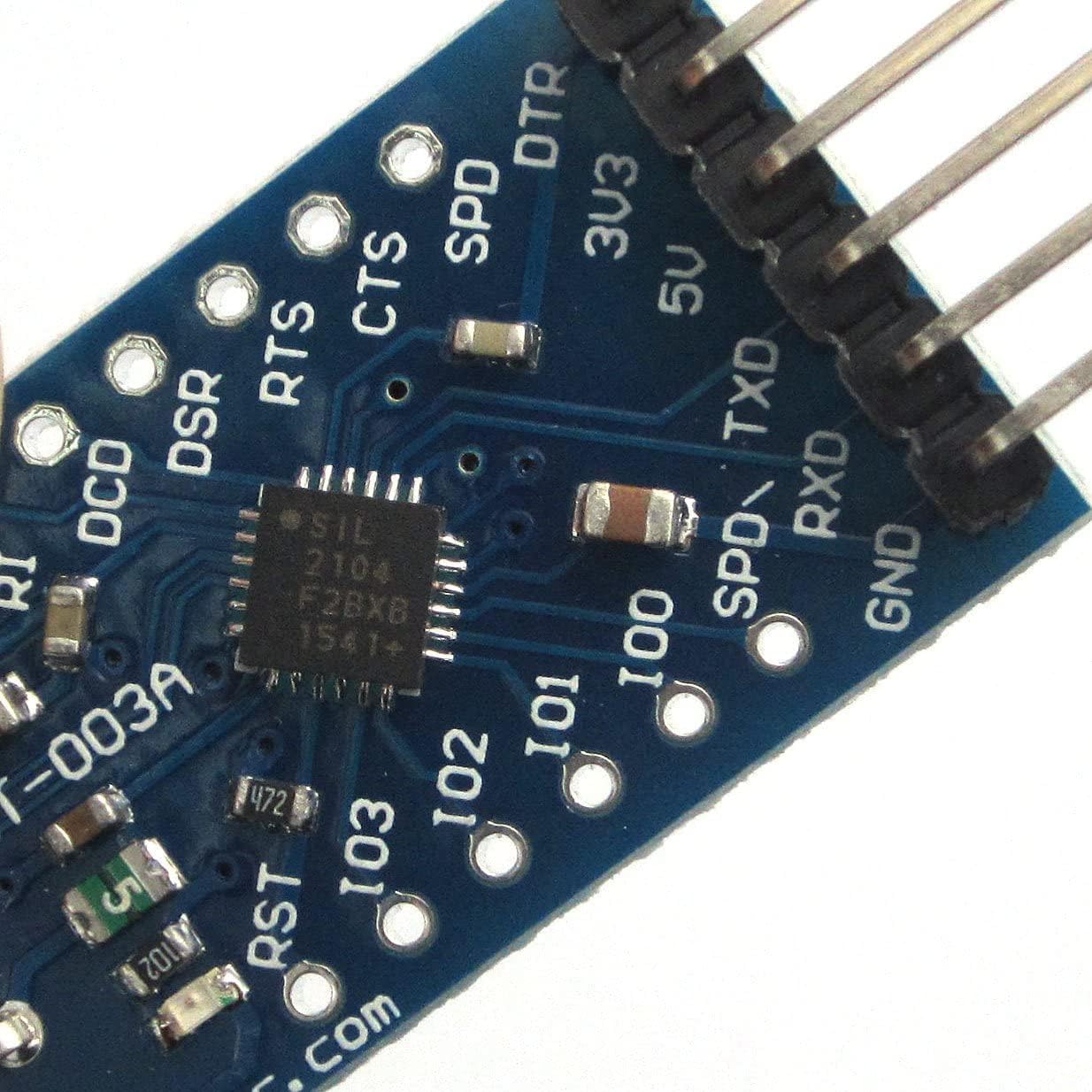
Зураг 5.1: Ойрын зураг view of the CP2104 module's 6-pin header.
- DTR: Data Terminal Ready. Used for automatic reset in some microcontroller programming scenarios (e.g., Arduino).
- 3.3В: 3.3 Volt power output. Provides power to the target device if it operates at 3.3V.
- 5В: 5 Volt power output. Provides power to the target device if it operates at 5V.
- TXD: Transmit Data. Connect this pin to the RXD (Receive Data) pin of your target device.
- RXD: Receive Data. Connect this pin to the TXD (Transmit Data) pin of your target device.
- GND: Ground. Connect this pin to the GND (Ground) pin of your target device.
Чухал: Ensure that the TXD pin of the CP2104 module is connected to the RXD pin of your target device, and the RXD pin of the CP2104 module is connected to the TXD pin of your target device. Also, select the appropriate voltage (3.3V or 5V) for your target device. Do not connect both 3.3V and 5V outputs simultaneously to the same device.

Зураг 5.2: Жишээ ньample connection of the CP2104 module with jumper wires.
6. Ашиглалтын заавар
Once the drivers are installed and the module is correctly wired to your target device, you can begin serial communication.
- Компьютерт холбогдох: Plug the CP2104 module into an available USB port on your computer.
- Open Serial Terminal Software: Use a serial terminal program (e.g., PuTTY, Tera Term, Arduino IDE Serial Monitor, CoolTerm) on your computer.
- Configure Serial Port: In the terminal software, select the COM port identified during driver installation (e.g., COM3 on Windows, /dev/ttyUSB0 on Linux). Set the baud rate, data bits, parity, and stop bits to match the settings of your target device.
- Харилцаа холбоог эхлүүлэх: You should now be able to send and receive data between your computer and the target device. For microcontroller programming, follow the specific instructions for your development environment (e.g., Arduino IDE, STC-ISP).
6.1. Системийн диаграм
The following diagram illustrates the internal block structure and typical connections of the CP2104 chipset.
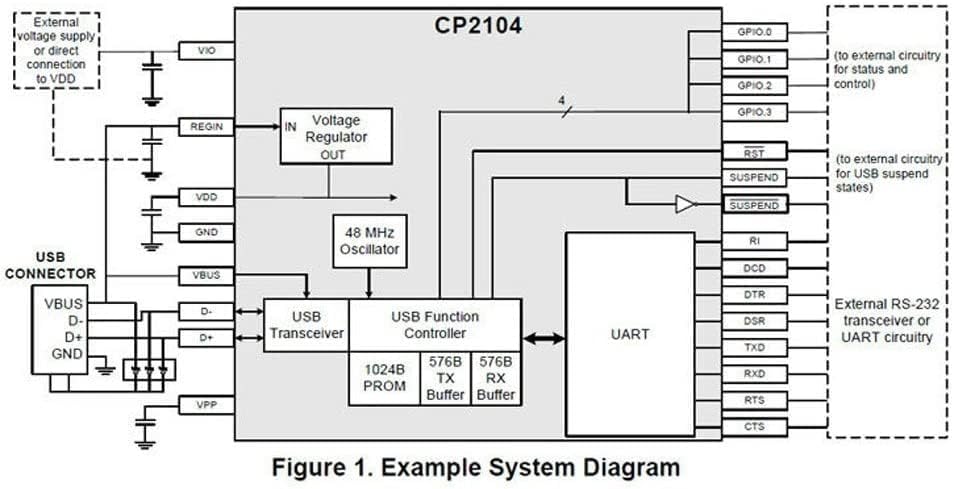
Figure 6.1: CP2104 Example System Diagram.
7. Засвар үйлчилгээ
The WINGONEER CP2104 module is a robust electronic component, but proper care ensures its longevity.
- Хадгалах: Store the module in a dry, anti-static environment when not in use.
- Харьцуулах: Handle the module by its edges to avoid touching the electronic components directly. Static electricity can damage sensitive components.
- Цэвэрлэгээ: If necessary, gently clean the module with a soft, dry cloth. Avoid using liquids or abrasive cleaners.
- Бие махбодийн хамгаалалт: As the module does not come with a protective casing, exercise caution to prevent physical damage to the circuit board or pins.
8. Алдаа засах
If you encounter issues with your CP2104 module, consider the following troubleshooting steps:
- Модуль танигдаагүй:
- Ensure drivers are correctly installed (refer to Section 5.2).
- Компьютер дээрээ өөр USB порт ашиглаж үзнэ үү.
- Драйвер суулгасны дараа компьютерээ дахин эхлүүлнэ үү.
- Өгөгдөл дамжуулах/хүлээн авах боломжгүй:
- Verify that TXD and RXD connections are crossed (CP2104 TXD to device RXD, CP2104 RXD to device TXD).
- Check that the GND pins of both the module and the target device are connected.
- Confirm that the baud rate, data bits, parity, and stop bits in your serial terminal software match the target device's settings.
- Ensure the target device is powered correctly (either by its own supply or via the 3.3V/5V pin from the CP2104 module).
- Завсарлагатай холболт:
- Check for loose connections or damaged jumper wires.
- USB кабель найдвартай холбогдсон эсэхийг шалгаарай.
- Avoid using excessively long or poor-quality USB cables.
- Ботьtage Асуудал:
- Confirm that you are using the correct voltage (3.3V or 5V) for your target device.
- Do not connect both 3.3V and 5V outputs to the same device simultaneously.
9. Баталгаат хугацаа ба дэмжлэг
Specific warranty details for the WINGONEER CP2104 module are not provided in the product information. For any issues or technical support, please refer to the retailer or the manufacturer's official website for assistance. Keep your purchase receipt as proof of purchase.