
1. Танилцуулга
This manual provides instructions for the proper use and maintenance of your Casio GX-12B Value Series Desk Top/Compact Desk Type Calculator. Please read this manual thoroughly before using the calculator to ensure optimal performance and longevity.
Гол онцлогууд:
- Extra Large 12-Digit Display
- Two-Way Power (Solar and Battery)
- 2 Independent Memories
- Item Counter Function
- Mark-up Percentage Чиг үүрэг
- Durable Plastic Keys
- Compact Desk Type Design
2. Тохиргоо ба цахилгаан хангамж
Эрчим хүчний эх үүсвэр:
The Casio GX-12B calculator operates on a two-way power system, utilizing both solar power and a single LR44 button-cell battery. For optimal performance, ensure the solar panel is exposed to sufficient light. In low-light conditions, the battery automatically takes over.
Батерей суурилуулах/солих:
- Тооцоолуурыг унтраасан эсэхийг шалгана уу.
- Тооцоолуурын ар талд байрлах батерейны тагийг олоорой.
- Using a small screwdriver, carefully remove the screw and open the battery compartment cover.
- Remove the old LR44 battery (if replacing) and insert a new LR44 battery with the positive (+) side facing up.
- Зайны тасалгааны тагийг сольж, боолтоор бэхлээрэй.
- дээр дарна уу AC (All Clear) button to reset the calculator.
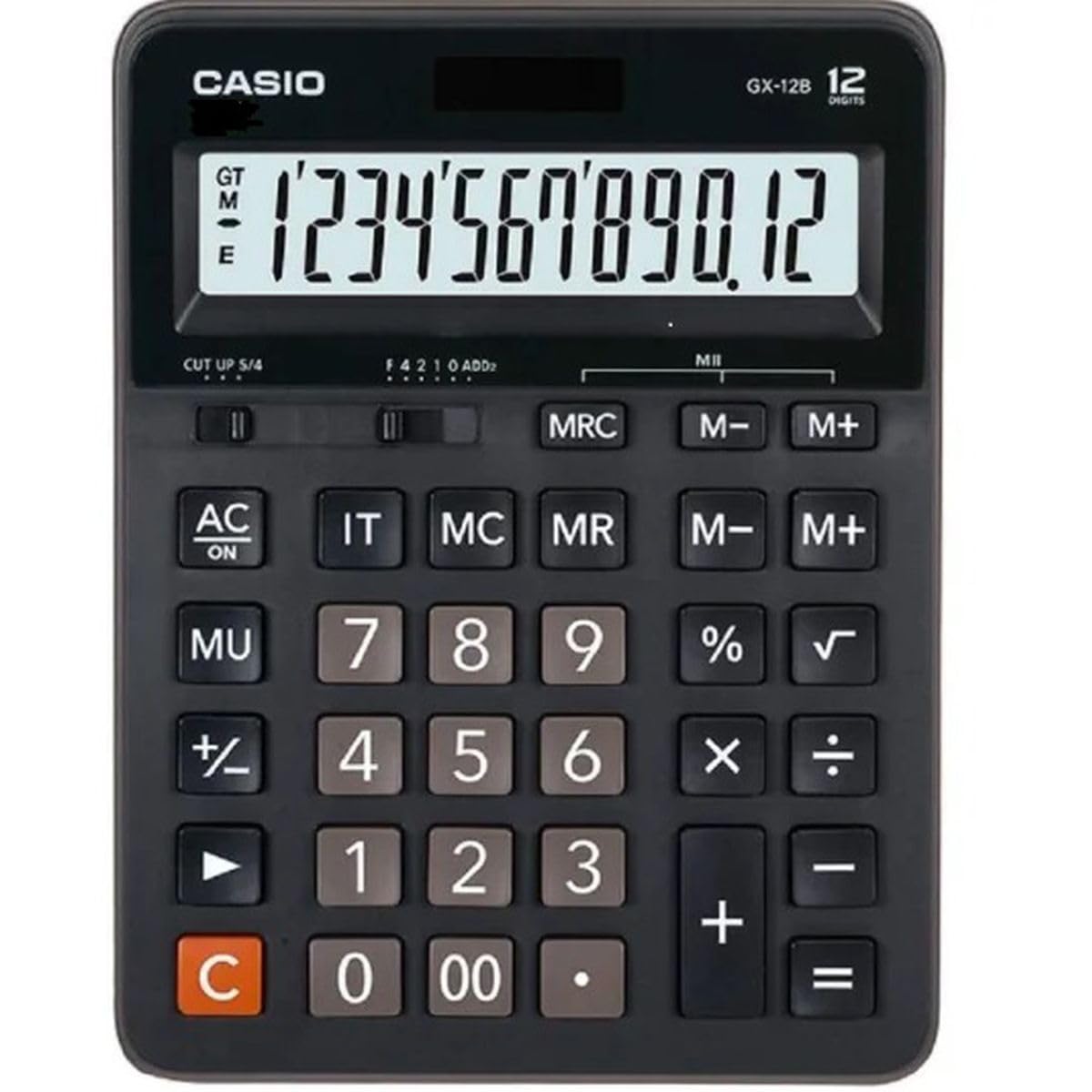
This image displays the Casio GX-12B calculator, highlighting its approximate length of 8.8 inches (22 cm) for scale. The calculator features a large display and clearly labeled keys.
3. Үндсэн үйлдлүүд
Familiarize yourself with the key functions to perform calculations efficiently.
Гол функцууд дууссанview:
- AC: All Clear. Clears all values and operations, resetting the calculator.
- C: Clear Entry. Clears the last entered number.
- + / - / × / ÷: Basic arithmetic operations.
- =: Executes the pending calculation.
- %: хувьtage key. Used for percentage calculations (e.g., 100 + 10% = 110).
- MU: Mark-up key. Used for profit margin calculations.
- M+: Харуулсан утгыг санах ойд нэмнэ.
- M-: Subtracts the displayed value from the memory.
- МГХ: Memory Recall/Clear. Press once to recall the memory value. Press twice to clear the memory.
- IT: Item Counter. Counts the number of entries in a series of calculations.
Example Calculations:
- Нэмэлт: To calculate 123 + 456:
- дарна уу AC
- Оруулна уу 123
- дарна уу +
- Оруулна уу 456
- дарна уу = (Result: 579)
- Персенtage: To add 10% to 200:
- дарна уу AC
- Оруулна уу 200
- дарна уу +
- Оруулна уу 10
- дарна уу % (Result: 220)
- Санах ойн функц: To calculate (5 × 3) + (8 × 2):
- дарна уу AC
- Оруулна уу 5 × 3 M+ (15 is added to memory)
- Оруулна уу 8 × 2 M+ (16 is added to memory)
- дарна уу МГХ (Result: 31)
- дарна уу МГХ again to clear memory.
4. Арчилгаа, засвар үйлчилгээ
- Цэвэрлэгээ: Тооцоолуурыг зөөлөн, хуурай даавуугаар арчина. Зөрүүд бохирдлыг зөөлөн даавуугаар арчина.ampened with water and a mild detergent, then wipe dry immediately. Avoid using strong solvents or abrasive cleaners.
- Хадгалах: Тооцоолуурыг сэрүүн, хуурай газар, нарны шууд тусгал болон хэт өндөр температураас хол хадгална уу.
- Нөлөөлөлөөс зайлсхийх: Do not drop or subject the calculator to strong impacts, as this can damage internal components or the display.
- Зайны хугацаа: If the display becomes dim or unresponsive, replace the LR44 battery.
5. Алдаа засах
| Асуудал | Боломжит шалтгаан | Шийдэл |
|---|---|---|
| Дэлгэц хоосон эсвэл бүдэг байна. | Нарны хавтангийн гэрэл хангалтгүй эсвэл батерей бага байна. | Move the calculator to a brighter area. Replace the LR44 battery if the issue persists. |
| Буруу тооцооллын үр дүн. | Incorrect key input, or memory not cleared. | дарна уу AC to clear all operations and memory, then re-enter the calculation. Ensure correct order of operations. |
| Түлхүүрүүд хариу өгөхгүй байна. | Low battery, or internal malfunction. | Replace the LR44 battery. If the problem continues, contact customer support. |
6. Техникийн үзүүлэлтүүд
- Загвар: GX-12B
- Дэлгэц: 12-Digit Extra Large LCD
- Эрчим хүчний эх үүсвэр: Two-Way Power (Solar and 1 x LR44 Battery)
- Хэмжээ (L x W): Ойролцоогоор 20.8 см x 15.9 см (8.2 инч x 6.3 инч)
- Жин: Ойролцоогоор 0.32 кг (0.7 фунт)
- Материал: Хуванцар
- Чиг үүрэг: Basic arithmetic, Percentage, Mark-up, Memory (M+, M-, MRC), Item Counter
7. Баталгаат хугацааны мэдээлэл
This Casio product is covered by a Limited Warranty. For specific terms, conditions, and duration of the warranty, please refer to the warranty card included with your purchase or visit the official Casio webсайт. Баталгаат нэхэмжлэл гаргахын тулд худалдан авалтаа нотлох баримтаа хадгалаарай.
8. Хэрэглэгчийн дэмжлэг
If you encounter any issues not covered in this manual or require further assistance, please contact Casio customer support. Contact details can typically be found on the official Casio webсайт эсвэл бүтээгдэхүүний сав баглаа боодол дээр.