
Танилцуулга
Худалдан авалт хийсэнд баярлалааasing the QUMOX L165U 2.4GHz Wireless Gamepad. This high-quality game controller is designed for use with PC and Android devices, offering a reliable 2.4GHz wireless connection for an enhanced gaming experience. Please read this manual carefully to ensure proper setup and operation of your new gamepad.

Figure 1: QUMOX L165U Gamepad with included USB adapter and OTG connection kit.
Багцын агуулга
Таны багцад бүх зүйл байгаа эсэхийг шалгаарай:
- 1x QUMOX L165U Gamepad
- 1x 2.4GHz USB Wireless Adapter
- 1x OTG Connection Kit (Micro USB to USB-A adapter)
Тохиргоо
1. Зай суурилуулах
The QUMOX L165U Gamepad is powered by 2 AAA batteries (not included). To install the batteries:
- Gamepad-ын ар талд батерейны тасалгааг олоорой.
- Зайны тагийг гулсуулж нээнэ үү.
- Зөв туйлшралыг (+/-) баталгаажуулж, 2 AAA батерейг оруулаарай.
- Зайны тагийг сайтар хаа.

Figure 2: Open battery compartment for AAA battery installation.
2. Компьютерт холбогдож байна
- Plug the 2.4GHz USB Wireless Adapter into an available USB port on your PC.
- Turn on the gamepad by pressing the 'START' button. The gamepad will automatically attempt to connect.
- The PC should recognize the gamepad and install necessary drivers automatically.
- If the gamepad does not connect, press the 'MODE' button on the gamepad to cycle through connection modes until it is recognized by your PC.
3. Connecting to an Android Device (with OTG support)
- Connect the OTG Connection Kit to your Android device's Micro USB port.
- Plug the 2.4GHz USB Wireless Adapter into the USB-A end of the OTG Connection Kit.
- Turn on the gamepad by pressing the 'START' button. The gamepad will automatically attempt to connect.
- Your Android device should recognize the gamepad.
- If the gamepad does not connect, press the 'MODE' button on the gamepad to cycle through connection modes until it is recognized by your Android device.
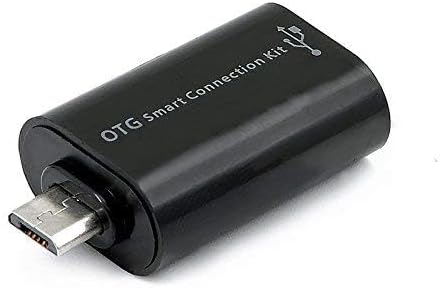
Figure 3: OTG Connection Kit for Android device connectivity.
Ашиглалтын заавар
Once connected, your QUMOX L165U Gamepad is ready for use. The layout is standard for most game controllers.
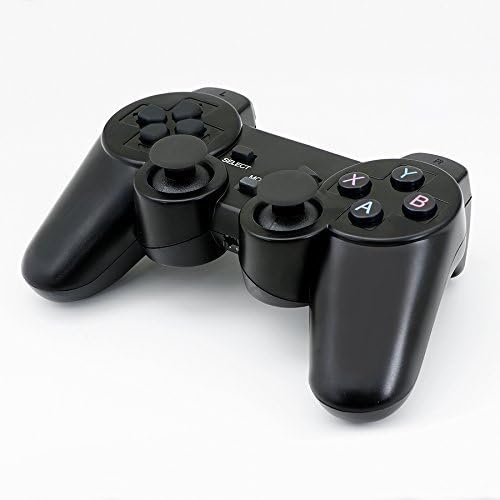
Зураг 4: Дээд тал view of the QUMOX L165U Gamepad, highlighting button layout.
- Чиглэлийн дэвсгэр (D-Pad): Нарийвчлалтай чиглэлтэй оролтын хувьд.
- Аналог Жойстикууд: Two analog sticks for 360-degree movement and camera control.
- Үйлдлийн товчлуурууд (A, B, X, Y): Тоглоомын доторх командуудад зориулсан стандарт үйлдлийн товчлуурууд.
- Мөрний товч (L1, R1) ба өдөөгч (L2, R2): Located on the top of the gamepad for additional actions.
- SELECT/BACK Button: Typically used for menu navigation or specific in-game functions.
- START товч: Тоглоомыг түр зогсоох эсвэл сонголтыг баталгаажуулахад ашигладаг.
- MODE товчлуур: Cycles through different operating modes (e.g., Android, PC) if automatic detection fails.
Видео үзүүлбэр
Видео 1: Худалдагчийн өгсөнview of a 2-pack wireless controller, demonstrating its features and compatibility. While showing a similar product, it illustrates general wireless controller usage and setup.
Засвар үйлчилгээ
- Цэвэрлэгээ: Тоглоомын самбарыг цэвэрлэхийн тулд зөөлөн, хуурай даавуу ашиглана уу. Химийн хатуу бодис, зүлгүүрийн материал ашиглахаас зайлсхий.
- Хадгалах: Тоглоомын самбарыг нарны шууд тусгал, хэт температураас хол, сэрүүн, хуурай газар хадгална уу.
- Батерейны арчилгаа: Remove batteries if the gamepad will not be used for an extended period to prevent leakage.
Алдааг олж засварлах
| Асуудал | Боломжит шалтгаан | Шийдэл |
|---|---|---|
| Gamepad does not connect. | Low batteries, incorrect mode, adapter not properly inserted. | Replace batteries. Press the 'MODE' button to cycle through modes. Ensure USB adapter is fully inserted into PC or OTG adapter. |
| Товчлуур эсвэл joystick нь хариу өгөхгүй байна. | Connection issue, game incompatibility, physical damage. | Reconnect the gamepad. Check game settings for controller support. If issue persists, contact support. |
| Android device does not recognize gamepad. | Android device lacks OTG support, OTG adapter issue. | Verify your Android device supports OTG. Ensure OTG adapter is functioning correctly. |
Үзүүлэлтүүд
| Онцлог | Дэлгэрэнгүй |
|---|---|
| Загварын дугаар | L165U |
| Холболтын технологи | 2.4GHz Wireless (via USB Adapter) |
| Тохиромжтой төхөөрөмжүүд | PC, Android (with OTG support) |
| Эрчим хүчний эх үүсвэр | 2х AAA батерей |
| Зүйлийн жин | 5.3 унц |
| Багцын хэмжээ | 8.07 x 5.63 x 2.95 инч |
| Өнгө | Хар |
Баталгаат болон дэмжлэг
For warranty information or technical support, please refer to the contact details provided with your purchase or visit the official QUMOX webсайт. Аливаа баталгаат нэхэмжлэлийн хувьд худалдан авалтаа нотлох баримтаа хадгалаарай.