
1. Бүтээгдэхүүн дууссанview
The Tenergy 11W Dimmable LED Desk Lamp (Model FY-0001) is designed to provide versatile lighting for various tasks, featuring adjustable brightness, multiple color temperatures, and a convenient USB charging port. Its sleek design and flexible arm make it suitable for home and office environments.

Image: The Tenergy 11W LED Desk Lamp, showcasing its modern design and adjustable features.
2. Хайрцагт юу байна
- Tenergy 11W Dimmable LED Desk Lamp
- USB цэнэглэгч кабель
- Эрчим хүчний адаптер
- Хэрэглэгчийн гарын авлага (энэ баримт бичиг)

Image: The Tenergy 11W LED Desk Lamp and its included accessories laid out on a surface.
3. Тохиргоо
- Сав баглаа боодолоос бүх бүрэлдэхүүн хэсгүүдийг болгоомжтой арилгана.
- l-г байрлуулamp тогтвортой, хавтгай гадаргуу дээр суурь болгоно.
- Цахилгаан адаптерийг l-д холбоно ууamp-ийн тэжээлийн оролтын порт нь ихэвчлэн суурийн ар талд байрладаг.
- Цахилгаан адаптерийг стандарт цахилгаан залгуурт залгаарай.amp's indicator light should illuminate, indicating it is ready for use.
4. Ашиглалтын заавар
4.1 Асаах/унтраах
l-г эргүүлэхийн тулдamp on or off, gently touch the Асаах/унтраах button located on the touch control panel on the lamp-ийн суурь.
4.2 Гэрэлт байдлыг тохируулах
Лamp offers 5 levels of brightness. Use the + болон - buttons on the touch control panel to increase or decrease the light intensity.
4.3 Changing Light Modes (Color Temperature)
Лamp features 4 distinct light modes, each with a different color temperature, optimized for various activities:
- Унших горим: Provides a bright, neutral white light ideal for reading.
- Study Mode: Offers a cooler, more focused light to enhance concentration.
- Амрах горим: Emits a warm, soft light for a comfortable and calming atmosphere.
- Унтах горим: Delivers a very warm, dim light suitable for winding down before sleep.
To switch between these modes, repeatedly touch the corresponding icon on the control panel.

Image: Visual representation of the four adjustable light color temperatures available on the lamp.
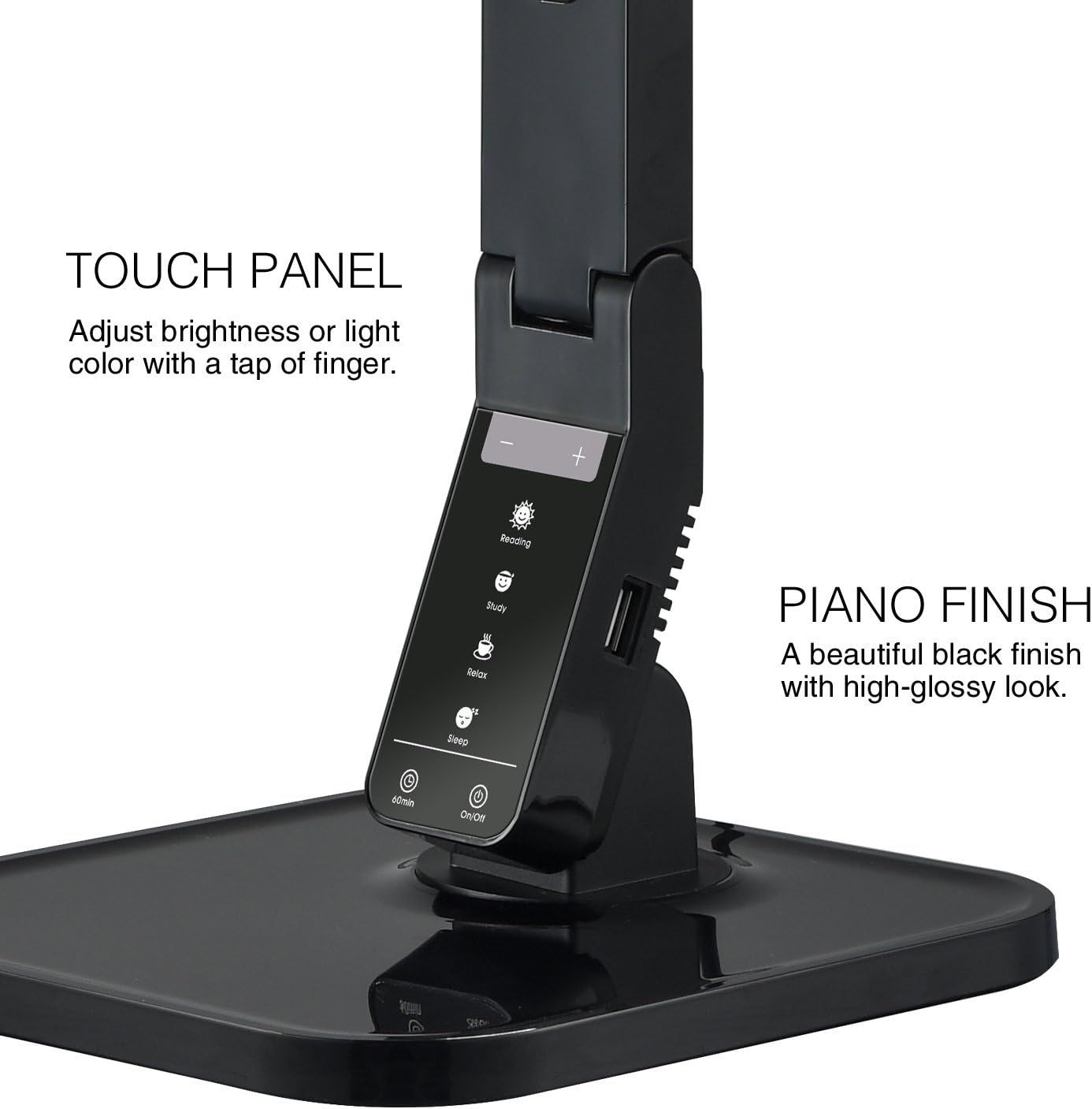
Image: The touch control panel with various light mode and brightness adjustment icons.
4.4 USB цэнэглэгч портыг ашиглах
A USB charging port is integrated into the lamp's base, allowing you to charge compatible devices such as smartphones or tablets. Simply connect your device's USB charging cable to the port.

Image: A smartphone being charged via the integrated USB port on the lamp-ийн суурь.
4.5 L-ийг тохируулахamp Гар
Лamp features an adjustable arm that allows you to direct the light precisely where needed. The arm can be folded, extended, and swiveled to achieve optimal positioning.

Image: Illustrations demonstrating the flexibility and adjustability of the lamp's arm.
4.6 Таймер функц
Лamp includes a 60-minute timer function. To activate, press the 60мин button on the control panel. The lamp 60 минутын дараа автоматаар унтрах болно.
4.7 Бүтээгдэхүүний албан ёсны видео
Video: An official product video from Tenergy Corporation demonstrating the features and benefits of the 11W LED Desk Lamp, including its adjustable lighting, USB charging, and sleek design.
5. Засвар үйлчилгээ
- Цэвэрлэгээ: л цэвэрлэхийн тулдamp, especially its glossy finish, use a soft, dry microfiber cloth. Avoid abrasive cleaners or harsh chemicals that may damage the surface.
- Хадгалах: Удаан хугацаагаар ашиглаагүй тохиолдолд лamp сэрүүн, хуурай газар.
6. Алдаа засах
- Lamp асахгүй байна: Цахилгаан адаптер нь хоёуланд нь найдвартай холбогдсон эсэхийг шалгаарайamp and a working electrical outlet. Check if the outlet is receiving power.
- USB port not charging: l-г баталгаажуулна ууamp is powered on and the USB cable is properly connected to both the lamp and your device. Ensure your device is compatible with USB charging.
- Гэрэл анивчих: If the light flickers, try unplugging the lamp for a few minutes and then plugging it back in. If the issue persists, contact customer support.
7. Техникийн үзүүлэлтүүд
| Загварын дугаар | FY-0001 |
| Брэнд | Эрчим хүч |
| Ватtage | 11 ватт |
| Гэрлийн эх үүсвэрийн төрөл | LED |
| Гэрэлтүүлгийн түвшин | 5 |
| Light Colors / Modes | 4 (Reading, Study, Relax, Sleep) |
| Хяналтын арга | Хүрэх |
| Холболтын технологи | USB |
| Эрчим хүчний эх үүсвэр | Утастай цахилгаан |
| Бүтээгдэхүүний хэмжээс | 7"D x 6.75"W x 16.7"H |
| Материалын төрөл | Хуванцар |
| Төгсгөлийн төрөл | Гялгар |
8. Баталгаат хугацаа ба дэмжлэг
For warranty information or technical support, please visit the official Tenergy webсайт эсвэл харилцагчийн үйлчилгээний хэлтэстэй холбогдоно уу. Аливаа баталгаат нэхэмжлэлийн хувьд худалдан авалтын баримтаа хадгалаарай.
Tenergy Store: https://www.amazon.com/stores/Tenergy/page/5AE2FFA8-E197-4708-9169-C4D8CB488E9E