
Танилцуулга
Худалдан авалт хийсэнд баярлалааasing the ipega PG-9087S Wireless Game Controller. This device is designed to enhance your mobile gaming experience on Android and iOS smartphones and tablets. Please read this manual carefully before use to ensure proper operation and to maximize the lifespan of your controller.
Аюулгүй байдлын мэдээлэл
- Хянагчийг хэт өндөр температур, чийгшил эсвэл нарны шууд тусгалд бүү оруул.
- Хянагчийг унагаах эсвэл хүчтэй цохилтод өртөхөөс зайлсхий.
- Do not attempt to disassemble or modify the controller. This will void the warranty and may cause damage.
- Keep the controller away from children and pets.
- Зөвхөн дагалдаж ирсэн эсвэл санал болгосон цэнэглэгч кабелийг ашиглана уу.
Багцын агуулга
- ipega PG-9087S Wireless Game Controller
- USB цэнэглэгч кабель
- Хэрэглэгчийн гарын авлага (энэ баримт бичиг)
Бүтээгдэхүүн дууссанview

Figure 1: Controller Layout. This image displays the ipega PG-9087S controller with its various buttons and components labeled, including the Left 3D joystick, D-Pad, TURBO button, battery/mode indicators, Home Button, R1/R2, ABXY Action buttons, Right 3D joystick, START, and SELECT buttons.

Зураг 2: Үндсэн шинж чанарууд. This image highlights specific design elements: a textured rocker for improved grip, LED red button lights for visibility, scrub and non-slip trigger construction for precise control, and a classic cross key design for the D-Pad.
Гол онцлогууд:
- Bluetooth 4.0 холболт: Ensures stable and high-speed transmission.
- Сунгах боломжтой гар: Accommodates devices with a maximum extending size of 6.2 inches (70-158mm) and a thickness of up to 9mm.
- Эргономик дизайн: Provides comfort for extended gaming sessions.
- High Sensitivity Buttons: Designed for quick and accurate responses.
- Custom Function/Button Mapping: Allows users to customize button functions according to personal preferences for various games.
- Олон платформын дэмжлэг: Compatible with Android 6.0 and above, and iOS devices.
Тохиргоо
1. Хянагчийг цэнэглэж байна
Before first use, fully charge the controller. Connect the provided USB charging cable to the controller's charging port and to a USB power source (e.g., computer, USB wall adapter). The battery charging indicators (1, 2, 3, 4) will illuminate to show charging status and battery level.
2. Асаах/унтраах

Figure 3: Power Switch and Connection Methods. This image shows the physical on/off switch located at the bottom of the controller and provides visual instructions for Android and iOS direct connection methods.
- Асаахын тулд: Locate the power switch (labeled 'switch:on/off' in Figure 3) on the bottom of the controller and slide it to the 'ON' position.
- Унтраахын тулд: Slide the power switch to the 'OFF' position.
3. Bluetooth хослол
The PG-9087S supports direct connection without needing to download a separate application.
- IOS төхөөрөмжүүдийн хувьд: Удирдлагыг унтраасан үед товчийг дараад барина уу Y button + HOME button simultaneously for 2 seconds until the indicator light flashes rapidly.
- Android төхөөрөмжүүдийн хувьд: Удирдлагыг унтраасан үед товчийг дараад барина уу A button + HOME button simultaneously for 2 seconds until the indicator light flashes rapidly.
Once the indicator light flashes, enable Bluetooth on your mobile device and search for "PG-9087S". Select it to pair. The indicator light will become solid once successfully connected.
4. Төхөөрөмж суурилуулах
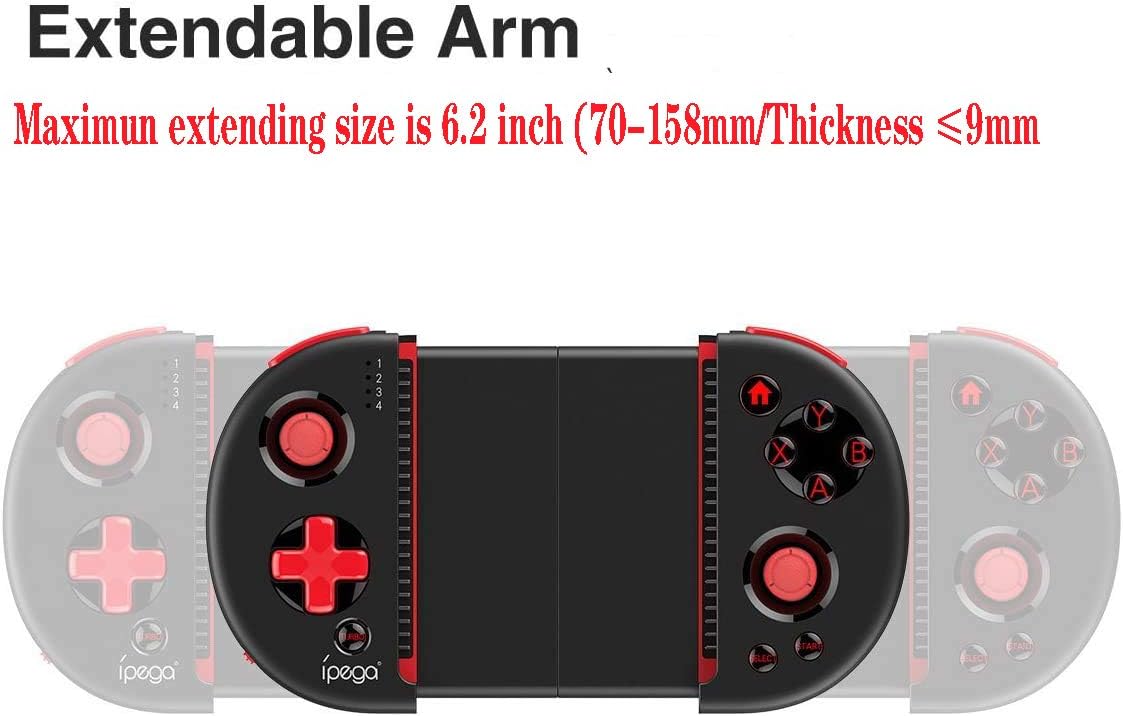
Figure 4: Extendable Arm. This image illustrates the extendable arm feature of the controller, showing its maximum extension size of 6.2 inches (70-158mm) and a maximum device thickness of 9mm.
Gently extend the arms of the controller to fit your smartphone or tablet. Ensure your device is securely seated within the extendable arm. The arm supports devices up to 6.2 inches (158mm) in length and 9mm in thickness.
Ашиглалтын заавар
1. Үндсэн удирдлага
Refer to Figure 1 for the layout of the buttons and joysticks. The controller features:
- Left/Right 3D Joysticks: Нарийвчлалтай хөдөлгөөн болон камерыг хянах зориулалттай.
- D-Pad (Чиглүүлэгч дэвсгэр): Чиглэлийн оролтын хувьд.
- ABXY Action Buttons: Standard gaming action buttons.
- L1/L2/R1/R2 өдөөгч: Тоглоомын янз бүрийн үйлдлийн мөрний товчлуурууд болон гохууд.
- START/SELECT товчлуурууд: For in-game menu navigation and selections.
- HOME товчлуур: Returns to the device's home screen or controller menu.
- TURBO товч: Activates rapid-fire functionality for assigned buttons.
2. Button Mapping and Customization
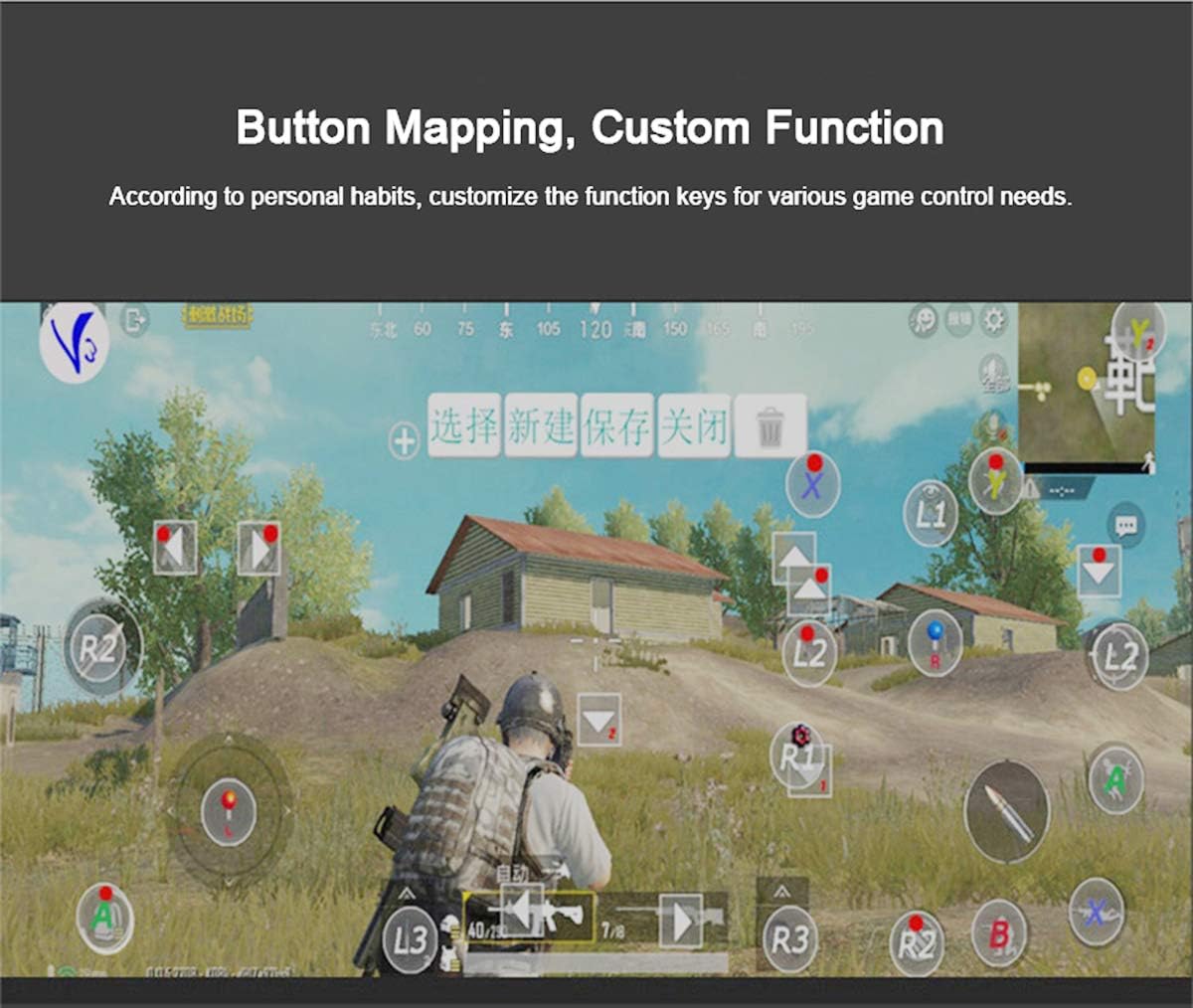
Figure 5: Button Mapping Interface. This image demonstrates the concept of button mapping within a game, allowing users to customize the function keys to suit their individual gaming preferences and needs.
The PG-9087S supports custom function key mapping. This feature allows you to assign specific in-game actions to the controller's buttons according to your personal habits. The method for customizing button functions typically depends on the game or emulator you are using. Refer to the specific game's settings or the emulator's configuration options for detailed instructions on how to remap controls.
3. Screen Orientation Support
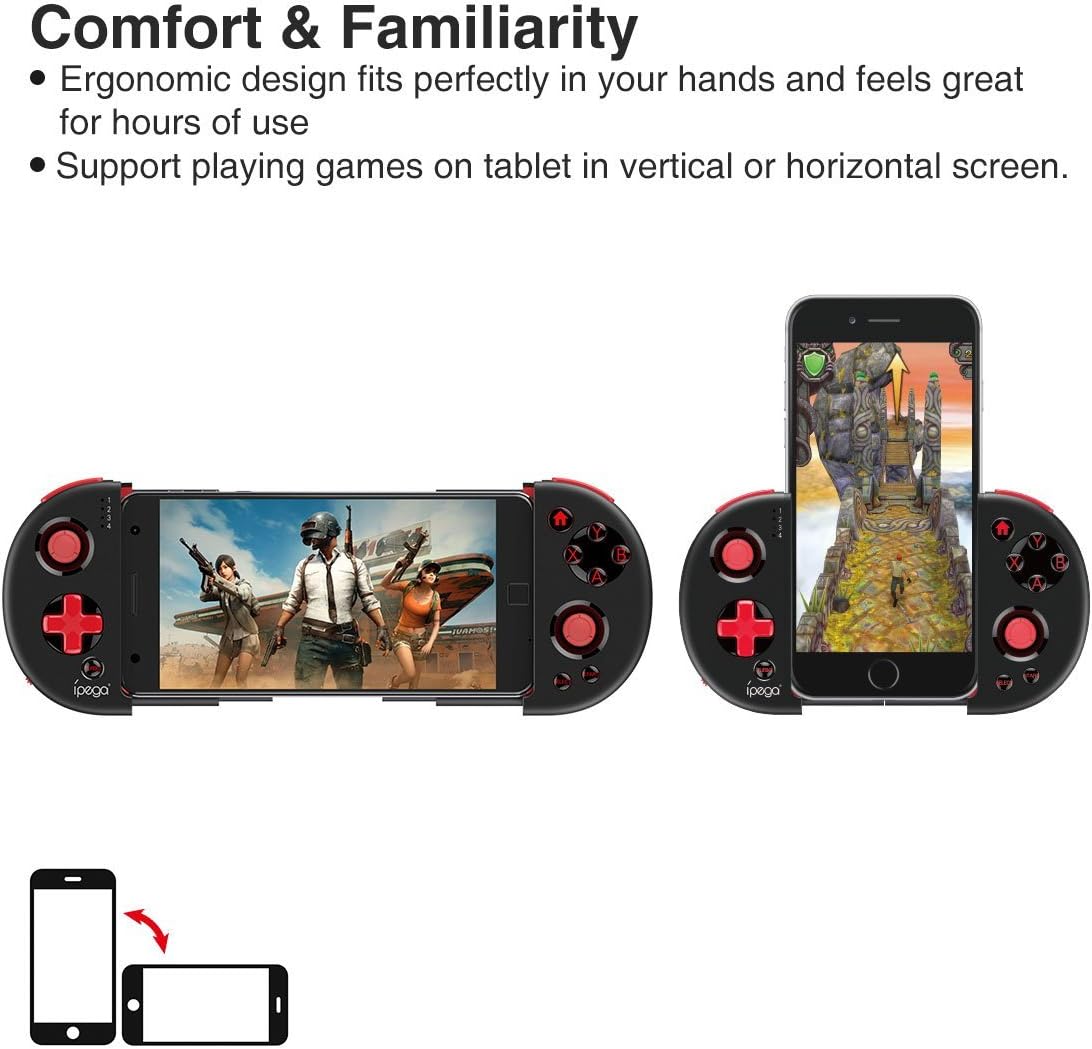
Figure 6: Orientation Support. This image illustrates the controller's ability to support gaming on tablets or smartphones in both vertical (portrait) and horizontal (landscape) screen orientations.
The controller supports playing games on your tablet or smartphone in both vertical (portrait) and horizontal (landscape) screen orientations, providing flexibility for various game types.
Засвар үйлчилгээ
- Цэвэрлэгээ: Use a soft, dry cloth to clean the controller. Do not use harsh chemicals or abrasive cleaners.
- Хадгалах: Store the controller in a cool, dry place away from direct sunlight when not in use.
- Батерейны арчилгаа: Батерейны ашиглалтын хугацааг уртасгахын тулд батерейг байнга бүрэн цэнэггүй болгохоос зайлсхий. Байнга ашиглаагүй байсан ч удирдлагыг тогтмол цэнэглээрэй.
Алдааг олж засварлах
- Controller does not power on: Ensure the battery is charged. Connect the controller to a power source using the USB cable.
- Controller does not pair with device:
- Ensure the controller is in pairing mode (indicator light flashing rapidly).
- Төхөөрөмжийнхөө Bluetooth-г унтрааж, асаана уу.
- Төхөөрөмжийг Bluetooth тохиргоондоо мартаад дахин холбохыг оролдоно уу.
- Ensure you are using the correct pairing combination (Y+HOME for iOS, A+HOME for Android).
- Товчлуурууд хариу өгөхгүй эсвэл хоцорч байна:
- Ensure the controller is fully charged. Low battery can affect performance.
- Хүчтэй Bluetooth холболтыг хангахын тулд төхөөрөмждөө ойртоорой.
- Хянагч болон гар утасны төхөөрөмжөө хоёуланг нь дахин эхлүүлнэ үү.
- Check the game's settings to ensure controller input is enabled and correctly configured.
- Device does not fit in the extendable arm: Check the dimensions of your device. The arm supports devices up to 6.2 inches (158mm) in length and 9mm in thickness. Remove any bulky cases from your device.
Үзүүлэлтүүд
| Загвар | PG-9087S |
| Брэнд | ипэга |
| Холболтын технологи | Bluetooth 4.0, USB (for charging) |
| Хянагчийн төрөл | Gamepad, Joystick |
| Тохиромжтой төхөөрөмжүүд | Android (6.0 and above), iOS |
| Батерей | 1 лити ион батерей (шаардлагатай) |
| Extendable Arm Max Size | 6.2 инч (158мм) |
| Extendable Arm Max Thickness | 9 мм |
| Зүйлийн жин | 6.9 унц |
| Өнгө | Хар |
| Багцын хэмжээ | 6.8 x 5.15 x 1.6 инч |
Баталгаат болон дэмжлэг
Warranty information for the ipega PG-9087S Wireless Game Controller is typically provided with your purchase or can be found on the manufacturer's official webсайт. Баталгаат заргад зориулж худалдан авалтаа нотлох баримтаа үлдээнэ үү.
For technical support or further assistance, please refer to the contact information provided by your retailer or visit the official ipega support channels.