
Танилцуулга
The Anderic RR3UNV is a versatile 3-device universal remote control designed to simplify the management of your entertainment systems. This remote can control up to three different devices, including TVs, DVD players, VCRs, cable boxes, satellite receivers, and audio systems. It features a learning function for expanded compatibility and glow-in-the-dark buttons for ease of use in low-light conditions. This manual provides detailed instructions for setup, operation, and maintenance of your RR3UNV remote control.
Тохиргоо
1. Зай суурилуулах
The Anderic RR3UNV remote requires two (2) AA batteries for operation. Ensure correct polarity when inserting the batteries.
- Алсын удирдлагын ар талд байрлах батерейны тасалгааны тагийг нээнэ үү.
- Тасалгааны дотор талд заасан (+) ба (-) терминалуудыг тааруулж хоёр шинэ AA батерейг оруулна уу.
- Зайны тасалгааны тагийг сайтар хаа.

Зураг: Ар талд view of the Anderic RR3UNV remote control, showing the battery compartment cover at the bottom. The back is black with a textured grip area.
2. Алсын удирдлагыг програмчлах
The RR3UNV can be programmed using direct code entry or the learning function. Refer to the included code booklet for a list of compatible device codes.
2.1. Шууд код оруулах
- Программ хийхийг хүсч буй төхөөрөмжөө (жишээлбэл, ТВ, DVD тоглуулагч) асаана уу.
- Хүссэн төхөөрөмжийн товчийг дараад барина уу (TV, DVD, эсвэл АУДИО) for approximately 5 seconds until the device button lights up and stays lit.
- Enter the 3-digit code for your device brand from the code booklet.
- If the code is valid, the device button light will blink twice and then turn off.
- Алсын удирдлагыг дарж шалгана уу ХҮЧ button. If the device turns off, the programming was successful. If not, repeat the process with the next code listed for your brand.
2.2. Сурах функц
The learning function allows the RR3UNV to learn commands directly from your original remote control.
- Place the RR3UNV and your original remote control head-to-head on a flat surface, approximately 1-2 inches apart.
- Хүссэн төхөөрөмжийн товчийг дараад барина уу (TV, DVD, эсвэл АУДИО) on the RR3UNV for approximately 5 seconds until the device button lights up and stays lit.
- Press and release the button on the RR3UNV that you want to program (e.g., ХҮЧ). The device button light will start blinking slowly.
- Press and hold the corresponding button on your original remote control (e.g., ХҮЧ).
- The device button light on the RR3UNV will blink rapidly three times and then stay lit, indicating successful learning.
- Repeat steps 3-5 for all other buttons you wish to program.
- To exit learning mode, press the device button again. The light will turn off.
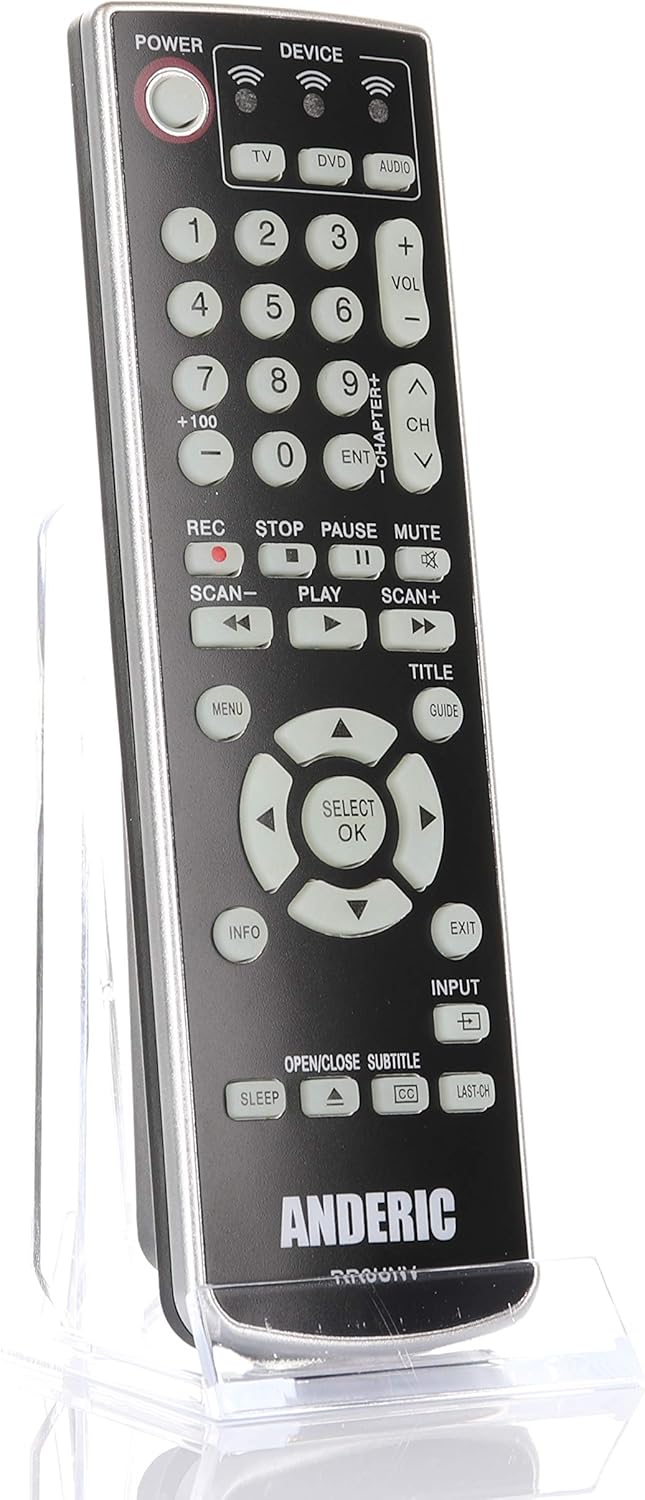
Зураг: Урд view of the Anderic RR3UNV remote control. It is black with silver trim, featuring glow-in-the-dark buttons for power, device selection, number pad, volume, channel, playback, menu, and navigation controls.
Алсын удирдлагатай ажиллах
Once programmed, the Anderic RR3UNV remote functions like your original remote. Select the desired device mode before sending commands.
- Төхөөрөмжийн сонголт: дээр дарна уу TV, DVD, эсвэл АУДИО button to select the device you want to control. The selected device button will light up briefly.
- Эрчим хүч: дээр дарна уу ХҮЧ сонгосон төхөөрөмжийг асаах эсвэл унтраах товчийг дарна уу.
- Дууны хяналт: -г ашиглана уу VOL+ болон VOL- дууны хэмжээг тохируулах товчлуурууд.
- Сувгийн хяналт: -г ашиглана уу CH+ болон CH- сувгийг өөрчлөх товчлуурууд.
- Дууг хаах: дээр дарна уу ЗУРАГ аудиог чимээгүй болгох товчлуур.
- Тооны дэвсгэр: Сувгийн дугаар эсвэл бусад тоон оролтыг шууд оруулахын тулд тоон товчлууруудыг (0-9) ашиглана уу.
- Тоглуулах удирдлага: Товчлуурууд гэх мэт ТОГЛОХ, ЗУРАГСАХ, ЗОГС, REC, SCAN-, ба SCAN+ control media playback functions.
- Навигац: The directional arrow buttons and SELECT/OK button are used for menu navigation.
- Menu/Guide/Info/Exit: These buttons provide access to device-specific menus, program guides, information displays, and exit functions.
- Оруулах: The ОРОЛТ button cycles through available input sources on your TV.
- Унтах: The УНТАХ button may activate a sleep timer function on compatible devices.
- CC/Subtitles: The CC/SUBTITLE button toggles closed captions or subtitles.
Засвар үйлчилгээ
- Зай солих: Replace batteries when the remote's performance degrades or if the device indicator light does not illuminate. Always replace both AA batteries at the same time with new ones.
- Цэвэрлэгээ: Clean the remote control with a soft, dry cloth. Do not use liquid cleaners or abrasive materials, as they may damage the remote's surface or internal components.
- Хадгалах: Алсын удирдлагыг нарны шууд тусгал болон хэт өндөр температураас хол, хуурай газар хадгална уу. Удаан хугацаагаар хадгалах бол гоожихоос сэргийлж батерейг нь салгаж авна уу.
Алдааг олж засварлах
| Асуудал | Боломжит шалтгаан | Шийдэл |
|---|---|---|
| Алсын удирдлага огт ажиллахгүй байна. | Дууссан эсвэл буруу оруулсан батерей. | Зөв туйлшралыг хангаж, батерейг шинэ АА батерейгаар солино уу. |
| Remote controls some functions but not others. | Incorrect device code or incomplete learning. | Try a different code for your device brand or re-program specific buttons using the learning function. |
| Device does not respond to remote commands. | Remote not aimed correctly; obstruction; device not selected. | Ensure the remote is aimed directly at the device's IR sensor. Remove any obstructions. Press the correct device button (TV, DVD, AUDIO) before sending commands. |
| Сурах функц бүтэлгүйтдэг. | Original remote batteries low; remotes too far apart; ambient light interference. | Ensure original remote has fresh batteries. Place remotes 1-2 inches apart. Try learning in a dimly lit room. |
Үзүүлэлтүүд
- Брэнд: Андерик
- Загварын нэр: RR3UNV
- Загварын дугаар: RR3UNV
- Дэмжигдсэн төхөөрөмжүүдийн хамгийн их тоо: 3
- Холболтын технологи: Хэт улаан туяаны (IR)
- Зайны төрөл: 2 х АА батерей (оруулаагүй)
- Хамгийн их хүрээ: Ойролцоогоор 25 фут (7.6 метр)
- Button Quantity: 41
- Онцлог шинж чанарууд: Universal compatibility, Learning function, Glow-in-the-dark buttons
- Тохиромжтой төхөөрөмжүүд: TV, DVD, VCR, Cable, Satellite, Audio, DVD/VCR Combos, TV/DVD/VCR Combos
Баталгаат хугацааны мэдээлэл
Anderic products typically come with a limited warranty covering manufacturing defects. For specific warranty details, including duration and terms, please refer to the documentation included with your purchase or visit the official Anderic webсайт. Баталгаат нэхэмжлэл гаргахын тулд худалдан авалтаа нотлох баримтаа хадгалаарай.
Хэрэглэгчийн дэмжлэг
For technical assistance, programming help, or general inquiries regarding your Anderic RR3UNV remote control, please contact Anderic customer support:
- Webсайт: www.anderic.com
- Утас: 1-855-573-6683
Please have your model number (RR3UNV) and a description of your issue ready when contacting support.