
Танилцуулга
The Casio CTK-2550 Digital Keyboard is a versatile 61-key portable piano designed for beginners and enthusiasts. It offers a wide array of sounds, rhythms, and learning features to enhance your musical journey. This manual provides essential information for setting up, operating, and maintaining your keyboard.

Зураг: Урд view of the Casio CTK-2550 61-Key Portable Piano Keyboard, showcasing its black body, white and black keys, control panel, and built-in speakers.
Гол онцлогууд
- 61 Стандарт Түлхүүр: Provides a full range for playing various musical pieces.
- 400 ая: A diverse selection of instrument sounds, including pianos, electric pianos, organs, guitars, basses, synths, and drum kits.
- 100 хэмнэл: Accompaniment patterns across various genres like 8 Beat, 16 Beat, Ballad, Dance, Pops, Rock, Jazz, European, Latin, World, and Piano Rhythms.
- 50 Dance Music Patterns: Dedicated mode for creating electronic dance music, including EDM, House, and Hip-Hop styles.
- 60 Song Bank: Built-in songs for listening and learning, categorized into World, Event, Piano/Classics, and User Songs.
- Step-Up Lesson System: An integrated learning system to help users practice and master songs.
- Хариултыг шүргэх: Keys respond to playing dynamics, allowing for expressive performances.
- Давирхай нугалах дугуй: Тэмдэглэлд тод дууны хэлбэлзэл нэмэхэд зориулагдсан.
- Chordana Play App Integration: Connects with the Chordana Play app for expanded learning and functionality.
- Зөөврийн дизайн: Lightweight and can be battery-powered for on-the-go use.
Тохиргоо
1. Сав баглаа боодол ба эд ангиуд
Carefully remove all components from the packaging. Ensure you have the Casio CTK-2550 keyboard, the included power supply, and the music stand.
2. Attaching the Music Stand
Locate the wire-frame music stand. Insert its prongs into the designated slots at the top rear of the keyboard. This stand is used to hold sheet music or a tablet.
3. Гарыг асаах
The CTK-2550 can be powered in two ways:
- AC адаптер: Connect the included AC adapter to the DC 9.5V power input jack on the rear panel of the keyboard and then plug it into a wall outlet.
- Батерей: For portable use, the keyboard can be powered by six AA-size alkaline batteries. Open the battery compartment on the underside of the keyboard and insert the batteries, ensuring correct polarity.
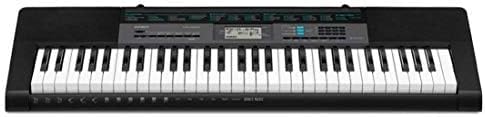
Image: Close-up of the rear panel of the Casio CTK-2550, showing the power input, audio in, phones/output, USB, and sustain pedal jacks.
Ашиглалтын заавар
1. Асаах/унтраах, дууны түвшин
- дээр дарна уу ХҮЧ гарыг асаах эсвэл унтраах товчлуур.
- ашиглан мастер дууны түвшинг тохируулна уу ЭЗЭМШИГ slider located on the left side of the control panel.
2. Selecting Tones (Sounds)
The CTK-2550 features 400 built-in tones. To select a tone:
- дээр дарна уу Ая товч.
- Тооны товчлуурыг ашиглах эсвэл + / - buttons to enter the desired tone number. A list of tones is printed on the keyboard's panel.
Examples of Tone Categories: Piano (001-014), Electric Piano (015-028), Organ (043-064), Guitar (065-078), Bass (079-088), Synth-Lead (166-202), Drum Set (395-400).
3. Playing Rhythms (Accompaniment)
The keyboard includes 100 rhythms for automatic accompaniment. To use rhythms:
- дээр дарна уу RHYTHM/SONG BANK CONTROLLER товч.
- Тооны товчлуурыг ашиглах эсвэл + / - buttons to select a rhythm.
- дарна уу START/STOP to begin the rhythm.
- ашиглан хурдыг тохируулна уу ТЕМПО товчлуурууд.
Examples of Rhythm Categories: 8 Beat (001-003), Dance (011-015), Rock (021-026), Jazz (027-033), World (054-087), Piano Rhythms (091-100).
4. Dance Music Mode
Engage the Dance Music Mode to create and play along with 50 electronic dance music patterns.
- дээр дарна уу DANCE MUSIC товч.
- Select a pattern (e.g., EDM 01-35, House 36-45, Hip-Hop 46-50).
- Use the keys to trigger different phrases and build your track.
5. Song Bank and Lesson System
The 60-song bank allows you to listen to pre-recorded songs or use the Step-Up Lesson System to learn them.
- дээр дарна уу SONG BANK товч.
- Select a song using the number pad or + / - товчлуурууд.
- -г ашиглана уу СОНС, дагана уу, эсвэл ХЭЛБЭР functions to engage with the lesson system.
6. Touch Response and Pitch Bend
- The keys are touch-sensitive, meaning the volume and tone will change based on how hard or soft you press them.
- -г ашиглана уу PITCH BEND wheel on the left side of the keyboard to smoothly raise or lower the pitch of notes while playing.
Холболт
The rear panel of the CTK-2550 offers several connection options:
- PHONES/OUTPUT (Standard Stereo Jack): Connect headphones for private practice or connect to an external PA system/ampөргөгч ampхурц дуу чимээ.
- AUDIO IN (3.5mm Stereo Mini Jack): Connect an external audio player (like a smartphone or tablet) to play along with your favorite music through the keyboard's speakers.
- SUSTAIN Jack: Connect an optional sustain pedal for extended note decay, similar to a traditional piano.
- USB (B төрөл): Connect the keyboard to a computer or smart device (Android/Apple) for MIDI data transfer, allowing use with digital audio workstation (DAW) software or educational apps like Chordana Play.
Үзүүлэлтүүд
| Онцлог | Дэлгэрэнгүй |
|---|---|
| Брэнд | Casio |
| Загварын нэр | CTK-2550 |
| Түлхүүрүүдийн тоо | 61 |
| Полифони | 48 тэмдэглэл |
| Ая | 400 AHL Tones |
| Хэмнэл | 100 хэмнэл |
| Dance Music Patterns | 50 |
| Song Bank | 60 дуу |
| Хичээлийн функц | Step-Up Lesson System |
| Холболт | USB (MIDI), Audio In, Phones/Output, Sustain |
| Эрчим хүчний эх үүсвэр | AC Adapter (9.5V DC) or 6x AA Batteries |
| Зүйлийн жин | 7.3 фунт |
| Зүйлийн хэмжээ | 12.09 x 37.24 x 3.62 инч |
Засвар үйлчилгээ
- Цэвэрлэгээ: Гарыг зөөлөн, хуурай даавуугаар арчина. Зөрүүд шороонд бага зэрэг damp даавуу, дараа нь сайтар хатаана. Зүлгүүрийн цэвэрлэгч эсвэл уусгагчаас зайлсхий.
- Хадгалах: Гарыг нарны шууд тусгал, хэт температур, өндөр чийгшилээс хол, сэрүүн, хуурай газар хадгална.
- Харьцуулах: Avoid dropping the keyboard or subjecting it to strong impacts. Do not place heavy objects on the keys.
- Батерейны арчилгаа: Хэрэв батерей ашиглаж байгаа бол гарыг удаан хугацаагаар ашиглахгүй бол зайгаа гаргана уу.
Алдааг олж засварлах
- Дуугүй:
- Цахилгаан асаалттай, дуу чангарсан эсэхийг шалгана уу.
- Хэрэв та чанга яригч ашиглах гэж байгаа бол чихэвчээ залгаагүй байгаа эсэхийг шалгаарай.
- Verify that the correct tone is selected.
- Хариу өгөхгүй байгаа түлхүүрүүд:
- Цахилгаан хангамжийг шалгана уу.
- If using batteries, ensure they are fresh and correctly inserted.
- Гажуудсан дуу:
- Дууны хэмжээг бууруулна уу.
- Ensure external audio devices connected to AUDIO IN are not set too high.
- Апп холболтын асуудал:
- USB кабель найдвартай холбогдсон эсэхийг шалгаарай.
- Check app settings and device compatibility.
Баталгаат болон дэмжлэг
The Casio CTK-2550 comes with a 1 жилийн эд анги, хөдөлмөрийн баталгаа. For technical support, service, or warranty claims, please refer to the contact information provided in your product's warranty card or visit the official Casio webсайт.
Нэмэлт нөөц болон бүтээгдэхүүний талаарх мэдээллийг авахыг хүсвэл зочилно уу Амазон дээрх Casio дэлгүүр.