
Танилцуулга
Thank you for choosing OMIKA LED Fairy Lights. This manual provides essential information for the safe and efficient use of your 33-foot, 100-LED, multi-color changing string lights. Designed for both indoor and outdoor use, these lights offer versatile decoration options with convenient remote control and dual power capabilities.
Багцын агуулга
Доор жагсаасан бүх зүйл таны багцад байгаа эсэхийг шалгана уу.
- 1 x LED String Lights with Battery Case
- 1 x Алсын удирдлага
- 1 x USB кабель
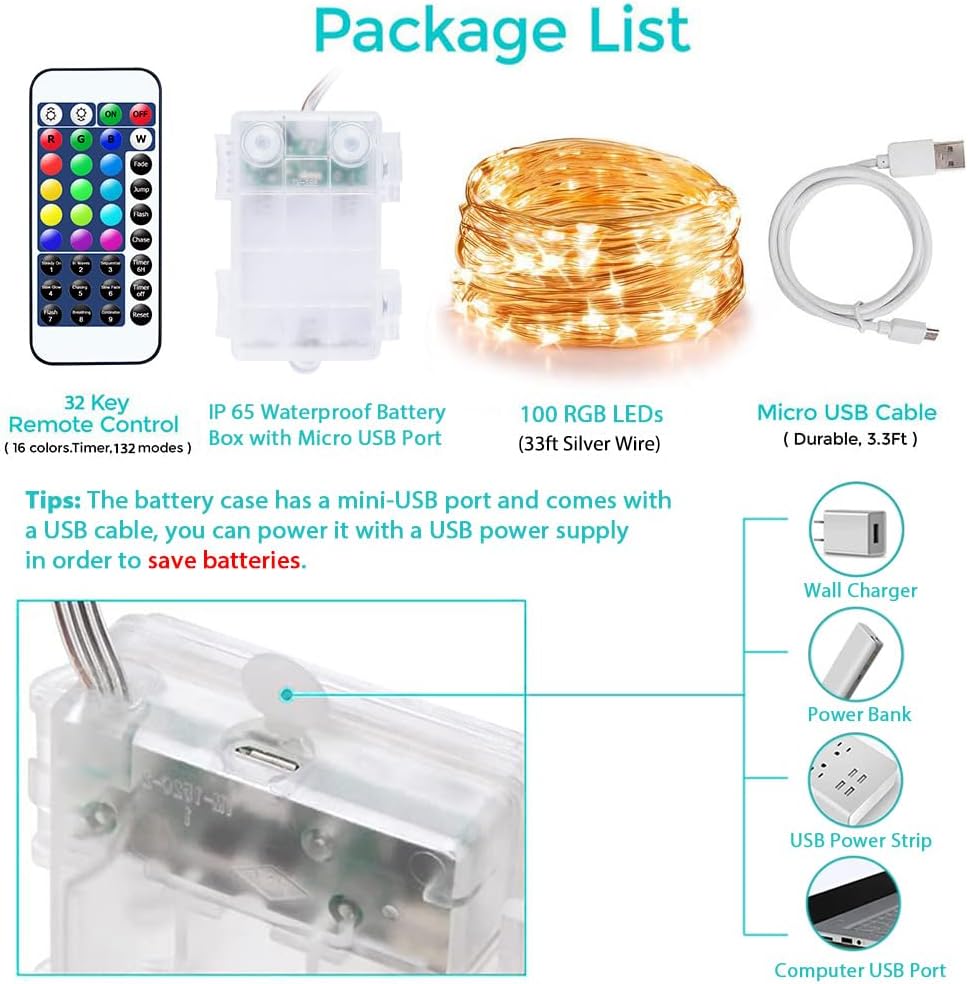
Image: Contents of the OMIKA LED Fairy Lights package, including the remote control, IP65 waterproof battery box with Micro USB port, 100 RGB LEDs (33ft silver wire), and a Micro USB cable.
Тохиргоо
Your OMIKA LED Fairy Lights offer two power options: battery or USB.
Зайны хүч
- Open the battery compartment on the battery case.
- Insert 3 new AA batteries (not included), ensuring correct polarity (+/-).
- Зайны тасалгааг найдвартай хаа.
USB тэжээл
- Connect the provided USB cable to the Micro USB port on the battery case.
- Plug the other end of the USB cable into a 4.5V USB adapter, power bank, or computer USB port. Ensure the USB power supply output is 5V/1A for optimal performance.

Image: Diagram illustrating the two power supply methods for the OMIKA LED Fairy Lights: 3x AA battery power and USB power via a power adapter or power bank.
Ашиглалтын заавар
The OMIKA LED Fairy Lights are controlled using the included 32-key infrared remote control.
Алсын удирдлагын функцууд
- ON/OFF: дээр дарна уу ON гэрэл асаах товчлуур болон OFF тэдгээрийг унтраах товчийг дарна уу.
- Өнгөний сонголт: Choose from 16 individual colors using the colored buttons (R, G, B, W, and other color swatches).
- Гэрэлтүүлгийн горимууд: Each of the 16 single colors has 8 different flashing modes. Additionally, there are 4 multi-color modes, totaling 132 modes. Select modes using buttons like Flash, Chase, Fade, Jump, Steady On, In Waves, Sequential, Slow Glow, Chasing, Slow Fade, Breathing, and Combination.
- Гэрэлтүүлгийн тохируулга: Use the brightness +/- buttons to increase or decrease the light intensity.
- Таймер функц: дээр дарна уу Цаг хэмжигч 6H button to activate the 6-hour timer (6 hours on, 18 hours off). Press Цаг хэмжигч унтраалттай идэвхгүй болгох.
- Дахин тохируулах дээр дарна уу Дахин тохируулах button to return to default settings.

Image: The 32-key infrared remote control for OMIKA LED Fairy Lights, showing buttons for ON/OFF, 16 color selections, 8 dynamic modes, 4 multi-color modes, brightness adjustment, and timer settings.
Video: An official OMIKA video demonstrating the various color and mode changes of the 33ft 100 LED Battery Operated String Light, showcasing түүний олон талт байдал.
Онцлогууд
- Vibrant 16 Color Changing Lights: Enjoy 16 individual colors with 8 different flashing modes per color and 4 multi-color modes, offering a total of 132 lighting effects.
- Хос тэжээлийн сонголтууд: Can be powered by 3 AA batteries (not included) or via a 4.5V USB adapter, power bank, or computer, providing flexibility and environmental friendliness.
- IP65 Waterproof & Durable: Constructed with 4 high-quality, sturdy, waterproof, and insulated copper wires, making them suitable for all weather conditions.
- Easy to Shape: The thin and flexible copper wires can be easily twisted into any desired shape, allowing for creative decoration in various settings.

Зураг: Ойролцоогоор view of the OMIKA LED Fairy Lights highlighting their IP65 waterproof rating, snowproof, windproof, and sunproof capabilities, along with the durable 4-copper wire construction.

Image: A hand gently holding the OMIKA LED Fairy Lights, demonstrating the thin and flexible nature of the copper wire, which allows for easy shaping and placement.
Засвар үйлчилгээ
To ensure the longevity and optimal performance of your OMIKA LED Fairy Lights, follow these simple maintenance guidelines:
- Keep the battery case dry, especially when used outdoors, despite its IP65 rating.
- Avoid excessive bending or sharp creases in the copper wire to prevent damage to the internal wiring.
- Clean the lights gently with a soft, dry cloth if dust accumulates. Do not use harsh chemicals or abrasive materials.
- When not in use for extended periods, remove batteries from the battery case to prevent leakage and corrosion.
Алдааг олж засварлах
If you encounter issues with your OMIKA LED Fairy Lights, please refer to the following common solutions:
Lights Not Turning On or Some Colors/Modes Not Working
- Эрчим хүчний эх үүсвэрийг шалгах: Ensure batteries are correctly installed and not depleted. If using USB power, verify the connection and that the power source is active.
- Батерейны эзлэхүүнtage: Different color options may require different voltages. If some options do not work after prolonged use, replace the 3 AA batteries with new ones (4.5V total) or switch to a USB power supply.
- Алсын удирдлага: Ensure the remote control has a working battery and is pointed directly at the battery case's sensor. Remove any obstructions.
- Дахин тохируулах Try pressing the 'Reset' button on the remote control to restore default settings.
Гэрэл бүдэг эсвэл анивчих
- Батерей бага: Хуучин батерейг шинэ батарейгаар солих.
- USB тэжээлийн гаралт: Ensure your USB power source provides sufficient and stable power (5V/1A recommended).
Үзүүлэлтүүд
| Онцлог | Дэлгэрэнгүй |
|---|---|
| Брэнд | ОМИКА |
| Загварын дугаар | DY-OA08-200 |
| Өнгө | 16 RGB Colors (Battery+USB) |
| Гэрлийн эх үүсвэрийн төрөл | LED |
| Гэрлийн эх үүсвэрийн тоо | 100 |
| Зүйлийн урт | 33 фут |
| Эрчим хүчний эх үүсвэр | 3 X AA Battery Operated or 5V USB Powered |
| Ботьtage | 4.5 вольт |
| Ватtage | 4.5 ватт |
| Дотор/гадаа ашиглах | Дотор, гадаа |
| Онцлог шинж чанар | Өнгө өөрчлөх |
| Материал | Copper Wires |
| Хянагчийн төрөл | Алсын удирдлага |
| Зүйлийн жин | 5.3 унц |
Баталгаат болон дэмжлэг
OMIKA offers a 1 жилийн чанарын баталгаа for these LED Fairy Lights. If you experience any problems with your twinkle lights, please contact us directly. We are committed to responding to your inquiries within 24 hours to provide assistance and resolve any issues.
For support, please refer to the contact information provided with your purchase or visit the official OMIKA store on Amazon: OMIKA Store.