
Танилцуулга
Худалдан авалт хийсэнд баярлалааasing the SAMVIX BT Box BASS X65 Wireless Bluetooth Speaker System. This manual provides essential information for setting up, operating, and maintaining your speaker. Please read it carefully to ensure optimal performance and longevity of your device.
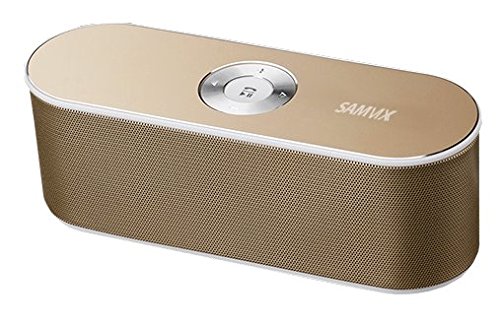
Image: The SAMVIX BT Box BASS X65 speaker in gold, positioned next to a laptop and a smartphone, demonstrating its portable design and connectivity.
Бүтээгдэхүүн дууссанviewХяналт ба портууд
Familiarize yourself with the speaker's controls and connection ports for proper operation.

Image: A detailed diagram illustrating the top and rear panels of the SAMVIX BT Box BASS X65 speaker, labeling the 3.5mm audio port, Line In/On/Off switch, USB port, Micro SD port, Micro USB input, and the central control buttons for volume, track navigation, and play/pause/answer.
- Central Control Buttons:
- Тоглуулах/түр зогсоох/Хариулах: Press to play or pause music. Press to answer or end a call.
- Дамжуулах: Дараагийн дуу руу шилжихийн тулд дарна уу.
- Өмнөх: Өмнөх дуу руу очихын тулд дарна уу.
- Дууны өсөлт: Дууг нэмэгдүүлэхийн тулд дарна уу.
- Дууны бууралт: Дууг багасгахын тулд дарна уу.
- 3.5 mm Audio Port (AUX-IN): Аудио төхөөрөмжүүдэд утастай холболт хийх зориулалттай.
- Line In / On / Off Switch: Power switch for the speaker.
- USB порт: USB флаш дискнээс хөгжим тоглуулах зориулалттай.
- Micro SD Port (TF Card): Micro SD картаас хөгжим тоглуулах зориулалттай.
- Micro USB Input (DC IN): Чанга яригчийг цэнэглэхэд зориулагдсан.
Тохиргоо
1. Илтгэгчийг цэнэглэх
Before first use, fully charge the speaker. Connect the provided Micro USB cable to the speaker's Micro USB Input port and the other end to a USB power source (e.g., computer USB port, USB wall adapter). The charging indicator will illuminate during charging and turn off when fully charged. A full charge provides approximately 8 hours of playback at 50% volume.
2. Асаах/унтраах
Locate the Line In / On / Off switch on the rear panel. Slide the switch to the 'On' position to power on the speaker. Slide it to 'Off' to power off.
Ашиглалтын заавар
1. Bluetooth хослол
To connect your speaker wirelessly via Bluetooth:
- Ensure the speaker is powered on. It will automatically enter Bluetooth pairing mode, indicated by a flashing LED light.
- Ухаалаг утас, таблет эсвэл бусад Bluetooth-тэй төхөөрөмж дээрээ Bluetooth тохиргоо руу очно уу.
- хайх available devices and select "SAMVIX X65" (or similar) from the list.
- Холбогдсоны дараа чанга яригч баталгаажуулах дуут дохио өгөх бөгөөд LED гэрэл анивчихаа болино.

Image: A silver SAMVIX BT Box BASS X65 speaker next to a smartphone, illustrating the wireless Bluetooth connection process.
The speaker has a wireless Bluetooth range of up to 100 unobstructed feet.
2. AUX-IN Connection
For devices without Bluetooth, use the 3.5mm audio port:
- Connect one end of a 3.5mm audio cable (not included) to the speaker's 3.5 mm Audio Port.
- Нөгөө үзүүрийг төхөөрөмжийнхөө чихэвчний залгуур эсвэл аудио гаралтад холбоно уу.
- Чанга яригч автоматаар AUX горимд шилжинэ.
3. USB Flash Drive Playback
To play music from a USB flash drive:
- Аудио агуулсан USB флаш дискийг оруулна уу files into the USB Port.
- The speaker will automatically detect the drive and begin playing music.
4. Микро SD карт тоглуулах
To play music from a Micro SD (TF) card:
- Insert a Micro SD card containing audio files into the Micro SD Port.
- Чанга яригч нь картыг автоматаар илрүүлж, хөгжим тоглуулж эхэлнэ.

Image: A blue SAMVIX speaker in a living room, with graphics indicating its multi-function music capabilities including USB Flash, TF Micro Card, Audio AUX, and Wireless BT inputs.
5. Чанга яригчийн функц
When connected via Bluetooth, the speaker can be used as a speakerphone:
- Дуудлагад хариулах: Press the central Play/Pause/Answer button once.
- Дуудлага дуусгах: Press the central Play/Pause/Answer button once during a call.
- Дуудлагаас татгалзаж байна: Press and hold the central Play/Pause/Answer button.
Засвар үйлчилгээ
- Чанга яригчийг ус, чийг, хэт өндөр температураас хол байлга.
- Чанга яригчийг зөөлөн, хуурай даавуугаар цэвэрлэ. Зүлгүүрийн цэвэрлэгч, уусгагчийг бүү ашигла.
- Чанга яригчийг унагах эсвэл хүчтэй нөлөө үзүүлэхээс зайлсхий.
- Батерейны ашиглалтын хугацааг уртасгаагүй үед чанга яригчийг сэрүүн, хуурай газар хадгалж, үе үе цэнэглэж байгаарай.
Алдааг олж засварлах
| Асуудал | Боломжит шалтгаан | Шийдэл |
|---|---|---|
| Чанга яригч асахгүй байна. | Батерей дуусч байна. | Charge the speaker for at least 2-3 hours. |
| Bluetooth-ээр холбох боломжгүй. | Чанга яригч нь холболтын горимд байхгүй эсвэл төхөөрөмжөөс хэт хол байна. | Ensure speaker is on and in pairing mode. Move speaker closer to the device (within 10m/33ft). Restart both devices. |
| Дуу алга. | Volume too low, incorrect input mode, or device not playing. | Increase speaker and device volume. Ensure correct input mode (Bluetooth, AUX, USB, SD) is selected. Check if the source device is playing audio. |
| Дууны чанар муу. | Device too far, interference, or low battery. | Move device closer to speaker. Avoid obstacles. Charge the speaker. |
Үзүүлэлтүүд
| Онцлог | Дэлгэрэнгүй |
|---|---|
| Загварын нэр | BT Box BASS X65 |
| Брэнд | SAMVIX |
| Холболтын технологи | Bluetooth, туслах, USB |
| Bluetooth хувилбар | 4.0 |
| Утасгүй сүлжээ | 100 фут хүртэл (саадгүй) |
| Чанга яригчийн гаралтын чадал | 6 Watts (3W + 3W) |
| Зайны төрөл | 1500mAh Lithium-ion (rechargeable) |
| Зайны ашиглалт | 8 цаг хүртэл (50% эзлэхүүнтэй) |
| Оролтууд | Micro USB (charging), USB (playback), Micro SD (playback), 3.5mm AUX-IN |
| Хэмжээ | Ойролцоогоор 20 см (урт) x 7.5 см (өргөн) x 6 см (өндөр) |
| Жин | 128 гр |
| Чанга яригчийн төрөл | Outdoor/Indoor Portable |
| Онцлог шинж чанарууд | Built-in Microphone (Speakerphone) |
Баталгаат болон дэмжлэг
SAMVIX offers a full warranty on its Bluetooth speaker range. If you encounter any issues or are not completely satisfied with your purchase, please contact SAMVIX customer support for assistance. Refer to your purchase documentation for specific warranty terms and contact information.