1. Танилцуулга
This manual provides comprehensive instructions for the assembly, operation, and maintenance of your Zinus Tresa Metal Desk with Storage and Monitor Stand, Large. Designed for home office or den use, this desk features a durable metal frame, an espresso wood-like finish tabletop, a movable monitor stand, a hanging hook, a side storage tray, and a built-in cable organizer. Please read all instructions carefully before assembly and use to ensure proper function and safety.

Figure 1: Zinus Tresa Metal Desk, Large. This image shows the assembled desk with a monitor, lamp, and small plant, highlighting its functional design.
2. Аюулгүй байдлын мэдээлэл
Бүтээгдэхүүнийг гэмтээх, гэмтээхээс сэргийлэхийн тулд дараах аюулгүй байдлын удирдамжийг дагаж мөрдөнө үү.
- Ширээг үргэлж өгөгдсөн зааврын дагуу угсарна уу.
- -ийн жингийн хязгаараас хэтрүүлж болохгүй 100 фунт (45 кг).
- Ensure the desk is stable and secure before use.
- Keep the work area clear of obstacles to prevent accidents.
- Ширээн дээр зогсож, сууж болохгүй.
- Угсрах явцад жижиг хэсгүүдийг хүүхдээс хол байлга.
3. Багцын агуулга
Угсарч эхлэхээс өмнө бүх бүрэлдэхүүн хэсгүүд байгаа эсэхийг шалгаарай. Хэрэв ямар нэг эд анги дутуу эсвэл гэмтсэн бол хэрэглэгчийн дэмжлэгтэй холбоо барина уу.

Figure 2: Product Packaging. The desk components are efficiently packed in one compact box for shipping.
Оруулсан бүрэлдэхүүн хэсгүүд:
- Desk Tabletop (Espresso Finish)
- Desk Legs and Frame (Steel)
- Хяналтын зогсоол
- Side Storage Tray
- Дэгээ өлгөх
- Cable Management Organizer
- Угсрах тоног төхөөрөмж (эрэг, боолт гэх мэт)
- Assembly Tools (ratchet tool)
- Зааварчилгааны гарын авлага
4. Угсрах заавар
Assembly is designed to be straightforward and typically takes under 30 minutes with one person. All necessary tools are included.
- Бүрэлдэхүүн хэсгүүдийг задлах: Зурааснаас сэргийлж бүх эд ангиудыг савлагаанаас болгоомжтой гаргаж, цэвэрхэн, зөөлөн гадаргуу дээр тавь. Бүх эд ангиуд савлагааны агуулгын жагсаалттай харьцуулж байгаа эсэхийг шалгаарай.
- Хөлийг хүрээ рүү бэхлэх: Securely attach the desk legs to the main frame using the provided hardware. Ensure all connections are tight but do not overtighten.
- Ширээний тавцан суурилуулах: Carefully place the tabletop onto the assembled frame. Align the pre-drilled holes and secure the tabletop using the designated screws.
- Дагалдах хэрэгсэл суурилуулах: Attach the monitor stand, side storage tray, hanging hook, and cable organizer to their respective positions as indicated in the detailed assembly diagram (refer to the included printed manual for specific diagrams).
- Эцсийн шалгалт: Once assembled, gently lift and move the desk to its desired location. Ensure all connections are secure and the desk is stable before placing any items on it.
5. Хэрэглээ
Хяналтын зогсоол
The movable monitor stand helps elevate your screen to an ergonomic height, reducing neck and back strain. It can be positioned anywhere on the desk surface to suit your setup.
Side Storage Tray
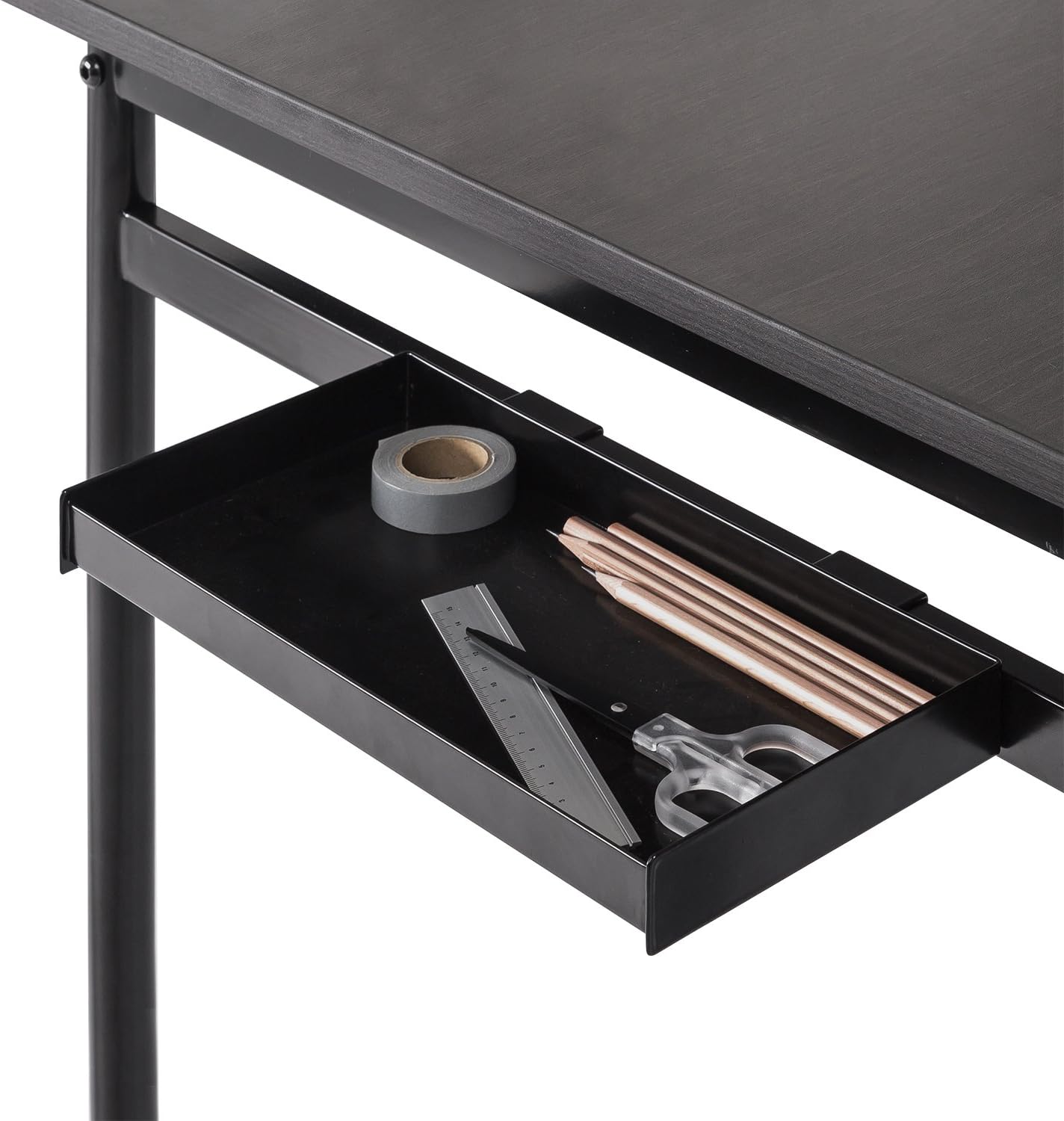
Figure 3: Side Storage Tray. This tray provides convenient access for small office supplies like pens, pencils, and rulers.
The integrated side storage tray is ideal for keeping small office essentials, such as pens, pencils, and other accessories, within easy reach.
Дэгээ өлгөх

Figure 4: Hanging Hook. A bag is shown hanging from the hook, demonstrating its use for personal items.
Utilize the hanging hook to keep bags, headphones, or other items off the floor and within easy access, helping to maintain a tidy workspace.
Cable Management Organizer

Figure 5: Cable Management Organizer. This image illustrates how cables can be routed through the organizer to keep them neat and prevent tangling.
The built-in cable organizer helps manage and route power cords and other cables, preventing clutter and ensuring a clean, organized desk surface.
6. Засвар үйлчилгээ
To maintain the appearance and longevity of your Zinus Tresa Metal Desk, follow these simple care instructions:
- Цэвэрлэгээ: Ширээний гадаргууг зар сурталчилгаагаар арчихamp даавуу. Өнгөлгөөг гэмтээж болох хүчтэй химийн бодис, зүлгүүрийн цэвэрлэгч хэрэглэхээс зайлсхий.
- Шалгалт: Бүх эрэг ба холболтыг нягт байлгахын тулд үе үе шалгаж байгаарай. Шаардлагатай бол дахин чангална.
- Хэт их чийгээс зайлсхийх: Do not expose the desk to excessive moisture or direct sunlight for prolonged periods.
7. Алдаа засах
Хэрэв таны ширээнд ямар нэгэн асуудал тулгарвал дараах нийтлэг шийдлүүдийг үзнэ үү.
- Ширээ догдолж байна: Ensure all bolts and screws are securely tightened. Check that the desk is on a level surface. If the floor is uneven, consider using furniture pads to stabilize.
- Дутуу хэсгүүд: If any parts were missing upon unboxing, please contact Zinus customer support immediately for assistance.
- Угсралтын явцад учирсан хохирол: If a part was damaged during assembly, cease assembly and contact customer support.
8. Техникийн үзүүлэлтүүд

Figure 6: Desk Dimensions. This image provides a visual representation of the desk's key measurements in centimeters.
| Онцлог | Дэлгэрэнгүй |
|---|---|
| Брэнд | Зинус |
| Загварын нэр | Tresa |
| Загварын дугаар | OLB-DS-PL55 |
| Бүтээгдэхүүний хэмжээ (L x W x H) | 55"D x 22.53"W x 32.52"H (ойролцоогоор 139.7 см x 57.2 см x 82.6 см) |
| Зүйлийн жин | 53.73 фунт (ойролцоогоор 24.37 кг) |
| Хамгийн их жингийн зөвлөмж | 100 фунт (ойролцоогоор 45 кг) |
| Материалын төрөл | Инженерийн аргаар хийсэн мод, ган |
| Төгсгөлийн төрөл | Steel frame, Espresso wood-like tabletop |
| Онцлог шинж чанарууд | Adjustable Monitor Stand, Side Storage Tray, Hanging Hook, Cable Organizer |
| Угсрах шаардлагатай | Yes (Tools included, 1 person recommended) |
| Өрөөний төрөл | Dormitory, Office, Study Room |
9. Баталгаат хугацаа ба дэмжлэг
Баталгаат хугацааны мэдээлэл
The Zinus Tresa Metal Desk is covered by a Санаа зоволтгүй 1 жилийн баталгаатай худалдан авсан өдрөөс эхлэн. Энэхүү баталгаат хугацаа нь материал болон хийцийн үйлдвэрлэлийн согогийг хамарна. Баталгаат хугацааны нэхэмжлэлийн хувьд худалдан авалтын баримтаа хадгална уу.
Хэрэглэгчийн дэмжлэг
For any questions, missing parts, or warranty claims, please contact Zinus customer support. Refer to the contact information provided in your product packaging or visit the official Zinus webтусламж авах сайт.


