
1. Танилцуулга
Худалдан авалт хийсэнд баярлалааasing the CONTEC SolarView Compact SV-CPT-MC310. This device is designed for efficient monitoring and data logging of solar power generation. It integrates essential functions such as power measurement, data display, and storage into a compact form factor. This manual provides detailed instructions for the proper setup, operation, and maintenance of your device.
Аюулгүй, оновчтой ажиллагааг хангахын тулд бүтээгдэхүүнийг ашиглахаасаа өмнө энэ гарын авлагыг сайтар уншина уу. Энэ гарын авлагыг цаашид лавлах зорилгоор хадгална уу.
2. Бүтээгдэхүүн дууссанview
The CONTEC SolarView Compact SV-CPT-MC310 is a versatile device for solar power monitoring. Its slim design houses comprehensive features including a screen display, network connectivity, RS-485 communication, and an SD card slot for data storage.
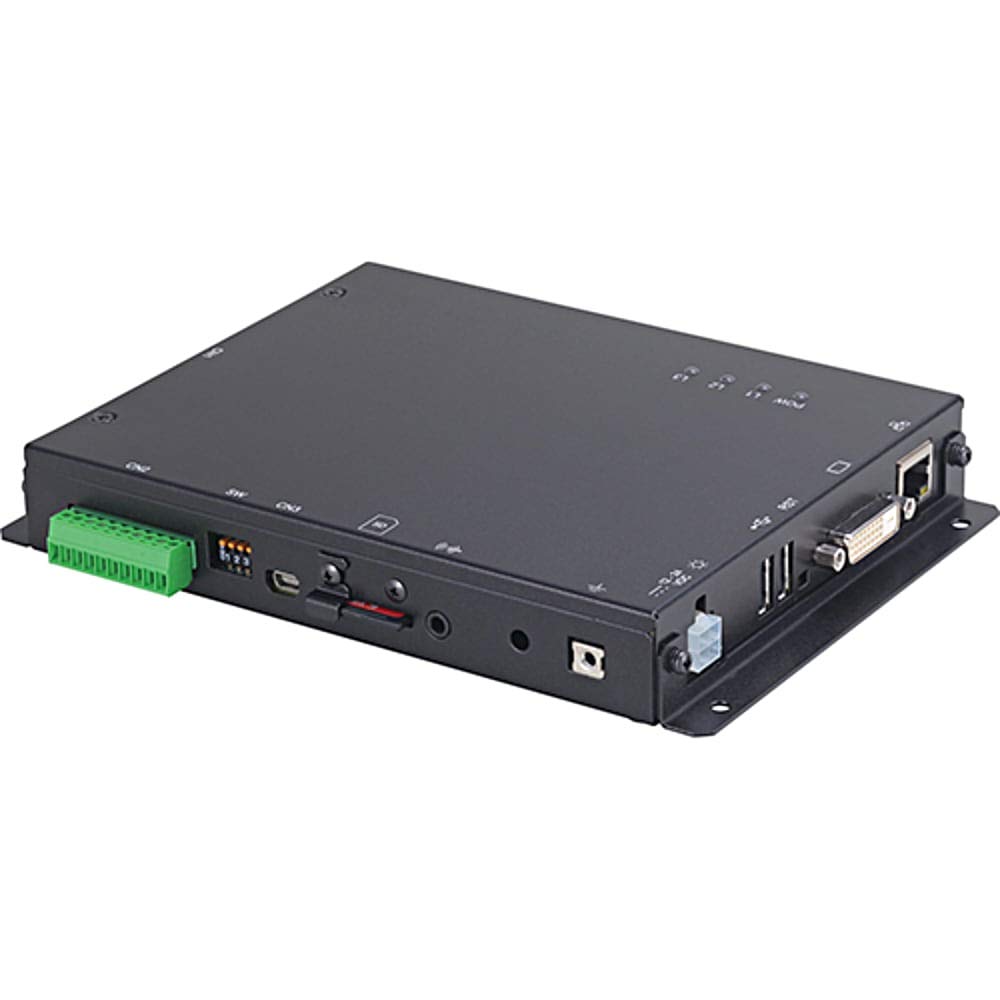
Зураг 1: Урд view of the CONTEC SolarView Compact SV-CPT-MC310. This image illustrates the compact size and the integrated display panel of the device, highlighting its user-friendly interface for monitoring solar power data.
3. Аюулгүй байдлын мэдээлэл
Төхөөрөмжийг гэмтээх, гэмтээхгүйн тулд дараах аюулгүй байдлын арга хэмжээг үргэлж дагаж мөрдөөрэй.
- Ensure the device is installed by qualified personnel.
- Төхөөрөмжийг хэт өндөр температур, чийгшил, нарны шууд тусгалд бүү тавь.
- Засвар үйлчилгээ, суурилуулалт хийхээс өмнө цахилгааныг салга.
- Зөвхөн заасан цахилгаан адаптер болон кабелийг ашиглана уу.
- Do not attempt to open or repair the device yourself. Refer to authorized service personnel.
4. Тохиргоо
4.1 Савлах, шалгах
Carefully remove the device from its packaging. Inspect for any signs of damage during transit. If any damage is found, contact your supplier immediately.
4.2 Төхөөрөмжийг суурилуулах
НарView Compact SV-CPT-MC310 is designed for indoor installation. Choose a location that is dry, well-ventilated, and free from direct sunlight or excessive heat sources. Ensure adequate space around the device for ventilation and cable connections.
- Тохиромжтой суурилуулах гадаргууг тодорхойл.
- Secure the device using appropriate screws or mounting brackets (not included).
4.3 Цахилгааны холболтууд
Connect the power supply and communication cables as follows:
- Эрчим хүчний оролт: Connect the DC power adapter to the device's power input port. Ensure the power source matches the device's voltage шаардлага.
- RS-485 Харилцаа холбоо: Connect the RS-485 cable to the designated port for communication with other devices or systems.
- Сүлжээ (Ethernet): For network connectivity, plug an Ethernet cable into the RJ45 port.
- SD карт: Insert a compatible SD card into the SD card slot for data logging. Ensure the card is correctly oriented.
Warning: Ensure all connections are secure before applying power.
5. Ашиглалтын заавар
5.1 Асаах ба анхны ачаалах
Once all connections are made, apply power to the device. The device will perform a self-test and the display will show the boot-up sequence. After successful boot, the main monitoring screen will appear.
5.2 Хэрэглэгчийн интерфэйсээр навигаци хийх
The device features an integrated display and control buttons. Use the navigation buttons to scroll through menus and select options.
- Дээш/доош товчлуурууд: Navigate through menu items or adjust values.
- Нэвтрэх товч: Сонголтыг баталгаажуулах эсвэл дэд цэс рүү орно уу.
- Буцах/Гарах товчлуур: Өмнөх дэлгэц рүү буцах эсвэл цэснээс гарах.
5.3 Monitoring Solar Power Data
The main screen typically displays real-time data such as:
- Current Power Generation (W)
- Daily Energy Yield (Wh)
- Total Energy Yield (kWh)
- Системийн төлөв
Refer to the on-screen menu for detailed historical data and system settings.
5.4 Өгөгдөл бүртгэх болон экспортлох
The device automatically logs data to the inserted SD card. To access or export data:
- Navigate to the "Data Management" or "Log" menu.
- Select the desired time range or data type.
- Choose the "Export" option (if available) to transfer data via network or remove the SD card and access data on a computer.
6. Засвар үйлчилгээ
6.1 Цэвэрлэгээ
Төхөөрөмжийг цэвэр, тоос шороогүй байлга. Гадна талыг нь зөөлөн, хуурай даавуугаар арчина. Шингэн цэвэрлэгч эсвэл зүлгүүрийн материал бүү хэрэглэ.
6.2 Програм хангамжийн шинэчлэлтүүд
Periodically check the CONTEC website for firmware updates. Follow the provided instructions carefully for any update procedures to ensure optimal performance and access to new features.
6.3 SD картын удирдлага
Regularly back up data from the SD card. Consider replacing the SD card periodically, especially if it shows signs of wear or data corruption, to ensure reliable data logging.
7. Алдаа засах
| Асуудал | Боломжит шалтгаан | Шийдэл |
|---|---|---|
| Төхөөрөмж асахгүй байна. | No power supply; faulty power adapter; loose connection. | Check power cable connection. Ensure power adapter is functional. Verify power outlet. |
| No data displayed. | Sensor not connected; communication error; incorrect settings. | Verify sensor connections. Check RS-485 or network settings. Restart the device. |
| SD картын алдаа. | SD card not inserted correctly; incompatible card; corrupted card. | Reinsert SD card. Try a different compatible SD card. Format the SD card (data will be lost). |
| Сүлжээний холболтын алдаа. | Ethernet cable disconnected; incorrect network settings; router issue. | Check Ethernet cable. Verify network settings on the device. Restart router/modem. |
If the problem persists after attempting these solutions, please contact CONTEC technical support.
8. Техникийн үзүүлэлтүүд
| Онцлог | Дэлгэрэнгүй |
|---|---|
| Загварын дугаар | SV-CPT-MC310 |
| Хэмжээ (L x W x H) | 14 x 17 x 3 см |
| Жин | 650 гр |
| Харилцаа холбооны интерфейсүүд | Network (Ethernet), RS-485 |
| Өгөгдөл хадгалах | SD карт |
| Үйлдвэрлэгч | CONTEC |
9. Баталгаат хугацаа ба дэмжлэг
9.1 Баталгаат хугацааны мэдээлэл
CONTEC warrants this product against defects in materials and workmanship for a period specified at the time of purchase. Please retain your proof of purchase. The warranty does not cover damage caused by improper installation, misuse, unauthorized repairs, or natural disasters.
For detailed warranty terms and conditions, please refer to the warranty card included with your product or visit the official CONTEC webсайт.
9.2 Техникийн дэмжлэг
If you require technical assistance or have questions regarding the operation of your SolarView Compact SV-CPT-MC310, please contact CONTEC technical support through their official webсайт эсвэл таны бүтээгдэхүүний баримт бичигт заасан холбоо барих мэдээлэл.
When contacting support, please have your model number (SV-CPT-MC310) and a detailed description of the issue ready.