
1. Танилцуулга
Thank you for choosing the Bagotte SH020 3MP 1296P FHD Wireless IP Camera. This manual provides detailed instructions for setting up, operating, and maintaining your camera to ensure optimal performance and security. Please read this manual carefully before use and keep it for future reference.
2. Багцын агуулга
Бүх зүйл багцад байгаа эсэхийг шалгаарай:
- 1 x Bagotte SH020 IP Camera
- 1 x тэжээлийн адаптер
- 1 x USB кабель
- 1 х угсрах хаалт
- 2 х эрэг
- 1 х хэрэглэгчийн гарын авлага
3. Бүтээгдэхүүн дууссанview
The Bagotte SH020 is a 3MP 1296P Full HD wireless IP camera designed for indoor surveillance. It features pan and tilt functionality, infrared night vision, two-way audio, motion detection, and local storage via a MicroSD card.

Зураг 1: Урд view of the Bagotte SH020 3MP 1296P FHD Wireless IP Camera.

Image 2: Diagram illustrating the components of the Bagotte SH020 camera, including the IR sensor, lens, MicroSD card slot, antenna, network interface, power input, and reset button.
4. Тохиргоо
4.1. Асаах
- Connect the USB cable to the camera's power input port.
- Цахилгаан адаптерийг ердийн цахилгаан залгуурт холбоно уу.
- The camera will power on and initiate its startup sequence. Wait for the indicator light to flash, indicating it's ready for setup.
4.2. Програм суулгах
Download the recommended mobile application (e.g., SriHome or MIPC, as mentioned in product reviews) from your device's app store (Google Play Store for Android or Apple App Store for iOS). хайх 'SriHome' or 'MIPC' and install the application.
4.3. Wi-Fi-д холбогдож байна
- Open the installed application and create an account or log in.
- Follow the in-app instructions to add a new device. This usually involves scanning a QR code located on the camera or manually entering the device ID.
- Ensure your mobile device is connected to a 2.4GHz Wi-Fi network. The camera does not support 5GHz Wi-Fi.
- Аппликейшн асуухад Wi-Fi сүлжээнийхээ нууц үгийг оруулна уу.
- The camera will attempt to connect to your Wi-Fi network. Once connected, the indicator light will typically turn solid blue or green, and the app will confirm successful pairing.
4.4. Камер суурилуулах
The camera can be placed on a flat surface or mounted to a wall or ceiling using the provided bracket and screws.
- Хамгийн оновчтой хяналтын хамрах хүрээг бий болгохын тулд тохиромжтой байршлыг сонгоно уу.
- Attach the mounting bracket to the desired surface using the screws.
- Securely attach the camera to the mounting bracket. Ensure it is firmly in place.
5. Камерыг ажиллуулах
5.1. Амьд View болон Хяналт
Access the live video feed through the mobile application. You can remotely control the camera's pan (355°) and tilt (90°) movements to adjust the viewing angle. The app also supports 4x digital zoom.
Video 1: Seller's operation video demonstrating the camera's pan, tilt, auto-tracking, mobile phone view, two-way audio, MicroSD card slot, and infrared night vision features.
5.2. Хоёр талын аудио
The camera features a built-in microphone and speaker, enabling two-way audio communication. Use the microphone icon in the app to speak through the camera and listen to audio from the camera's location.
5.3. Шөнийн хараа
Equipped with 10 IR LEDs, the camera provides clear infrared night vision up to 10 meters, ensuring surveillance even in complete darkness. The IR-Cut filter automatically switches between day and night modes.
5.4. Хөдөлгөөн илрүүлэх ба дохиолол
The camera supports motion detection with adjustable sensitivity. When motion is detected, the camera can trigger an alarm, send push notifications to your phone, and initiate recording. Advanced AI features include auto motion tracking and humanoid detection.
5.5. Бичлэг ба Хадгалалт
The camera supports MicroSD cards up to 128GB for local storage of recordings. Recording modes include motion-activated, timed, and manual recording. You can playback recorded footagапп-аас шууд.
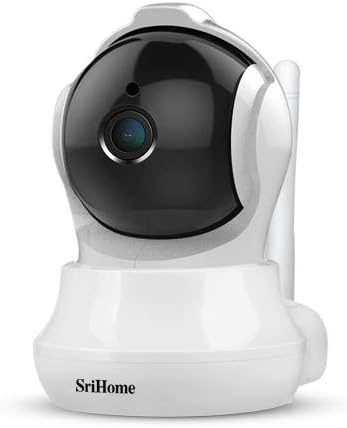
Image 3: The Bagotte SH020 camera positioned in a room, demonstrating its discreet design and wide viewөнцөг.
6. Засвар үйлчилгээ
- Цэвэрлэгээ: Use a soft, dry cloth to clean the camera lens and body. Avoid harsh chemicals or abrasive materials.
- Програм хангамжийн шинэчлэлтүүд: Regularly check the mobile application for available firmware updates to ensure your camera has the latest features and security enhancements.
- MicroSD карт: If using a MicroSD card, periodically check its status and ensure sufficient storage space. Back up important recordings as needed.
7. Алдаа засах
- Камер Wi-Fi-д холбогдоогүй байна: Ensure your Wi-Fi network is 2.4GHz. Verify the Wi-Fi password is correct. Move the camera closer to the router. Reset the camera using the reset button and try again.
- Видео чанар муу: Check your internet connection speed. Ensure the camera lens is clean. Adjust video resolution settings in the app.
- Хөдөлгөөн мэдрэгч ажиллахгүй байна: Verify motion detection is enabled in the app settings. Adjust sensitivity levels and detection zones.
- Аудио байхгүй: Check volume settings in the app. Ensure the microphone and speaker are not obstructed.
8. Техникийн үзүүлэлтүүд
| Онцлог | Тодорхойлолт |
|---|---|
| Видеоны нягтрал | 3MP, 1296P (2304*1296), H.264 |
| Тойрог/Найлтын муж | Пан: 355°, хазайлт: 90° |
| Линз | 3.6 мм |
| Шөнийн харааны хүрээ | Up to 10 meters (10 IR LEDs) |
| Аудио | Хоёр талын аудио (суулгасан микрофон ба чанга яригч) |
| Хадгалах | MicroSD карт (128 ГБ хүртэл) |
| Утасгүй холболт | Wi-Fi (зөвхөн 2.4 GHz) |
| Хөдөлгөөн илрүүлэх | Yes, with AI Auto Motion Tracking and AI Humanoid Detection |
| Эрчим хүчний хангамж | DC 5V, 1A хувилбарууд |
| Хэмжээ | 7.3 x 7.6 x 10 см |
| Жин | 380 гр |
9. Баталгаат хугацаа ба дэмжлэг
For warranty information and technical support, please refer to the documentation included with your product or visit the official Bagotte webсайт. Худалдан авалтын баримтаа баталгаат нэхэмжлэлд зориулж худалдан авалтын баталгаа болгон хадгална уу.