
1. Танилцуулга
Thank you for choosing the KAIDI KD-904 Bluetooth Earphones. These wireless in-ear headphones are designed for comfort and stability, making them ideal for sports and daily use. Featuring Bluetooth connectivity and a built-in microphone, they allow for hands-free calls and high-quality audio playback. This manual provides essential information for the proper setup, operation, and maintenance of your earphones.
2. Багцын агуулга
- KAIDI KD-904 Bluetooth Earphones
- USB цэнэглэгч кабель
- Хэрэглэгчийн гарын авлага
3. Бүтээгдэхүүн дууссанview
The KAIDI KD-904 earphones feature an ergonomic design with ear hooks for a secure fit, especially during physical activity. The earbuds are magnetic, allowing them to clip together for convenient storage around your neck when not in use. An inline control module provides easy access to power, volume, and call functions.

Зураг: Ойролцоогоор view of a single KAIDI KD-904 earphone, highlighting the in-ear bud and the flexible ear hook designed for stability.

Зураг: Нарийвчилсан view of the earbud housing with the 'KAIDI' brand logo, showing the design and finish of the earphone unit.
4. Тохиргоо
4.1 Чихэвчийг цэнэглэх
- Connect the micro USB end of the charging cable to the charging port on the inline control module of the earphones.
- Connect the USB-A end of the charging cable to a USB power source (e.g., computer USB port, wall adapter).
- The LED indicator on the control module will illuminate, typically red, during charging.
- Once fully charged (approximately 1-2 hours), the LED indicator will change color (e.g., blue) or turn off.
Note: Ensure the earphones are fully charged before first use for optimal battery life.
4.2 Bluetooth холболт
- Асаах: Press and hold the multi-function button (usually the center button on the inline control) for approximately 3-5 seconds until the LED indicator flashes blue and red alternately. This indicates the earphones are in pairing mode.
- Bluetooth-г идэвхжүүлэх: Ухаалаг утас эсвэл бусад Bluetooth идэвхжүүлсэн төхөөрөмж дээрээ Bluetooth тохиргоо руу очоод Bluetooth асаалттай байгаа эсэхийг шалгана уу.
- хайх Төхөөрөмжүүд: Your device will scan for available Bluetooth devices. Look for "KD-904" or a similar name in the list.
- Холбох: Select "KD-904" from the list to initiate the connection. Once successfully paired, the LED indicator on the earphones will typically flash blue slowly or turn solid blue, and you may hear an audible confirmation.
- Дахин холбогдох: After initial pairing, the earphones will automatically attempt to connect to the last paired device when powered on, provided the device's Bluetooth is active and within range.
5. Ашиглалтын заавар
5.1 Үндсэн функцууд
- Асаах: Олон үйлдэлт товчлуурыг 3 секундын турш дарна уу.
- Унтраах: Олон үйлдэлт товчлуурыг 5 секундын турш дарна уу.
- Тоглуулах/түр зогсоох: Олон үйлдэлт товчлуурыг богино хугацаанд дарна уу.
- Дууг нэмэгдүүлэх: "+" товчийг богино хугацаанд дарна уу.
- Дууг багасгах: '-' товчийг богино хугацаанд дарна уу.
- Дараагийн дуу: '+' товчийг удаан дар.
- Өмнөх бичлэг: '-' товчийг удаан дар.
5.2 Дуудлагын удирдлага
- Дуудлагад хариулах: Ирж буй дуудлага дуугарах үед олон үйлдэлт товчийг богино дарна уу.
- Дуудлага дуусгах: Дуудлагын үеэр олон үйлдэлт товчлуурыг богино дарна уу.
- Дуудлагаас татгалзах: Long press the multi-function button when an incoming call rings.
- Сүүлийн дугаарыг дахин залгах: Олон үйлдэлт товчийг хоёр удаа дарна уу.
6. Засвар үйлчилгээ
- Цэвэрлэгээ: Use a soft, dry cloth to clean the earphones. Do not use abrasive cleaners or immerse in water.
- Хадгалах: Store the earphones in a cool, dry place away from direct sunlight and extreme temperatures. The magnetic earbuds help prevent tangling during storage.
- Батерейны арчилгаа: To prolong battery life, avoid completely discharging the earphones frequently. Charge them regularly, even if not in use for extended periods.
- Гэмтлээс зайлсхийх: Do not drop, disassemble, or modify the earphones. Keep away from sharp objects.
7. Алдаа засах
| Асуудал | Боломжит шалтгаан | Шийдэл |
|---|---|---|
| Чихэвч асахгүй байна. | Батерей бага. | Чихэвчийг бүрэн цэнэглэ. |
| Төхөөрөмжтэй хослуулах боломжгүй. | Earphones not in pairing mode; Bluetooth off on device; device out of range. | Ensure earphones are in pairing mode (flashing red/blue). Turn on Bluetooth on your device. Move device closer to earphones (within 10 meters). Try re-pairing. |
| Дуу байхгүй эсвэл дуу багатай. | Дууны хэмжээ хэт бага; холбогдоогүй; буруу аудио гаралтыг сонгосон. | Increase volume on both earphones and connected device. Ensure earphones are successfully connected. Check audio output settings on your device. |
| Цэнэглэх нь ажиллахгүй байна. | Алдаатай кабель эсвэл тэжээлийн эх үүсвэр. | Try a different USB charging cable and/or a different USB power source. |
8. Техникийн үзүүлэлтүүд
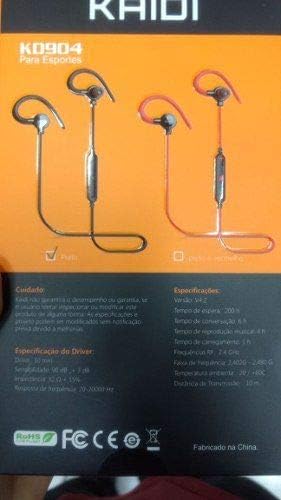
Image: Back of the KAIDI KD-904 product box, displaying detailed technical specifications and features in text.
- Загвар: KD-904
- Bluetooth хувилбар: V4.2
- Үйл ажиллагааны хүрээ: 10 метр (33 фут) хүртэл
- Хөгжим тоглуулах хугацаа: Ойролцоогоор 4 цаг
- Хүлээлгийн хугацаа: Ойролцоогоор 200 цаг
- Цэнэглэх хугацаа: Ойролцоогоор 1-2 цаг
- Жолоочийн хэмжээ: 10 мм
- Жолоочийн мэдрэмж: 98 дБ
- Давтамжийн хариу: 20Гц - 20кГц
- Холболт: Утасгүй Bluetooth
- Чихний байрлал: In-ear (Intra-auricular)
- Тодорхой хэрэглээ: Sports, Running
- Тохиромжтой төхөөрөмжүүд: Android, Samsung, iPhone
9. Баталгаат хугацаа ба дэмжлэг
For warranty information or technical support, please refer to the purchase documentation or contact your retailer. Keep your proof of purchase for any warranty claims. KAIDI is committed to providing quality products and support.