
1. Танилцуулга
Худалдан авалт хийсэнд баярлалааasing the Yenkee YKB 3200 Gaming Keyboard. This manual provides essential information for the proper setup, operation, and maintenance of your new keyboard. Please read this manual thoroughly before using the product to ensure optimal performance and longevity.
2. Аюулгүй байдлын мэдээлэл
- Гарыг шингэн зүйл болон хэт их чийгээс хол байлга.
- Гарыг хэт өндөр температурт бүү гарга.
- Гарыг унагах эсвэл хүчтэй цохилтонд оруулахаас зайлсхий.
- Do not attempt to disassemble or repair the keyboard yourself. Refer all servicing to qualified personnel.
- Use only a dry, soft cloth for cleaning.
3. Багцын агуулга
Савлахдаа багцын агуулгыг шалгана уу. Хэрэв ямар нэг зүйл дутуу эсвэл гэмтсэн бол жижиглэн худалдаалагчтайгаа холбоо барина уу.
- Yenkee YKB 3200 Gaming Keyboard with integrated smartphone holder
- USB кабель (хавсаргасан)
4. Бүтээгдэхүүн дууссанview
The Yenkee YKB 3200 is a robust gaming keyboard designed for an enhanced gaming experience. It features a durable metal construction, responsive rubber dome keys, and dynamic rainbow backlighting.
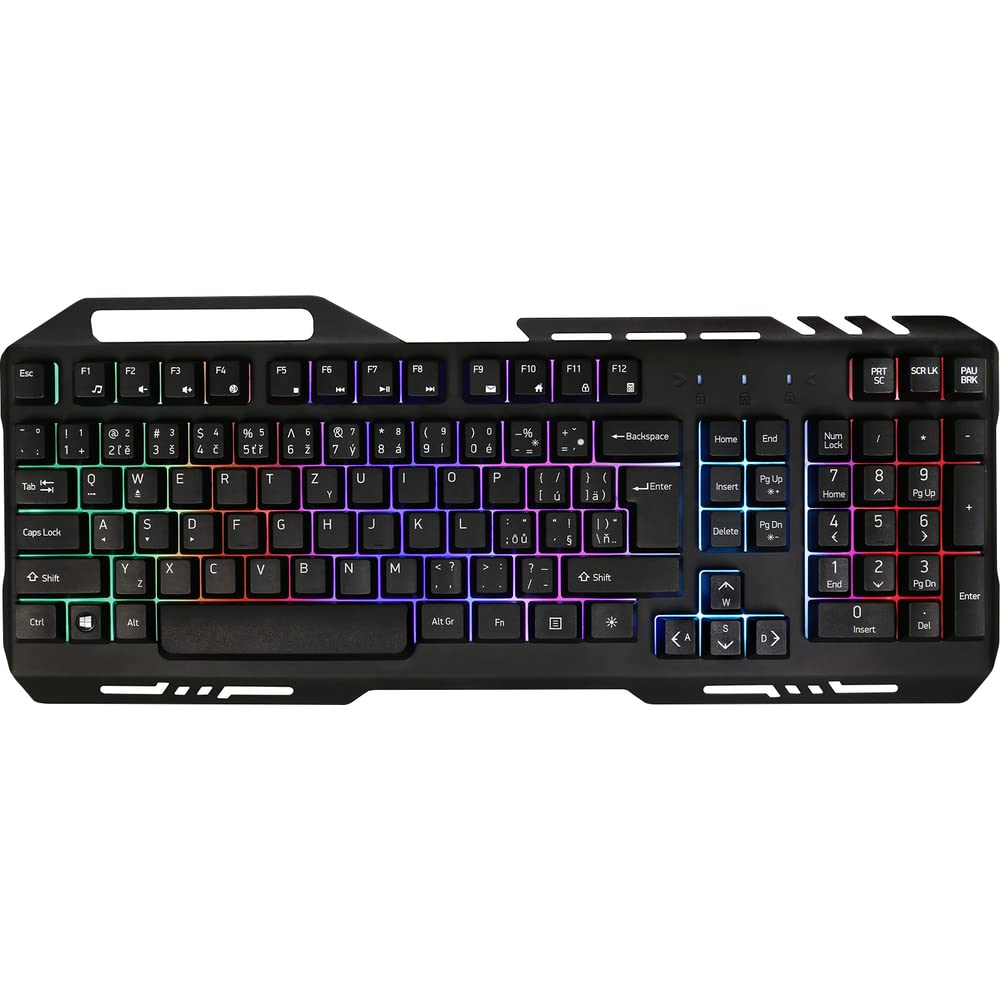
Image 1: Yenkee YKB 3200 Gaming Keyboard. This image displays the full keyboard with its metal frame and illuminated keys, highlighting the integrated smartphone holder at the top.
Гол онцлогууд:
- Metal Keyboard Design: Provides enhanced durability and a premium feel.
- Ухаалаг гар утасны нэгдсэн эзэмшигч: Conveniently located at the top of the keyboard for easy access to your mobile device.
- Durable Rubber Dome Keys: Offers a comfortable and responsive typing experience.
- Nine Rainbow Backlight Modes: Customizable lighting effects to suit your preference and gaming atmosphere.
- USB холболт: Simple plug-and-play connection to your computer.
- 1.5m Cable Length: хангадаг ampянз бүрийн тохиргоонд хүрч болно.
5. Тохиргоо
- Гарыг задлах: Гарыг савлагаанаас нь болгоомжтой салга.
- Компьютерт холбогдох: Locate an available USB port on your computer (PC or laptop). Insert the USB connector of the keyboard into the USB port.
- Драйвер суурилуулах: The keyboard is plug-and-play and typically does not require additional driver installation. Your operating system should automatically detect and install the necessary drivers.
- Байршил: Place the keyboard on a stable, flat surface. You can use the integrated smartphone holder to position your mobile device.
- Туршилтын функц: Open a text editor or browser to test if the keys are responding correctly.
6. Ашиглалтын заавар
Арын гэрлийн хяналт:
The Yenkee YKB 3200 features nine distinct rainbow backlight modes. These modes can typically be cycled through using a dedicated function key combination.
- Горим өөрчлөх: Look for a key labeled 'FN' (Function) and a key with a light bulb icon or 'Scroll Lock' / 'Pause Break'. Pressing FN + Light Bulb / Scroll Lock / Pause Break (depending on keyboard layout) will cycle through the available backlight modes.
- Гэрэлтүүлгийг тохируулах: Some keyboards allow brightness adjustment using FN + Up/Down Arrow keys. Refer to your specific keyboard layout for exact key combinations.
- Turning Backlight On/Off: A long press of the backlight control key or a specific FN combination might turn the backlight on or off.
Multimedia and Function Keys:
The keyboard may include additional function keys (F1-F12) that, when combined with the 'FN' key, provide multimedia control or quick access to applications. Common functions include:
- FN + F1-F12: Volume control, media playback, email, web browser, etc. (Specific functions vary by model).
7. Засвар үйлчилгээ
Цэвэрлэгээ:
- Ерөнхий цэвэрлэгээ: Зөөлөн, хуурай, хөвөнгүй даавуугаар гарны гадаргууг арчина.
- Тоос арилгах: Товчлуурын хоорондох тоос, хог хаягдлыг арилгахын тулд шахсан агаарыг ашиглана.
- Зөрүүд толбо: Зөрүүд толбоны хувьд бага зэрэг dampen the cloth with water or a mild, non-abrasive cleaning solution. Ensure no liquid enters the keyboard.
Хадгалах:
Удаан хугацаагаар ашиглаагүй үед гарыг сэрүүн, хуурай газар, нарны шууд тусгал болон хэт өндөр температураас хол хадгална уу.
8. Алдаа засах
| Асуудал | Боломжит шалтгаан | Шийдэл |
|---|---|---|
| Гар хариу өгөхгүй байна | Сул USB холболт, буруу USB порт, драйверын асуудал. | Ensure USB cable is securely connected. Try a different USB port. Restart your computer. |
| Арын гэрэл ажиллахгүй байна | Backlight turned off, low brightness setting. | Press the backlight control key combination (e.g., FN + Scroll Lock) to cycle modes or adjust brightness. |
| Түлхүүрүүд наалдамхай эсвэл хариу өгөхгүй байна | Түлхүүр доорх шороо эсвэл хог хаягдал. | Clean the keyboard using compressed air and a soft cloth. |
9. Техникийн үзүүлэлтүүд
| Онцлог | Тодорхойлолт |
|---|---|
| Брэнд | Yenkee |
| Загварын дугаар | YKB 3200 |
| Холболтын технологи | USB |
| Кабелийн урт | 1.5 метр |
| Гарын тайлбар | Тоглоом |
| Backlight Theme | Rainbow (9 modes) |
| Тохиромжтой төхөөрөмжүүд | Зөөврийн компьютер, компьютер |
| Бүтээгдэхүүний хэмжээс | 45.2 x 20 x 3.5 см |
| Бүтээгдэхүүний жин | 841 гр |
| Оруулсан бүрэлдэхүүн хэсгүүд | USB cable (attached) |
10. Баталгаат хугацаа ба дэмжлэг
Yenkee products are designed and manufactured to the highest quality standards. For information regarding warranty terms and conditions, please refer to the warranty card included with your purchase or visit the official Yenkee website. For technical support or service inquiries, please contact your local retailer or the Yenkee customer support team.