
Танилцуулга
Thank you for choosing the MARVO KG925G Mechanical Gaming Keyboard. This manual provides essential information for setting up, operating, maintaining, and troubleshooting your new keyboard. Please read this manual carefully before use to ensure optimal performance and longevity of your device.
Багцын агуулга
Бүх зүйл багцад байгаа эсэхийг шалгана уу:
- MARVO KG925G Mechanical Gaming Keyboard
- Хэрэглэгчийн гарын авлага (энэ баримт бичиг)
Тохиргоо
Системийн шаардлага
- Үйлдлийн систем: Windows 8 ба түүнээс дээш
- USB 2.0 порт ашиглах боломжтой
Гарыг холбох
- Компьютер дээрээ байгаа USB 2.0 портыг олоорой.
- Plug the USB connector of the MARVO KG925G keyboard into the USB port.
- Үйлдлийн систем нь шаардлагатай драйверуудыг автоматаар илрүүлж суулгана. Энэ процесс хэдэн минут үргэлжилж магадгүй.
- Once the drivers are installed, the keyboard's backlighting will illuminate, indicating it is ready for use.
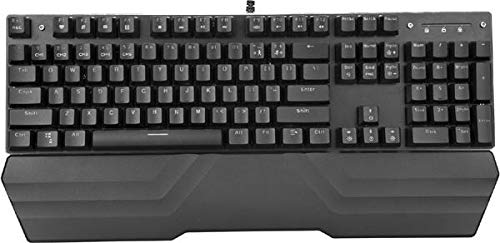
Image: The MARVO KG925G Mechanical Gaming Keyboard with its USB cable connected, ready for use. The keyboard features a wrist rest and illuminated keys.
Ашиглалтын заавар
Гарны үндсэн функцууд
The MARVO KG925G functions as a standard QWERTY keyboard for typing and general computer use.
Мультимедиа түлхүүрүүд
The keyboard includes dedicated multimedia functions, typically accessed via the Fn key combined with the F-keys (F1-F12). Refer to the keycap legends for specific functions such as volume control, media playback, and launching applications.
- Fn + F1-F12: Access various multimedia and system functions.
Арын гэрэлтүүлгийн хяналт
The MARVO KG925G features customizable backlighting. Specific key combinations are used to change lighting modes, brightness, and speed. Consult the keyboard's keycap legends or the manufacturer's website for detailed instructions on advanced lighting customization.
- Гэрэлтүүлгийн горимууд: Typically cycled using a dedicated key or Fn + a specific key (e.g., Scroll Lock, Pause Break, or a dedicated lighting key).
- Гэрэлтүүлгийн тохируулга: Often controlled by Fn + Up/Down arrow keys.
Засвар үйлчилгээ, арчилгаа
Тохиромжтой засвар үйлчилгээ нь таны гарны урт наслалт, гүйцэтгэлийг баталгаажуулдаг.
- Цэвэрлэгээ: Use a soft, dry cloth to wipe the keyboard surface. For deeper cleaning, use a can of compressed air to remove dust and debris from between the keycaps. Avoid using harsh chemicals or abrasive materials.
- Асгаралт: In case of liquid spills, immediately unplug the keyboard from your computer. Turn it upside down to drain any liquid and allow it to dry completely for at least 24-48 hours before reconnecting. Do not attempt to use the keyboard while it is wet.
- Хадгалах: Гарыг нарны шууд тусгал, хэт температураас хол, сэрүүн, хуурай газар хадгална.
Алдааг олж засварлах
If you encounter issues with your MARVO KG925G keyboard, refer to the following common solutions:
| Асуудал | Боломжит шийдэл |
|---|---|
| Гар хариу өгөхгүй байна. |
|
| Backlighting is not working. |
|
| Keys are not registering correctly. |
|
Үзүүлэлтүүд
- Загвар: KG925G
- Брэнд: MARVO
- Холболт: USB 2.0
- Гарны төрөл: Механик тоглоомын гар
- Онцлогууд: Illumination, Wrist Rest, Multimedia Keys
- Тохиромжтой үйлдлийн систем: Windows 8 ба түүнээс дээш
- Хэмжээ: Ойролцоогоор 47.5 x 18.7 x 8.4 см (18.7 x 7.4 x 3.3 инч)
Баталгаат болон дэмжлэг
For warranty information and technical support, please refer to the warranty card included with your product or visit the official MARVO webсайт. Баталгаат нэхэмжлэл гаргахын тулд худалдан авалтаа нотлох баримтаа хадгалаарай.