
1. Танилцуулга
Thank you for choosing the ILIFE V7s Plus Hybrid Robot Vacuum Cleaner. This manual provides essential information for the safe operation, maintenance, and troubleshooting of your device. Please read it thoroughly before using the robot and keep it for future reference.
The ILIFE V7s Plus is designed to provide efficient cleaning for various floor types, offering both vacuuming and mopping functionalities to keep your home spotless.
2. Аюулгүй ажиллагааны заавар
Гэмтэл, гэмтлийн эрсдлийг бууруулахын тулд дараах аюулгүй байдлын урьдчилан сэргийлэх арга хэмжээг дагаж мөрдөнө үү.
- Read all instructions before operating the robot.
- Хүүхдүүдэд роботтой тоглохыг бүү зөвшөөр. Робот ажиллаж байх үед хүүхэд, тэжээвэр амьтдыг хянах.
- Use only the original power adapter and charging dock provided by ILIFE.
- Роботыг нойтон орчинд эсвэл шатамхай материалын ойролцоо ажиллуулж болохгүй.
- Засвар үйлчилгээ хийхээсээ өмнө роботыг унтрааж, залгуураас нь салгасан эсэхээ шалгаарай.
- Avoid using the robot on high-pile carpets or uneven surfaces.
- Үс, сул хувцас, хуруу, биеийн бүх хэсгийг нүх, хөдлөх хэсгүүдээс хол байлга.
3. Бүтээгдэхүүн дууссанview
The ILIFE V7s Plus is equipped with advanced features for comprehensive cleaning.
3.1 Гол онцлогууд
- i-Dropping Technology: The water tank sprinkles water only when the V7s Plus is moving, minimizing water consumption for thorough wet cleaning. It stops dispensing water when the robot stops, preventing floor damage and mechanical overload.
- Smart Dustbin Detector: This technology alerts you if the dustbin is not installed correctly, preventing the robot from sucking dirt in and causing mechanical damage.
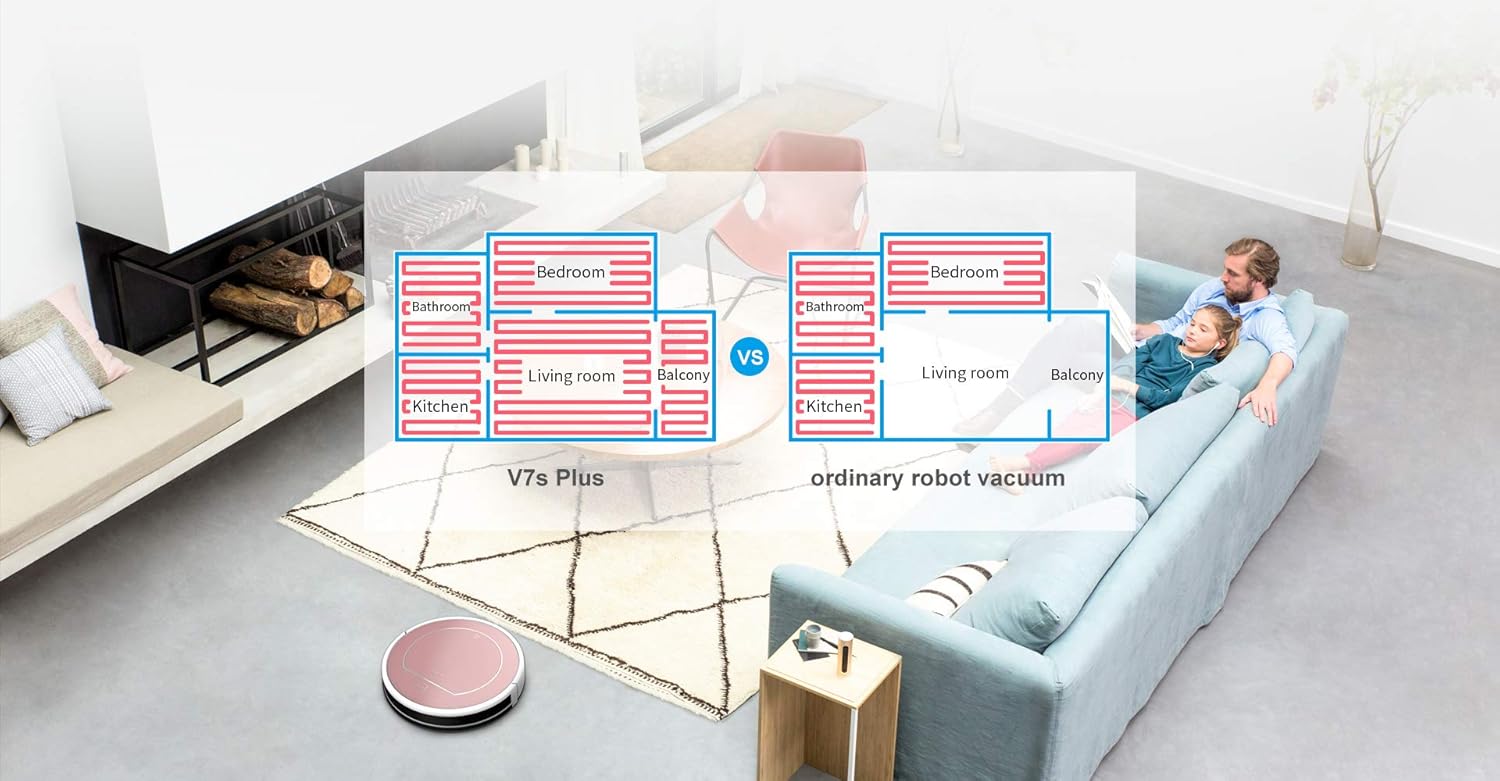
- Цэвэрлэх хоёр горим: The V7s Plus offers both vacuuming and mopping. Dirt and dust are extracted by a combination of brush and suction into the dustbin, while stains are removed by the microfiber mop cloth.
- Ухаалаг мэдрэгч: Equipped with intelligent sensors and a slim profile, the V7s Plus can clean under most furniture and effectively prevent falls from stairs or ledges.
- RoadRover Wheels: Designed to easily climb a 15-degree slope and navigate over most obstacles.
3.2 Бүрэлдэхүүн хэсэг

Зураг 3.2.1: The ILIFE V7s Plus robot vacuum, demonstrating its i-Dropping Technology with the water tank and microfiber mop cloth.

Зураг 3.2.2: A hand inserting the dustbin into the ILIFE V7s Plus, highlighting the smart dustbin detector feature.
Зураг 3.2.3: The underside of the ILIFE V7s Plus, illustrating its two cleaning modes with the main brush, side brushes, dustbin, and water tank.

Зураг 3.2.4: The ILIFE V7s Plus navigating around furniture and avoiding stairs, showcasing its smart sensor capabilities.

Зураг 3.2.5: Нарийвчилсан view of the ILIFE V7s Plus underside, highlighting the RoadRover wheels and the microfiber mop cloth for enhanced performance.
4. Тохиргоо
4.1 Савлах
- Сав баглаа боодолоос бүх бүрэлдэхүүн хэсгүүдийг болгоомжтой арилгана.
- Remove any protective films or stickers from the robot and charging dock.
- Ensure all accessories are present: robot, charging dock, power adapter, remote control, cleaning tool, side brushes, dustbin, water tank, mop cloth.
4.2 Роботыг цэнэглэх
- Цэнэглэх цэгийг задгай талбайд хананд нааж байрлуулж, хажуу талаас нь 1 метр, урд талаас нь 2 метрийн дотор ямар ч саад тотгор байхгүй эсэхийг шалгаарай.
- Цахилгаан адаптерийг цэнэглэх цэгт холбоод цахилгааны залгуурт залгана уу. Док дээрх заагч гэрэл асна.
- Place the robot onto the charging dock, ensuring the charging contacts align. The robot will emit a sound, and the indicator light on the robot will flash, indicating it is charging.
- Fully charge the robot for at least 5-6 hours before first use.
4.3 Хажуугийн сойз суурилуулах
Хажуугийн сойзнуудыг роботын доод хэсэгт байрлах тулгуурууд дээр байрандаа товших хүртэл дарна уу.
4.4 Цэвэрлэгээнд бэлтгэх
- Тоос сороход: Ensure the dustbin is properly installed.
- Ариутгалын хувьд: Fill the water tank with clean water. Attach the mop cloth to the water tank. Insert the water tank assembly into the robot.
5. Ашиглалтын заавар
5.1 Цэвэрлэгээ эхлүүлэх/зогсоох
- Эхлэх: Press the 'CLEAN' button on the robot or the remote control. The robot will begin cleaning in Auto mode.
- Түр зогсоох: Press the 'CLEAN' button again or the 'Pause' button on the remote control.
- Зогсох: Press the 'CLEAN' button for 3 seconds or the 'Power' button on the remote control.
5.2 цэвэрлэх горим
The V7s Plus offers multiple cleaning modes:
- Авто горим: The robot automatically cleans the area, adjusting its path based on obstacles and dirt levels.
- Spot горим: Робот нь өтгөрүүлсэн шороонд тохиромжтой спираль хэлбэрээр тодорхой хэсгийг цэвэрлэдэг.
- Ирмэгийн горим: Робот нь хана, тавилганы ирмэгийг цэвэрлэдэг.
- Угаах горим: When the water tank is installed, the robot performs wet mopping.
5.3 Төлөвлөлт
The robot can be scheduled to clean at a specific time each day. Refer to the remote control instructions for setting the current time and scheduling cleaning tasks.
5.4 Алсын удирдлага
Use the remote control to start/stop cleaning, select cleaning modes, direct the robot manually, and set schedules.
6. Засвар үйлчилгээ
Regular maintenance ensures optimal performance and extends the lifespan of your ILIFE V7s Plus.
6.1 Хогийн савыг хоослох
Empty the dustbin after each use. Press the release button to remove the dustbin, open its lid, and discard the collected debris.
6.2 Шүүлтүүрийг цэвэрлэх
Remove the primary filter and high-efficiency filter from the dustbin. Tap them gently to remove dust. Rinse the primary filter with water if necessary, but ensure it is completely dry before reinstallation. Do not wash the high-efficiency filter.
6.3 Усны сав болон шүүрний алчуурыг цэвэрлэх
After mopping, remove the water tank. Empty any remaining water. Detach the mop cloth and wash it by hand or machine. Allow the mop cloth and water tank to air dry completely before reassembling.
6.4 цэвэрлэх сойз
- Хажуугийн сойз: Periodically remove and clean hair and debris wrapped around the side brushes. Replace them if they are worn or damaged.
- Үндсэн сойз: Remove the main brush cover and then the main brush. Use the cleaning tool to cut and remove hair and debris.
6.5 Цэвэрлэх мэдрэгч
Wipe the anti-drop sensors (located on the bottom of the robot) and the bumper sensors (on the front bumper) with a clean, dry cloth to ensure proper function.
7. Алдаа засах
If your ILIFE V7s Plus encounters an issue, refer to the following common problems and solutions:
- Робот асахгүй байна: Ensure the battery is charged. Check if the power switch is in the 'ON' position.
- Робот цэнэглэдэггүй: Verify the charging dock is powered on and the robot's charging contacts are aligned with the dock's contacts. Clean contacts if dirty.
- Робот байнга гацдаг: Clear obstacles from the cleaning path. Ensure the wheels are free of debris.
- Цэвэрлэх чадвар муу: Empty the dustbin, clean filters, main brush, and side brushes. Ensure the water tank is filled for mopping.
- Робот шатаар унаж байна: Роботын доод хэсэгт байрлах уналтын эсрэг мэдрэгчийг цэвэрлэ.
- Ер бусын дуу чимээ: Check if the main brush or side brushes are entangled with hair or debris.
Хэрэв асуудал хэвээр байвал хэрэглэгчийн тусламжтай холбогдоно уу.
8. Техникийн үзүүлэлтүүд
Below are the technical specifications for the ILIFE V7s Plus:
| Брэнд | ILIFE |
| Загвар | V7s Plus |
| Гадаргуугийн зөвлөмж | Hard floor, Carpet (thin) |
| Онцлог шинж чанарууд | Автомат, Хөнгөн |
| Өнгө | Сарнай алт |
| Хянагчийн төрөл | Алсын удирдлага |
| Өөрөө цэнэглэдэг | Тиймээ |
| Цагийн хуваарь | Тиймээ |
| Anti-dropping off & Collision | Тиймээ |
| Нойтон арчих | Тиймээ |
| Цэвэрлэх горимууд | 4 горим |
| Dustbin Detection Technology | Тиймээ |
| i-Dropping Technology | Тиймээ |
| Ажлын цаг | 110-120 минут |
| Floors Priority | Hardwood > Tile > Thin Carpet |
| Using Orientation | Тоос сорогч, цэвэрлэх |

Зураг 8.1: Feature comparison between ILIFE V7s and V7s Plus models.
9. Баталгаат хугацаа ба дэмжлэг
For warranty information, please refer to the warranty card included in your product packaging or consult the retailer from whom you purchased the ILIFE V7s Plus. For technical support or service inquiries, please contact ILIFE customer service through their official webсайт эсвэл таны бүтээгдэхүүний баримт бичигт заасан холбоо барих мэдээлэл.