
1. Танилцуулга
This manual provides instructions for the installation, operation, and maintenance of the Cisco CP-68KEM-3PCC Expansion Module. This module is designed to enhance the functionality of your Cisco IP Phone 6851 by providing additional programmable keys.
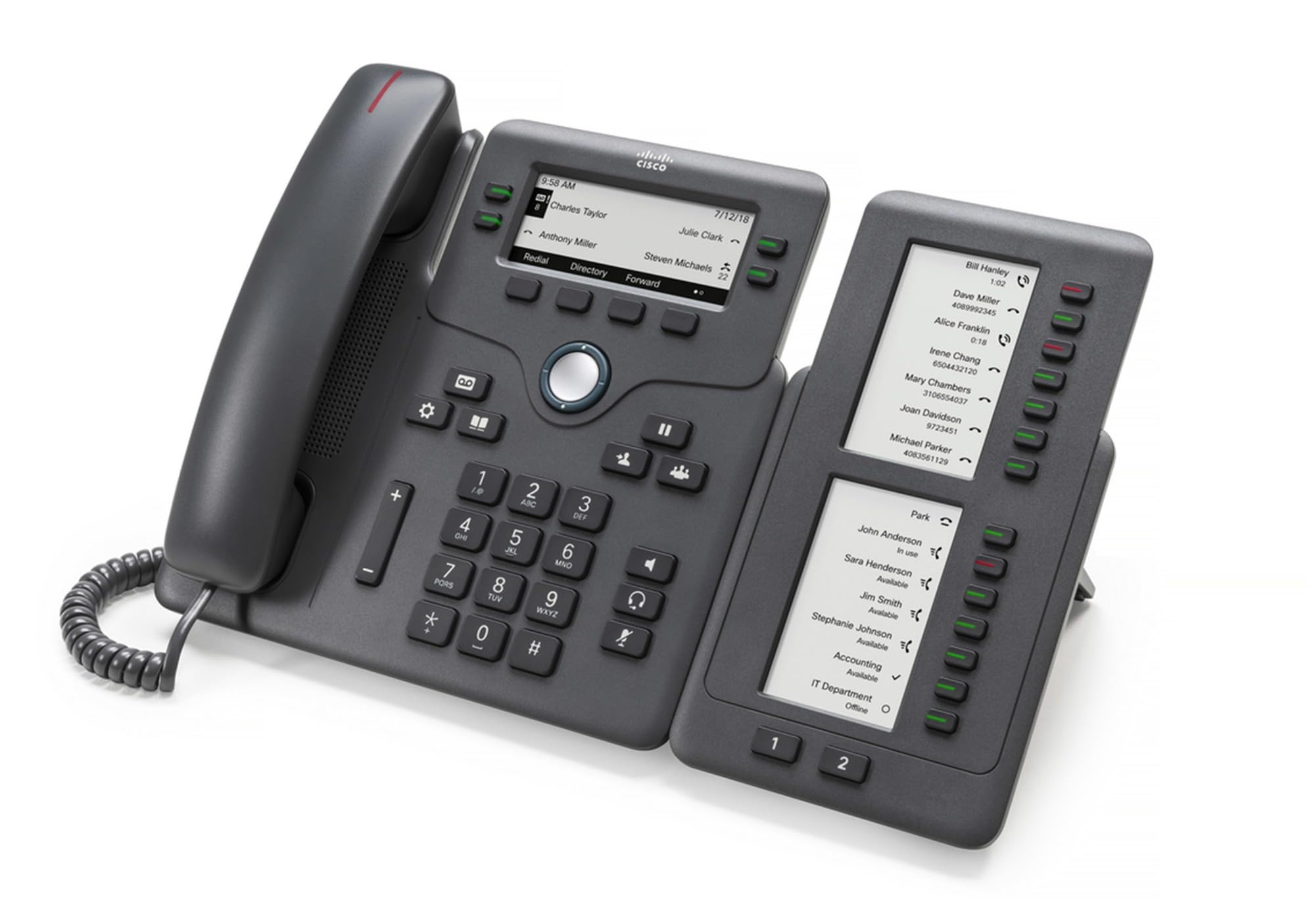
Figure 1: Cisco CP-68KEM-3PCC Expansion Module. This image shows the front view of the expansion module with its grayscale LCD screen and programmable keys.
The Cisco CP-68KEM-3PCC Expansion Module adds 14-line keys and 2-page keys, totaling 28 additional keys, with an easy-to-read grayscale LCD screen. It is ideal for monitoring and managing call status, directory numbers, and speed dial functions.
2. Хайрцагт юу байна
Хайрцагыг болгоомжтой задалж, бүх зүйл байгаа эсэхийг шалгаарай:
- Cisco CP-68KEM-3PCC Phone Expansion Module
- Connecting Cable (typically included for linking to the phone)
- Documentation (this user manual, safety information)
If any items are missing or damaged, please contact your vendor or Cisco support immediately.
3. Тохируулах заавар
Follow these steps to connect your Cisco CP-68KEM-3PCC Expansion Module to your Cisco IP Phone 6851.
- Prepare the IP Phone: Ensure your Cisco IP Phone 6851 is powered off and disconnected from the network.
- Connect the Expansion Module: Locate the expansion port on the back or side of your Cisco IP Phone 6851. Connect the provided connecting cable from the expansion module to this port.
- Холболтын аюулгүй байдлыг хангах: Санамсаргүйгээр салгахаас сэргийлж кабелийг найдвартай бэхэлсэн эсэхийг шалгаарай.
- Асаах: Reconnect your Cisco IP Phone 6851 to the network and power it on. The expansion module should be detected automatically.
- Функцийг шалгах: Once the phone has booted, check the expansion module's display and keys to ensure they are responsive.
For detailed visual instructions, refer to the official Cisco documentation or support webсайт.
4. Operating the Expansion Module
The expansion module provides additional keys for various functions, enhancing your call management capabilities.
4.1 програмчлагдах түлхүүрүүд
The 28 programmable keys (14 keys across 2 pages) can be configured for:
- Directory Numbers (DNs): Assign specific phone lines or extensions.
- Хурдан залгах: Program frequently called numbers for quick access.
- Онцлог түлхүүрүүд: Assign functions like call transfer, conference, or call park.
- Call Status Monitoring: Monitor the status of other lines (e.g., busy, ringing).
4.2 Page Navigation
Use the dedicated page keys (usually located near the display) to switch between the two pages of programmable keys. The grayscale LCD screen will update to show the labels for the currently active page.
4.3 Тохиргоо
Configuration of the programmable keys is typically managed through your organization's phone system administrator or via the web interface of the Cisco IP Phone 6851. Consult your IT department for specific configuration instructions.
5. Засвар үйлчилгээ
To ensure the longevity and optimal performance of your Cisco CP-68KEM-3PCC Expansion Module, follow these maintenance guidelines:
- Цэвэрлэгээ: Use a soft, dry, lint-free cloth to clean the exterior surfaces. For stubborn marks, slightly dampДаавууг усаар норгоно. Хүчтэй химийн бодис, зүлгүүрийн цэвэрлэгч эсвэл уусгагч хэрэглэхээс зайлсхий, учир нь эдгээр нь өнгөлгөө болон электрон эд ангиудыг гэмтээж болзошгүй.
- Байгаль орчин: Keep the module in a clean, dry environment, away from direct sunlight, excessive heat, and moisture.
- Харьцуулах: Handle the module with care. Avoid dropping it or subjecting it to strong impacts.
- Кабелийн менежмент: Ensure connecting cables are not kinked, pinched, or under strain.
There are no user-serviceable parts inside the expansion module. Do not attempt to open or repair the device yourself.
6. Алдаа засах
If you encounter issues with your expansion module, try the following troubleshooting steps:
| Асуудал | Боломжит шалтгаан | Шийдэл |
|---|---|---|
| Module not recognized by phone | Loose cable connection, phone not restarted, incompatible phone model. |
|
| Түлхүүрүүд хариу өгөхгүй байна | Software glitch, configuration issue. |
|
| Display is blank or flickering | Цахилгааны асуудал, дотоод алдаа. |
|
If these steps do not resolve the issue, please contact Cisco technical support or your authorized reseller.
7. Техникийн үзүүлэлтүүд
| Онцлог | Дэлгэрэнгүй |
|---|---|
| Загварын дугаар | CP-68KEM-3PCC |
| Брэнд | Cisco |
| Тохиромжтой төхөөрөмжүүд | Cisco IP утас 6851 |
| Өнгө | Хар |
| Материал | Металл |
| Хэмжээ (LxWxH) | 5.1 x 10.2 x 20.3 см |
| Эрчим хүчний эх үүсвэр | Corded (powered via host IP Phone) |
| Түлхүүрүүдийн тоо | 28 (14 keys across 2 pages) |
| Дэлгэц | Саарал өнгийн LCD |
| GTIN/UPC | 889728068383 |
8. Баталгаат хугацааны мэдээлэл
The Cisco CP-68KEM-3PCC Expansion Module comes with a Бүтээгдэхүүний 2 жилийн баталгаат хугацаа худалдан авсан өдрөөс эхлэн. Энэхүү баталгаа нь хэвийн ашиглалтын үед материал болон хийцийн согогийг хамарна. Энэ нь буруу ашиглалт, осол, зөвшөөрөлгүй өөрчлөлт, эсвэл гадны шалтгаанаас үүдэлтэй хохирлыг хамрахгүй.
For warranty claims or detailed terms and conditions, please refer to the official Cisco warranty policy available on their webсайт руу орж үзэх эсвэл худалдан авалтын цэгтэйгээ холбогдоно уу.
9. Дэмжлэг
For technical assistance, product information, or to report issues, please contact Cisco support:
- Cisco дэмжлэг Webсайт: Албан тушаалтанд зочилно уу Cisco дэмжлэг webсайт for documentation, downloads, and contact options.
- Эрх бүхий борлуулагч: Contact the reseller from whom you purchased the product.
When contacting support, please have your product model (CP-68KEM-3PCC) and serial number ready.