
1. Танилцуулга
This manual provides detailed instructions for the installation, operation, and maintenance of your EMANER Model 7042-WH Dual-Head LED Security Light. Please read this manual thoroughly before installation and retain it for future reference.

Урд view of the EMANER Dual-Head LED Security Light, highlighting its two rotatable light heads and motion sensor. A 120V warning label is visible.
2. Аюулгүй байдлын мэдээлэл
АНХААРУУЛГА: Risk of electric shock. Disconnect power at the fuse or circuit breaker before installation or servicing. All wiring connections must be in accordance with local and national electrical codes.
- Цахилгаан хангамж нь 120V AC байгаа эсэхийг шалгаарай.
- Шатамхай материалын ойролцоо суурилуулж болохгүй.
- This product is designed for outdoor use and is IP65 waterproof rated.
- Хэрэв та суулгах процессын талаар эргэлзэж байвал мэргэшсэн цахилгаанчинтай зөвлөлд.
- LED гэрлийн эх үүсвэрийг гэрэлтүүлэх үед шууд харж болохгүй.
3. Бүтээгдэхүүн дууссанview болон бүрэлдэхүүн хэсгүүд
The EMANER Model 7042-WH is a dual-head LED security light featuring a rotatable design and multiple intelligent control modes. Key components include:
- Rotatable Light Heads: Two adjustable LED light panels.
- PIR хөдөлгөөн мэдрэгч: Хөдөлгөөн илрүүлэх зориулалттай идэвхгүй хэт улаан туяаны мэдрэгч.
- Хяналтын утаснууд: For adjusting time delay and sensitivity.
- Суурилуулах тоног төхөөрөмж: Includes mounting strap, screws, and wire nuts.

A diagram providing precise measurements of the security light's length, width, height, and the dimensions of the rotatable light heads and PIR motion sensor.
4. Техникийн үзүүлэлтүүд
| Онцлог | Тодорхойлолт |
|---|---|
| Брэнд | ЭМАНЕР |
| Загварын дугаар | 7042-WH |
| Өнгө | White Fixture |
| Материал | ABS Plastic + Aluminum internal |
| Гэрлийн эх үүсвэрийн төрөл | LED |
| Ватtage | 28 ватт |
| Гэрэлтүүлэг | 2800 люмен |
| Өнгөний температур | 5000К Өдрийн цагаан |
| Ботьtage | 120 вольт |
| Усны эсэргүүцлийн түвшин | IP65 Усны хамгаалалттай |
| Мэдрэгч өнцөг | 180 градус |
| Илрүүлэх зай | 20-70 feet (adjustable) |
| Суурилуулах төрөл | Хананд бэхэлгээ, Eave/Soffit бэхэлгээ |
| Бүтээгдэхүүний хэмжээс | 9"L x 7.4"W x 6.4"H |
| Зүйлийн жин | 1.74 фунт |
5. Тохиргоо ба суурилуулалт
This LED security light is designed for easy installation. Follow these steps carefully:
5.1 Урьдчилсан суурилуулалт
- Цахилгааныг унтраах: Disconnect power at the circuit breaker or fuse box before beginning installation.
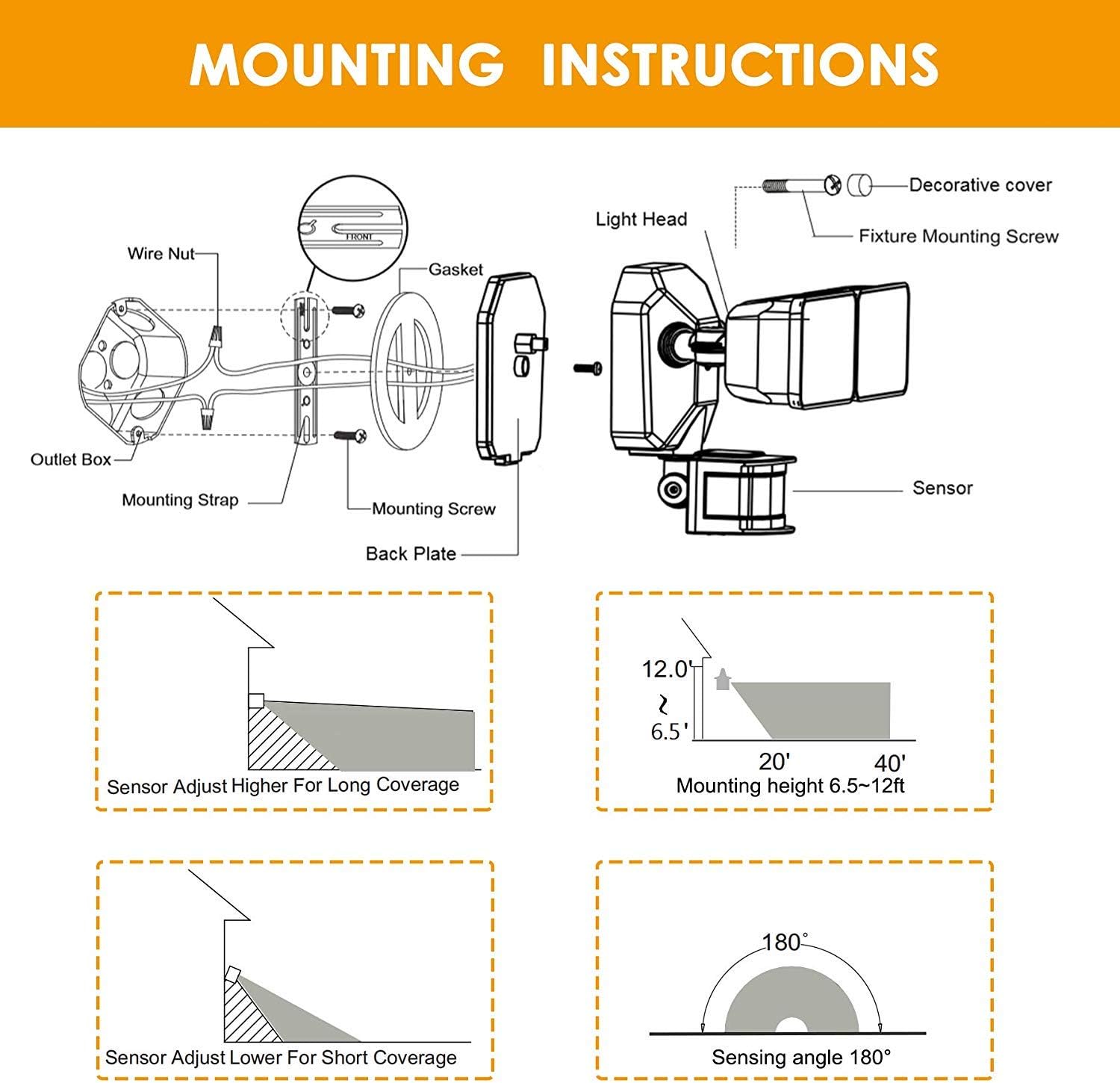
- Select mounting location: Choose a wall or eave/soffit location that provides the desired coverage and is within reach of existing wiring. Recommended mounting height is 6.5-12 feet.
- Агуулгыг задлах: Ensure all components are present: light fixture, mounting strap, screws, and wire nuts.
5.2 Утас ба угсралт
- Attach the mounting strap to your existing electrical outlet box using the provided screws.
- Цахилгааны утсыг холбоно уу:
- -г холбоно уу хар бэхэлгээнээс (гүйдэлтэй) утас хар (Live) wire from the outlet box.
- -г холбоно уу цагаан (Саармаг) утас бэхэлгээнээс цагаан (Neutral) wire from the outlet box.
- -г холбоно уу green/bare copper (Газардсан) утас бэхэлгээнээс green/bare copper (Ground) wire from the outlet box.
- Carefully tuck the wires into the outlet box.
- Align the light fixture with the mounting strap and secure it with the decorative cover and fixture mounting screw.
- Гэрлийн толгой болон хөдөлгөөн мэдрэгчийг өөрийн хүссэн өнцгөөр тохируулна уу.
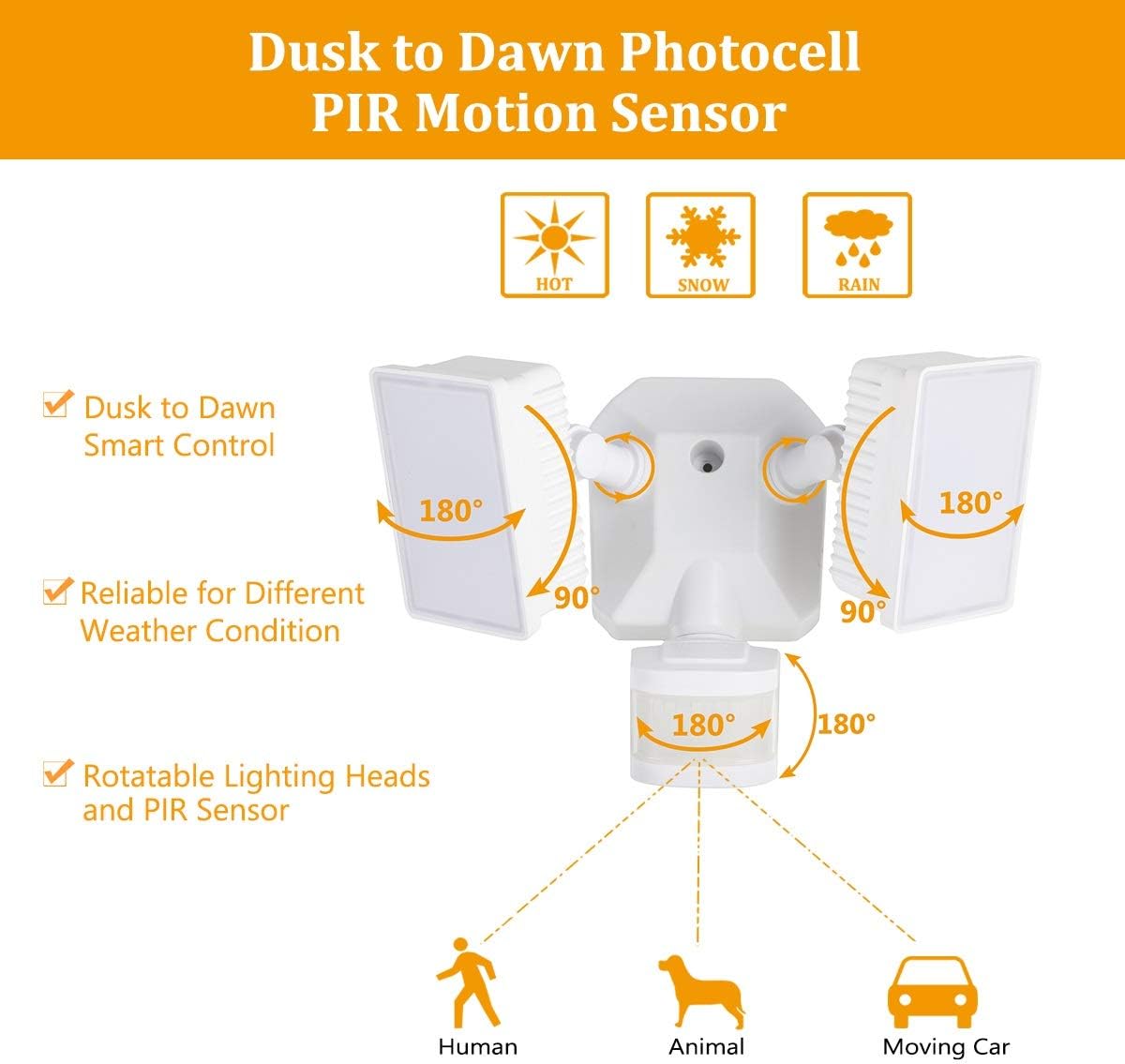
Diagram for installing the security light, detailing wire connections, mounting strap, back plate, and attaching the light head and sensor.
Illustrations showing two common installation methods: mounting the light under an eave or soffit, and mounting it directly onto a wall.
6. Үйлдлийн горим ба тохиргоо
The security light features a control panel with dials for TIME and SENSITIVITY, and a slide switch for selecting operating modes. All modes operate only at night or in dark environments, automatically turning off at dawn.

An infographic explaining the various operating modes: TEST, AUTO, Motion Sensor, 6 Hours, and Dusk to Dawn (PC) modes, along with their respective time delay and sensitivity settings.
6.1 Хяналтын самбар дээрview

Нарийвчилсан view of the control panel, showing the 'TIME' dial (5S, 3MIN, TEST) and 'SENSITIVITY' dial (+/-) for adjusting light duration and motion detection range.
- ЦАГИЙН Залгах: Adjusts how long the light stays on after motion is detected (5 seconds to 3 minutes). The 'TEST' setting is for initial setup.
- МЭДРЭМЖИЙН Залгах: Adjusts the motion sensor's detection range (Low to High sensitivity, 20-70 feet).
- Mode Slide Switch: Selects between AUTO, OFF (Motion Sensor), 6H (6 Hours), and PC (Dusk to Dawn Stay On) modes.
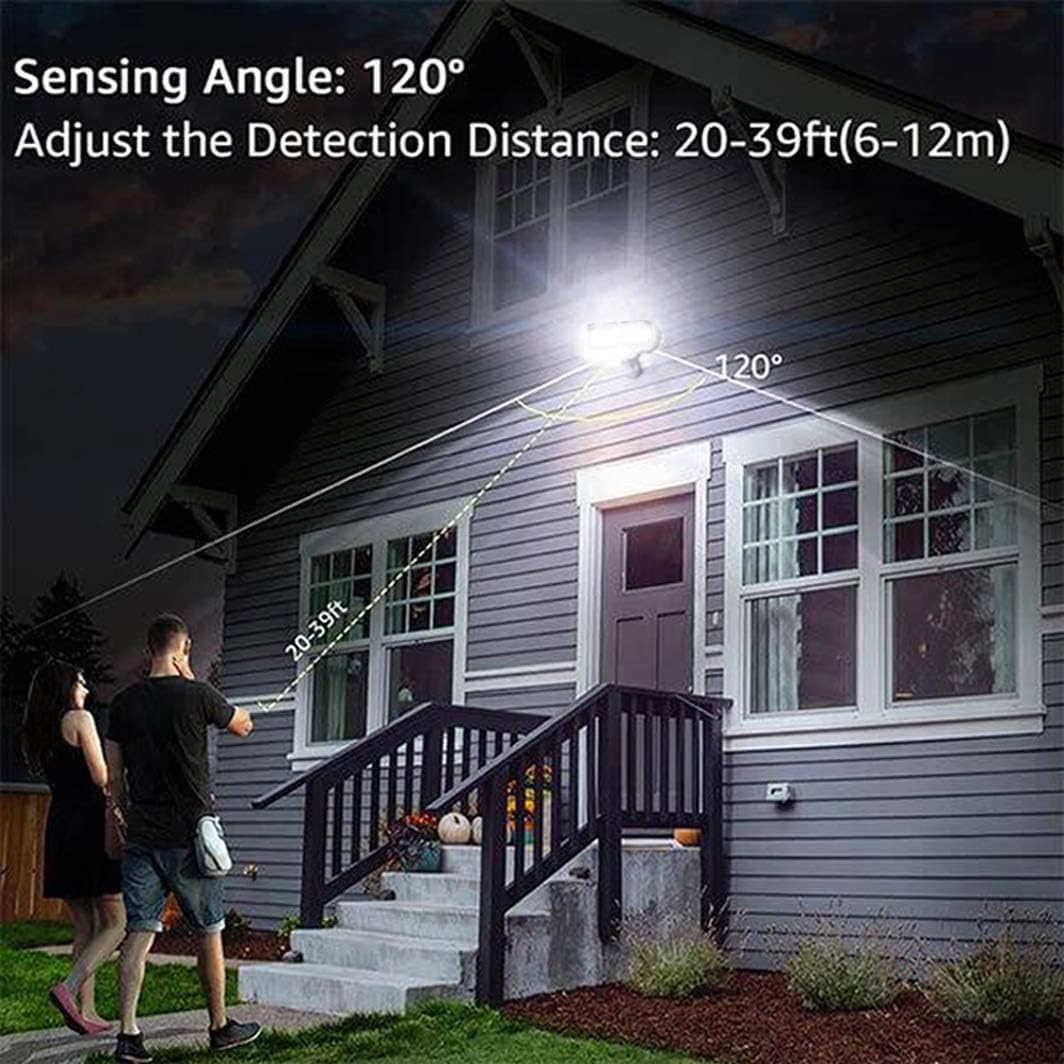
An illustration demonstrating the motion sensor's 120-degree sensing angle and adjustable detection distance of 20-39 feet (6-12 meters) from a mounting height of 6.5-12 feet.
6.2 Үйлдлийн горимууд
- ТЕСТ горим: (Slide switch to 'TEST' on TIME dial) This mode is for testing after installation. When connected to AC power, the light will turn on for 5 seconds based on the time delay setting.
- AUTO Dim Light Mode: (Slide switch to 'AUTO') The security light turns on with dim light at dusk. When motion is detected, it switches to 100% brightness. After no motion is detected for the set time delay (5 seconds to 3 minutes), it returns to dim light. Automatically turns off at dawn.
- Motion On/Off Mode: (Slide switch to 'OFF') The security flood light only turns on at 100% brightness when motion is activated. It automatically turns off when no motion is detected for the set time delay. Automatically turns off at dawn.
- 6 Hours Mode: (Slide switch to '6H') The flood light turns on at 100% brightness and stays on for 6 hours. After 6 hours, it automatically switches to 'AUTO Dim Light Mode'. Automatically turns off at dawn.
- Dusk to Dawn Stay On Mode (PC Mode): (Slide switch to 'PC') The motion security light turns on with bright light (100% brightness) and stays on all night. It automatically turns off in the daytime.
7. Засвар үйлчилгээ
Regular maintenance ensures optimal performance and longevity of your EMANER LED Security Light.
- Цэвэрлэгээ: Гэрлийн толгой болон хөдөлгөөн мэдрэгчийн линзийг зөөлөн, d аргаар үе үе цэвэрлэж байгаарай.amp даавуу. Зүлгүүрийн цэвэрлэгч, уусгагчийг бүү ашигла.
- Шалгалт: Жил бүр утас, бэхэлгээний элэгдэл, эвдрэл, холболт сул байгаа эсэхийг шалгана.
- Хэрэглэгчийн засвар үйлчилгээ хийх боломжтой эд анги байхгүй: The LED light source is non-removable and not user-serviceable. Do not attempt to open the light heads.
8. Алдаа засах
If you encounter issues with your security light, refer to the following common problems and solutions:
| Асуудал | Боломжит шалтгаан | Шийдэл |
|---|---|---|
| Шөнийн цагаар гэрэл асдаггүй. | 1. Цахилгаан унтарсан. 2. Photocell sensor is detecting ambient light. 3. Цахилгааны утастай холбоотой асуудал. | 1. Хэлхээ таслагч/гал хамгаалагчийг шалгана уу. 2. Ensure the sensor is not obstructed or exposed to other light sources. 3. Verify all wiring connections are secure. |
| Гэрэл тасралтгүй асдаг. | 1. Mode set to 'PC' (Dusk to Dawn Stay On). 2. Constant motion detected. 3. Утасны холболтын алдаа. | 1. Change mode to 'AUTO' or 'OFF'. 2. Adjust sensor sensitivity or angle to avoid constant triggers. 3. Утасыг дахин шалгана уу. |
| Гэрэл анивчих эсвэл хурдан асах/унтраах. | 1. Intermittent power supply. 2. Sensor interference. 3. Faulty unit. | 1. Check power connections. 2. Ensure no objects are moving within the sensor's range. 3. Асуудал хэвээр байвал хэрэглэгчийн тусламжтай холбогдоно уу. |
| Хөдөлгөөн мэдрэгчийг илрүүлэхгүй байна. | 1. Мэдрэмжийг хэт бага тохируулсан. 2. Sensor obstructed or misaligned. 3. Temperature too high (reduces PIR effectiveness). | 1. Increase SENSITIVITY setting. 2. Clear obstructions and adjust sensor angle. 3. This is normal behavior in very hot weather. |
9. Баталгаат хугацааны мэдээлэл
The EMANER Model 7042-WH LED Security Light comes with a Үйлдвэрлэгчийн 2 жилийн баталгаат хугацаа. Энэхүү баталгаа нь ердийн ашиглалтын үед хийгдсэн материал, хийцийн согогийг хамарна. Баталгаат заргад зориулж худалдан авалтаа нотлох баримтаа үлдээнэ үү.
10. Хэрэглэгчийн дэмжлэг
For technical assistance, warranty claims, or any questions regarding your EMANER product, please contact EMANER customer service. You can typically find contact information on the product packaging or through the retailer where the product was purchased.
Alternatively, you may visit the official EMANER brand store online or use the 'Ask a question' feature on the product's retail page.