
1. Танилцуулга
Thank you for choosing the Targus W620 Wireless Optical Mouse. This manual provides detailed instructions for setting up, operating, and maintaining your mouse to ensure optimal performance and longevity. The Targus W620 offers reliable 2.4 GHz wireless connectivity, a precise 1600 DPI optical sensor, and a compact design suitable for both office and mobile use.
2. Багцын агуулга
Дараах зүйлсийн багцад байгаа эсэхийг шалгана уу.
- Targus W620 Wireless Optical Mouse
- USB хүлээн авагч
- 2 х AAA батерей
3. Бүтээгдэхүүн дууссанview
Familiarize yourself with the components of your Targus W620 Wireless Optical Mouse.
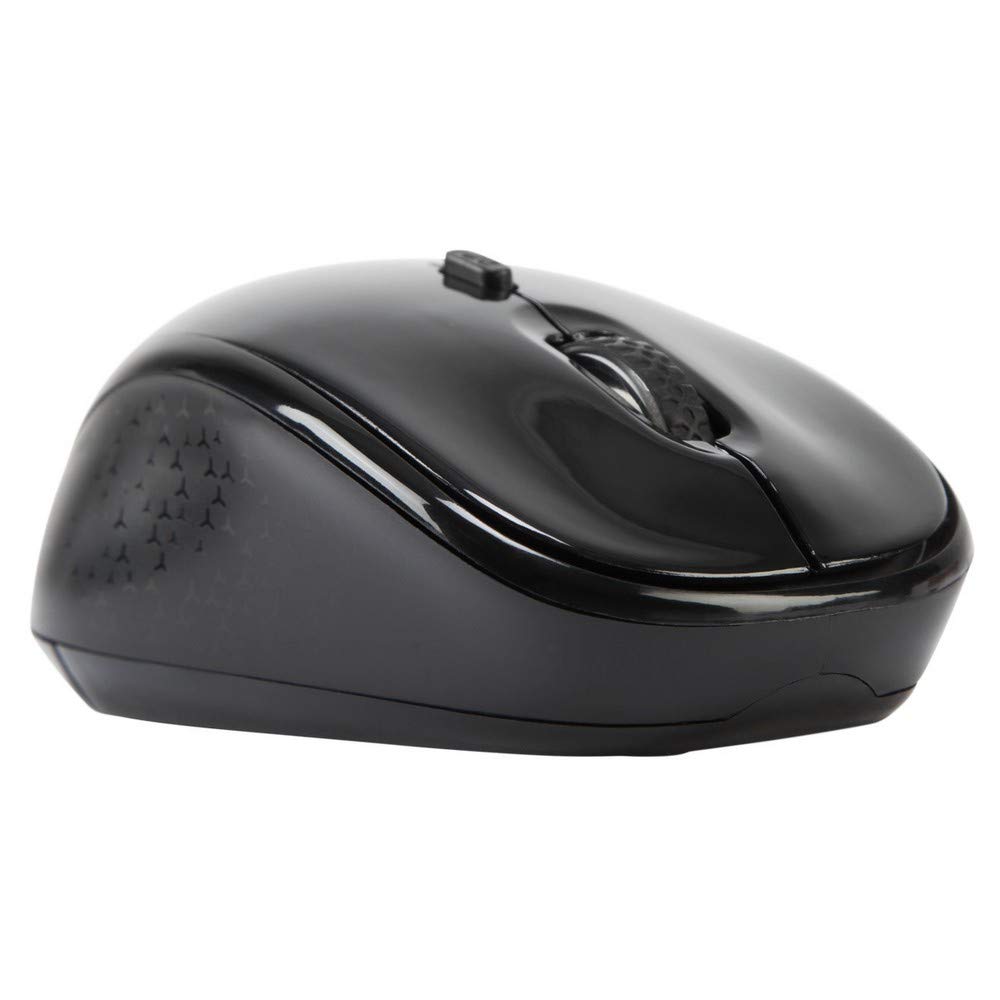
Зураг 3.1: Топ view of the Targus W620 Wireless Optical Mouse. This image displays the primary buttons and scroll wheel.
- Зүүн товшилтын товчлуур: Стандарт үндсэн товшилтын функц.
- Баруун товчлуур дээр дарна уу: Стандарт хоёрдогч товшилтын функц.
- Гүйлгэх дугуй: Босоо гүйлгэх, дунд товших функцэд зориулагдсан.
- DPI товчлуур: Хулганы мэдрэмжийг (DPI) тохируулна.
- Оптик мэдрэгч: Located on the bottom, detects mouse movement.
- Зайны тасалгаа: Located on the bottom, holds two AAA batteries.
- USB хүлээн авагчийн сан: A dedicated slot on the bottom for storing the USB receiver when not in use.

Зураг 3.2: Доод талд view of the mouse, highlighting the battery compartment and optical sensor.
4. Тохируулах заавар
Follow these steps to set up your Targus W620 Wireless Optical Mouse:
- Батерейг суулгах:
- Хулганы доод хэсэгт зайны тасалгааны тагийг олоорой.
- Тагийг нь нээнэ үү.
- Хоёр AAA батерейг зөв туйлшруулж (+/-) оруулаарай.
- Зайны тасалгааны тагийг сайтар хаа.
- USB хүлээн авагчийг холбоно уу:
- The USB receiver is typically stored in a slot on the bottom of the mouse for transport. Gently remove it.
- USB хүлээн авагчийг компьютер дээрээ байгаа USB порт руу холбоно уу.

Зураг 4.1: The mouse with its USB receiver, ready for connection.
- Асаах:
- There is no explicit power switch on this model; the mouse activates upon movement and connection.
- Таны компьютер шаардлагатай драйверуудыг автоматаар илрүүлж суулгах ёстой. Үүнд хэдэн хором зарцуулагдаж магадгүй.
- Once drivers are installed, the mouse is ready for use.
5. Ашиглалтын заавар
The Targus W620 Wireless Optical Mouse is designed for intuitive use. Here are its primary functions:
- Үндсэн навигаци: Дэлгэц дээрх курсорыг удирдахын тулд хулганаа хавтгай гадаргуу дээр хөдөлгөнө үү.
- Зүүн товшилт: Зүйлсийг сонгох, нээхэд ашиглах files, эсвэл функцийг идэвхжүүлэх.
- Баруун товшино уу: Use for accessing context menus or secondary functions.
- Гүйлгэх дугуй: Rotate the wheel to scroll vertically through documents and web pages. Press the scroll wheel for a middle-click function, often used for opening links in new tabs or auto-scrolling.
- DPI тохируулга: Press the DPI button (located behind the scroll wheel) to cycle through the available DPI settings (800, 1200, 1600 DPI). This changes the sensitivity of the mouse cursor. A higher DPI means the cursor moves further with less physical mouse movement.
6. Засвар үйлчилгээ
Тохиромжтой засвар үйлчилгээ нь хулганы урт наслалт, гүйцэтгэлийг баталгаажуулдаг.
- Цэвэрлэгээ: Use a soft, dry, lint-free cloth to clean the exterior of the mouse. For stubborn dirt, slightly dampдаавуугаар усаар. Хүчтэй химийн бодис, зүлгүүрийн цэвэрлэгч хэрэглэхээс зайлсхий.
- Оптик мэдрэгч: Keep the optical sensor area on the bottom of the mouse clean and free from dust or debris to ensure accurate tracking.
- Зай солих: When the mouse performance degrades or stops responding, it is likely time to replace the batteries. Follow the steps in Section 4.1 to replace the two AAA batteries.
- Хадгалах: When transporting or storing the mouse, always place the USB receiver back into its dedicated storage slot on the bottom of the mouse to prevent loss.
7. Алдаа засах
If you encounter issues with your Targus W620 mouse, try the following solutions:
| Асуудал | Боломжит шийдэл |
|---|---|
| Mouse not responding or cursor not moving. |
|
| Курсорын хөдөлгөөн тогтворгүй эсвэл үсрэлттэй байна. |
|
| DPI товчлуур нь мэдрэг чанарыг өөрчлөхгүй байна. |
|
| Утасгүй холболтын асуудал. |
|
8. Техникийн үзүүлэлтүүд
| Брэнд | Таргус |
| Загварын дугаар | AMW620AP |
| Холболтын технологи | 2.4 GHz утасгүй (Радио давтамж) |
| Хөдөлгөөнийг илрүүлэх технологи | Optical (BlueTrace Technology) |
| DPI түвшин | 800 / 1200 / 1600 DPI (Тохируулж болно) |
| Товчлуурын тоо | 4 (Зүүн, баруун, гүйлгэх дугуй, DPI) |
| Гарын чиг баримжаа | Right (Comfortable for ambidextrous use) |
| Эрчим хүчний эх үүсвэр | 2 x AAA батерей (дагсан) |
| Зүйлийн жин | 26 грамм |
| Үйлдлийн системийн нийцтэй байдал | Linux, Windows XP (Compatible with modern Windows and macOS) |
| Техник хангамжийн платформ | Mac, PC |
| Өнгө | Хар |
9. Баталгаат хугацаа ба дэмжлэг
Баталгаат мэдээлэл: The Targus W620 Wireless Optical Mouse comes with a Үйлдвэрлэгчийн 3 жилийн баталгаат хугацаа худалдан авсан өдрөөс. Энэхүү баталгаа нь ердийн ашиглалтын үед хийгдсэн материал, хийцийн согогийг хамарна. Баталгаат заргад зориулж худалдан авалтаа нотлох баримтаа үлдээнэ үү.
Хэрэглэгчийн дэмжлэг: For technical assistance, troubleshooting beyond this manual, or warranty inquiries, please visit the official Targus website or contact their customer support service. Refer to the contact information provided with your product packaging or on the Targus official webсайт.