
1. Танилцуулга
This manual provides detailed instructions for the installation, operation, and maintenance of your ESX VN715-E39-DAB In-Car Navigation and Multimedia System. Please read this manual thoroughly before using the device to ensure proper functionality and to prevent damage. Keep this manual for future reference.
2. Бүтээгдэхүүн дууссанview болон онцлог
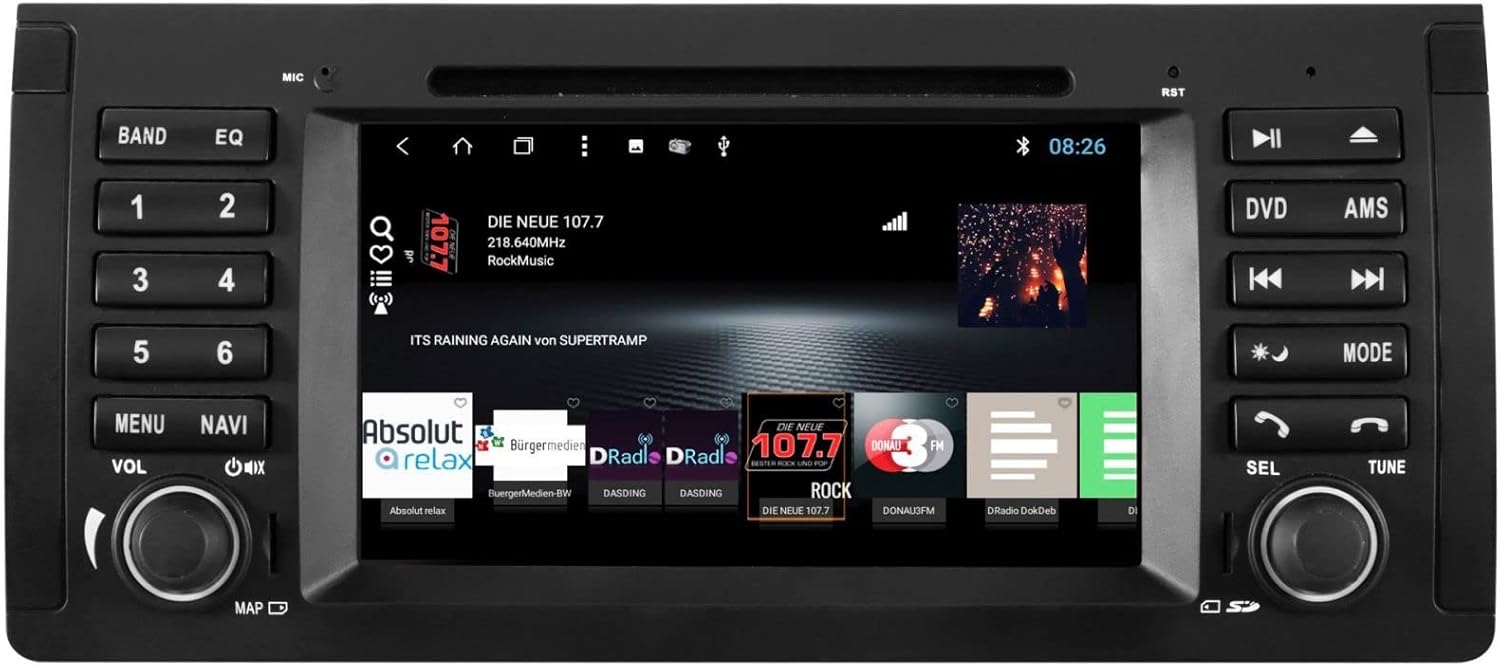
The ESX VN715-E39-DAB is an advanced in-car multimedia system designed to enhance your driving experience with navigation, entertainment, and connectivity features. It integrates seamlessly into compatible BMW vehicles.
Гол онцлогууд:
- High-Resolution 8-inch Touchscreen: Provides clear visuals and intuitive control.
- Advanced Android i15 Operating System: Offers a familiar and customizable user interface.
- Google Maps Navigation: Supports both online and offline navigation for reliable route guidance.
- Mobile Internet Connectivity: Connects via Wi-Fi hotspot for online services.
- DAB+ Дижитал Радио: Includes a DAB antenna for high-quality digital radio reception with station logos.
- AM/FM Radio with RDS: Standard analog radio reception with Radio Data System functionality.
- Multi-format DVD Player: Supports DVD, DVD-R/RW, DVD+R/RW, VCD, CD, CD Text, CD-R/RW, and MP3 formats.
- Bluetooth Hands-Free Kit: Enables safe phone calls and audio streaming with an internal microphone and optional external microphone connection.
- Ухаалаг гар утасны интеграци: Connect iPhone or Android smartphones via USB for various functions.
- Дуут удирдлага: Utilize voice commands through a connected smartphone.
- Аудио гаралт: Урьдчиланamplifier outputs for front, rear, subwoofer, and center channels.
- Камерын оролт: One adjustable camera input for reverse cameras.
- Туслах оролт/гаралт: One AUX video input, two audio/video outputs, and one AUX audio input.
- USB портууд: Two USB ports for media and connectivity.
- Бичил SD картны үүр: Dedicated slot for navigation data and media files.
- Тохируулга: Personalize with customizable logos and wallpapers.
- Authenticity Certificate: Included with the product.
3. Тохиргоо ба суурилуулалт
Installation of the ESX VN715-E39-DAB system requires technical knowledge and should ideally be performed by a qualified professional. Incorrect installation can lead to damage to the device or vehicle electrical system.
Тохиромжтой байдал:
This unit is compatible with specific BMW models and connector types:
- BMW 5 Series E39 (1996-2001) with 17-pin system connector.
- BMW 5 Series E39 (2002-2003) with 40-pin system connector.
- BMW X5 E53 (2000-2001) with 17-pin system connector.
- BMW X5 E53 (2002-2007) with 40-pin system connector.
- BMW M5 (1996-2003) with 17/40-pin system connector.
Суулгах ерөнхий алхамууд (Мэргэжлийн суулгахыг зөвлөж байна):
- Батерейг салгах: Always disconnect the vehicle's battery before starting any electrical work.
- Одоо байгаа нэгжийг устгах: Carefully remove the factory radio or navigation system from the dashboard.
- Цахилгааны утас холбох: Connect the appropriate wiring harness (17-pin or 40-pin) to the vehicle's electrical system and the ESX unit. Ensure all connections are secure.
- Антен холбох: Connect the GPS antenna, DAB antenna, and radio antenna to their respective ports on the unit. Position the antennas for optimal reception.
- Дагалдах төхөөрөмжүүдийг холбох: Connect any optional accessories such as a reverse camera, external microphone, USB devices, or auxiliary inputs/outputs.
- Нэгжийг суурилуулах: Securely mount the ESX unit into the dashboard opening.
- Батерейг дахин холбох: Тээврийн хэрэгслийн батерейг дахин холбож, системийг туршина уу.

4. Ашиглалтын заавар
Familiarize yourself with the touchscreen interface and physical buttons for optimal use.
4.1 Үндсэн үйл ажиллагаа
- Асаах/унтраах: Press and hold the power button (usually the VOL knob) to turn the unit on or off. A short press typically mutes or unmutes the audio.
- Дууны хяналт: Rotate the VOL knob to adjust the audio volume.
- Мэдрэгчтэй дэлгэцийн интерфейс: Navigate through menus and applications by tapping, swiping, and pinching on the 8-inch touchscreen.

4.2 Навигац
Access the navigation application (e.g., Google Maps) from the home screen. Input your destination, and the system will provide turn-by-turn directions. Ensure GPS antenna is properly connected for accurate positioning.

4.3 Radio (DAB+/AM/FM)
- Сонгох горим: Tap the 'Radio' or 'DAB+' icon on the home screen or press the 'BAND' button.
- Сканнердах станцууд: Use the 'AMS' (Auto Memory Store) button or on-screen controls to scan and save available stations.
- Ая: Manually tune using the 'TUNE' knob or on-screen frequency controls.
- Урьдчилан тохируулсан зүйлс: Save your favorite stations to preset buttons (1-6) for quick access.

4.4 Bluetooth холболт
- Хослуулах: Go to the Bluetooth settings on the unit and your smartphone. хайх available devices and select 'ESX VN715-E39-DAB'. Enter the PIN if prompted (usually '0000' or '1234').
- Гар чөлөөтэй дуудлага: Хослуулсны дараа та төхөөрөмжөөр дамжуулан шууд дуудлага хийж, хүлээн авах боломжтой.
- Аудио дамжуулалт: Play music from your smartphone via Bluetooth A2DP.
4.5 Media Playback (DVD/USB/SD)
- DVD: Insert a DVD into the disc slot. The system will automatically switch to DVD mode or prompt you to select it.
- USB/SD: Insert a USB drive into a USB port or an SD card into the Micro SD slot. Access media files through the 'Media' or 'File Explorer' application.
5. Засвар үйлчилгээ
Regular maintenance ensures the longevity and optimal performance of your ESX VN715-E39-DAB system.
- Дэлгэц цэвэрлэх: Мэдрэгчтэй дэлгэцийг зөөлөн, хөвөнгүй даавуугаар арчих. Зөрүүд толбоны хувьд бага зэрэг dampдаавуугаар усаар эсвэл дэлгэцэнд аюулгүй цэвэрлэгчээр угаана. Химийн хүчтэй бодисоос зайлсхий.
- Програм хангамжийн шинэчлэлтүүд: Periodically check for software updates from the manufacturer's official website or through the unit's system settings (if available) to ensure you have the latest features and bug fixes.
- Disc Drive Care: Keep the DVD slot free of dust and debris. Avoid inserting damaged or non-standard discs.
6. Алдаа засах
If you encounter issues with your unit, refer to the following common troubleshooting steps:
| Асуудал | Боломжит шалтгаан | Шийдэл |
|---|---|---|
| Хүч чадалгүй | Цахилгааны холболт тасарсан, гал хамгаалагч шатсан, машины аккумляторын асуудал. | Check power cables and fuse. Ensure vehicle battery is charged. Consult a professional if issues persist. |
| Дуу байхгүй | Volume muted, speaker wires disconnected, incorrect audio source. | Check volume level and mute status. Verify speaker connections. Select the correct audio source. |
| GPS Signal Lost | GPS antenna improperly connected or obstructed, unit in an area with poor satellite reception. | GPS антенн найдвартай холбогдсон бөгөөд тунгалаг эсэхийг шалгаарай view тэнгэрийн. Нээлттэй газар руу шилж. |
| Блютүүт холболтын алдаа | Bluetooth not enabled on device, incorrect PIN, device out of range. | Ensure Bluetooth is active on both devices. Re-enter PIN. Bring devices closer. Restart both devices. |
| Мэдрэгчтэй дэлгэц хариу өгөхгүй байна | Систем хөлдсөн, дэлгэц дээр бохирдсон. | Perform a soft reset (refer to device settings or power cycle). Clean the screen. |
Хэрэв эдгээр алхамууд асуудлыг шийдэж чадахгүй бол хэрэглэгчийн дэмжлэг эсвэл мэргэшсэн үйлчилгээний техникчтэй холбогдоно уу.
7. Техникийн үзүүлэлтүүд
Detailed technical specifications for the ESX VN715-E39-DAB unit:
- Брэнд: ESX
- Загвар: VN715-E39-DAB
- Дэлгэцийн хэмжээ: 8 инч
- Дэлгэцийн төрөл: LCD
- Үйлдлийн систем: Android i15
- Холболтын технологи: Bluetooth, USB, Wi-Fi (via hotspot)
- Хэвлэл мэдээллийн төрөл: DVD, DVD-R/RW, DVD+R/RW, VCD, CD, CD Text, CD-R/RW, MP3, USB, Micro SD
- Радио тааруулагч: DAB+, AM/FM with RDS
- Навигац: Google Maps (online/offline)
- Тохиромжтой байдал: BMW 5 Series E39 (1996-2003), BMW X5 E53 (2000-2007), BMW M5 (1996-2003)
- Гарал үүсэл: Хятад
8. Баталгаат хугацаа ба дэмжлэг
For warranty information, please refer to the documentation provided with your purchase or contact your retailer. For technical support, please visit the official ESX website or contact their customer service department. Ensure you have your model number (VN715-E39-DAB) and proof of purchase available when seeking support.