
YuanLey YS082G-P
YuanLey YS082G-P 10-Port PoE Switch User Manual
Model: YS082G-P
1. Танилцуулга
This manual provides detailed instructions for the YuanLey YS082G-P 10-Port PoE Switch. This unmanaged network switch is designed for various applications, offering 8 Power over Ethernet (PoE+) ports and 2 Gigabit uplink ports for efficient network connectivity and power delivery.

Зураг 1.1: Урд view of the YuanLey YS082G-P 10-Port PoE Switch.
2. Үндсэн шинж чанарууд
- Портын тохиргоо: Features 8 PoE ports (10/100Mbps) and 2 Gigabit uplink Ethernet ports (1000Mbps) for high-bandwidth connections.
- Ethernet-ээр асаах (PoE+): Supports IEEE 802.3af/at standards with a maximum total power budget of 120W, delivering up to 30W per port.
- Plug and Play: Unmanaged switch design allows for automatic device detection and requires no configuration for easy setup.
- Өргөтгөх функц: Enables single PoE ports to support transmission distances up to 250m at 10Mbps when activated.
- VLAN дэмжлэг: Ports 1-8 support VLAN isolation to reduce network congestion and enhance security.
- Бат бөх дизайн: Constructed with a metal case for bilateral heat dissipation, fanless operation for quiet performance, and 4KV lightning protection.
- Өргөн хэрэглээний температур: Designed to operate reliably in environments ranging from -10°C to +55°C.
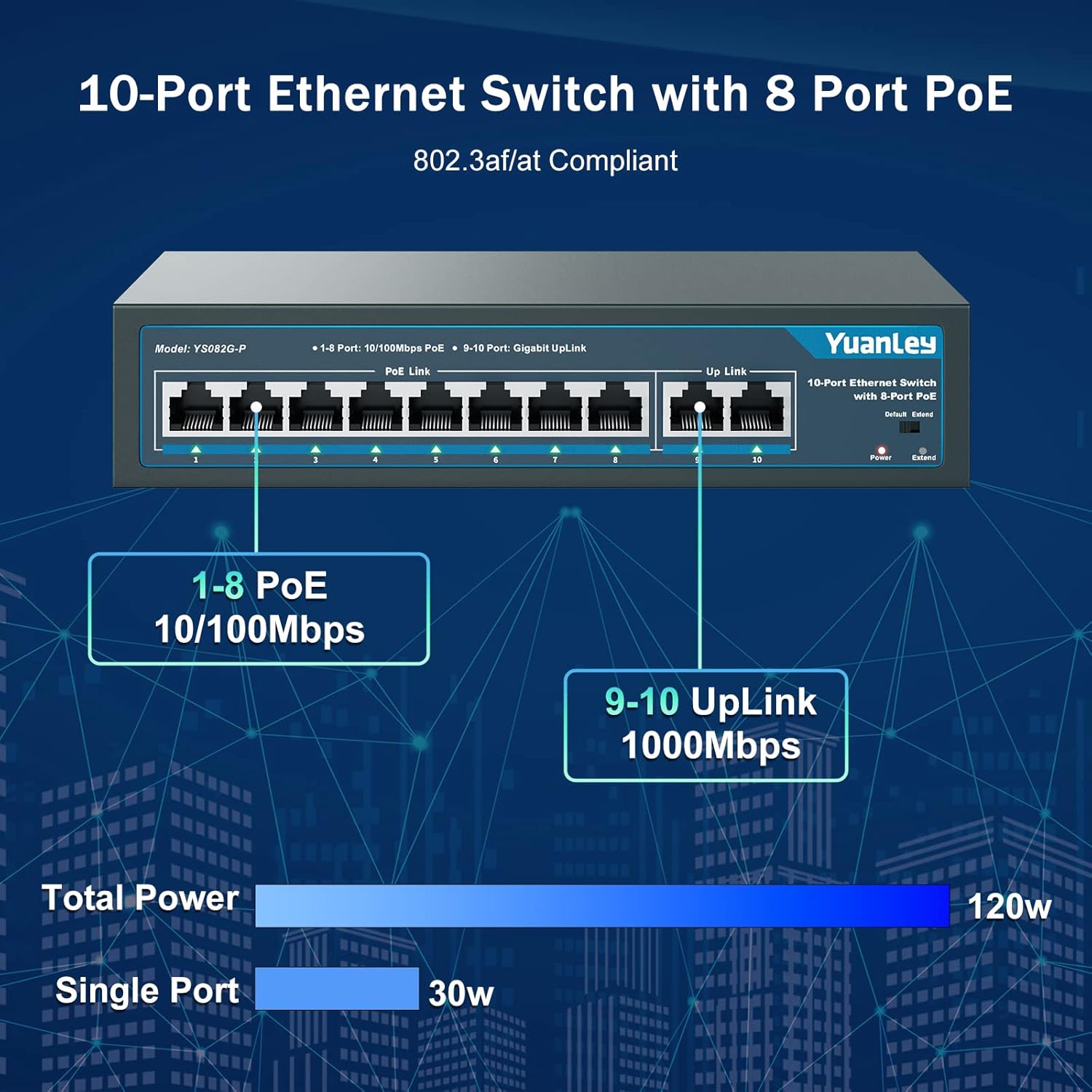
Image 2.1: Port configuration showing 8 PoE ports (10/100Mbps) and 2 Gigabit uplink ports (1000Mbps).

Image 2.2: Diagram illustrating the One Key VLAN function, isolating ports 1-8 while allowing communication with uplink ports.

Image 2.3: Comparison of Extend Mode (250m, 10Mbps) and Default Mode (100m, 100Mbps) for PoE transmission.
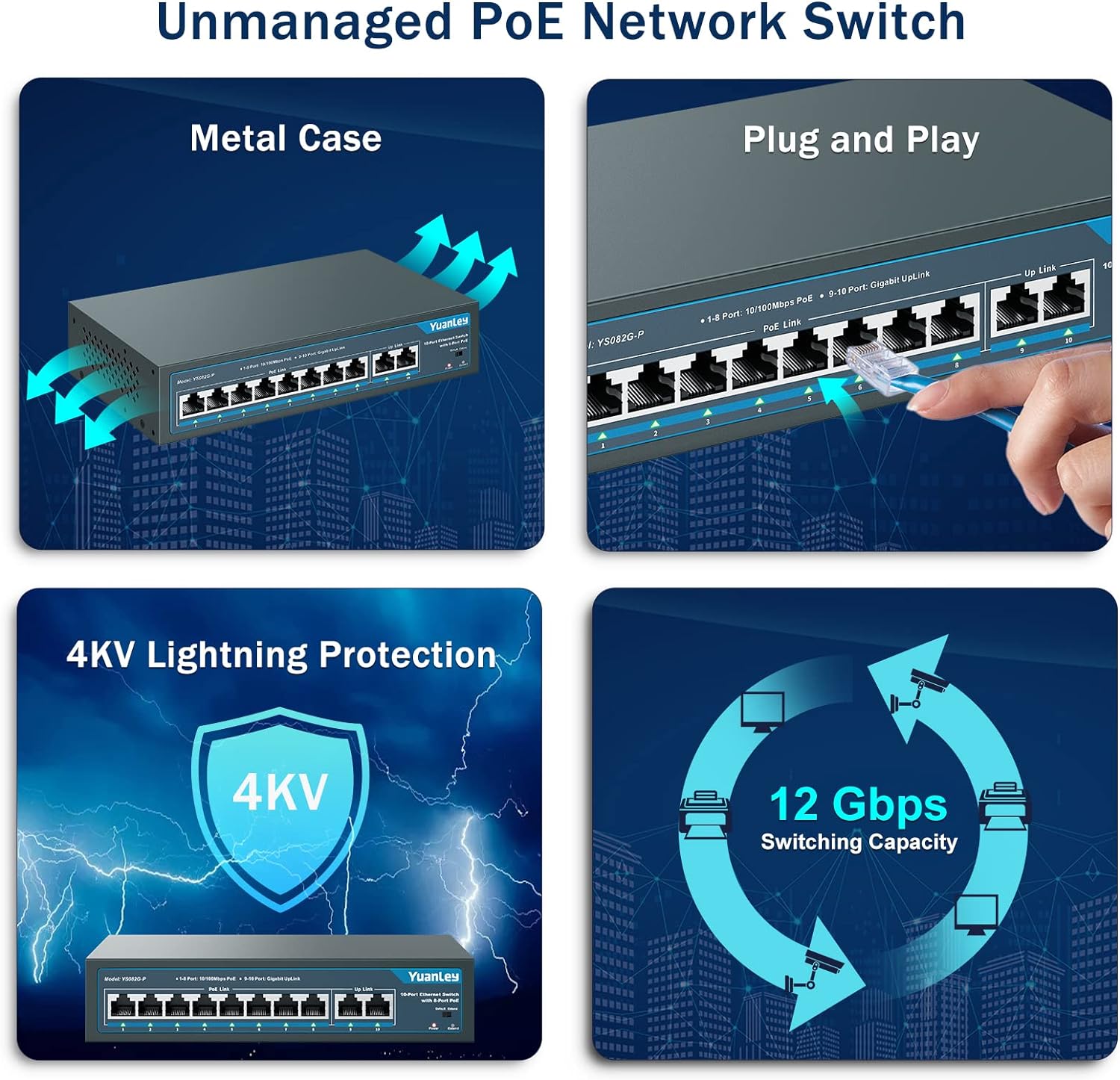
Зураг 2.4: Дууслааview of the switch's unmanaged features including metal case, plug and play, 4KV lightning protection, and 12 Gbps switching capacity.

Image 2.5: Illustration of the switch's fanless design and wide operating temperature range (-10°C to +55°C).
3. Багцын агуулга
Бүх зүйл багцад байгаа эсэхийг шалгана уу:
- YuanLey YS082G-P 10-Port PoE Switch
- Цахилгааны утас
- Mounting Brackets (for rackmount or wall mount)
- Суурилуулах зориулалттай шураг
- Түргэн эхлүүлэх гарын авлага
4. Тохируулах заавар
The YuanLey YS082G-P is a plug-and-play unmanaged switch, requiring minimal setup.
- Эрчим хүчийг холбох: Plug the provided power cord into the AC IN port on the back of the switch and then into a standard electrical outlet. The Power LED on the front panel should illuminate.
- Доорх холбоосыг холбох: Connect your router or main network device to one of the two Gigabit uplink ports (ports 9 or 10) using a standard Ethernet cable.
- PoE төхөөрөмжүүдийг холбох: Connect your PoE-compatible devices (e.g., IP cameras, wireless access points, IP phones) to any of the 8 PoE ports (ports 1-8) using Ethernet cables. The switch will automatically detect and power these devices.
- Суулгах (заавал биш): Use the included mounting brackets and screws to install the switch in a 19-inch rack or mount it on a wall.
Видео 4.1: Товчхонview of the YuanLey 10 Port PoE Switch, demonstrating its physical appearance and basic connectivity.

Image 4.2: Visual guide for the simple plug-and-play setup process: Connect to Power, Connect Devices, and Enjoy.
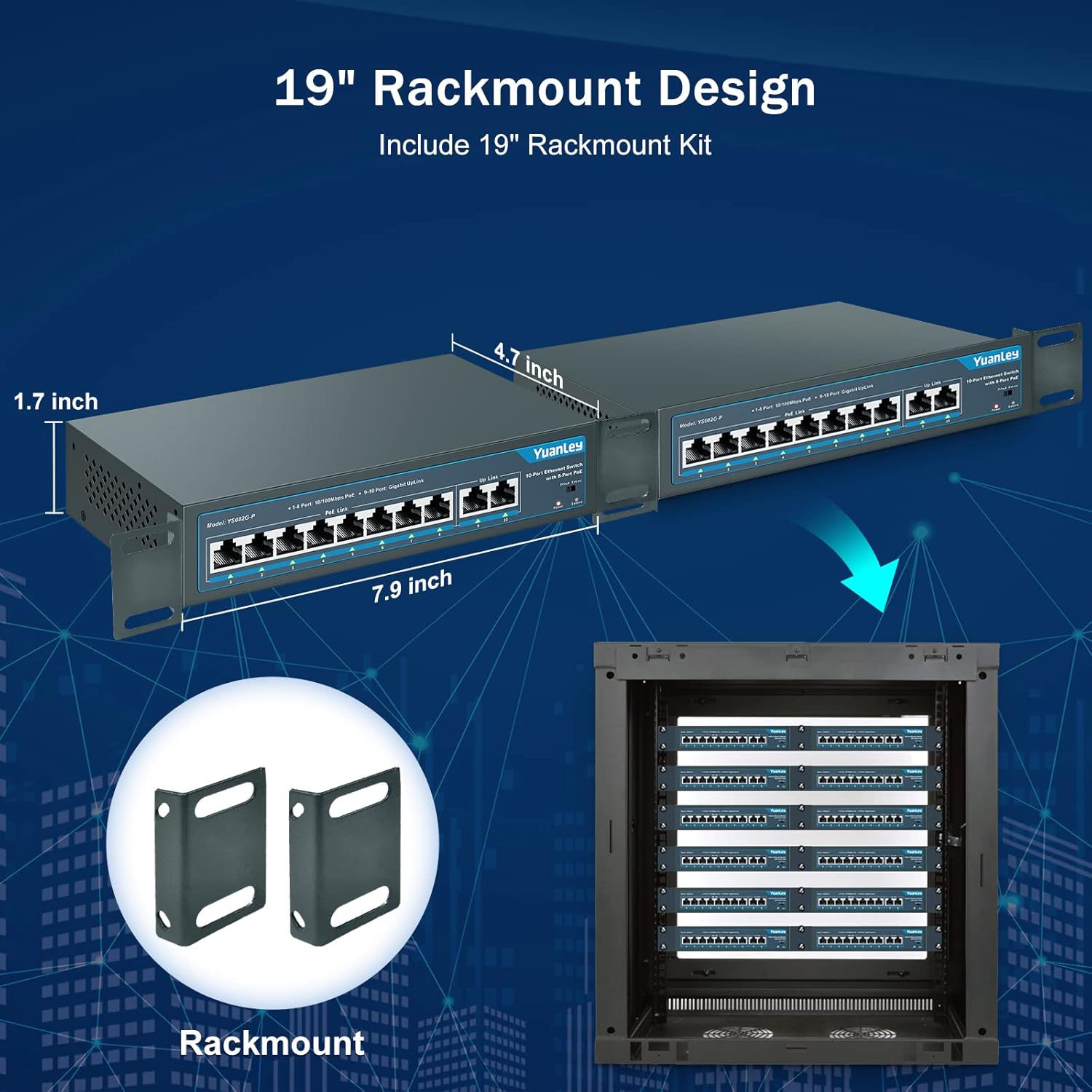
Image 4.3: Illustration of the rackmount design and included brackets for installation.
5. Үйлдлийн горимууд
The switch features a mode switch on the front panel to select between Default and Extend modes.
- Өгөгдмөл горим: In this mode, all ports operate at their standard speeds (10/100Mbps for PoE ports, 1000Mbps for uplink ports) with a maximum transmission distance of 100 meters.
- Өргөтгөх горим: When the switch is set to Extend mode, PoE ports 1-8 can transmit data and power up to 250 meters, but the speed for these ports will be reduced to 10Mbps. This mode is ideal for long-distance deployments of devices like IP cameras where higher bandwidth is not critical.
- VLAN Functionality: The switch supports VLAN isolation on ports 1-8. When enabled, these ports are isolated from each other but can still communicate with the uplink ports (9-10). This helps in segmenting the network, reducing broadcast storms, and improving overall network security and performance.
Image 5.1: The physical switch for selecting between Default and Extend modes.

Image 5.2: Diagram illustrating the functionality of One Key VLAN and the Extend mode for longer PoE distances.
6. Засвар үйлчилгээ
To ensure optimal performance and longevity of your YuanLey PoE Switch:
- Keep the device in a well-ventilated area to prevent overheating. The fanless design relies on natural convection.
- Regularly inspect cables for damage and ensure secure connections.
- Clean the exterior of the switch with a soft, dry cloth. Avoid using liquid cleaners or aerosols.
- Ensure the power source is stable and within the specified voltage хүрээ (AC 100-240V).
7. Алдаа засах
| Асуудал | Боломжит шалтгаан | Шийдэл |
|---|---|---|
| Эрчим хүчний LED заалт байхгүй. | No power supply or faulty power cord. | Check power cord connection and power outlet. Ensure the power source is active. |
| PoE device not receiving power or data. | Incorrect cable, non-PoE device, or device exceeding power budget. | Verify the device is PoE-compatible (IEEE 802.3af/at). Check Ethernet cable for damage. Ensure total power consumption does not exceed 120W and individual port consumption does not exceed 30W. |
| Slow network speed on PoE ports. | Өргөтгөх горим идэвхжсэн. | If high speed is required for short distances (under 100m), switch the mode to Default. Extend mode reduces speed to 10Mbps for longer distances. |
| Network congestion or security concerns. | No network segmentation. | Enable VLAN isolation for ports 1-8 to segment traffic and improve security. |
8. Техникийн үзүүлэлтүүд
| Онцлог | Дэлгэрэнгүй |
|---|---|
| Загвар | YS082G-P |
| Портууд | 8 x 10/100Mbps PoE+ Ports, 2 x 1000Mbps Gigabit Uplink Ports |
| PoE стандарт | IEEE 802.3af / at |
| Нийт PoE эрчим хүчний төсөв | 120 Вт |
| Порт бүрт хамгийн их хүч | 30 Вт |
| Өгөгдөл дамжуулах хурд | 1000 Megabits Per Second (Uplink), 100 Megabits Per Second (PoE Ports) |
| Шилжүүлэгч хүчин чадал | 12 Gbps |
| Extend Function | Up to 250m transmission distance at 10Mbps on PoE ports 1-8 |
| VLAN дэмжлэг | Ports 1-8 isolation, communication with uplink ports |
| Интерфейсийн төрөл | RJ45 |
| Эрчим хүчний оролт | AC 100-240V, 50/60Hz (Built-in Power Supply) |
| Кейсийн материал | Металл |
| Хөргөх | Сэнсгүй |
| Ашиглалтын температур | -10 хэмээс +55 хэм хүртэл |
| Бүтээгдэхүүний хэмжээс | 7.9"L x 4.7"W x 1.7"H |
| Зүйлийн жин | 0.96 килограмм (2.11 фунт) |
| Аянга хамгаалалт | 4 кВ |
9. Баталгаат хугацаа ба дэмжлэг
For any questions, technical assistance, or warranty inquiries, please contact YuanLey official support. Refer to the product packaging or the official YuanLey webхамгийн сүүлийн үеийн холбоо барих мэдээллийг авах сайт.
Холбогдох баримт бичиг - YS082G-P
 |
Yuanley PoE Switch хэрэглэгчийн гарын авлага болон техникийн үзүүлэлтүүд Энэхүү хэрэглэгчийн гарын авлага болон техникийн тодорхойлолтын баримт бичиг нь Юанлейн PoE свичүүдийн талаар дэлгэрэнгүй мэдээлэл, үүнд хэрэглээний хувилбарууд, урд талын самбарын тайлбар, төрөл бүрийн загваруудын техникийн цогц үзүүлэлтүүдийг багтаасан болно. |
 |
AirLive POE-GSH420-60 хурдан тохируулах гарын авлага: 6 порттой гигабит PoE+ унтраалга Энэхүү хурдан тохируулгын гарын авлагад AirLive POE-GSH420-60 6 порттой гигабит PoE+ унтраалгын суурилуулалтын заавар, заагч гэрэл болон функцийн унтраалгын талаарх дэлгэрэнгүй мэдээллийг оруулсан болно. Мөн холбогдох POE-GSH802M загварыг дурдсан болно. |
 |
Loocam PoE Switch Quick Start Guide: Installation, Features, and Troubleshooting Get started quickly with the Loocam PoE Switch. This guide covers package contents, product appearance, installation methods (desktop, wall-mount, rack-mount), connection diagrams, port specifications, and FAQs for Loocam Gigabit PoE switches. |
 |
UltraTech 10 порттой Гигабит PoE унтраалга (8 PoE + 2 Uplink) - 0E-9P8POEGB2 загвар 8 PoE порт болон 2 uplink порттой UltraTech 10 порттой Гигабит PoE унтраалгын талаарх дэлгэрэнгүй мэдээлэл. Техникийн үзүүлэлтүүд, суурилуулах гарын авлага, алдааг олж засварлах, баталгаат хугацааны мэдээлэл багтсан болно. |
 |
UltraTech 8 Port Gigabit PoE Switch: Features, Specifications, Installation & Warranty Comprehensive guide for the UltraTech 8 Port Gigabit PoE Switch (Model 0E-8P4POEGIG), covering its features, technical specifications, installation steps, troubleshooting, and limited warranty information. Includes details on PoE capabilities and network standards. |
 |
NICGIGA PoE Switch хэрэглэгчийн гарын авлага V4.0 - Техникийн үзүүлэлтүүд ба онцлогууд GS0410P, FS0820GP, GS0800P, AI-FS1621GP, GS1620P, FS2420GP, NIC0402P25- зэрэг загваруудын хэрэглээний хувилбарууд, урд талын самбарын тайлбар, техникийн иж бүрэн техникийн үзүүлэлтүүдийг агуулсан NICGIGA PoE шилжүүлэгчийн (V4.0) хэрэглэгчийн гарын авлага. NIC-S25-0801P. |
Ask a question about this manual
Ask about setup, troubleshooting, compatibility, parts, safety, or missing instructions. Manuals+ will review the question and use this page’s manual context to help answer it.