
Launch CRP239
CRP239 Дээд зэрэглэлийн код уншигч сканнер хэрэглэгчийн гарын авлагыг ажиллуулна уу
Model: CRP239
1. Танилцуулга
The LAUNCH CRP239 is an intelligent and networkable automotive diagnostic tool designed for passenger cars. It offers comprehensive OBD II full functionality and rapid testing capabilities for four major vehicle systems: Engine, Automatic Transmission (A/T), Anti-lock Braking System (ABS), and Supplemental Restraint System (SRS). Additionally, the CRP239 includes advanced reset functions such as Oil Reset, Steering Angle Reset, Brake-Pad Reset, Battery Matching, Throttle Adaptation, and Diesel Particulate Filter (DPF) Regeneration, catering to the needs of professional technicians and DIY enthusiasts.
2. Аюулгүй байдлын мэдээлэл
Always observe the following safety precautions when operating the LAUNCH CRP239:
- Оношилгооны хэрэгслийг холбох эсвэл салгахаасаа өмнө тээврийн хэрэгслийн асаалт унтарсан эсэхийг шалгаарай.
- Багажийг нойтон нөхцөлд эсвэл шатамхай шингэн, хийн ойролцоо ажиллуулж болохгүй.
- Тээврийн хэрэгсэл дээр ажиллахдаа хамгаалалтын шил гэх мэт хувийн хамгаалалтын хэрэгслийг өмс.
- Оношлогооны тодорхой журам болон аюулгүй байдлын анхааруулгыг тээврийн хэрэгслийн үйлчилгээний гарын авлагаас үзнэ үү.
- Keep the tool away from strong magnetic fields.
- Only use the provided cables and accessories.
3. Багцын агуулга
Бүх зүйл багцад байгаа эсэхийг шалгана уу:
- LAUNCH CRP239 Main Unit
- OBD II оношлогооны кабель
- USB кабель
- Хэрэглэгчийн гарын авлага
- Зөөврийн цүнх

Figure 3.1: Contents of the LAUNCH CRP239 package, showing the diagnostic tool, cables, and storage case.
4. Бүтээгдэхүүн дууссанview
The LAUNCH CRP239 features a robust design with a 5.0-inch 720p touch screen for intuitive navigation. It includes physical buttons for common operations and a durable rubber exterior for protection.

Зураг 4.1: Урд view of the LAUNCH CRP239, highlighting the touch screen display and navigation buttons.
4.1 дугаартай. Бүрэлдэхүүн хэсгүүд
- 5.0 инчийн мэдрэгчтэй дэлгэц: High-resolution display for clear data presentation and touch input.
- Навигацийн товчлуурууд: Directional pad, OK button, and Return button for menu navigation.
- OBD II Connector: Тээврийн хэрэгслийн холбооны стандарт 16 зүү холбогч.
- USB порт: Шинэчлэлт эсвэл өгөгдөл дамжуулах зорилгоор компьютерт холбогдох зориулалттай.
- Эрчим хүчний үзүүлэлт: LED light indicating power status.
5. Тохиргоо
Follow these steps for initial setup of your LAUNCH CRP239:
- Төхөөрөмжийг цэнэглэх: Connect the CRP239 to a power source using the provided USB cable to ensure the internal 4000mAh lithium-polymer battery is fully charged before first use.
- Асаах: Төхөөрөмжийг асаахын тулд цахилгаан товчийг удаан дар.
- Хэлний сонголт: On the initial setup screen, select your preferred language. The device supports multilingual operation.
- Wi-Fi холболт: Navigate to the 'Settings' menu and select 'Wi-Fi'. Connect to an available wireless network to enable online updates and diagnostic report sharing.
- Програм хангамжийн шинэчлэл: It is recommended to perform a software update immediately after connecting to Wi-Fi to ensure you have the latest features and vehicle coverage. Navigate to the 'Update' section and follow the on-screen prompts.

Figure 5.1: The LAUNCH CRP239 with its diagnostic cable connected, ready for vehicle communication.
6. Ашиглалтын заавар
The LAUNCH CRP239 provides a comprehensive suite of diagnostic functions. Below are instructions for common operations.
6.1. Тээврийн хэрэгсэлд холбогдох
- Locate the vehicle's 16-pin OBD II diagnostic port (usually under the dashboard).
- Тээврийн хэрэгслийн асаалт УНТРААЛТТАЙ байгаа эсэхийг шалгаарай.
- Connect the OBD II diagnostic cable to the vehicle's OBD II port and to the CRP239.
- Turn the vehicle's ignition to the ON position (engine off). The CRP239 will power on automatically.
6.2. Үндсэн цэсийн навигаци
From the main menu, you can access various functions:
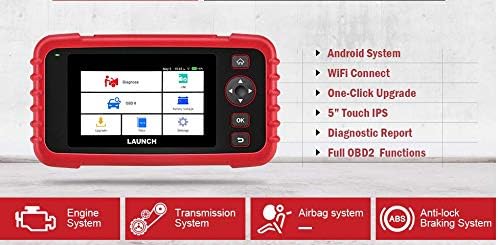
Figure 6.1: The main menu interface of the LAUNCH CRP239, providing access to all primary functions.
- Оношлогоо: For full system diagnostics (Engine, A/T, ABS, SRS).
- Би/Б: Readiness status for emissions.
- OBD II: Standard OBD II functions (read/clear DTCs, live data, freeze frame, O2 sensor test, etc.).
- Дахин тохируулах Access various maintenance reset functions.
- Батерейны эзлэхүүнtage: Displays real-time vehicle battery voltage.
- Шинэчлэлт: For software and firmware updates via Wi-Fi.
- Өгөгдөл: Review saved diagnostic data and reports.
- Тохиргоо: Configure device settings such as language, Wi-Fi, and display.
6.3. Performing a Diagnostic Scan
- Үндсэн цэсээс сонгоно уу "Diagnose".
- The tool will attempt to automatically identify the vehicle via VIN scan. If unsuccessful, you may need to manually select the vehicle make, model, and year.
- Оношлохыг хүссэн системээ сонгоно уу (жишээ нь, Хөдөлгүүр, Хурдны хайрцаг, ABS, SRS).
- Сонго "Read Fault Codes" руу view Diagnostic Trouble Codes (DTCs).
- Сонго "Clear Fault Codes" to erase DTCs after repairs have been made. Caution: Clearing codes without addressing the underlying issue will result in the codes reappearing.
- Сонго "Read Data Stream" руу view live sensor data.
6.4. Using Reset Functions
The CRP239 supports several common maintenance reset functions:
- Тосыг дахин тохируулах: Resets the oil life reminder after an oil change.
- Жолооны өнцгийг дахин тохируулах: Resets the steering angle sensor after alignment or component replacement.
- Brake-Pad Reset (EPB): Тоормосны дэвсгэрийг сольсны дараа электрон зогсоолын тоормосны системийг дахин тохируулна.
- Battery Matching (BMS): Registers a new battery with the vehicle's Battery Management System.
- тохируулагч тохируулга: Цэвэрлэх эсвэл сольсны дараа хурдны хайрцгийн байрлалыг дахин сурна.
- DPF нөхөн төлжилт: Initiates the Diesel Particulate Filter regeneration process.
To use a reset function, select "Reset" from the main menu, then choose the desired function and follow the on-screen instructions.
6.5. Програм хангамжийн шинэчлэлтүүд
The CRP239 supports one-click Wi-Fi updates for software and vehicle coverage, ensuring you always have the latest diagnostic capabilities.
- Төхөөрөмж тогтвортой Wi-Fi сүлжээнд холбогдсон эсэхийг шалгаарай.
- Үндсэн цэсээс сонгоно уу "Update".
- The device will check for available updates. Select the updates you wish to install and confirm.
- Allow the update process to complete without interruption. The device may restart during this process.

Figure 6.2: The update screen on the LAUNCH CRP239, showing available software updates for various vehicle brands.
6.6. Оношлогооны тайлан үүсгэх
The CRP239 can automatically generate diagnostic reports, which can be shared via email.
- After completing a diagnostic session, the tool will prompt you to generate a report.
- Confirm to generate the report.
- руу шилжих "Data" цэс рүү view saved reports.
- Select a report and choose the option to share via email. Ensure your Wi-Fi is connected and email settings are configured in the 'Settings' menu.
7. Засвар үйлчилгээ
Proper maintenance ensures the longevity and optimal performance of your LAUNCH CRP239:
- Цэвэрлэгээ: Төхөөрөмжийг цэвэрлэхийн тулд зөөлөн, хуурай даавуу ашиглана уу. Зүлгүүрийн цэвэрлэгч, уусгагчийг бүү ашигла.
- Хадгалах: Store the device in its carrying case in a cool, dry place when not in use. Avoid extreme temperatures.
- Батерейны арчилгаа: Charge the battery regularly, even if the device is not in frequent use, to maintain battery health. Avoid fully discharging the battery for extended periods.
- Кабелийн үзлэг: Periodically inspect the diagnostic and USB cables for any signs of damage. Replace damaged cables immediately.
8. Алдаа засах
This section addresses common issues you might encounter with the LAUNCH CRP239.
| Асуудал | Боломжит шалтгаан | Шийдэл |
|---|---|---|
| Төхөөрөмж асахгүй байна. | Low battery; faulty connection to vehicle. | Charge the device fully. Ensure the OBD II cable is securely connected to both the CRP239 and the vehicle. Check vehicle's ignition is ON. |
| Cannot communicate with vehicle. | Incorrect vehicle protocol; faulty OBD II port; damaged cable. | Verify vehicle compatibility. Check the vehicle's OBD II port for power. Try a different vehicle or cable if available. Ensure vehicle ignition is ON. |
| Програм хангамжийн шинэчлэл амжилтгүй боллоо. | Wi-Fi холболт тогтворгүй байна; хадгалах сан хангалтгүй байна. | Ensure a strong and stable Wi-Fi connection. Check available storage space on the device. Restart the update process. |
| Дэлгэц хариу өгөхгүй байна. | Програм хангамжийн алдаа; бие махбодийн гэмтэл. | Perform a soft reset by holding the power button until the device restarts. If the issue persists, contact customer support. |
9. Техникийн үзүүлэлтүүд
| Онцлог | Дэлгэрэнгүй |
|---|---|
| Загвар | CRP239 (CREADER PROFESSIONAL 239) |
| Дэлгэц | 5.0 инчийн 720p мэдрэгчтэй дэлгэц |
| Батерей | 4000mAh цэнэглэдэг литийн полимер (оруулсан) |
| Холболт | OBD II, Wi-Fi, USB |
| Тээврийн хэрэгслийн хамрах хүрээ | Domestic, Asian, European vehicles (1996 and newer OBD2) |
| Дэмжигдсэн системүүд | Engine, Automatic Transmission (A/T), ABS, SRS |
| Тусгай функцууд | Oil Reset, Steering Angle Reset, Brake-Pad Reset (EPB), Battery Matching (BMS), Throttle Adaptation, DPF Regeneration |
| Хэмжээ | 32.4 x 25.4 x 8 см (Багц) |
| Зүйлийн жин | 560 гр |
| Гаднах материал | Резин |
10. Баталгаат хугацааны мэдээлэл
The LAUNCH CRP239 comes with a standard manufacturer's warranty. For specific warranty terms and conditions, please refer to the warranty card included in your product package or visit the official Launch webсайт. Худалдан авалтын баримтаа баталгаат нэхэмжлэлд зориулж худалдан авалтын баталгаа болгон хадгална уу.
Өргөтгөсөн баталгаат сонголтыг гуравдагч талын үйлчилгээ үзүүлэгчдээс авах боломжтой. Жишээ ньample, Salama Care нь энэ бүтээгдэхүүнд 1 жил болон 2 жилийн сунгасан баталгаат хугацааг санал болгож байна.
11. Дэмжлэг
For technical assistance, product inquiries, or support, please contact Launch customer service through their official website or the contact information provided in your product documentation. Ensure you have your product model number (CRP239) and serial number ready when contacting support.
Нэмэлт эх сурвалжийг эндээс авна уу Launch Official Webсайт.
Ask a question about this manual
Ask about setup, troubleshooting, compatibility, parts, safety, or missing instructions. Manuals+ will review the question and use this page’s manual context to help answer it.