
1. Бүтээгдэхүүн дууссанview
The Alecto WS-1560 is a wireless weather station designed to provide accurate indoor and outdoor environmental data. Featuring a clear color display and a remote outdoor sensor, it offers comprehensive weather information and additional useful functions for your home.
Гол онцлогууд:
- Дотор болон гадна талын температур, чийгшлийг хэмждэг.
- Long-range wireless outdoor sensor (up to 100 meters).
- 5.7-inch well-lit color display with animated weather forecast icons.
- Temperature and ice alarm functions.
- Зүүрмэглэх функцтэй сэрүүлэгтэй цаг.
- Memory function for latest and highest readings.
- Moon phase indicator, date, day, and time display.
- Battery-operated main unit and outdoor sensor with backup batteries.

Figure 1.1: Alecto WS-1560 Main Unit and Wireless Outdoor Sensor.
2. Багцын агуулга
Ensure all components are present and in good condition upon unpacking:
- Alecto WS-1560 Үндсэн Төхөөрөмж (Дотор Дэлгэц)
- Утасгүй гаднах мэдрэгч
- Хэрэглэгчийн гарын авлага
- (Power adapter and batteries may be included depending on package)
Video 2.1: Illustrative video showing typical weather station components and basic setup. (Note: This video is for a related product and may not show the exact Alecto WS-1560 model.)
3. Тохиргоо ба суурилуулалт
3.1. Зай суурилуулах
Both the main unit and the outdoor sensor require batteries for operation. Ensure you use the correct type and polarity.
- Гадна мэдрэгч:
- Утасгүй гадаа мэдрэгчийн ар талд байрлах зайны тасалгааг нээнэ үү.
- Insert 2x AA batteries (not included) according to the polarity markings (+/-).
- Зайны тасалгааг найдвартай хаа.
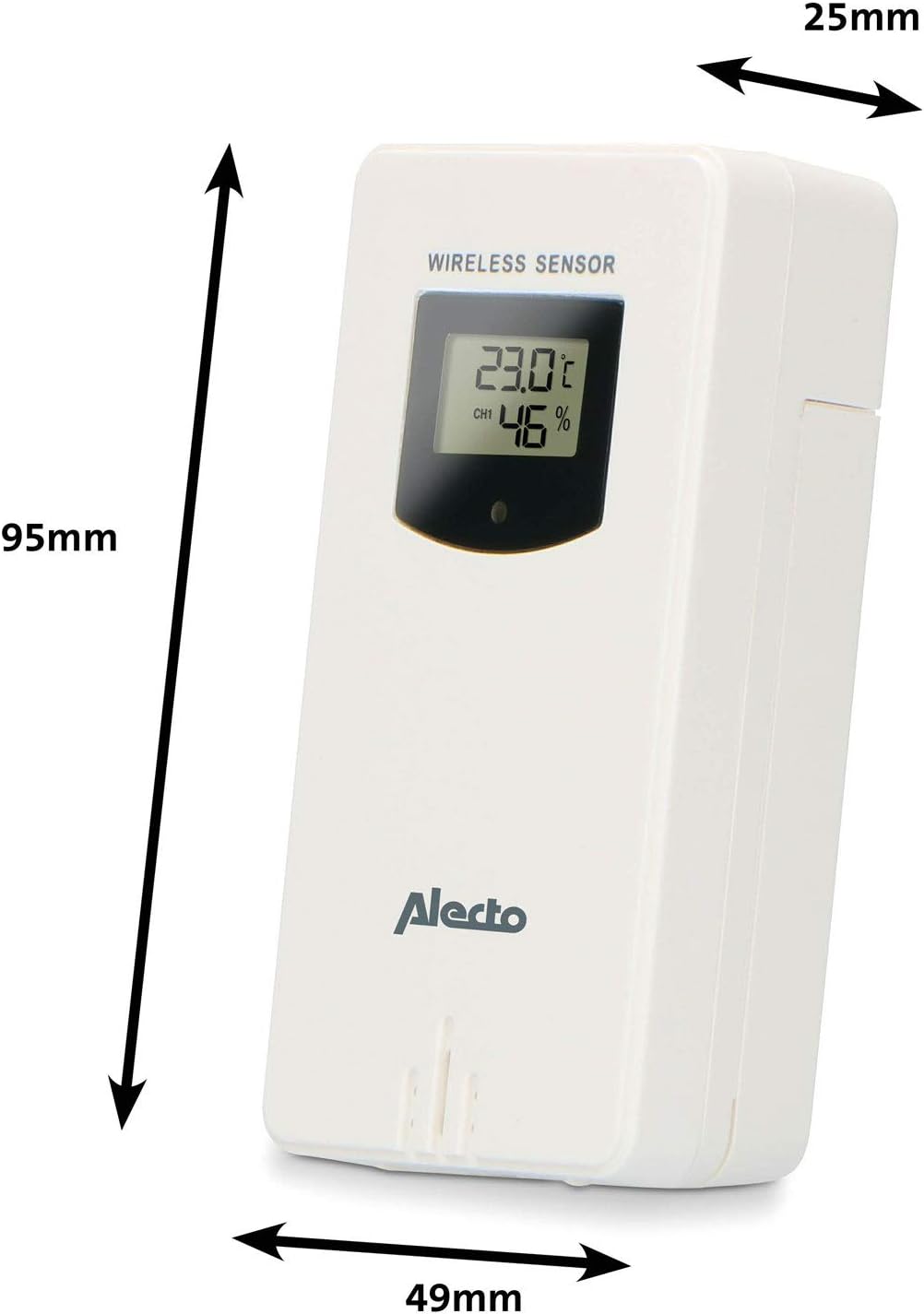
Figure 3.1: Wireless Outdoor Sensor dimensions and battery compartment location.
- Үндсэн нэгж:
- Үндсэн нэгжийн арын хэсэгт зайны тасалгааг нээнэ үү.
- Insert 2x AA batteries (not included) according to the polarity markings (+/-). These serve as backup batteries.
- Зайны тасалгааг найдвартай хаа.
- Connect the main unit to a power outlet using the provided power adapter (if included).

Figure 3.2: Main Unit dimensions and power input.
3.2. Мэдрэгчийн байршил
For accurate outdoor readings, proper placement of the wireless sensor is crucial:
- Place the sensor in a shaded area, away from direct sunlight, to prevent inaccurate temperature readings.
- Ensure good air circulation around the sensor.
- Mount the sensor vertically, approximately 1.5 to 2.5 meters (5 to 8 feet) above the ground.
- Avoid placing the sensor near heat sources (e.g., vents, windows) or moisture sources.
- The maximum transmission range is 100 meters (328 feet) in open air. Walls and other obstacles will reduce this range.

Зураг 3.3: Жишээ ньample of outdoor sensor placement on a wall.
3.3. Мэдрэгчийг үндсэн төхөөрөмжтэй хослуулах
The main unit and sensor should automatically pair once both are powered on. If pairing does not occur:
- Ensure both units have fresh batteries and are within range.
- Press the "TX" button inside the outdoor sensor's battery compartment to manually send a signal.
- On the main unit, you may need to initiate a search for the outdoor sensor (refer to the "Operation" section for specific button functions).
4. Үйл ажиллагаа
4.1. Байршлыг харуулах
The 5.7-inch color display provides a clear overview of all measured data. Key areas include:
- Гадна температур ба чийгшил: Displays current outdoor conditions.
- Өрөөн доторх температур ба чийгшил: Displays current indoor conditions.
- Хөдөлгөөнт цаг агаарын урьдчилсан мэдээ: Icons predict upcoming weather (sunny, partly cloudy, cloudy, rainy, snowy).
- Цаг, огноо: Current time, day, and date.
- Барометрийн даралт: Одоогийн атмосферийн даралт.
- Сарны үе шат: Одоогийн сарны үе шатны график дүрслэл.
- Temperature/Ice Alarm Indicators: Alerts for specific temperature thresholds or potential ice conditions.

Зураг 4.1: Нарийвчилсан view of the main unit's color display.
4.2. Товчлуурын функцууд
The main unit features several buttons for setting and adjusting functions. Common buttons include:
- Тохируулах: Enters setup mode for time, date, and other settings.
- Заалт: Switches between display modes or confirms settings.
- UP/DOWN (or +/-): Adjusts values during setup or cycles through channels.
- Сэрүүлэг: Сэрүүлгийн функцийг тохируулна эсвэл идэвхжүүлнэ.
- MEM: Displays maximum/minimum temperature and humidity records. Long press to clear records.
- УНТАХ / ГЭРЭЛ: Activates snooze during an alarm or adjusts backlight brightness.
Video 4.2: Illustrative video demonstrating various features and settings of a weather station. (Note: This video is for a related product and may not show the exact Alecto WS-1560 model.)
4.3. Цаг, огноог тохируулах
- Цагийн дэлгэц анивчих хүртэл "SET" товчийг удаан дар.
- Use the "UP" or "DOWN" buttons to adjust the hour, then press "SET" to confirm and move to minutes.
- Минут, жил, сар, өдрөөр давтана.
- Press "SET" again to exit the setting mode.
4.4. Сэрүүлгийн тохиргоо
- Press the "ALARM" button once to view сэрүүлгийн цаг.
- Press and hold the "ALARM" button until the alarm time starts flashing.
- Use the "UP" or "DOWN" buttons to set the desired alarm hour and minute.
- Press "ALARM" to confirm.
- To activate/deactivate the alarm, press the "ALARM" button briefly when the alarm time is displayed. An alarm icon will appear/disappear.
4.5. Max/Min Records
The weather station automatically records the maximum and minimum temperature and humidity values over a 24-hour period.
- Press the "MEM" button briefly to view the maximum recorded values.
- Press "MEM" again to view the minimum recorded values.
- Press "MEM" a third time to return to current readings.
- To clear the records, press and hold the "MEM" button for a few seconds.
5. Засвар үйлчилгээ
- Цэвэрлэгээ: Дэлгэц болон төхөөрөмжийн гадаргууг зөөлөн, d-ээр арчинаamp даавуу. Зүлгүүрийн цэвэрлэгч, уусгагчийг бүү ашигла.
- Зай солих: Replace batteries in both the main unit and the outdoor sensor when the low battery indicator appears on the display. Always replace all batteries at the same time with new ones of the same type.
- Мэдрэгчийн арчилгаа: Periodically check the outdoor sensor for debris or obstructions that might affect its readings. Ensure it remains in a shaded, well-ventilated area.
6. Алдаа засах
| Асуудал | Боломжит шалтгаан | Шийдэл |
|---|---|---|
| No outdoor temperature/humidity reading (or "---" displayed) |
|
|
| Температур/чийгшлийн заалт буруу байна |
|
|
| Дэлгэц бүдэг эсвэл хоосон байна |
|
|
7. Техникийн үзүүлэлтүүд
| Загварын дугаар | WS-1560 дугаартай |
| Брэнд | Алекто |
| Эрчим хүчний эх үүсвэр (Үндсэн хэсэг) | Power Adapter (if included) + 2x AA batteries (backup) |
| Эрчим хүчний эх үүсвэр (гадна мэдрэгч) | 2х АА батерей |
| Бүтээгдэхүүний хэмжээс (Үндсэн хэсэг) | 5.1 x 16.5 x 12.3 см |
| Бүтээгдэхүүний жин | 440 гр |
| Утасгүй мэдрэгчийн хүрээ | 100 метр хүртэл (задгай агаарт) |
| Дэлгэцийн хэмжээ | 5.7 инч / 14.5 см |
| Гарал үүсэл | Хятад |
8. Баталгаат хугацаа ба дэмжлэг
For warranty information, technical support, or service inquiries, please refer to the warranty card included with your product or visit the official Alecto webсайт. Худалдан авалтын баримтаа худалдан авалтын баталгаа болгон хадгалаарай.
Алекто Webсайт: www.alecto.nl (General Alecto website, specific support page may vary)