
1. Танилцуулга
This manual provides instructions for the operation and maintenance of your Crosley CR612B-AB Corsair Tabletop AM/FM Bluetooth Radio with CD Player and Dual Alarm Clock. Please read this manual thoroughly before using the product to ensure proper function and to prevent damage.

Figure 1: Crosley CR612B-AB Corsair Tabletop AM/FM Bluetooth Radio with CD Player and Dual Alarm Clock.
2. Хайрцагт юу байна
Доор жагсаасан бүх зүйл таны багцад байгаа эсэхийг шалгаарай.
- Crosley CR612B Corsair Radio Unit
- АС тэжээлийн хувиргагч
- Зааварчилгааны гарын авлага
3. Бүтээгдэхүүн дууссанview
Familiarize yourself with the various components and controls of your Corsair radio.

Figure 2: Front Panel Controls and Features. This image highlights the headphone jack, alarm clock buttons (Alarm 1, Alarm 2), and the analog tuning dial.
- Эзлэхүүний товчлуур: Аудио гаралтын түвшинг тохируулна.
- Тохируулах товчлуур: Selects AM/FM radio frequencies.
- Горимын товчлуур: Switches between AM/FM radio, CD player, and Bluetooth modes.
- Унтлагын товчлуур: Унтах цаг хэмжигч функцийг идэвхжүүлнэ.
- Alarm 1 / Alarm 2 Buttons: Set and activate dual alarms.
- Цагийн товчлуур: Used for setting the clock.
- AM/FM Button: AM болон FM радио давтамжийн хооронд шилждэг.
- CD тоглуулагчийн удирдлага: Play/Pause, Stop, Display, CD Mode, Skip/Search (Forward/Backward), Program.
- Чихэвчний Жак: Хувийн сонсох зориулалттай.
- Цахилгаан товч: Төхөөрөмжийг асаах эсвэл унтраана.
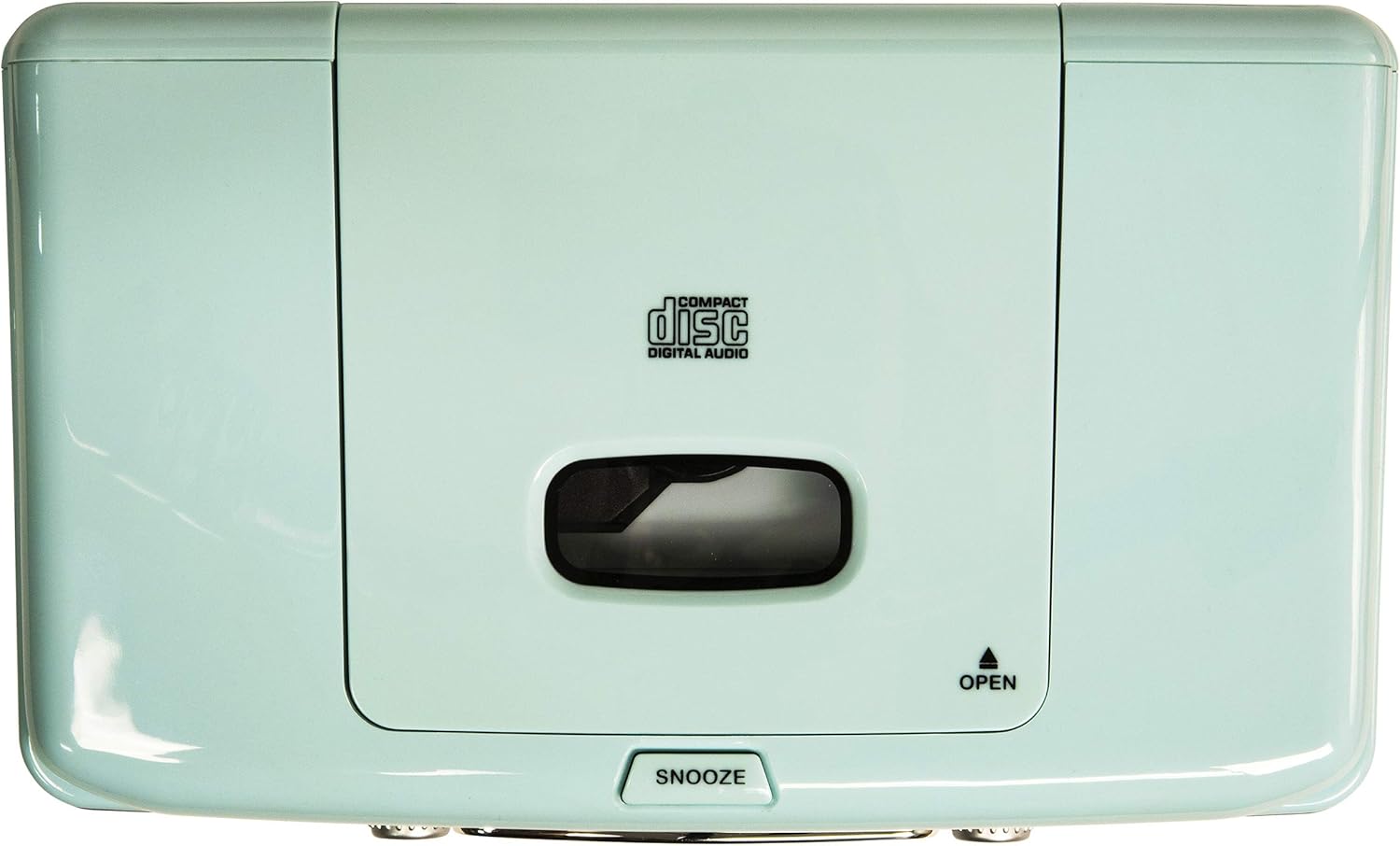
Figure 3: Top Panel. This image shows the top-loading CD player compartment and the Snooze button.

Figure 4: Rear Panel. This image displays the AC power input and the battery compartment for backup power.
4. Тохиргоо
4.1 Эрчим хүчний холболт
- Төхөөрөмжийг тогтвортой, тэгш гадаргуу дээр байрлуулсан эсэхийг шалгаарай.
- Connect the AC power adapter to the DC IN jack on the rear of the unit.
- Хувьсах гүйдлийн тэжээлийн адаптерийг ердийн ханын залгуурт холбоно уу.
4.2 Батерейны нөөцлөлт (заавал биш)
For alarm clock backup during power outages, install one 9V battery (not included) into the battery compartment on the rear of the unit. This will maintain time and alarm settings in case of a power interruption.
4.3 Антенны тохиргоо
The unit has a built-in AM antenna. For FM reception, extend the wire FM antenna located on the rear of the unit for optimal signal reception.
5. Ашиглалтын заавар
5.1 Асаах/унтраах
дээр дарна уу ХҮЧ button located on the front panel to turn the unit on or off.
5.2 AM/FM радиогийн ажиллагаа
- дээр дарна уу MODE button until 'RADIO' is displayed.
- дээр дарна уу AM/FM button to select either AM or FM band.
- -г эргүүл ТААРУУЛАХ хүссэн радио станцаа сонгохын тулд товчлуурыг дарна уу.
- -ийг тохируулна уу ЭЗЭМШИГ Сонгосон сонсох түвшний товчлуурыг дарна уу.
Video 1: Crosley CR612B-AB Corsair AM/FM Bluetooth Radio. This video demonstrates the radio's AM/FM tuning functionality.
5.3 CD тоглуулагчийн ажиллагаа
- дээр дарна уу MODE button until 'CD' is displayed.
- дээр дарна уу НЭЭЛТТЭЙ button on the top of the unit to open the CD compartment.
- Place a CD with the label side facing up into the compartment.
- CD тасалгааны тагийг хаа.
- дээр дарна уу ТОГЛОХ/ЗОГСООХ тоглуулж эхлэх товчлуур.
- -г ашиглана уу Алгасах / хайх замуудын хооронд шилжих товчлуурууд.
- дээр дарна уу ЗОГС тоглуулахыг дуусгах товчийг дарна уу.
- The ХӨТӨЛБӨР button allows you to create a custom playback order for tracks.

Figure 5: CD Player Open. This image shows the top-loading CD player ready for disc insertion.
5.4 Bluetooth-ийн ажиллагаа
- дээр дарна уу MODE button until 'BT' (Bluetooth) is displayed. The unit will enter pairing mode, indicated by a flashing 'BT'.
- Өөрийн гадаад төхөөрөмж (ухаалаг утас, таблет гэх мэт) дээр Bluetooth-г идэвхжүүлнэ.
- хайх 'Crosley Corsair' in your device's Bluetooth settings and select it to pair.
- Once paired, the 'BT' indicator will stop flashing, and you can stream audio from your device to the radio.
- Adjust the volume on both your external device and the radio for optimal sound.

Figure 6: Bluetooth Streaming. This image illustrates connecting an external device via Bluetooth to the radio.
Video 2: CR612B Corsair Tabletop AM/FM Bluetooth Radio with CD Player. This video provides an overview of the radio's features, including Bluetooth connectivity.
5.5 Сэрүүлэгтэй цагийн функцууд
- Цагийг тохируулах: -г удаан дар ЦАГ товч. -г ашиглана уу Алгасах / хайх buttons to adjust hours and minutes, then press ЦАГ дахин баталгаажуулна уу.
- Сэрүүлгийн тохиргоо 1/2: Аль нэгийг нь дараад удаан дар Сэрүүлэг 1 or Сэрүүлэг 2 товч. -г ашиглана уу Алгасах / хайх buttons to set the alarm time. Press the respective СЭРҮҮЛЭГ button again to select the alarm source (Buzzer, Radio, or CD) and confirm.
- Сэрүүлгийг идэвхжүүлэх/идэвхгүй болгох: Товчхон дарна уу Сэрүүлэг 1 or Сэрүүлэг 2 to toggle the alarm on or off. An alarm icon will appear on the display when active.
- Түр хойшлуулах: Сэрүүлэг дуугарах үед товчийг дарна уу УНТАХ button on top of the unit to temporarily silence it. The alarm will sound again after a few minutes.
- Унтах цаг: дээр дарна уу УНТАХ button repeatedly to set a sleep timer (e.g., 15, 30, 60, 90 minutes). The unit will automatically turn off after the set time.
5.6 Чихэвчний хэрэглээ
3.5 мм чихэвчийг залгуурт залгаарай УТСНЫ ЖЕК on the front panel for private listening. The main speakers will be muted automatically.
6. Засвар үйлчилгээ
6.1 Цэвэрлэгээ
- Төхөөрөмжийн гадна талыг зөөлөн, хуурай даавуугаар арчина.
- Өнгөлгөөг гэмтээж болзошгүй тул зүлгүүрийн цэвэрлэгч, лав, уусгагчийг бүү ашигла.
- Keep the CD compartment clean and free of dust.
6.2 Хадгалалт
When not in use for extended periods, unplug the unit from the power outlet and store it in a cool, dry place.
7. Алдаа засах
| Асуудал | Боломжит шалтгаан | Шийдэл |
|---|---|---|
| Хүч чадалгүй | Цахилгааны утас найдвартай холбогдоогүй байна. | Ensure the AC power adapter is firmly plugged into the unit and a working wall outlet. |
| Радио хүлээн авалт муу | Сул дохио. | Adjust the position of the FM wire antenna. For AM, try repositioning the unit. |
| CD тоглогдохгүй байна | CD-г буруу оруулсан эсвэл бохирдсон/зураастай байна. | Ensure the CD is inserted label-side up. Clean the CD with a soft cloth. Try a different CD. |
| Bluetooth холбогдоогүй байна | Device not in pairing mode or too far away. | Ensure the radio is in Bluetooth mode and 'BT' is flashing. Move your device closer to the radio. Check your device's Bluetooth settings. |
| Сэрүүлэг дуугарахгүй байна | Сэрүүлэг тохируулагдаагүй эсвэл идэвхгүйжүүлсэн байна. | Verify alarm time and source are set correctly and the alarm is activated (icon visible). |
8. Техникийн үзүүлэлтүүд
| Брэнд | Кросли |
| Загварын дугаар | CR612B-AB |
| Өнгө | Усан цэнхэр |
| Бүтээгдэхүүний хэмжээ (L x W x H) | 6.75"L x 11.5"W x 7.25"H |
| Холболтын технологи | Bluetooth |
| Радио хамтлагуудыг дэмждэг | AM/FM |
| Аудио гаралтын горим | Стерео |
| Эрчим хүчний эх үүсвэр | Хувьсах гүйдлийн адаптер |
| Зайны шаардлага | 1 x 9V battery (for backup, not included) |
| Дэлгэцийн төрөл | LED |
| Материал | Chrome (accents) |

Figure 7: Product Dimensions. This diagram provides the overall measurements of the unit.
9. Баталгаат хугацаа ба дэмжлэг
9.1 Баталгаат хугацааны мэдээлэл
Энэ бүтээгдэхүүн нь а One Year Limited Manufacturer's Warranty. Please refer to the warranty card included in your packaging for full details on coverage and terms.
9.2 Хэрэглэгчийн дэмжлэг
For technical assistance, troubleshooting, or warranty claims, please contact Crosley customer support. Contact information can typically be found on the manufacturer's official webсайт эсвэл бүтээгдэхүүний сав баглаа боодол дээр.