
Танилцуулга
Welcome to your new Gembird GHS-U-5.1-01 USB 5.1 Surround Headset. This manual provides essential information for setup, operation, and maintenance to ensure optimal performance and an immersive audio experience.
Багцын агуулга
Багц нь дараахь зүйлийг агуулсан байх ёстой.
- Gembird GHS-U-5.1-01 USB 5.1 Surround Headset

Image: Retail packaging for the Gembird GHS-U-5.1-01 USB 5.1 Surround Headset, showing the headset inside a clear window.
Бүтээгдэхүүн дууссанview
The Gembird GHS-U-5.1-01 is a USB headset designed for immersive audio experiences with 5.1 surround sound. It features an adjustable microphone, built-in volume control, comfortable ear pads, and an adjustable headband for extended use.
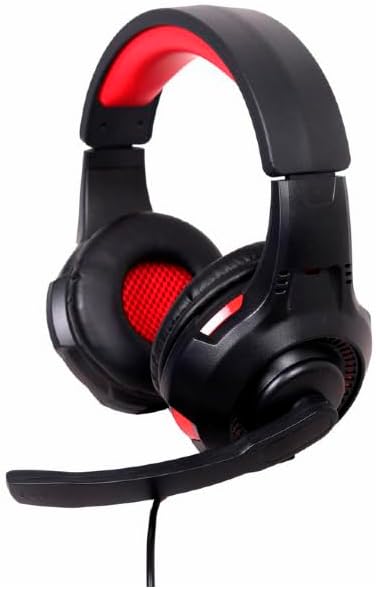
Зураг: өнцөгтэй view of the Gembird GHS-U-5.1-01 USB 5.1 Surround Headset, showcasing its black and red design with the microphone boom extended.

Зураг: Урд view of the Gembird GHS-U-5.1-01 USB 5.1 Surround Headset, highlighting the adjustable headband and earcups.

Image: Close-up of the in-line control unit for the Gembird GHS-U-5.1-01 headset, showing volume up/down and microphone mute buttons.
Тохиргоо
Чихэвчийг холбож байна
The Gembird GHS-U-5.1-01 headset connects via a standard USB port.
- Компьютер дээрээ байгаа USB портыг олоорой.
- Plug the USB connector of the headset into the USB port.
- Таны үйлдлийн систем автоматаар шаардлагатай драйверуудыг илрүүлж суулгах ёстой. Энэ үйл явц хэдэн хором болж магадгүй.
- Once installed, the headset will be ready for use as an audio input and output device.
Audio Settings Configuration
For optimal 5.1 surround sound experience, you may need to configure your computer's audio settings.
- Windows: Go to "Sound Settings" (right-click speaker icon in taskbar) > "Sound Control Panel" > "Playback" tab. Select the Gembird headset, click "Configure," and choose "5.1 Surround."
- макос: Go to "System Preferences" > "Sound" > "Output" tab. Select the Gembird headset.
Ашиглалтын заавар
Дууны хяналт
The headset features an in-line remote control for easy volume adjustment.
- -г ашиглана уу "+" дууны хэмжээг нэмэгдүүлэхийн тулд товчлуур.
- -г ашиглана уу "-" дууны хэмжээг багасгах товчлуур.
Микрофоны хэрэглээ
The adjustable microphone boom allows for precise positioning.
- Position the microphone approximately 1-2 inches from your mouth for clear voice capture.
- Use the microphone mute button on the in-line remote to toggle the microphone on or off.
Тав тухтай тохируулга
Adjust the headband to fit comfortably on your head. The ear pads are designed for extended use.
Засвар үйлчилгээ
To ensure the longevity and performance of your headset, follow these maintenance guidelines:
- Цэвэрлэгээ: Use a soft, dry cloth to wipe the headset. Do not use harsh chemicals or abrasive cleaners.
- Хадгалах: Store the headset in a clean, dry place away from extreme temperatures.
- Кабель арчилгаа: USB кабелийг гэмтээхгүйн тулд хурц гулзайлгах эсвэл хэт их татахаас зайлсхий.
Алдааг олж засварлах
No Sound or Microphone Not Working
- USB холболтыг шалгана уу: Ensure the USB connector is fully inserted into the port. Try a different USB port.
- Check Volume Levels: Verify that the volume on the in-line control, your computer's system volume, and application-specific volumes are not muted or set too low.
- Check Audio Settings: Confirm that the Gembird headset is selected as the default playback and recording device in your computer's sound settings.
- Компьютерийг дахин эхлүүлэх: Sometimes a simple restart can resolve driver or software conflicts.
Дууны чанарын асуудал
- Драйверын шинэчлэлт: Үйлдлийн системийн драйверууд тань шинэчлэгдсэн эсэхийг шалгаарай.
- Эх сурвалжийн чанар: Poor audio quality may stem from the audio source itself. Test with different audio files эсвэл програмууд.
Үзүүлэлтүүд
| Загварын нэр | GHS-U-5.1-01 |
| Холболт | Утастай USB |
| Form Factor | Чихэн дээр |
| Өнгө | Хар |
| Материал | Aluminum (Enclosure) |
| Жин | 0.4 кг |
| Нэмэлт онцлогууд | Adjustable microphone boom, Built-in volume control, Comfortable ear pads, Adjustable headband |
Баталгаат хугацааны мэдээлэл
This Gembird headset comes with a 24 Month Manufacturer Guarantee. Please retain your proof of purchase for warranty claims. For detailed warranty terms and conditions, refer to the documentation provided with your product or contact Gembird customer support.
Дэмжлэг
If you encounter issues not covered in this manual or require further assistance, please visit the official Gembird website or contact their customer support for technical assistance.