
1. Танилцуулга
This manual provides detailed instructions for the safe and effective use of the Walfront PM6508 Digital Temperature Humidity Meter. This device is designed for high-precision measurement of ambient temperature and relative humidity, offering features such as data hold, backlight display, and wet bulb/dew point temperature calculations. It is suitable for various applications including home, office, industrial settings, and environmental monitoring.
2. Аюулгүй байдлын мэдээлэл
Please read and understand all safety warnings and operating instructions before using this instrument. Failure to follow these instructions may result in electric shock, fire, or injury.
- Хэрэв тоолуур эвдэрсэн эсвэл батерейны тагийг зөв хаагаагүй бол түүнийг бүү ажиллуул.
- Avoid exposing the meter to extreme temperatures, direct sunlight, or high humidity for prolonged periods.
- Do not attempt to repair or modify the meter. Refer all servicing to qualified personnel.
- Хэрэв тоолуурыг удаан хугацаагаар ашиглахгүй бол гоожихоос сэргийлж батерейг нь салгаж авна уу.
- Keep the sensor area clean and free from obstructions to ensure accurate readings.
3. Бүтээгдэхүүн дууссанview
The Walfront PM6508 is a compact and portable digital meter designed for accurate environmental measurements. It features an easy-to-read LCD display with backlight and intuitive button controls.

Зураг 3.1: Урд view of the Walfront PM6508 meter with key components labeled. This includes the temperature and humidity sensor at the top, the HD display, various control buttons (Power, Max/Min, Data Hold, Data Storage, Unit Switch, Backlight), and an anti-fall protective sleeve.
3.1 Гол онцлогууд
- Өндөр нарийвчлалтай мэдрэгч: Provides accurate temperature and humidity readings.
- Арын гэрэлтүүлэгтэй LCD дэлгэц: Төрөл бүрийн гэрэлтүүлгийн нөхцөлд тодорхой уншигдахуйц байдлыг хангана.
- Өгөгдөл хадгалах функц: Дэлгэц дээрх одоогийн уншилтыг царцаана.
- Өгөгдөл хадгалах: Хэмжилтийн өгөгдлийн 100 хүртэлх бүлгийг хадгалдаг.
- Wet Bulb & Dew Point Temperature: Calculates and displays these critical environmental parameters.
- Нэгж солих: Цельсийн (°C) болон Фаренгейтийн (°F) хооронд хялбархан шилжинэ.
- Автоматаар унтрах: Зайны ашиглалтын хугацааг хэмнэдэг.
- Бага чадлын үзүүлэлт: Батерейг солих шаардлагатай үед анхааруулга өгнө.
3.2 Багцын агуулга

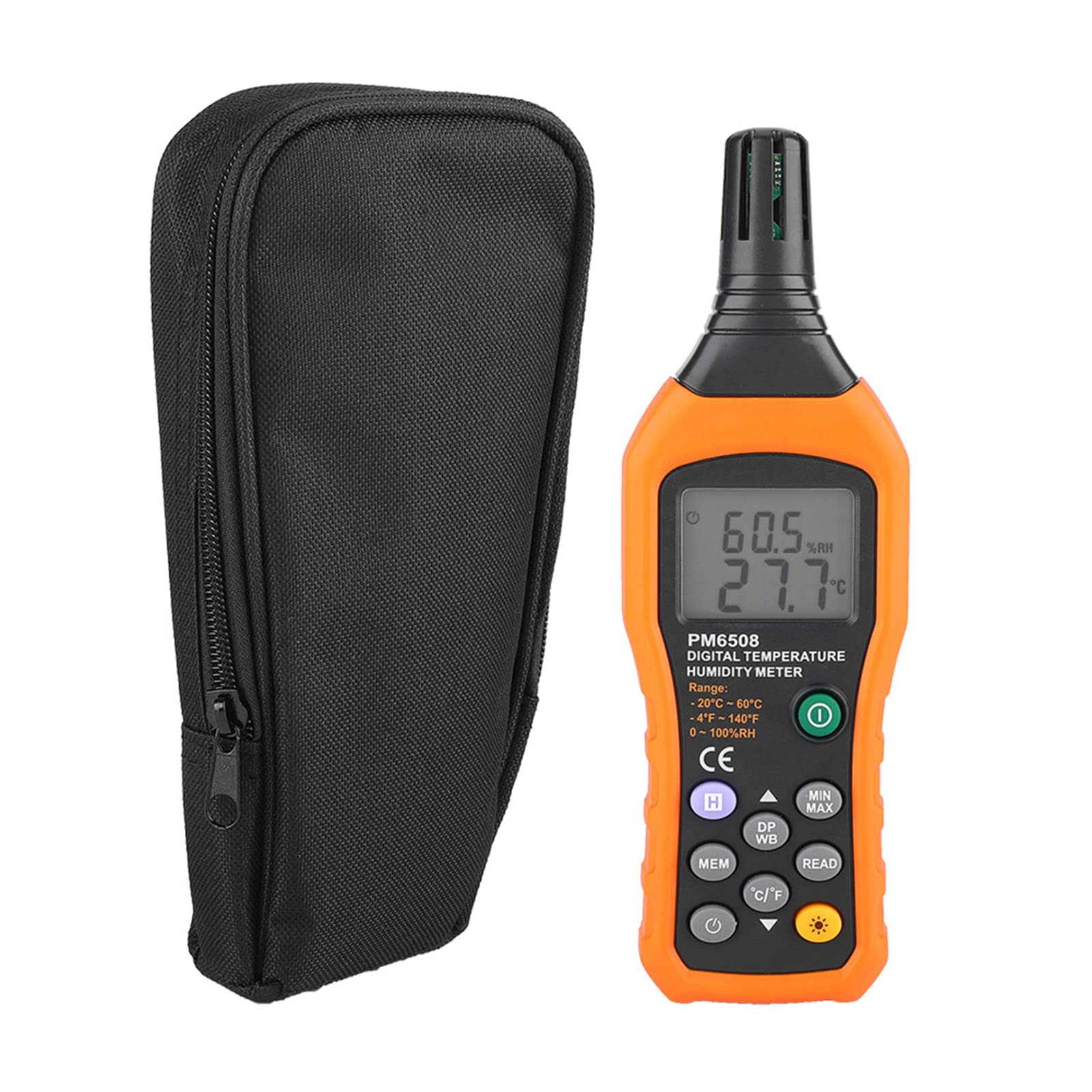
Зураг 3.2: The Walfront PM6508 meter shown alongside its portable storage bag, indicating typical package contents.
- Walfront PM6508 Digital Temperature Humidity Meter
- Зөөврийн хадгалах уут
- Хэрэглэгчийн гарын авлага
4. Тохиргоо
4.1 Батерей суурилуулах
The PM6508 meter requires 4 x 1.5V AAA batteries (not included) for operation.
- Тоолуурын арын хэсэгт зайны тасалгааны тагийг олоорой.
- Зайны тагийг нээхийн тулд доошоо гулсуулна уу.
- Insert four AAA batteries, ensuring correct polarity (+ and -) as indicated inside the compartment.
- Батерейны тагийг сайтар товших хүртэл нь эргүүлж байрлуулна уу.
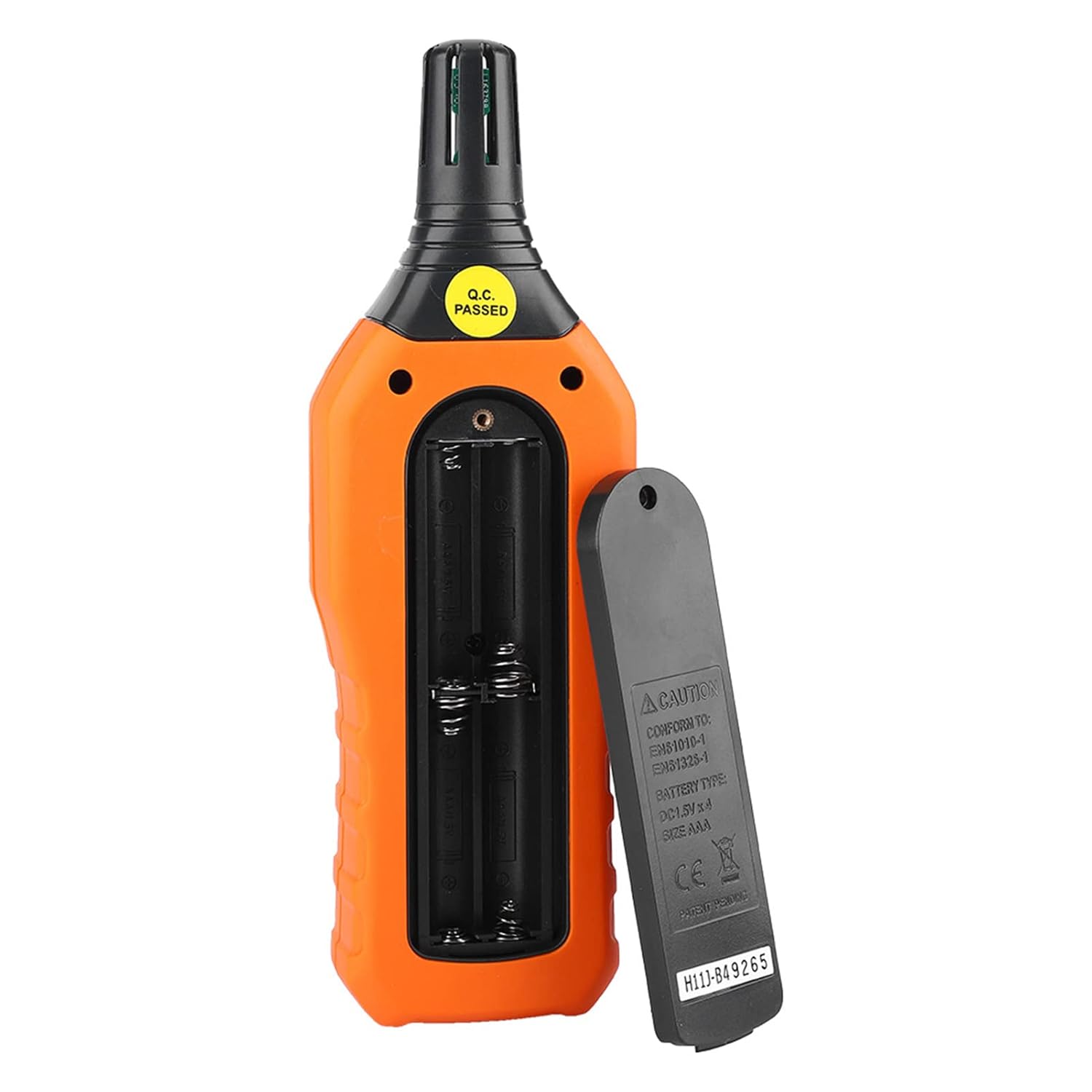
Зураг 4.1: Арын view of the meter showing the open battery compartment for AAA battery installation.
5. Ашиглалтын заавар
5.1 Асаах/унтраах
- дээр дарна уу green power button (
 ) to turn the meter on.
 - -г удаан дар gray power button () for approximately 2 seconds to turn the meter off. The meter also features an automatic shut-down function to conserve battery life.
5.2 Хэмжилт хийх
Once powered on, the meter will immediately begin displaying real-time temperature and humidity readings on the LCD screen. Ensure the sensor at the top of the device is exposed to the environment you wish to measure.

Зураг 5.1: The meter in use, displaying temperature and humidity readings on its LCD screen.
5.3 Нэгжийн шилжүүлэлт (°C/°F)
To switch between Celsius (°C) and Fahrenheit (°F) temperature units:
- дээр дарна уу °C/°F товчлуур () located on the keypad. The display will update to show readings in the selected unit.
5.4 Арын гэрэлтүүлгийн функц
To activate or deactivate the display backlight:
- дээр дарна уу арын гэрэлтүүлгийн товчлуур () to toggle the backlight on or off. This is useful for reading in low-light conditions.
5.5 Өгөгдөл хадгалах (H)
To freeze the current readings on the display:
- дээр дарна уу H товч (). The "H" icon will appear on the display, indicating that the data is held.
- дээр дарна уу H товч again to release the data hold and resume real-time measurements.
5.6 Maximum/Minimum (MIN/MAX) Measurement
руу view the maximum or minimum recorded values:
- дээр дарна уу MIN/MAX товч () once to display the maximum temperature and humidity recorded since the meter was powered on or the function was reset.
- дээр дарна уу MIN/MAX товч again to display the minimum temperature and humidity.
- дээр дарна уу MIN/MAX товч a third time to exit the MIN/MAX mode and return to real-time readings.
5.7 Data Storage (MEM) and Retrieval (READ)
The meter can store up to 100 groups of measurement data.
- Мэдээлэл хадгалахын тулд: дээр дарна уу MEM товч () to save the current temperature and humidity readings. The display will briefly show a memory location number.
- To Retrieve Data: дээр дарна уу УНШИХ товч () to enter data retrieval mode. Use the MEM товч to scroll through stored data records.
- To Exit Retrieval: дээр дарна уу УНШИХ товч again to exit data retrieval mode.
5.8 Wet Bulb (WB) and Dew Point (DP) Temperature
To display Wet Bulb or Dew Point temperatures:
- дээр дарна уу DP/WB button () once to display the Dew Point temperature.
- дээр дарна уу DP/WB button again to display the Wet Bulb temperature.
- дээр дарна уу DP/WB button a third time to return to standard temperature and humidity display.
6. Засвар үйлчилгээ
6.1 Цэвэрлэгээ
- Тоолуурын тоолуурын тоолуурыг арчинаasing зөөлөн, damp даавуу. Зүлгүүрийн цэвэрлэгч, уусгагчийг бүү ашигла.
- Keep the sensor area clean and free from dust or debris to ensure accurate readings. Do not insert any objects into the sensor opening.
6.2 Хадгалалт
- When not in use for extended periods, remove the batteries to prevent leakage and damage to the device.
- Тоолуурыг сэрүүн, хуурай газар, нарны шууд тусгал болон хэт өндөр температураас хол хадгална уу.
- Utilize the provided portable storage bag for protection during storage and transport.
7. Алдаа засах
| Асуудал | Боломжит шалтгаан | Шийдэл |
|---|---|---|
| Тоолуур асахгүй байна. |
|
|
| Буруу уншилтууд. |
|
|
| Дэлгэц бүдэгхэн эсвэл анивчих. |
|
|
| Cannot store or retrieve data. |
|
|
8. Техникийн үзүүлэлтүүд
The following table outlines the technical specifications for the Walfront PM6508 Digital Temperature Humidity Meter.


Зураг 8.1: Detailed technical specifications including ranges, resolution, and precision for temperature, humidity, wet bulb, and dew point measurements, along with general parameters.
| Параметр | Үнэ цэнэ |
|---|---|
| Загвар | PM6508 |
| Орчны температурын хүрээ | -20-аас 60 °C (-4-аас 140 °F) |
| Ambient Temperature Precision | ±1.5 °C (-20 to 0 °C, 45 to 60 °C), ±0.5 °C (0 to 45 °C) |
| Харьцангуй чийгшлийн хүрээ | 0% - 100% Ням |
| Relative Humidity Precision | ±4.0% (0-20%, 80-100%), ±3.0% (20-80%) |
| Нойтон чийдэнгийн температурын хүрээ | -20-аас 60 °C (4-аас 140 °F) |
| Wet Bulb Temperature Precision | ±1.5 °C (-20 to 0 °C, 45 to 60 °C), ±0.5 °C (0 to 45 °C) |
| Шүүдэр цэгийн температурын хүрээ | -50-аас 60 °C (-58-аас 140 °F) |
| Dew Point Temperature Precision | ±1.5 °C (-50 to 0 °C, 45 to 60 °C), ±0.5 °C (0 to 45 °C) |
| Шийдвэр | 0.1 °C / °F / %RH |
| Өгөгдөл хадгалах | 100 бүлэг |
| Эрчим хүчний хангамж | 4 x 1.5V AAA батерей (багцад ороогүй болно) |
| Хэмжээ (L x W x H) | 180 x 60 x 29 мм (7.1 x 2.4 x 1.1 инч) |
| Жин | 254 гр (9 унц) |
| Ашиглалтын чийгшил | 0% - 100% (non-condensing) |
9. Хэрэглээ
The Walfront PM6508 is suitable for a wide range of applications requiring accurate temperature and humidity monitoring.

Зураг 9.1: Examples of environments where the PM6508 meter can be effectively used for temperature and humidity monitoring.
- Residential and Office Environments: Monitoring indoor climate for comfort and health.
- Industrial Production: Ensuring optimal conditions for manufacturing processes.
- Warehousing and Storage: Protecting goods sensitive to temperature and humidity, such as in wine cellars or general storage.
- Хөдөө аж ахуй: Monitoring conditions in planting sheds, greenhouses, and aquaculture.
- Research and Development Laboratories: Maintaining precise environmental controls for experiments.
- HVAC системүүд: Assisting in the evaluation and maintenance of heating, ventilation, and air conditioning systems.
10. Баталгаат хугацаа ба дэмжлэг
Walfront products are designed for reliability and performance. For warranty information, technical support, or service inquiries, please refer to the contact information provided with your purchase or visit the official Walfront webсайт. Баталгаат заргад зориулж худалдан авалтаа нотлох баримтаа үлдээнэ үү.