
Танилцуулга
This manual provides instructions for the safe and effective use of your SURPEER Infrared Thermometer Gun, Model 7D-4. This non-contact device is designed for accurate surface temperature measurement across a wide range of applications, from cooking to industrial use. Please read this manual thoroughly before operation and retain it for future reference.
Аюулгүй байдлын мэдээлэл
WARNING: LASER RADIATION. DO NOT STARE INTO BEAM. CLASS II LASER PRODUCT.
- Лазерыг нүд рүү шууд эсвэл тусгал гадаргуугаас шууд бусаар чиглүүлж болохгүй.
- Төхөөрөмжийг хүүхдэд хүрэхгүй газар хадгална уу.
- Do not use the thermometer for medical purposes or to measure human body temperature.
- Төхөөрөмжийг ус болон бусад шингэнд дүрж болохгүй.
- Avoid exposing the device to extreme temperatures, humidity, or direct sunlight for prolonged periods.
- Use only the specified battery type (9V).
Хайрцагт юу байна
- SURPEER Infrared Thermometer Gun (Model 7D-4)
- 9V батерей
- Meat Thermometer (additional accessory)
- Хэрэглэгчийн гарын авлага
Бүтээгдэхүүн дууссанview
Familiarize yourself with the components and display of your infrared thermometer.
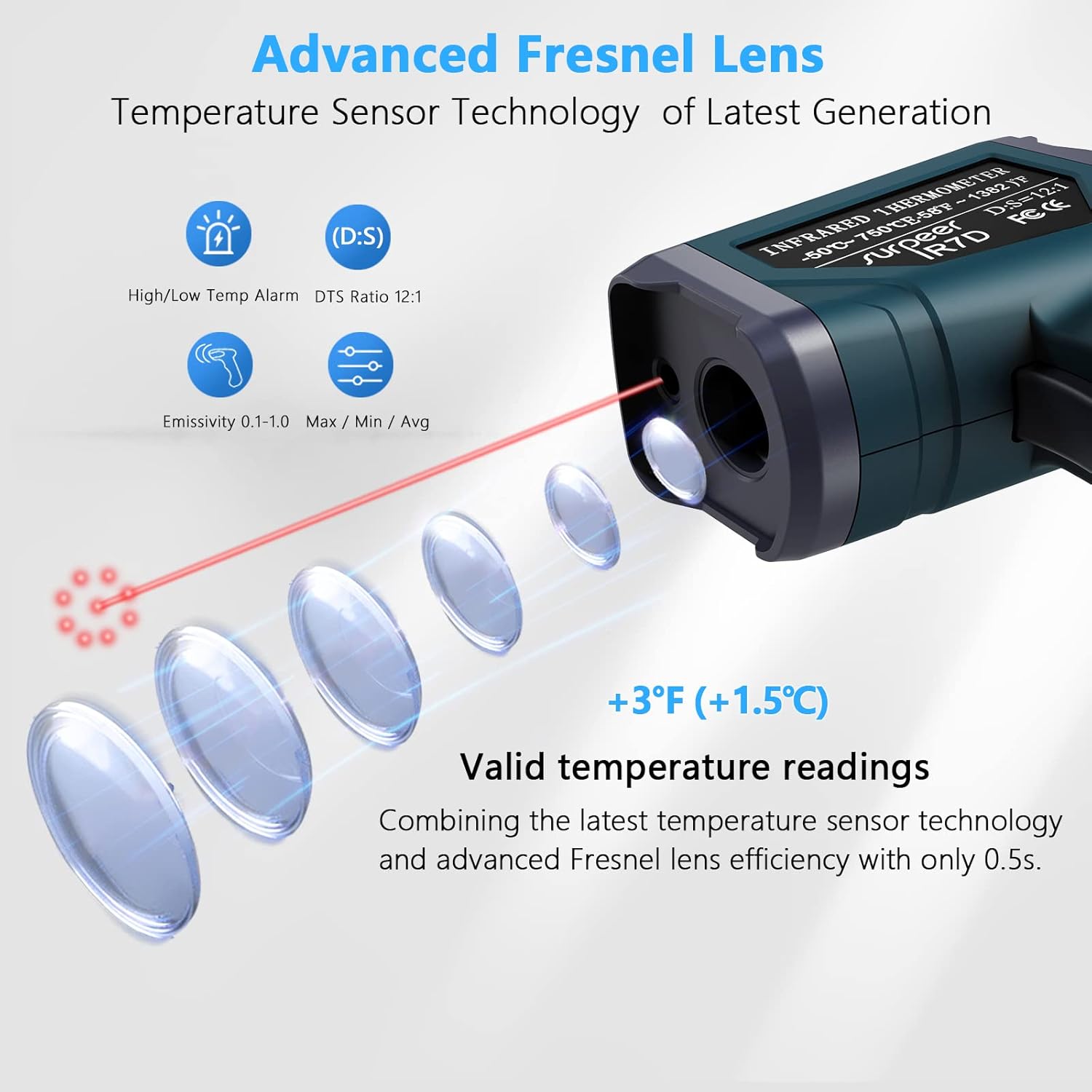
Figure 1: LCD Color Display and Controls
- 1. High/Low-Temperature Alarm Indicator: Lights up when temperature limits are exceeded.
- 2. Laser Indicator: Shows when the laser is active.
- 3. Backlight Display: Illuminates the screen for visibility in low light.
- 4. Temperature Value Display: Shows the measured temperature.
- 5. Mode (Max/Min/Avg/Dif): Indicates the current measurement mode.
- 6. EMS Adjustable: Одоогийн цацрагийн тохиргоог харуулна.
- SET товчлуур: Accesses settings and alarm thresholds.
- MODE товчлуур: Cycles through measurement modes (MAX, MIN, AVG, DIF, EMS).
- HI/LO Buttons (Up/Down Arrows): Adjust settings and toggle features.
- Өдөөгч: Activates the thermometer for measurement.
Тохиргоо
Батерей суурилуулах
- Термометрийн бариул дээрх батерейны тасалгааг олоорой.
- Зайны тасалгааны тагийг нээ.
- Зөв туйлшралыг (+/-) хангаж, дагалдах 9V батерейг оруулна уу.
- Зайны тасалгааны тагийг сайтар хаа.
Төхөөрөмж одоо ашиглахад бэлэн боллоо. Батерейг солих шаардлагатай үед дэлгэц дээр батерей бага байгааг харуулсан заалт гарч ирнэ.
Ашиглалтын заавар
1. Basic Temperature Measurement
- Point the thermometer at the target surface. Ensure the distance-to-spot ratio (D:S) of 12:1 is considered for accurate readings. For example, at 12 inches, the measurement spot is 1 inch in diameter.
- Press and hold the trigger to activate the laser and begin scanning the temperature.
- The measured temperature will be displayed on the LCD screen.
- Release the trigger to hold the last measured temperature on the display. The device will automatically shut off after 15 seconds of inactivity to conserve battery.
2. Температурын нэгжийг өөрчлөх (°C/°F)
With the device powered on, press the "HI/LO" (Up/Down) buttons to toggle between Celsius (°C) and Fahrenheit (°F).
3. Adjustable Emissivity (EMS)
Emissivity (EMS) is the ability of a material to emit thermal energy. Different materials have different emissivity values. Adjusting the emissivity ensures accurate readings for various surfaces.

Figure 2: Adjustable Emissivity for Various Materials
The thermometer's EMS mode allows adjustment from 0.1 to 1.0. To adjust:
- Press the "MODE" button until "EMS" appears on the display.
- Use the "HI/LO" (Up/Down) buttons to increase or decrease the emissivity value.
- Refer to common emissivity tables for typical values of different materials.
4. Temperature Alarm Settings
The device features high and low-temperature alarms that will sound when measured temperatures exceed or fall below set thresholds.

Figure 3: Temperature Alarm Indicators
Сэрүүлэг тохируулахын тулд:
- Press the "SET" button to enter the alarm setting mode.
- Use the "MODE" button to select either the High Alarm (HI) or Low Alarm (LO) threshold.
- Use the "HI/LO" (Up/Down) buttons to adjust the desired temperature threshold.
- Press "SET" again to confirm and exit.
5. Max/Min/Avg/Dif Modes
The thermometer can track maximum, minimum, average, and differential temperatures during a continuous scan.
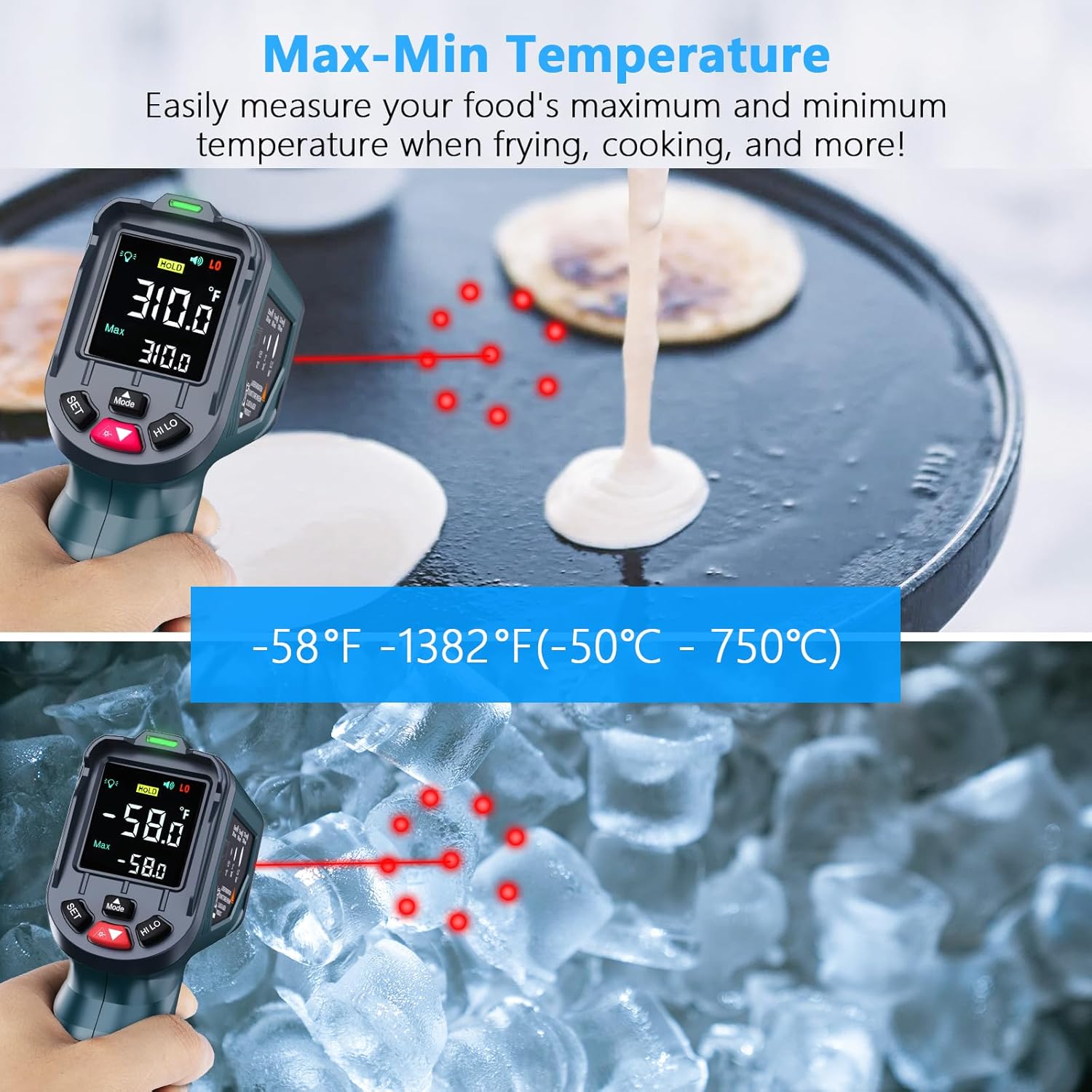
Figure 4: Max-Min Temperature Measurement
To use these modes:
- Press the "MODE" button repeatedly to cycle through MAX (Maximum), MIN (Minimum), AVG (Average), and DIF (Difference) modes.
- While in one of these modes, press and hold the trigger to scan. The display will show the corresponding value.
6. Laser and Backlight Control
Use the "HI/LO" (Up/Down) buttons to toggle the laser pointer and backlight on or off as needed.
7. Advanced Fresnel Lens Technology

Figure 5: Advanced Fresnel Lens System
The thermometer incorporates advanced Fresnel lens technology and a sensitive temperature sensor to provide precise readings within 0.5 seconds. This design enhances the accuracy and speed of temperature detection.
Видео үзүүлбэр
Дараах видео нь харааны үзлэгийг харуулж байнаview of the SURPEER Infrared Thermometer Gun, demonstrating its features and basic operation. Please note that this video is from a third-party reviewer and not an official seller demonstration.
Video: In Hand Review of Infrared Thermometer Gun -58F to 1382F. This video demonstrates the physical appearance and basic temperature measurement function of the infrared thermometer, including its display and controls. It shows the device being used to measure the temperature of a pie.
Засвар үйлчилгээ
Цэвэрлэгээ
- Төхөөрөмжийг зөөлөн, d-ээр арчиж цэвэрлэнэ үүamp даавуу.
- Зүлгүүрийн цэвэрлэгч, уусгагчийг бүү ашигла.
- Төхөөрөмжийг ус болон бусад шингэнд бүү дэвтээ.
- Keep the lens clean and free of dust or debris for accurate readings.
Хадгалах
- Термометрийг ашиглаагүй үед сэрүүн, хуурай газар хадгална.
- Хэрэв төхөөрөмжийг удаан хугацаагаар ашиглахгүй бол ус гоожихоос сэргийлж зайгаа ав.
Алдааг олж засварлах
If you encounter issues with your thermometer, please refer to the following common problems and solutions:
| Асуудал | Боломжит шалтгаан | Шийдэл |
|---|---|---|
| Ямар ч дэлгэц/төхөөрөмж асахгүй | Батерей бага эсвэл цэнэггүй; Батерейг буруу суурилуулсан. | 9V батерейг солино уу; Батерейг зөв туйлшралтай суурилуулсан эсэхийг шалгаарай. |
| Буруу уншилтууд | Incorrect emissivity setting; Lens is dirty; Distance to spot ratio not optimal; Object temperature outside range. | Adjust emissivity for the target material; Clean the lens; Ensure proper distance (12:1 D:S ratio); Verify target temperature is within -58°F to 1382°F. |
| Лазер ажиллахгүй байна | Laser is turned off in settings. | Toggle the laser on using the "HI/LO" buttons. |
| Сэрүүлэг дуугарахгүй байна | Alarm thresholds not set; Sound is turned off. | Set high/low alarm thresholds via the "SET" button; Ensure sound is enabled. |
Хэрэв асуудал хэвээр байвал хэрэглэгчийн тусламжтай холбогдоно уу.
Үзүүлэлтүүд
| Онцлог | Дэлгэрэнгүй |
|---|---|
| Температурын хүрээ | -58°F - 1382°F (-50°C - 750°C) |
| Цэг хүртэлх зайны харьцаа (D:S) | 12:1 |
| Хариу өгөх хугацаа | 0.5 секунд |
| Эмиссия | 0.1-ээс 1.0 хүртэл тохируулах боломжтой |
| Лазер заагч | 9-Point Laser (Class II) |
| Дэлгэцийн төрөл | Color LCD with Backlight |
| Автомат унтрах | 15 секунд (ойролцоогоор) |
| Эрчим хүчний эх үүсвэр | 1 x 9V зай |
| Онцлог шинж чанарууд | High/Low Temperature Alarm, Max/Min/Avg/Dif Modes, Low Battery Indicator |
| Гэрчилгээ | CE, FCC, RoHS |
| Зүйлийн жин | 160 грамм |
| Хэмжээ (ойролцоогоор) | 6.1 инч (Урт) |
Баталгаат болон дэмжлэг
SURPEER products are manufactured to high-quality standards. For information regarding warranty coverage, technical support, or service, please refer to the contact information provided with your purchase or visit the official SURPEER webсайт. Баталгаат заргад зориулж худалдан авалтаа нотлох баримтаа үлдээнэ үү.