Танилцуулга
This manual provides detailed instructions for the setup, operation, and maintenance of your HXSJ J800 Wired Gaming Mouse. Please read this manual thoroughly to ensure proper use and to maximize your gaming and productivity experience.
Багцын агуулга
- 1 x HXSJ J800 Wired Gaming Mouse
- 1 х хэрэглэгчийн гарын авлага
Тохиргоо
- Хулгана холбоно уу: Insert the USB connector of the HXSJ J800 mouse into an available USB port on your computer.
- Драйвер суурилуулах: The mouse is plug-and-play. Your operating system will automatically detect and install the necessary drivers. No additional software installation is required for basic functionality.
- Анхны хэрэглээ: Once connected, the mouse is ready for immediate use.

Image: The HXSJ J800 mouse with its braided USB cable, ready for connection to a computer.
Ашиглалтын заавар
1. Mode Switching (Office Mode / Game Mode)
The HXSJ J800 mouse features two operational modes: Office Mode and Game Mode.
- Өгөгдмөл горим: The mouse defaults to Office Mode upon connection.
- Солих горимууд: To switch between Office Mode and Game Mode, press and hold the Scroll Wheel button болон Хулганы баруун товч нэгэн зэрэг 3 секунд.
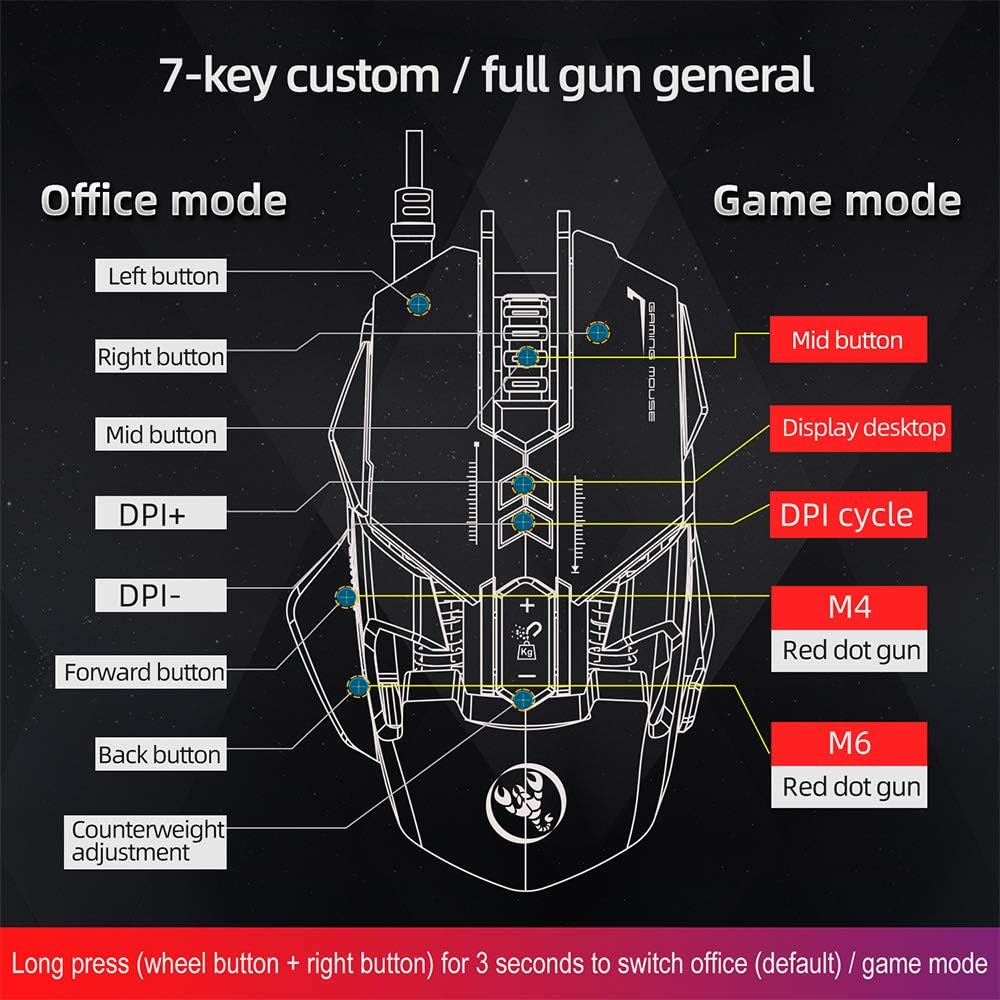
Image: A diagram illustrating the different button assignments for Office Mode (left) and Game Mode (right), including the mode switching instruction.
2. DPI тохируулга
The mouse supports six adjustable DPI settings for varying cursor sensitivity.
- DPI түвшин: 800, 1600, 2400, 3200, 4800, 6400 DPI.
- DPI өөрчлөх: Use the dedicated DPI+ and DPI- buttons located on the top of the mouse to cycle through the available DPI settings.
- Харааны үзүүлэлт: The RGB lighting will flash with a corresponding color when the DPI setting is changed.
3. Макро програмчлал
The HXSJ J800 features an A6653 E-sports Game Chip with onboard storage for hardware macro definition.
- Үйл ажиллагаа: Record and write macro definition commands directly to the mouse.
- Software-Free Operation: Once macros are recorded, no additional software is required for their execution, making it convenient for use across different computers.

Зураг: Нарийвчилсан view of the A6653 E-sports Game Chip, highlighting its role in hardware macro definition.
4. RGB Light Effect
The mouse features 16.8 million color RGB backlight modes.
- Тохируулга: The RGB lighting provides various color effects.
- DPI үзүүлэлт: The light of the corresponding gear will flash every time the DPI changes.

Image: The HXSJ J800 mouse illuminated with vibrant RGB lighting, showcasing its aesthetic features.
5. Removable Weight Adjustment
Customize the mouse's weight for enhanced stability and accuracy.
- Weight System: The mouse incorporates a suction magnet design with two 5g removable weights.
- Тохируулга: The weights can be easily inserted into or removed from the weight chamber. The magnetic design ensures the weights are securely held and not easily lost.

Image: A user adjusting the removable 5g weights in the HXSJ J800 mouse's magnetic weight chamber.
Онцлогууд дууссанview
- Seven-Key Macro Programming: Supports recording and writing macro definition commands for personalized control.
- Six Adjustable DPI Levels: Easily switch between 800-1600-2400-3200-4800-6400DPI to suit various tasks and games.
- E-sports Game Chip (A6653): Features onboard storage for true hardware macro definition, eliminating the need for software after initial setup.
- Cool RGB Light Effect: 16.8 million color RGB backlight modes with dynamic effects and DPI change indicators.
- Removable Weight Design: Two 5g magnetic weights allow for customization of mouse weight for optimal feel and precision.
- Удаан эдэлгээтэй унтраалга: Rated for 20 million cycles.
- Aluminum Alloy Roller: Provides a high-grade feel and comfortable damping.

Зураг: Дотоод view of the HXSJ J800 mouse, highlighting key components such as the A6653 chip, aluminum alloy roller, and weight counterweights.

Image: A close-up of the HXSJ J800 mouse, focusing on the aluminum alloy scroll wheel and its textured design.
Засвар үйлчилгээ
- Цэвэрлэгээ: Хулганы гадаргууг зөөлөн, хуурай даавуугаар цэвэрлэ. Зөрүүд шороонд бага зэрэг dampдаавуугаар усаар. Химийн хатуу бодис, зүлгүүрийн материал ашиглахаас зайлсхий.
- Мэдрэгчийн арчилгаа: Хулганы доод талд байрлах оптик мэдрэгчийг тоос шороо, хог хаягдлаас ангид байлгаж, үнэн зөв хянах боломжтой.
- Кабелийн менежмент: USB кабелийг гэмтээхгүйн тулд хурц гулзайлгах эсвэл хэт их татахаас зайлсхий.
- Хадгалах: Хулганыг ашиглаагүй үедээ цэвэр, хуурай орчинд хадгална уу.
Алдааг олж засварлах
- Хулгана хариу өгөхгүй байна:
- - Ensure the USB cable is securely connected to your computer's USB port.
- - Try connecting the mouse to a different USB port.
- - Компьютерээ дахин эхлүүлнэ үү.
- - Try connecting the mouse to a different USB port.
- DPI тохируулга ажиллахгүй байна:
- - Ensure you are pressing the correct DPI+ or DPI- buttons.
- - Check if the mouse is in a mode that supports DPI adjustment (both Office and Game modes support it).
- RGB гэрэлтүүлэг ажиллахгүй байна:
- - Verify the mouse is properly connected and receiving power.
- - The lighting should activate automatically. If not, ensure no software is overriding the mouse's default lighting settings (though this mouse is designed to be software-free for basic functions).
- Macros not executing:
- - Ensure the macros were correctly recorded and saved to the mouse's onboard memory.
- - Confirm the mouse is in Game Mode if the macros are assigned to Game Mode specific buttons.
Үзүүлэлтүүд
| Зүйл | Тодорхойлолт |
|---|---|
| Загвар | J800 |
| Өнгө | Саарал |
| Түлхүүрүүдийн тоо | 7 |
| DPI тохиргоо | 800-1600-2400-3200-4800-6400DPI |
| Интерфэйс | USB |
| Амьдралыг солих | 20 сая мөчлөг |
| Ботьtagд/Одоогийн | DC 5V/100mA |
| Дэмжигдсэн систем | Windows 2000/XP/Win7/Win8/Win10 Vista 32bit, iOS or latest |
| Барааны хэмжээ | 13 x 8 x 4 см (L x W x H) |
| Зүйлийн жин | Ойролцоогоор 154 гр |
| Чип | A6653 E-sports Game Chip |
| Онцлог шинж чанарууд | Programmable Buttons, Adjustable DPI, RGB Lighting, Removable Weights |
Баталгаат болон дэмжлэг
For warranty information or technical support, please refer to the retailer where you purchased the HXSJ J800 Wired Gaming Mouse or visit the official HXSJ webсайт. Баталгаат заргад зориулж худалдан авалтаа нотлох баримтаа үлдээнэ үү.