
1. Танилцуулга
This manual provides detailed instructions for the installation, operation, and maintenance of the TSL LTS CMIP8342W-M Platinum Network Mini Bullet IP Camera. Please read this manual thoroughly before using the product to ensure proper setup and optimal performance. Keep this manual for future reference.
2. Бүтээгдэхүүн дууссанview
The TSL LTS CMIP8342W-M is a 4MP High Definition Network Mini Bullet IP Camera designed for robust surveillance. It offers clear imaging up to 2560x1520 at 30 frames per second with a 4mm fixed lens. Key features include True WDR 120dB for balanced images in varying light conditions, Matrix IR 2.0 for night vision up to 100 feet, and support for H.265/H.264 video compression. The camera is WEATHERPROOF IP67 rated, making it suitable for both indoor and outdoor use, and includes a MicroSD slot for local storage up to 128GB. It supports both DC 12V and Power over Ethernet (PoE) for flexible power options. Advanced Video Content Analytics (VCA) features such as Line Crossing, Intrusion Detection, and Face Detection enhance its surveillance capabilities.
- Шийдвэр: 4MP - Image Sensor 1/3” sensor - True WDR 120dB
- Линз: 4mm @F1.6: horizontal FOV: 83°, vertical FOV: 45°, diagonal FOV: 99°
- Видео шахалт: Main stream: H.265/H.264; Sub-stream: H.265/H.264/MJPEG; Third stream: H.265/H.264
- Хүрээний хурд: 60Hz: 15fps (2048 x 1536), 30fps (1920 × 1080), 30fps (1280 x 720); 50Hz: 12.5fps (2048 x 1536), 25fps (1920 × 1080), 25fps (1280 x 720)
- Макс. Шийдвэр: 2688 × 1520 - WEATHERPROOF IP67
3. Аюулгүй байдлын мэдээлэл
- Эрчим хүчний хангамжийн хэмжээг баталгаажуулна ууtagКамерыг холбохоос өмнө e зөв байна.
- Камерыг хэт өндөр температур, чийгшил эсвэл идэмхий орчинд бүү байлга.
- Avoid pointing the camera lens directly at strong light sources for extended periods.
- Handle the camera with care. Do not drop or subject it to strong physical shocks.
- Зөвхөн үйлдвэрлэгчээс заасан дагалдах хэрэгслийг ашиглана уу.
- Суурилуулалт, засвар үйлчилгээг мэргэшсэн ажилтнууд гүйцэтгэх ёстой.
4. Багцын агуулга
Багцыг нээхдээ бүх зүйл байгаа бөгөөд сайн нөхцөлд байгаа эсэхийг шалгана уу:
- TSL LTS CMIP8342W-M IP Camera
- Суурилуулах эрэг ба ханын залгуур
- Ethernet кабелийн ус нэвтэрдэггүй холбогч
- Түргэн эхлүүлэх гарын авлага
- Drill Template (if applicable)
Note: A power adapter (DC 12V) may be sold separately or included depending on the specific package. An Ethernet cable is required for network connection.
5. Тохиргоо
5.1 Физик суурилуулалт
- Суулгах байршлыг сонгоно уу: Хүссэн талбарыг агуулсан байршлыг сонгоно уу view and is within range of power and network connections. Ensure the surface is strong enough to support the camera.
- Камерыг суурилуулах: Use the provided drill template to mark and drill holes. Secure the camera base to the wall or ceiling using the mounting screws and wall plugs.
- Камерын өнцгийг тохируулах: Loosen the adjustment screws on the camera body to position the lens for optimal coverage. Tighten the screws once the desired angle is achieved.
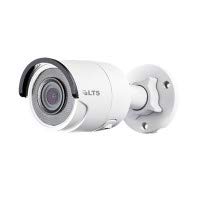
Зураг 5.1: Урд view of the TSL LTS CMIP8342W-M Platinum Network Mini Bullet IP Camera, showing the lens and IR illuminators.
5.2 Цахилгаан ба сүлжээний холболт
- Эрчим хүчний холболт:
- PoE (Ethernet дээр ажиллах): If using a PoE-enabled switch or NVR, connect an Ethernet cable from the camera's RJ45 port directly to the PoE port. No separate power adapter is needed.
- DC 12V хүч: If not using PoE, connect a 12V DC power adapter (not included) to the camera's power input port.
- Сүлжээний холболт: Connect an Ethernet cable from the camera's RJ45 port to your network switch or router. Use the waterproof connector for outdoor installations to protect the RJ45 connection.
- MicroSD карт суулгах (заавал биш): If local storage is desired, carefully open the MicroSD card slot cover (refer to the camera diagram in the quick start guide) and insert a MicroSD card (up to 128GB) with the contacts facing down. Close the cover securely.
Зураг 5.2: Хажуу тал view of the TSL LTS CMIP8342W-M Platinum Network Mini Bullet IP Camera, illustrating the mounting bracket and cable connections.
5.3 Анхны тохиргоо
- Камерыг нээж илрүүл: Use the manufacturer's IP camera search tool (e.g., SADP Tool) on a computer connected to the same network to find the camera's IP address.
- Камерыг идэвхжүүлэх: For first-time use, you may need to activate the camera by setting a strong password.
- Хандалт Web Интерфэйс: Нээлттэй a web browser and enter the camera's IP address. Log in with the newly set password.
- Сүлжээний тохиргоо: Configure network settings (e.g., static IP, DHCP) as needed for your network environment.
- Огноо ба цаг: Set the correct date and time, preferably using NTP (Network Time Protocol) for synchronization.
6. Ажиллаж байгаа
6.1 Амьд View болон Бичлэг
Once configured, access the camera's live view дамжуулан web interface, a compatible NVR, or a mobile application. From the live view, та:
- Monitor real-time video feed.
- Manually start/stop recordings.
- Take snapshots.
- Adjust image parameters (brightness, contrast, saturation).
6.2 Нарийвчилсан онцлог
- True WDR 120dB: Enable Wide Dynamic Range in settings to improve image clarity in scenes with both very bright and very dark areas.
- Matrix IR 2.0: The camera automatically activates its infrared illuminators in low-light conditions for night vision.
- Хөдөлгөөн илрүүлэх: Configure motion detection zones and sensitivity. Set up actions such as recording, sending notifications, or triggering alarms upon detection.
- VCA (Видео контентын аналитик): Utilize Line Crossing Detection, Intrusion Detection, and Face Detection features by defining specific rules and areas in the camera's settings.
- SD картын бичлэг: Configure continuous, scheduled, or event-triggered recording to the installed MicroSD card.
7. Засвар үйлчилгээ
- Цэвэрлэгээ: Камерын линзийг зөөлөн, хуурай даавуугаар тогтмол цэвэрлээрэй. Зөөлөн бохирдлыг арилгахын тулд зөөлөн линз цэвэрлэгч уусмал хэрэглээрэй. Хүчтэй химийн бодис бүү хэрэглээрэй.
- Програм хангамжийн шинэчлэлтүүд: Үйлдвэрлэгчийг шалгана уу website periodically for firmware updates. Updating firmware can improve performance, add new features, and fix bugs. Follow the provided instructions carefully during the update process.
- Хадгалах менежмент: If using a MicroSD card, regularly back up important recordings and format the card periodically to maintain optimal performance.
- Кабелийн үзлэг: Periodically inspect all cables and connections for wear, damage, or corrosion, especially in outdoor installations.
8. Алдаа засах
| Асуудал | Боломжит шалтгаан | Шийдэл |
|---|---|---|
| Камерт цахилгаан байхгүй | Loose power connection, faulty power adapter/PoE switch, power outage. | Check all power connections. Verify power adapter/PoE switch is functioning. Restore power. |
| Дэлгэц дээр зураг алга | Network connection issue, incorrect IP address, camera not activated, software/browser issue. | Verify network cable is connected. Check camera's IP address. Ensure camera is activated and logged in. Try a different browser or client software. |
| Зургийн чанар муу байна | Dirty lens, incorrect focus, low bandwidth, improper settings (WDR, exposure). | Clean the lens. Adjust focus if applicable. Check network bandwidth. Adjust image settings in the web интерфейс. |
| Сүлжээгээр дамжуулан камерт хандах боломжгүй | Incorrect IP address, network configuration mismatch, firewall blocking. | Use the discovery tool to find the correct IP. Ensure camera and computer are on the same subnet. Check firewall settings on your computer or router. |
| SD карт бичихгүй байна | SD card full, faulty SD card, incorrect recording schedule, SD card not formatted. | Check SD card status in settings. Replace faulty card. Verify recording schedule. Format the SD card via the camera's web интерфейс. |
9. Техникийн үзүүлэлтүүд
| Онцлог | Тодорхойлолт |
|---|---|
| Загварын дугаар | CMIP8342W-M |
| Видео бичлэгийн нягтрал | 4 МП |
| Үр дүнтэй шийдэл | 4 МП |
| Линз | 4мм @F1.6 |
| Frame Rate | 30 fps (max) |
| Шөнийн харааны хүрээ | 100 фут |
| Гэрэл багатай технологи | Шөнийн өнгө |
| Жинхэнэ WDR | 120дБ |
| Видео шахалт | H.265, H.265+, H.264, H.264+, MJPEG |
| MicroSD үүр | 128 ГБ хүртэл |
| Эрчим хүчний хангамж | DC 12V, PoE |
| Олон улсын хамгаалалтын зэрэглэл | IP67 |
| Суурилуулах төрөл | Ханын бэхэлгээ |
| Form Factor | Сум |
| Холболтын технологи | Утастай (Ethernet) |
| Дотор/гадаа ашиглах | Дотор, гадаа |
| Сэрэмжлүүлгийн төрөл | Motion Only (VCA: Line Crossing, Intrusion Detection, Face Detection) |
10. Баталгаат хугацаа ба дэмжлэг
For warranty information and technical support, please refer to the official TSL webсайт эсвэл эрх бүхий дилертэйгээ холбогдоно уу. Худалдан авалтын баримтаа баталгаат нэхэмжлэлд зориулж худалдан авалтын баталгаа болгон хадгална уу.
Үйлдвэрлэгч: LTS
Брэнд: TSL