
1. Танилцуулга
The JHS Pedals 3 Series Chorus is a versatile guitar effect pedal designed to deliver classic chorus and vibrato modulation sounds. Its straightforward controls allow for a wide range of tonal possibilities, suitable for various musical styles. This manual provides essential information for setting up, operating, maintaining, and troubleshooting your 3 Series Chorus pedal.
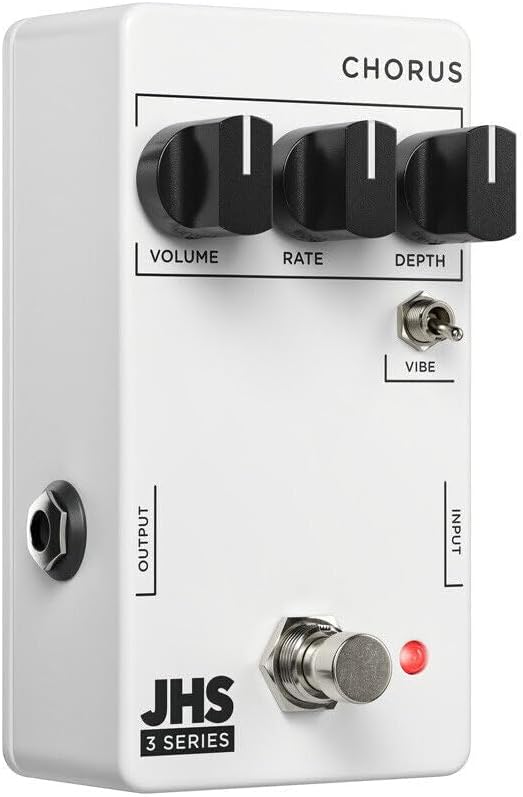
Зураг 1: Урд view of the JHS 3 Series Chorus pedal.
2. Тохиргоо
Follow these steps to properly set up your JHS 3 Series Chorus pedal:
- Эрчим хүчний холболт: Connect a standard 9V DC negative center power supply to the power input jack. The pedal requires 70mA of current. Ensure your power supply meets these specifications to prevent damage.
- Оролтын холболт: Гитар эсвэл бусад хөгжмийн зэмсгээ стандарт 1/4 инчийн кабелиар дөрөөний баруун талд байрлах INPUT залгуурт холбоно уу.
- Гаралтын холболт: Дөрөөний зүүн талд байгаа OUTPUT залгуурыг өөрийн төхөөрөмжид холбоно уу ampстандарт 1/4 инчийн багажны кабелийг ашиглан өргөгч эсвэл дохионы гинжин хэлхээний дараагийн дөрөөг дарна уу.
- Идэвхжүүлэх: Press the footswitch to engage or bypass the effect. The red LED indicator will illuminate when the effect is active.

Зураг 2: Дээд талд view of the JHS 3 Series Chorus pedal, showing input and output jacks.
Тохиргоо дууслааview Видео
Видео 1: Дууслааview of the JHS 3 Series Pedals, including setup and general features. This video provides a visual guide to connecting and understanding the basic operation of the 3 Series line.
3. Үйлдлийн удирдлага
The JHS 3 Series Chorus features three primary knobs and one toggle switch for shaping your sound:
- Эзлэхүүн: This knob controls the overall output level of the pedal. Adjust it to match the volume of your bypassed signal or to boost your sound when the effect is engaged.

Image 3: Detail of the Volume control knob.
- Үнэлгээ: The Rate knob adjusts the speed of the chorus or vibrato modulation. Turning it clockwise increases the speed, creating faster, more intense wobbles. Counter-clockwise movement slows the modulation for a more subtle, swirling effect.

Image 4: Detail of the Rate control knob.
- Гүн: This knob controls the intensity or depth of the modulation. A lower setting (counter-clockwise) provides a gentle, less pronounced chorus. Increasing the depth (clockwise) results in a more pronounced, seasick-like modulation.

Image 5: Detail of the Depth control knob.
- Vibe Toggle: This two-position toggle switch alters the character of the effect. When engaged (up position), the Vibe toggle removes the dry signal, transforming the chorus into a true pitch vibrato sound. In the down position, the pedal operates as a standard chorus effect, blending the modulated signal with your dry signal.

Image 6: Detail of the Vibe toggle switch.
4. Техникийн үзүүлэлтүүд
| Брэнд | JHS дөрөө |
| Загварын нэр | 3 Series Chorus |
| Загварын дугаар | 3SCHORUS |
| Загвар | Найрал дуу |
| Өнгө | Цагаан |
| Зүйлийн жин | 0.3 кг |
| Ботьtage | 9 вольт DC |
| Ampарилгах | 70 саяamps |
| Эрчим хүчний эх үүсвэр | Corded Electric (9V DC Negative Center) |
| Аудио гаралтын эффектүүд | Chorus, Vibrato |
| Хяналтын төрөл | Knob (Volume, Rate, Depth), Toggle (Vibe) |
| Дохионы формат | Аналог |
| Sound Profile | Warm, Musical, Chorus/Vibrato |
| Зүйлийн хэмжээ | 4 x 3 x 2 инч |
| UPC | 650415212354 |
5. Засвар үйлчилгээ
To ensure the longevity and optimal performance of your JHS 3 Series Chorus pedal, follow these maintenance guidelines:
- Цэвэрлэгээ: Use a soft, dry cloth to clean the pedal's exterior. Avoid using abrasive cleaners or solvents, as these can damage the finish and internal components.
- Хадгалах: Store the pedal in a cool, dry place away from direct sunlight and extreme temperatures. When not in use for extended periods, disconnect the power supply.
- Холболтууд: Бүх кабелийн холболтууд элэгдэж урагдаж байгаа эсэхийг үе үе шалгаж байх. Домкратын холбогч нь тоос шороо, хог хаягдалгүй эсэхийг шалгаарай.
- Эрчим хүчний хангамж: Always use a regulated 9V DC negative center power supply that meets the 70mA current requirement. Incorrect power can damage the pedal and void the warranty.
6. Алдаа засах
If you encounter issues with your JHS 3 Series Chorus pedal, refer to the following troubleshooting tips:
- Дуугүй:
- Бүх кабелийн холболтыг шалгана уу (гитараас оролт руу, гаралт руу) amp).
- Ensure the power supply is correctly connected and providing the specified 9V DC negative center power.
- Таны багаж хэрэгсэл болон ampӨргөгч нь дөрөөг алгасах замаар зөв ажиллаж байна.
- Confirm the pedal is engaged (red LED illuminated).
- Сул эсвэл гажуудсан дуу чимээ:
- Check the Volume knob setting on the pedal.
- Ensure your power supply is providing stable power. Low battery or an inadequate power supply can cause performance issues.
- Холболтын алдааг арилгахын тулд өөр өөр кабелиар туршиж үзээрэй.
- Effect Not Working as Expected:
- Adjust the Rate and Depth knobs to explore the full range of the effect.
- Experiment with the Vibe toggle switch to understand its impact on the sound (chorus vs. vibrato).
- If the sound is too subtle, increase the Depth. If it's too fast or slow, adjust the Rate.
7. Баталгаат хугацаа ба дэмжлэг
The JHS Pedals 3 Series Chorus comes with a 4-year non-transferable warranty within the USA. Product registration is required to activate the warranty.
For warranty claims, technical support, or further assistance, please visit the official JHS Pedals website or contact their customer service department. Always refer to the official JHS Pedals resources for the most accurate and up-to-date support information.
Албан ёсны Webсайт: www.jhspedals.com