
Casio DH-12ET
Casio DH-12ET Desktop Calculator User Manual
Model: DH-12ET
Танилцуулга
This manual provides detailed instructions for the proper use and maintenance of your Casio DH-12ET Desktop Calculator. Please read this manual thoroughly before using the calculator to ensure optimal performance and longevity.

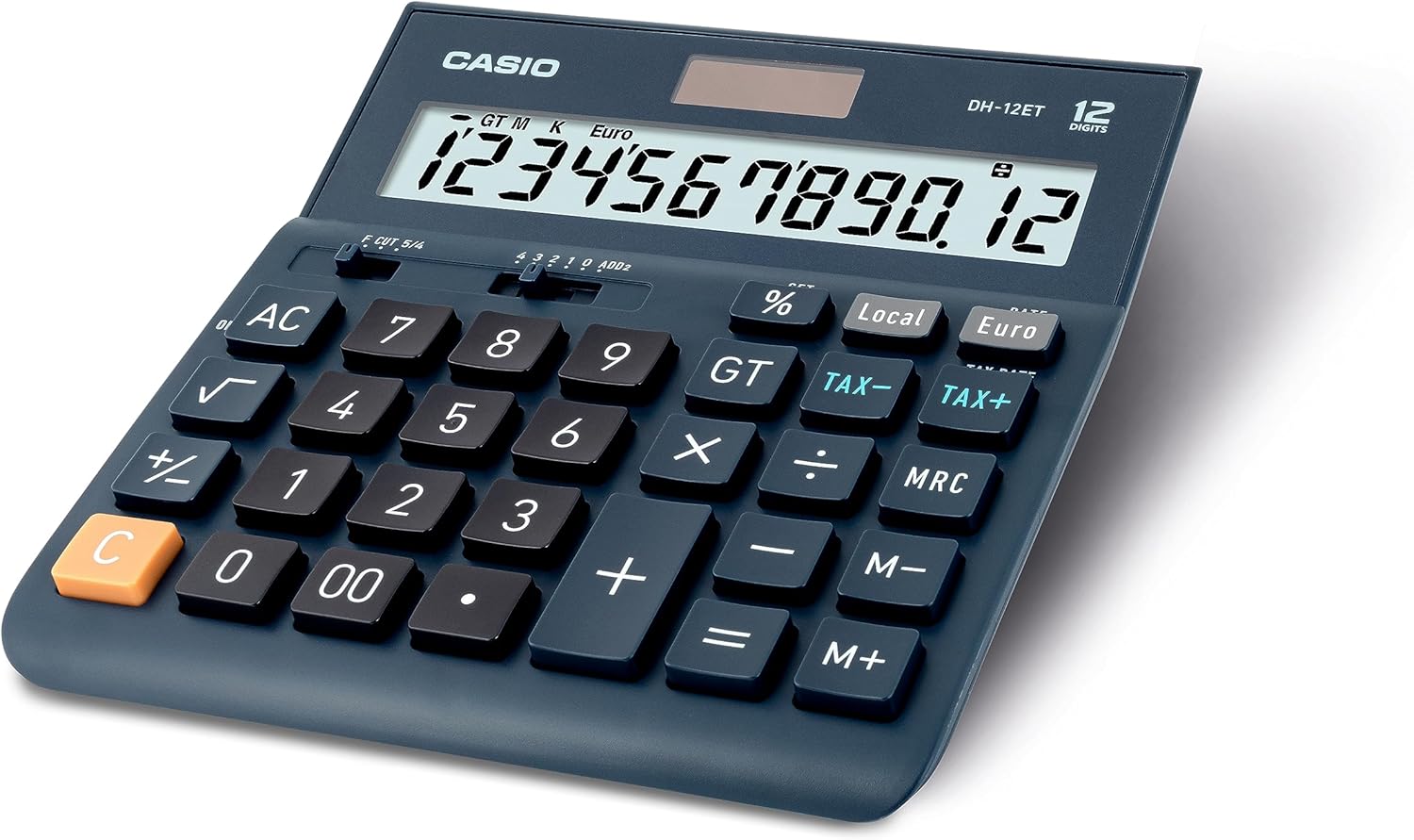
Зураг 1: Урд view of the Casio DH-12ET Desktop Calculator, showing the display and key layout.
Бүтээгдэхүүний онцлог
The Casio DH-12ET is a versatile 12-digit desktop calculator designed for various business and personal calculations. Key features include:
- 12 оронтой LCD дэлгэц: Clear display with calculation command indicators and thousands separators.
- Татварын тооцоо: Dedicated functions for easy and quick calculation of tax additions or subtractions.
- Валютын хөрвүүлэлт: Ability to convert amounts between two currencies after setting an exchange rate.
- Professional Percentage Тооцоолол: Determine percentage increase and decrease with separate display of calculated values.
- Mark Up Function: Quickly determine margins and markups.
- Square Root Function: Calculate square roots.
- Sign Change (+/-): Easily switch between positive and negative values.
- Total Sum Memory (GT): Automatically stores the sum of all calculation results.
- 3-Key Memory: Independent memory functions (M+, M-, MRC) for storing and recalling values.
- Solar/Battery Operated: Dual power source for reliable operation.
- Автомат унтраалт: Conserves battery life by shutting down after 6 minutes of inactivity.
- Memory Protection Battery: Retains stored data (e.g., currency rates, tax rates) during power loss or battery change.
- Резинэн хөл: Provides stability on surfaces.
Тохиргоо
Эрчим хүчний хангамж
The Casio DH-12ET calculator operates on a dual power system: solar power and a single LR44 button cell battery. The solar panel provides power in well-lit environments, while the battery acts as a backup in low light conditions or when the solar power is insufficient. The battery also serves as a memory protection battery.
Батерей суурилуулах/солих
The calculator comes with one LR44 battery pre-installed. If the display becomes dim or unresponsive in low light, the battery may need replacement.
- Тооцоологч асаалттай байгаа эсэхийг шалгаарай OFF.
- Тооцоолуурын ар талд батерейны тасалгааг олоорой.
- Жижиг халив ашиглан зайны тасалгааны тагийг бэхэлсэн боолтыг салгана.
- Carefully remove the old LR44 battery.
- Insert a new LR44 battery with the positive (+) side facing upwards.
- Зайны тасалгааны тагийг сольж, боолтоор бэхлээрэй.
Жич: Dispose of used batteries according to local regulations. Do not expose batteries to excessive heat or fire.
Ашиглалтын заавар
Үндсэн тооцоолол
- Нэмэлт: Эхний дугаарыг оруулаад, товчийг дарна уу +, хоёр дахь дугаарыг оруулаад, товчийг дарна уу =.
- Хасах: Эхний дугаарыг оруулаад, товчийг дарна уу -, хоёр дахь дугаарыг оруулаад, товчийг дарна уу =.
- Үржүүлэх: Эхний дугаарыг оруулаад, товчийг дарна уу x, хоёр дахь дугаарыг оруулаад, товчийг дарна уу =.
- Хэсэг: Эхний дугаарыг оруулаад, товчийг дарна уу ÷, хоёр дахь дугаарыг оруулаад, товчийг дарна уу =.
- Оруулгыг цэвэрлэх: дарна уу C to clear the last entered number.
- All Clear: дарна уу AC to clear all entries and reset the calculator.
Татварын тооцоо
The calculator allows for easy addition or subtraction of a pre-set tax rate.
- Татварын хувь хэмжээг тогтоох нь:
- дарна уу AC болон барина уу % key until "SET" appears on the display.
- дарна уу ТАТВАРЫН ХҮҮ (which is the TAX+ түлхүүр).
- Enter the desired tax rate (e.g., 8 for 8%).
- дарна уу % to confirm and save the tax rate.
- Татвар нэмэх: Тоо хэмжээг оруулаад дараа нь товчийг дарна уу TAX+. The display will show the amount with tax added.
- Татварыг хасах: Enter the amount with tax, then press TAX-. The display will show the original amount before tax.

Зураг 2: Steps for changing the tax rate on the Casio DH-12ET calculator.
Валютын хөрвүүлэлт
The calculator supports conversion between a local currency and a foreign currency (e.g., Euro).
- Setting the Exchange Rate:
- дарна уу AC болон барина уу % key until "SET" appears.
- дарна уу ҮНЭ (which is the евро түлхүүр).
- Enter the exchange rate (e.g., 1.25 if 1 Local unit = 1.25 Euro).
- дарна уу % to confirm and save the rate.
- Converting Local to Foreign: Enter the local amount, then press евро.
- Converting Foreign to Local: Enter the foreign amount, then press Орон нутгийн.
Персенtage Тооцоолол
- Calculate Percentage of a Number: Enter number, press x, enter percentage утга, дарна уу %. (e.g., 100 x 15 % = 15)
- Add Percentage: Enter number, press +, enter percentage утга, дарна уу %. (e.g., 100 + 15 % = 115)
- Subtract Percentage: Enter number, press -, enter percentage утга, дарна уу %. (e.g., 100 - 15 % = 85)
Санах ойн функцууд
- М+: Харуулсан утгыг санах ойд нэмнэ.
- М-: Харуулсан утгыг санах ойгоос хасна.
- МГХ:
- Press once to recall the value stored in memory.
- Press twice to clear the memory (M indicator disappears).
- GT (Их нийт):
- Automatically accumulates results of calculations (e.g., after pressing = or %).
- дарна уу GT to display the grand total.
- дарна уу AC to clear the grand total memory.
Бусад функцууд
- √ (квадрат үндэс): Enter a number, then press √ to calculate its square root.
- +/- (Тэмдгийн өөрчлөлт): Харуулсан тооны тэмдгийг эерэгээс сөрөг эсвэл эсрэгээр өөрчилнө.
- Decimal Selector (F CUT 5/4, 4 3 2 1 0 ADD2):
This slider switch controls the decimal point and rounding settings:
- F (Хөвөгч): Decimal point floats, displaying all digits.
- CUT: Truncates results to the specified number of decimal places.
- 5/4: Rounds results to the specified number of decimal places (standard rounding).
- 4, 3, 2, 1, 0: Specifies the number of decimal places (e.g., '2' for two decimal places).
- ADD2: Automatically adds two decimal places for currency calculations.
Засвар үйлчилгээ
Цэвэрлэгээ
To clean the calculator, wipe it gently with a soft, dry cloth. For stubborn dirt, slightly dampen the cloth with water and a mild detergent, then wipe dry immediately. Do not use strong solvents, abrasive cleaners, or spray cleaners directly onto the calculator.
Хадгалах
Тооцоолуурыг сэрүүн, хуурай, нарны шууд тусгал, хэт өндөр температур, өндөр чийгшилээс хол газар хадгална уу. Удаан хугацаагаар хадгалах бол гоожихоос сэргийлж зайг нь салгаж авахыг зөвлөж байна.
Алдааг олж засварлах
- Дэлгэц бүдэг эсвэл хоосон байна:
- Ensure the calculator is in a well-lit area for solar power.
- Check the battery. Replace the LR44 battery if it is depleted.
- Буруу тооцооллын үр дүн:
- дарна уу AC to clear all previous calculations and memory.
- Verify the decimal selector switch setting.
- Check if any memory functions (M, GT) are active and interfering.
- Түлхүүрүүд хариу өгөхгүй байна:
- Ensure the calculator is powered on.
- Аливаа хог хаягдлыг арилгахын тулд түлхүүрүүдийн эргэн тойронд цэвэрлэ.
- If the issue persists, try replacing the battery.
Үзүүлэлтүүд
| Онцлог | Дэлгэрэнгүй |
|---|---|
| Загвар | DH-12ET |
| Дэлгэц | 12 оронтой LCD |
| Эрчим хүчний эх үүсвэр | Solar / 1 x LR44 Battery (included) |
| Хэмжээ (L x W) | 15.9 см x 15.1 см (6.26 инч x 5.94 инч) |
| Жин | 180 грамм |
| Материал | Хуванцар, резин |
| Автомат унтрах | Approximately 6 minutes of inactivity |
Зураг 3: Хажуу тал view of the Casio DH-12ET calculator with approximate dimensions.
Баталгаат болон дэмжлэг
For information regarding warranty coverage, service, or technical support for your Casio DH-12ET Desktop Calculator, please refer to the warranty card included with your product or visit the official Casio website for your region. Contact details for customer service are typically available on the manufacturer's webсайт.
Casio албан ёсны Webсайт: www.casio.com