
1. Бүтээгдэхүүн дууссанview
The KAIDI KD-763 is a wired gaming headset designed for use with the PlayStation 4 (PS4) console and other compatible devices with a 3.5mm audio jack. It features over-ear cups for immersive sound, a rotary microphone for clear communication, and an inline volume control for convenient audio adjustments. The headset also includes an LED lighting effect, typically powered via a USB connection.
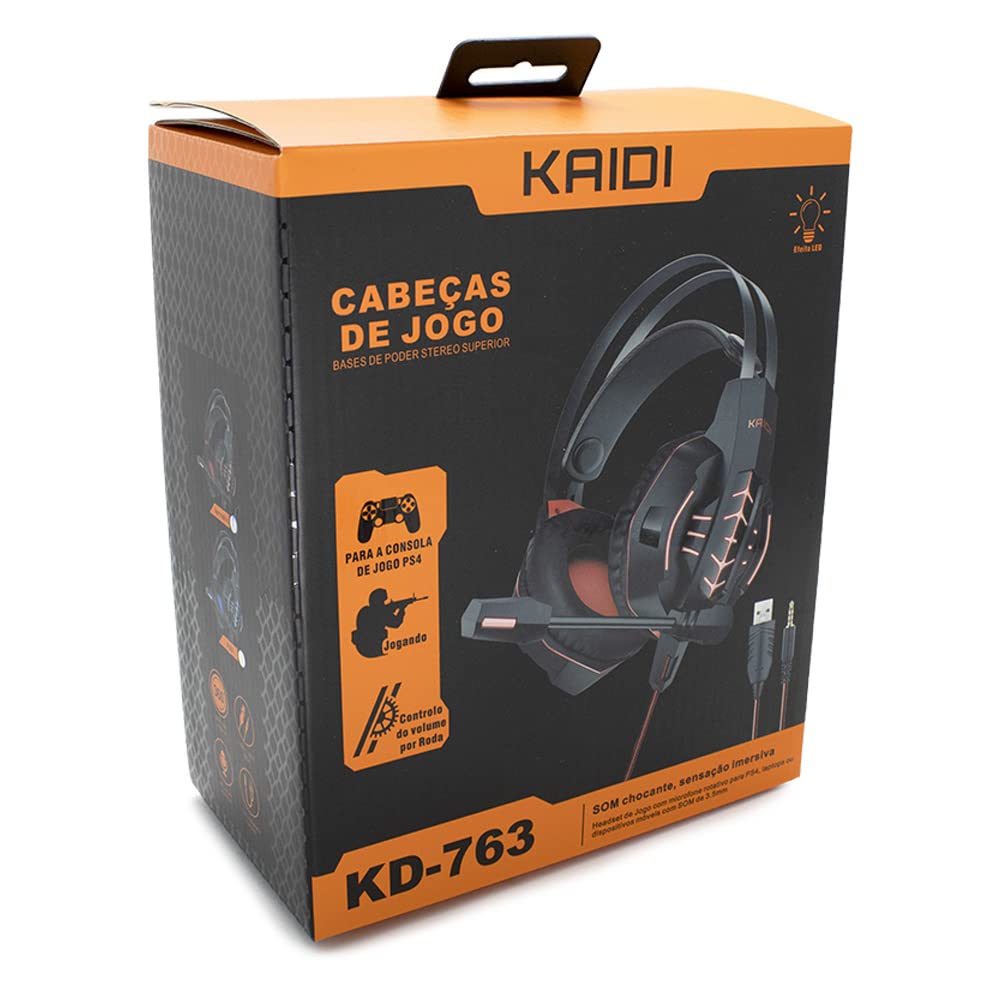
Зураг 1.1: The KAIDI KD-763 PS4 Gaming Headset packaging, showing the headset, its features, and compatibility with PS4.
2. Аюулгүй байдлын мэдээлэл
- Сонсголыг гэмтээхгүйн тулд өндөр дуугаар удаан сонсохоос зайлсхий.
- Do not expose the headset to extreme temperatures, humidity, or direct sunlight.
- Чихэвчийг ус болон бусад шингэнээс хол байлга.
- Do not attempt to disassemble or modify the headset. This may void the warranty and cause damage.
- Clean the headset with a soft, dry cloth only.
- Хүүхдийн гар хүрэхгүй газар хадгална.
3. Багцын агуулга
Нээхдээ савлагааны агуулгыг шалгана уу. Хэрэв ямар нэгэн зүйл алга болсон эсвэл гэмтсэн бол худалдагчтайгаа холбогдоно уу.
- KAIDI KD-763 Gaming Headset
- Хэрэглэгчийн гарын авлага (энэ баримт бичиг)
4. Тохируулах гарын авлага
- Connect to PS4 Controller: Locate the 3.5mm audio jack on your PS4 controller. Insert the 3.5mm connector from the KD-763 headset firmly into this port.
- Powering LED Lights (Optional): If your headset features LED lighting, connect the USB connector from the headset to an available USB port on your PS4 console or a compatible USB power adapter. The LED lights will illuminate once connected.
- Чихэвчний тохиргоог тохируулах: Extend or retract the headband to ensure the earcups sit comfortably and securely over your ears. The over-ear design should fully enclose your ears for optimal sound isolation.
- Микрофоны байрлал: Adjust the flexible rotary microphone boom to a position near your mouth for clear voice pickup. Ensure it is not obstructing your vision.
- Configure PS4 Audio Settings:
- руу оч Тохиргоо > Төхөөрөмжүүд > Аудио төхөөрөмж on your PS4.
- Тохируулах Оролтын төхөөрөмж to "Headset (Controller)".
- Тохируулах Гаралтын төхөөрөмж to "Headset (Controller)".
- Тохируулах Чихэвч рүү гарга to "All Audio" for full game and chat sound.
- Тохируулах Дууны түвшний хяналт (чихэвч) тав тухтай түвшинд.
5. Ашиглалтын заавар
5.1. Дууны түвшний хяналт
The KD-763 headset features an inline volume control wheel located on the cable. Rotate the wheel upwards to increase the volume and downwards to decrease it. Adjust to a comfortable listening level.
5.2. Микрофоны хэрэглээ
The microphone is designed to capture your voice clearly. Ensure it is positioned correctly near your mouth. If your PS4 audio settings are configured correctly, your voice will be transmitted to other players in online games or chat parties.
To mute the microphone, check if there is a physical mute switch on the inline control. If not, you can mute the microphone through your PS4's quick menu (hold the PS button on your controller).
6. Засвар үйлчилгээ
- Цэвэрлэгээ: Use a soft, dry, lint-free cloth to wipe the earcups and headband. Do not use liquid cleaners or abrasive materials.
- Хадгалах: When not in use, store the headset in a clean, dry place, away from direct sunlight and extreme temperatures. Avoid tangling the cable.
- Кабель арчилгаа: Do not pull on the cable to disconnect the headset. Always grasp the plug. Avoid bending or twisting the cable excessively.
7. Алдаа засах
- Дуу байхгүй эсвэл дуу багатай:
- Ensure the 3.5mm jack is fully inserted into the PS4 controller.
- Check the inline volume control wheel on the headset cable and turn it up.
- Verify PS4 audio settings (Тохиргоо > Төхөөрөмжүүд > Аудио төхөөрөмж) are correctly configured for the headset.
- Чихэвчний асуудлыг арилгахын тулд чихэвчийг өөр төхөөрөмжөөр (жишээ нь, ухаалаг утас) туршиж үзээрэй.
- Микрофон ажиллахгүй байна:
- Микрофоны хонх зөв байрлуулсан эсэхийг шалгаарай.
- Check PS4 audio settings (Тохиргоо > Төхөөрөмжүүд > Аудио төхөөрөмж) to ensure Оролтын төхөөрөмж is set to "Headset (Controller)".
- Confirm the microphone is not muted via an inline switch or the PS4 quick menu.
- Test the microphone with another application or device if possible.
- LED гэрэл ажиллахгүй байна:
- Ensure the USB connector is firmly plugged into a powered USB port.
- Өөр USB портоор оролдоно уу.
8. Техникийн үзүүлэлтүүд
| Брэнд: | KAIDI |
| Загвар: | KD-763 |
| Чихэвчний төрөл: | Over-ear (Circumaurais) |
| Эсэргүүцэл: | 32 Ом |
| Мэдрэмж: | 110 дБ |
| Холболт: | Wired (3.5mm audio jack + USB for LED) |
| Тохиромжтой төхөөрөмжүүд: | Gaming Consoles (e.g., PS4), devices with 3.5mm audio jack |
| Тусгай хэрэглээ: | Тоглоом |
| Хяналтын төрөл: | Inline Volume Control Wheel |
| Микрофон: | Rotary/Swivel |
| LED эффект: | Yes (USB powered) |
9. Баталгаат хугацаа ба дэмжлэг
KAIDI products are designed and manufactured to the highest quality standards. For information regarding warranty coverage, terms, and conditions, please refer to the warranty card included with your purchase or visit the official KAIDI webсайт.
For technical support, troubleshooting assistance, or to inquire about replacement parts, please contact KAIDI customer service through their official channels. Contact information can typically be found on the product packaging or the official KAIDI webсайт.